# Error Handling With Opentelemetry Python SDK: A Step-by-Step Guide
> Enhance your understanding of error handling in Python with OpenTelemetry. This detailed guide offers step-by-step instructions to use Global Error Handler in Otel Python SDK.
Source: https://openobserve.ai/blog/handling-errors-with-opentelemetry-python/
Published: 2024-11-13
Authors: Manas Sharma
Category: Engineering
Tags: OpenTelemetry, Application
---
## Introduction
Error handling is a fundamental aspect of robust software development. However, the concept of **errors and exceptions** varies significantly across programming languages. For instance, languages like **Java** and **Python** provide built-in support for exceptions, while **Go** discourages their use, treating errors as ordinary issues. This disparity poses challenges when developing microservices in multiple languages. Each language's unique error handling mechanisms complicate unified telemetry and error reporting.
**OpenTelemetry (OTel)** stands out as a powerful open-source tool that brings all these observability signals together in a standardized, vendor-neutral way. Managed by the **Cloud Native Computing Foundation (CNCF)**, OpenTelemetry provides an observability framework that supports seamless tracking, monitoring, and troubleshooting of distributed applications across various languages and platforms.
In this blog, we’ll take a deep dive into the **OpenTelemetry Python** and focus on its **Global Error Handler**, which provides a structured way to manage and log exceptions in Python applications.
## OpenTelemetry and Python SDK Overview
OpenTelemetry (OTel) standardizes telemetry data collection, processing, and export across distributed services. Its open-source, vendor-neutral framework supports multiple languages, simplifying observability.
### Python SDK Capabilities
- **Comprehensive Telemetry:** Logs, metrics, and traces for in-depth insights.
- **Seamless Error Management:** Global Error Handler for unified error tracking.
- **Flexible Instrumentation:** Automatic and manual options via APIs and libraries.
This powerful combination enhances error handling, performance monitoring, and application reliability.
## Global Error Handler in OpenTelemetry
In OpenTelemetry Python, the **Global Error Handler** provides a mechanism to capture and handle exceptions across our application in a consistent and reliable manner. Unhandled exceptions are caught by a `default handler`, ensuring that the application flow remains uninterrupted.
### Creating Custom Error Handlers
To create a custom error handler, we can extend the `ErrorHandler` class. Here’s an example for handling `ZeroDivisionError`:
```python
from opentelemetry.sdk.error_handler import ErrorHandler
from logging import getLogger
logger = getLogger(__name__)
class ZeroDivisionErrorHandler(ErrorHandler, ZeroDivisionError):
def handle(self, error: Exception, *args, **kwargs):
logger.exception("Handled ZeroDivisionError: %s", error)
```
#### Key Components
- **ErrorHandler Inheritance:** The `ZeroDivisionErrorHandler` class inherits from both `ErrorHandler` and `ZeroDivisionError`.
- **Custom Error Processing:** The `handle` method defines how errors are logged and processed.
- **Registration:** Custom handlers can be registered via `opentelemetry_error_handler` entry points.
## Using Global Error Handler in Practice
To integrate the custom error handler, we wrap our code within the `GlobalErrorHandler` context manager:
```python
from opentelemetry.sdk.error_handler import GlobalErrorHandler
with GlobalErrorHandler():
1 / 0 # Example where ZeroDivisionError is handled
```
_The GlobalErrorHandler automatically catches and processes the `ZeroDivisionError` using the custom handler._
### Prerequisites
- **Python** installed (3.7+ recommended).
- Familiarity with **virtual environments**.
- Basic understanding of **OpenTelemetry**.
### Step 1: Creating a Virtual Environment
1. Open terminal/command prompt.
2. Run the following command to create a directory:
```bash
mkdir global_error_handler
```
3. Navigate to the directory:
```bash
cd global_error_handler
```
4. Create a virtual environment:
```bash
python -m venv global_error_handler
```
5. Activate the environment:
- Linux/Mac:
```bash
source global_error_handler/bin/activate
```
- Windows:
```bash
global_error_handler\Scripts\activate
```
### Step 2: Installing Dependencies
Install the OpenTelemetry SDK:
```bash
pip install opentelemetry-sdk
```
Clone the OpenTelemetry repository:
```bash
git clone https://github.com/open-telemetry/opentelemetry-python.git
```
Install error handlers:
```bash
pip install -e opentelemetry-python/docs/examples/error_handler/error_handler_0
pip install -e opentelemetry-python/docs/examples/error_handler/error_handler_1
```
### Step 3: Implementing Global Error Handler (`example.py`)
```python
from opentelemetry.sdk.error_handler import GlobalErrorHandler
# ZeroDivisionError handling
with GlobalErrorHandler():
1 / 0
print()
# IndexError handling
with GlobalErrorHandler():
[1][2]
print()
# KeyError handling
with GlobalErrorHandler():
{1: 2}[2]
print()
# Default error handling (AssertionError)
with GlobalErrorHandler():
assert False
print()
# No error scenario
with GlobalErrorHandler():
print("No error raised")
```
Run the `example.py` script, you should get output similar to this one:
```text
ErrorHandler0 handling a ZeroDivisionError
Traceback (most recent call last):
File "test.py", line 5, in
1 / 0
ZeroDivisionError: division by zero
ErrorHandler1 handling an IndexError
Traceback (most recent call last):
File "test.py", line 11, in
[1][2]
IndexError: list index out of range
ErrorHandler1 handling a KeyError
Traceback (most recent call last):
File "test.py", line 17, in
{1: 2}[2]
KeyError: 2
Error handled by default error handler:
Traceback (most recent call last):
File "test.py", line 23, in
assert False
AssertionError
No error raised
```
### Global Error Handling Mechanism
OpenTelemetry's GlobalErrorHandler employs a centralized exception management system.
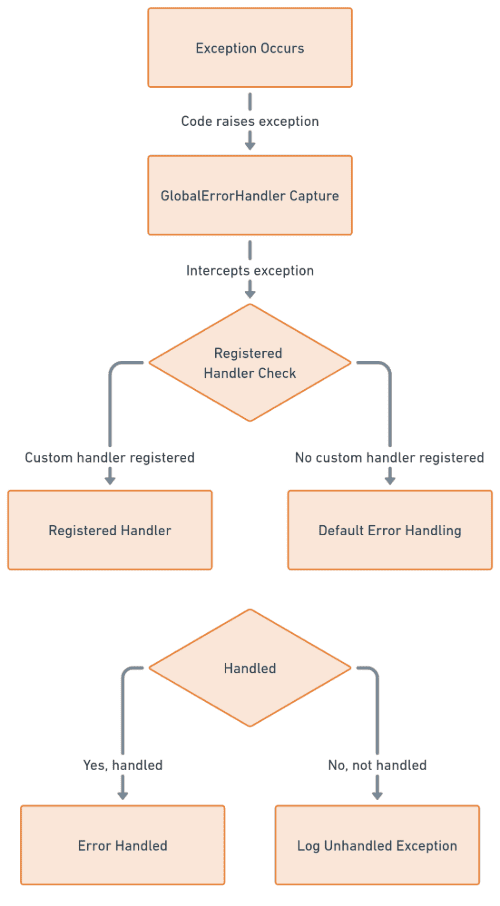
- Exception Capture: `GlobalErrorHandler` intercepts exceptions raised within its **context**.
- Handler Registration: Custom error handlers register via `opentelemetry_error_handler` entry points.
- Exception Directing: `GlobalErrorHandler` routes captured exceptions to registered handlers.
### Custom Error Handler Implementation
1. Inherit from `opentelemetry.sdk.error_handler.ErrorHandler`.
2. Implement exception-specific handling logic.
3. Register **handlers** in python code:
```python
[options.entry_points]
opentelemetry_error_handler =
error_handler_0 = error_handler_0:ErrorHandler0
```
This entry point should point to the error handler class, `ErrorHandler0` in this case.
## Conclusion
Mastering OpenTelemetry's `Global Error Handler` revolutionizes error and exception management. Key takeaways include:
- Centralized error handling
- Customizable processing
- Seamless integration
Next, integrate OpenTelemetry with OpenObserve to visualize error data, uncovering patterns and areas for optimization. Leverage OpenObserve's capabilities to streamline error analysis and amplify application reliability.
### To Advance Your Error Management Journey:
- Explore the OpenTelemetry documentation.
- Implement the Global Error Handler.
Happy Monitoring! 🚀