# What's New in OpenObserve: Terraform Support, Bring Your Own Bucket, and UX Updates
> OpenObserve now supports Terraform for infrastructure-as-code deployments, Bring Your Own Bucket for full control over your data storage, and ships targeted UX improvements across the service catalog, traces view, and log correlation.
Source: https://openobserve.ai/blog/openobserve-terraform-byob-updates/
Published: 2026-05-18
Authors: Simran Kumari
Category: Release
Tags: OpenObserve, Terraform, Observability
---
## **What's New in OpenObserve- May 2026**
We've been shipping. Here's a look at what's live \- Terraform support for infrastructure-as-code deployments, Bring Your Own Bucket for full control over your data storage and a round of UX and UI improvements.
## Now Live on OpenObserve Cloud
## **Terraform Support**
Managing your observability infrastructure manually doesn't scale and now you don't have to. OpenObserve ships two Terraform modules that together cover both the deployment of OpenObserve itself and the ongoing management of resources inside it.
**`terraform-provider-openobserve`** available on the Terraform Registry - lets you manage OpenObserve resources as code: streams, dashboards, users, and organizations. Define a stream with its retention policy, full-text search keys, and index fields in a `.tf` file, and it goes through the same plan/apply/review cycle as any other piece of your infrastructure.
```
provider "openobserve" {
endpoint = "https://openobserve.example.com"
username = "admin@example.com"
password = var.oo_password
org_id = "default"
}
resource "openobserve_stream" "app_logs" {
org_id = "default"
name = "app-logs"
stream_type = "logs"
settings {
data_retention = 30
full_text_search_keys = ["message"]
index_fields = ["level", "service"]
}
}
```
**`terraform-kubernetes-openobserve`** - published at `registry.terraform.io/modules/openobserve/openobserve/kubernetes` - handles deploying OpenObserve on Kubernetes via the official Helm chart. It covers both ends of the spectrum: a minimal single-node SQLite setup you can run locally in minutes, and a full production HA configuration with PostgreSQL, NATS, S3, Ingress, and per-component replica counts and resource limits. Set `create_aws_infrastructure = true` and the module will also provision the VPC, EKS cluster, S3 bucket, and IAM roles from scratch. OpenTofu is supported alongside Terraform.
The two modules are complementary: use the Kubernetes module to stand up and manage the platform, and the provider to manage what runs inside it. Both are Apache 2.0 licensed.
Read more about the [Terraform setup details](https://openobserve.ai/docs/enterprise-setup/terraform/) in the OpenObserve docs.
## **Bring Your Own Bucket**
OpenObserve is built around object storage. Bring Your Own Bucket (BYOB) now lets you decide exactly where that data lives.
Instead of using OpenObserve-managed storage, you can connect your own S3 bucket, or Azure Blob container directly. Your data stays in your account, in your region, under your own security policies and access controls, OpenObserve handles ingestion, compaction, and queries against it.
The use cases this unlocks:
* **Data residency and compliance** - Keep telemetry in a specific region or jurisdiction without any workarounds.
* **Cost control** - Use reserved capacity, existing storage commitments, or negotiated cloud rates you already have.
* **Data ownership** - Your raw telemetry data is yours, independent of the observability platform.
* **Portability** - No vendor lock-in on storage. Migrate or switch without a data migration project.
Setup is straightforward from the OpenObserve Cloud settings: provide your bucket details and access credentials, and you're done.
### **Regional and provider constraints.**
The customer's storage bucket must reside in the same region and use the same cloud provider as the OpenObserve cloud it's connected to.
For example:
* An OpenObserve Cloud running on AWS `us-west-1` can only use an AWS S3 bucket in `us-west-1`.
* An OpenObserve deployment running on Azure `East US 2` can only use an Azure Blob Storage container in `East US 2`.
Cross-region and cross-provider configurations are not supported.
### **Availability**
BYOB is available for **commercial OpenObserve Cloud customers**.
If you're interested in enabling this capability for your organization, please contact us through [OpenObserve Contact Us](https://openobserve.ai/contact/).
Read more in the [bring-your-own-bucket storage management docs](https://openobserve.ai/docs/administration/maintenance/storage-management/bring-your-own-bucket/).
## UX and UI Updates
A focused set of interface improvements has landed across the service catalog, traces view, and log correlation , all aimed at reducing the number of clicks it takes to go from a signal to an answer.
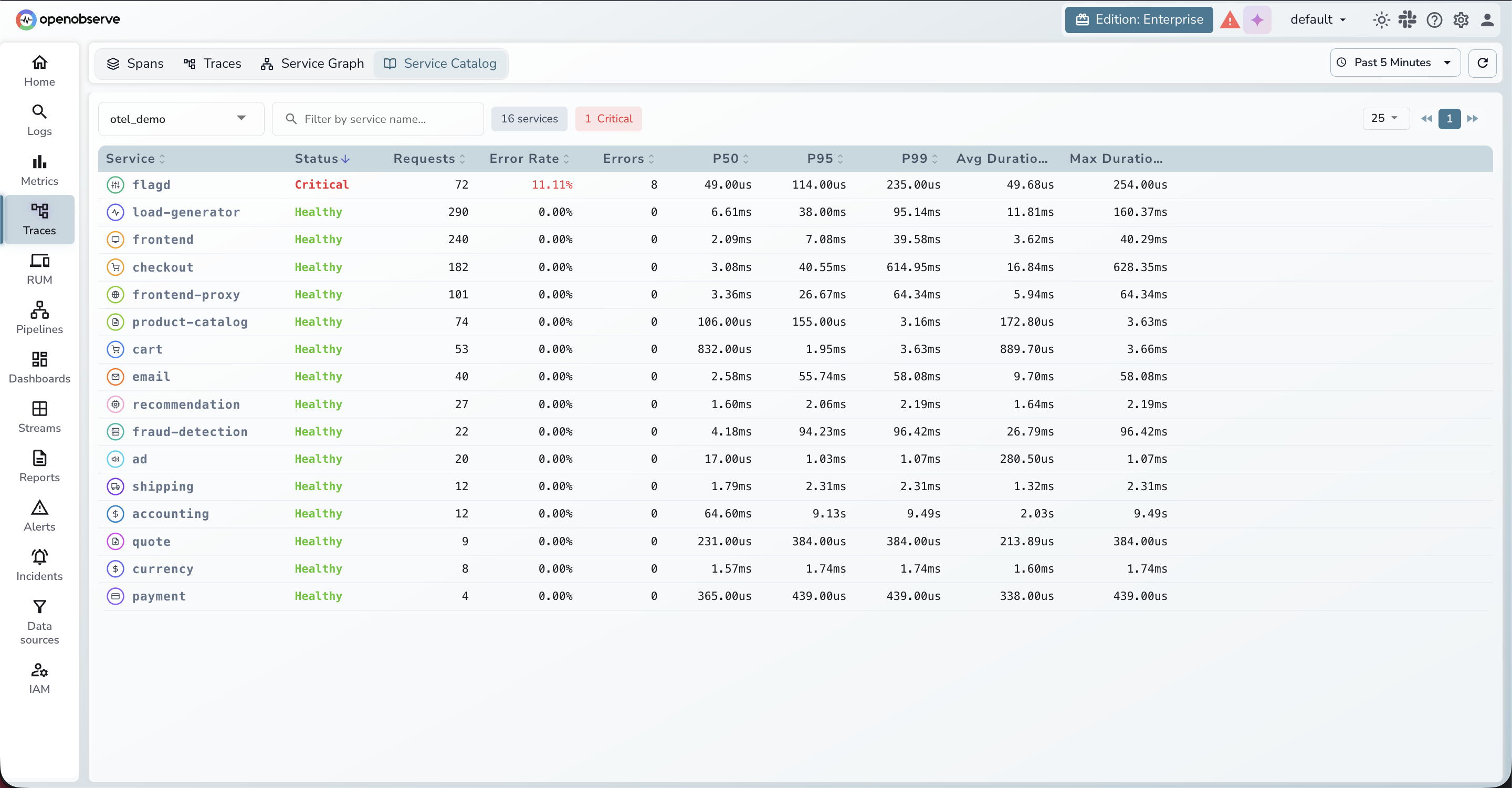
* **Service Catalog page and grouping.** A new service catalog page is now available, with grouping support for both traces and logs. The scrolling behavior has also been updated - previously only the table itself was scrollable, but the entire section now scrolls, giving the table more room to breathe and making it easier to work with dense datasets.
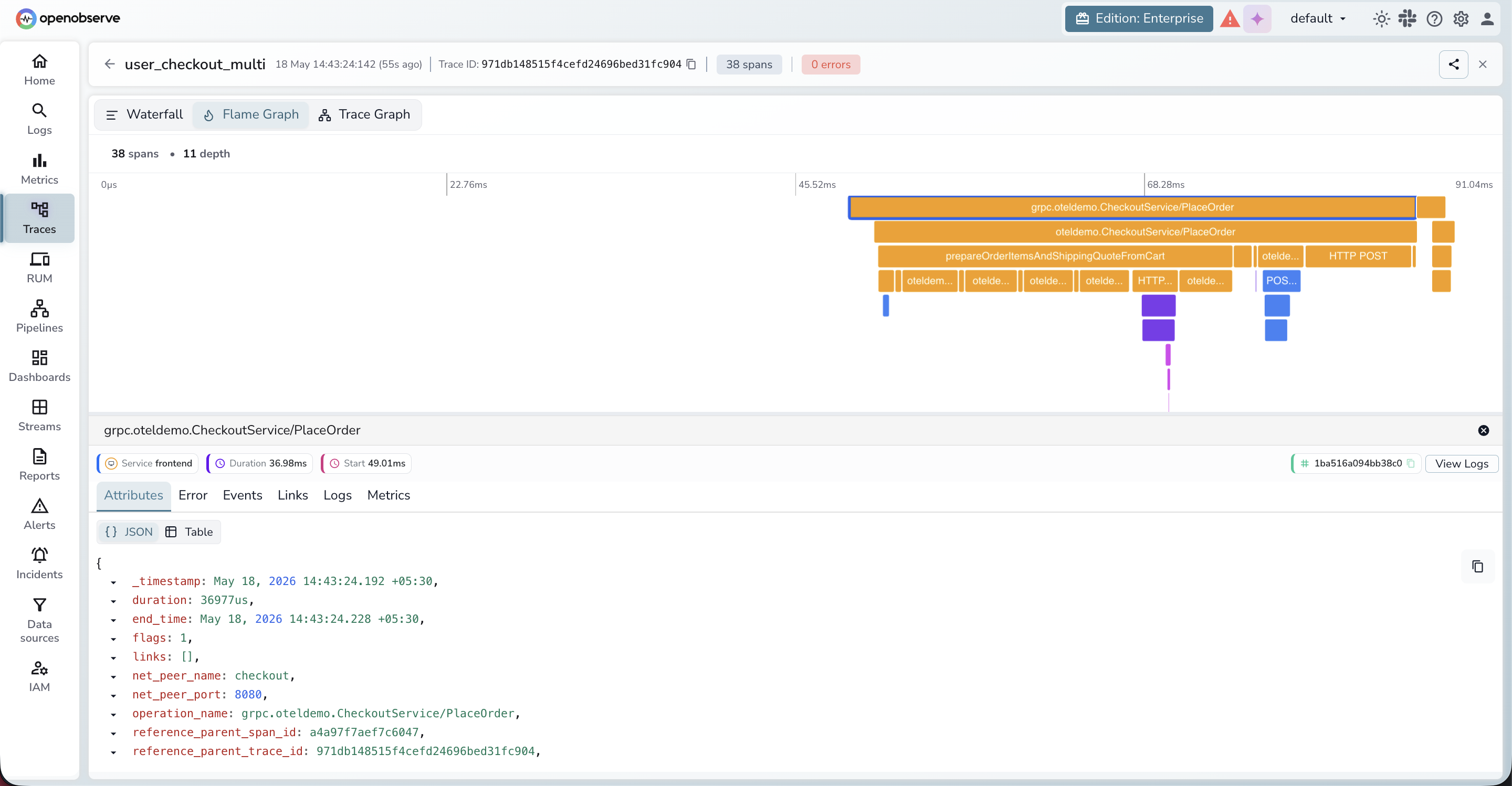
* **Span details in the flame graph.** In the traces view, selecting a span used to force a redirect to the waterfall view before you could see span details. That detour is gone. Span details now load directly within the flame graph, keeping you in context without losing your place.
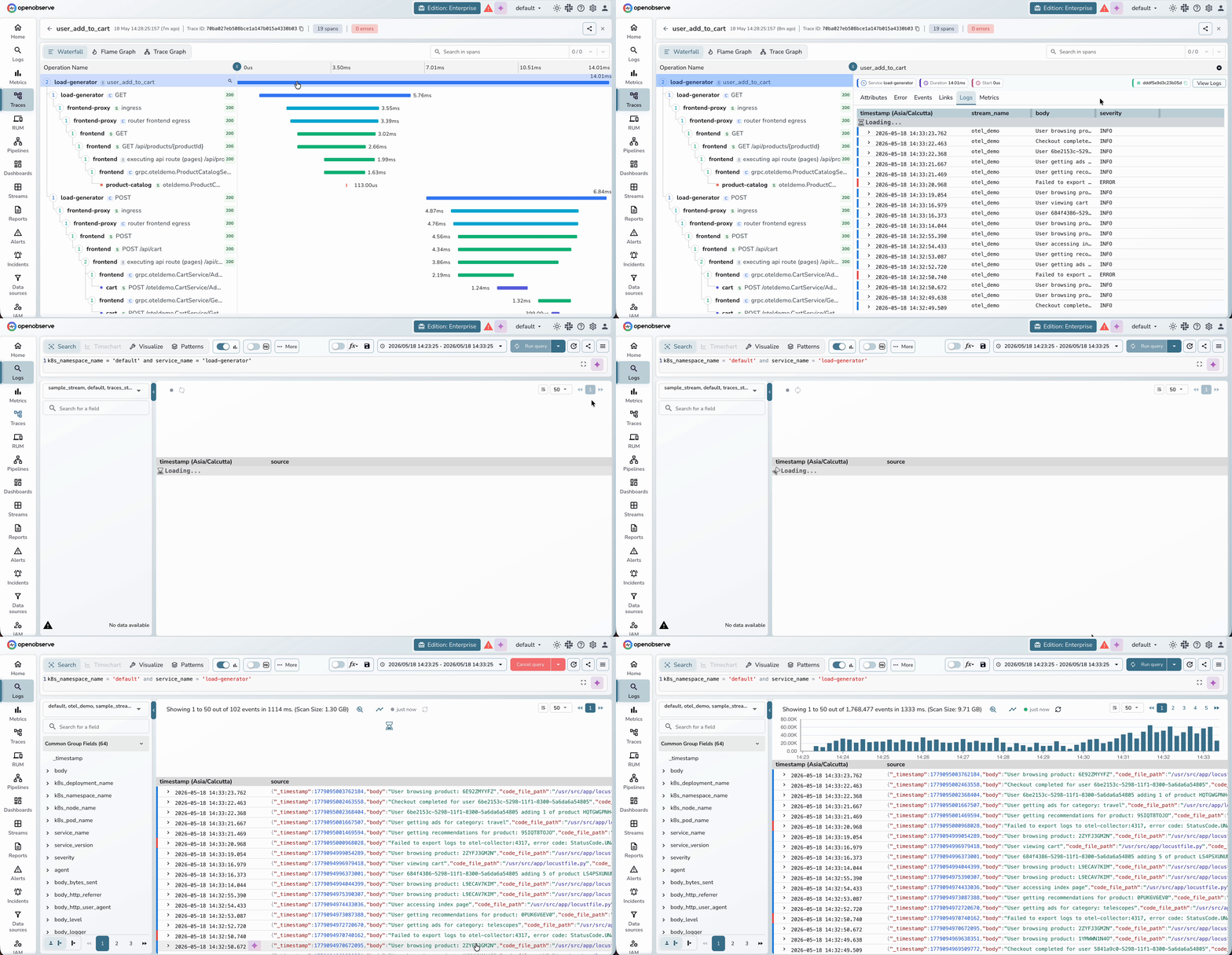
* **Richer log view defaults.** The log view previously showed only timestamps and sources by default. Default columns are now included out of the box, so the log view is immediately useful without requiring manual column configuration.
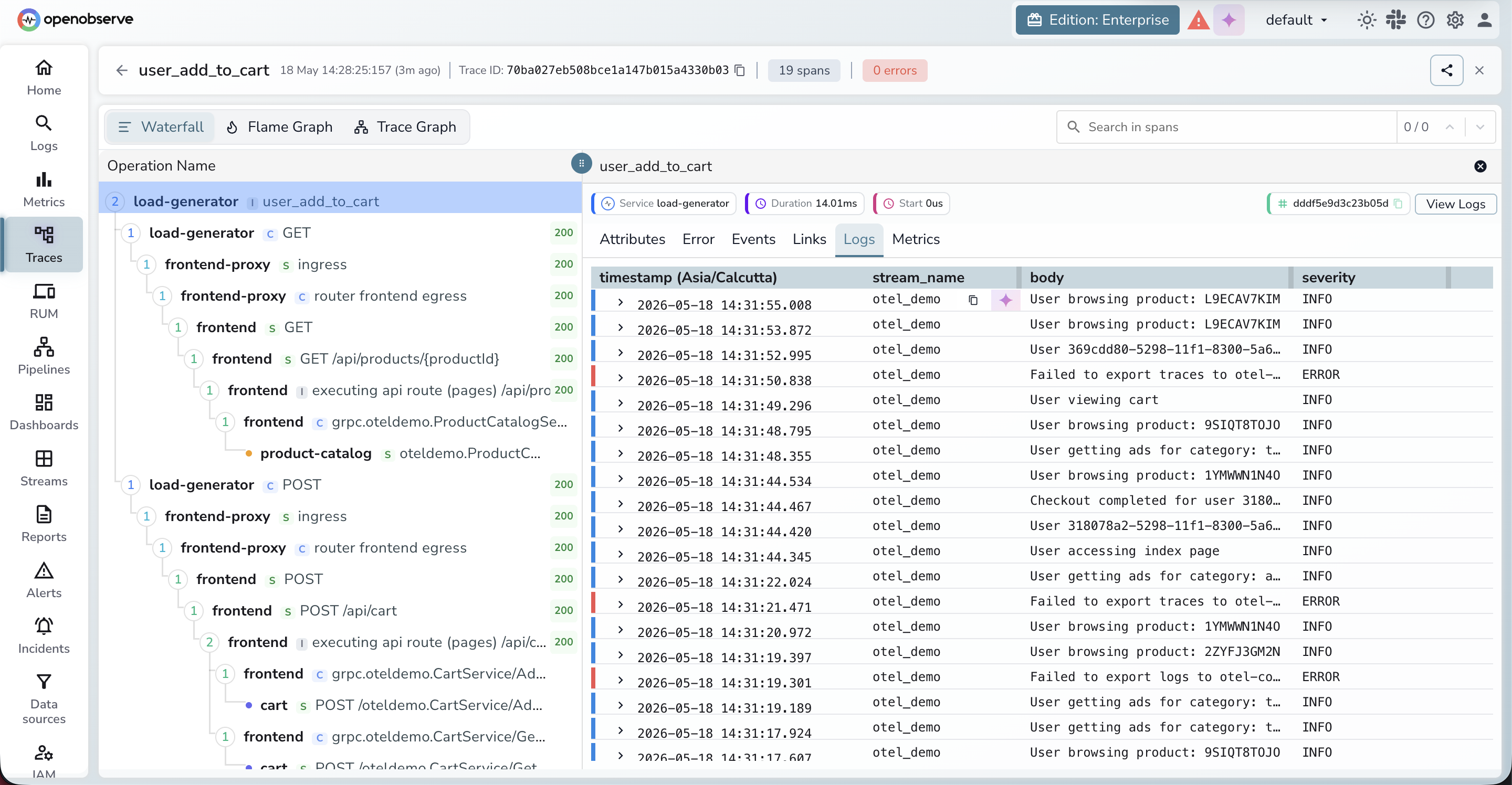
* **Log-to-log correlation across multiple streams.** Log correlation has been extended to work across multiple streams simultaneously. A new "stream name" field makes it possible to correlate logs from different streams. Previously, only a single log stream could be shown for a trace at a time.
* **Smarter "View Logs" redirection.** When navigating from a trace to logs via "View Logs," the system now redirects using precise filters - service name and the specific correlated streams - rather than relying solely on trace and span IDs. The system also performs field-level correlation between streams, mapping fields like `k8s.namespace.name` across different stream definitions so the right logs surface regardless of how each stream names its fields.
## **Try It**
Everything above is live now.
* **OpenObserve Cloud:** [cloud.openobserve.ai](https://cloud.openobserve.ai/)
* **Open source:** github.com/openobserve/openobserve
* **Terraform provider:** *https://github.com/openobserve/terraform-provider-openobserve* *, https://github.com/openobserve/terraform-kubernetes-openobserve*
* **Docs:** [openobserve.ai/docs](https://openobserve.ai/docs/)
Questions? Join the [Slack Community.](https://short.openobserve.ai/community)