# Payment Monitoring with Stripe in OpenObserve
> Enable end-to-end payment monitoring by sending Stripe events to OpenObserve and analyzing success/failure rates using dashboards, SQL queries, and alerts.
Source: https://openobserve.ai/blog/payment-monitoring-stripe/
Published: 2025-12-04
Authors: Simran Kumari
Category: How To
Tags: Logging, Integrations, Dashboards
---
Stripe is at the heart of many modern SaaS and consumer apps. Whether you're processing subscription payments, one-time charges, or marketplace payouts, you rely on Stripe events to understand what’s happening across your payment pipeline.
But here's the challenge: Stripe only shows you high-level dashboards, but developers, SREs, and finance teams need raw events, analytics, retention, and real-time alerting.
That’s where **OpenObserve** becomes your observability layer for Stripe.
This article explains **how a real production system sends Stripe events into OpenObserve** and how you can build dashboards & alerts on top of them.
**In this guide, you'll learn:**
* Why Stripe's built-in monitoring has critical limitations for production systems
* How to securely capture and forward Stripe webhook events to OpenObserve
* Best practices for building dashboards, alerts, and analytics on payment data
* Production-ready code examples and security considerations
## Why Stripe’s Dashboard Isn’t Enough For Observability
When most teams integrate Stripe, the dashboard feels like it covers everything. It’s clean, fast, and gives you a neat snapshot of payments and customer activity. But once real users start flowing in, you quickly discover its limits.
Stripe tells you *what* happened: a payment succeeded, failed, or got disputed , but rarely *why* it happened. If your checkout API slows down or your backend throws an error, Stripe only shows the final outcome, not the chain of events behind it. It won’t alert you when failures quietly rise, and it can’t help you connect a sudden dispute spike to a code deploy you made half an hour earlier.
Stripe is an exceptional payment platform, but it was never meant to be a monitoring tool. As your system scales, that gap becomes impossible to ignore.
## How Stripe Sends Events in Production
Whenever something happens : payment succeeds, fails, creates a subscription, refunds, disputes , Stripe sends a **webhook event** to an endpoint you configure.
That JSON event looks like this (simplified):
```
{
"id": "evt_123",
"type": "payment_intent.succeeded",
"data": {
"object": {
"id": "pi_456",
"amount": 4999,
"currency": "usd",
"customer": "cus_123"
}
}
}
```
Key Fields:
* `id`: Unique event identifier
* `type`: Event category (e.g., payment_intent.succeeded, charge.failed)
* `data.object`: The actual resource that triggered the event
* `created`: Unix timestamp of when the event occurred
## Getting Stripe Events Into OpenObserve
Now that you understand why monitoring Stripe alongside your backend is so valuable, the next step is: *how do you actually get the data into OpenObserve?*
### Pre-requisites
Before anything else, there are a few prerequisites.
* An OpenObserve instance running ( [cloud](https://cloud.openobserve.ai/) or [self-hosted](https://openobserve.ai/downloads/)) where you can ingest and query JSON events.
* A Stripe account.
Once these are in place, you can bring Stripe events into OpenObserve.
For most production setups, teams must route events through their own backend. This is the only way to ensure security and reliability. Here, Stripe sends the webhook to your server, where you perform three critical actions:
1. **Verify signatures:** Guarantee the event is genuinely from Stripe and hasn't been tampered with.
2. **Respond immediately (200 OK):** Prevent event retries by Stripe.
3. **Process/Forward asynchronously:** Filter, enrich, and reliably forward the data to OpenObserve without causing a timeout.
The flow looks like this:

### Step 1: Prepare Your Backend Webhook Endpoint
First, you need a server endpoint that can receive Stripe webhook events. For example, you could create: `POST /stripe/webhook`
You need to secure your endpoint. Refer to the documentation.
**CRITICAL SECURITY STEP:** Your server must verify the Stripe-Signature header using your webhook secret. If verification fails, reject the request (e.g., 400 response). Never process an unverified Stripe webhook in production.
### Step 2: Configure Stripe to Send Webhooks to Your Backend
In your Stripe dashboard:
1. Go to **Developers → Webhooks**
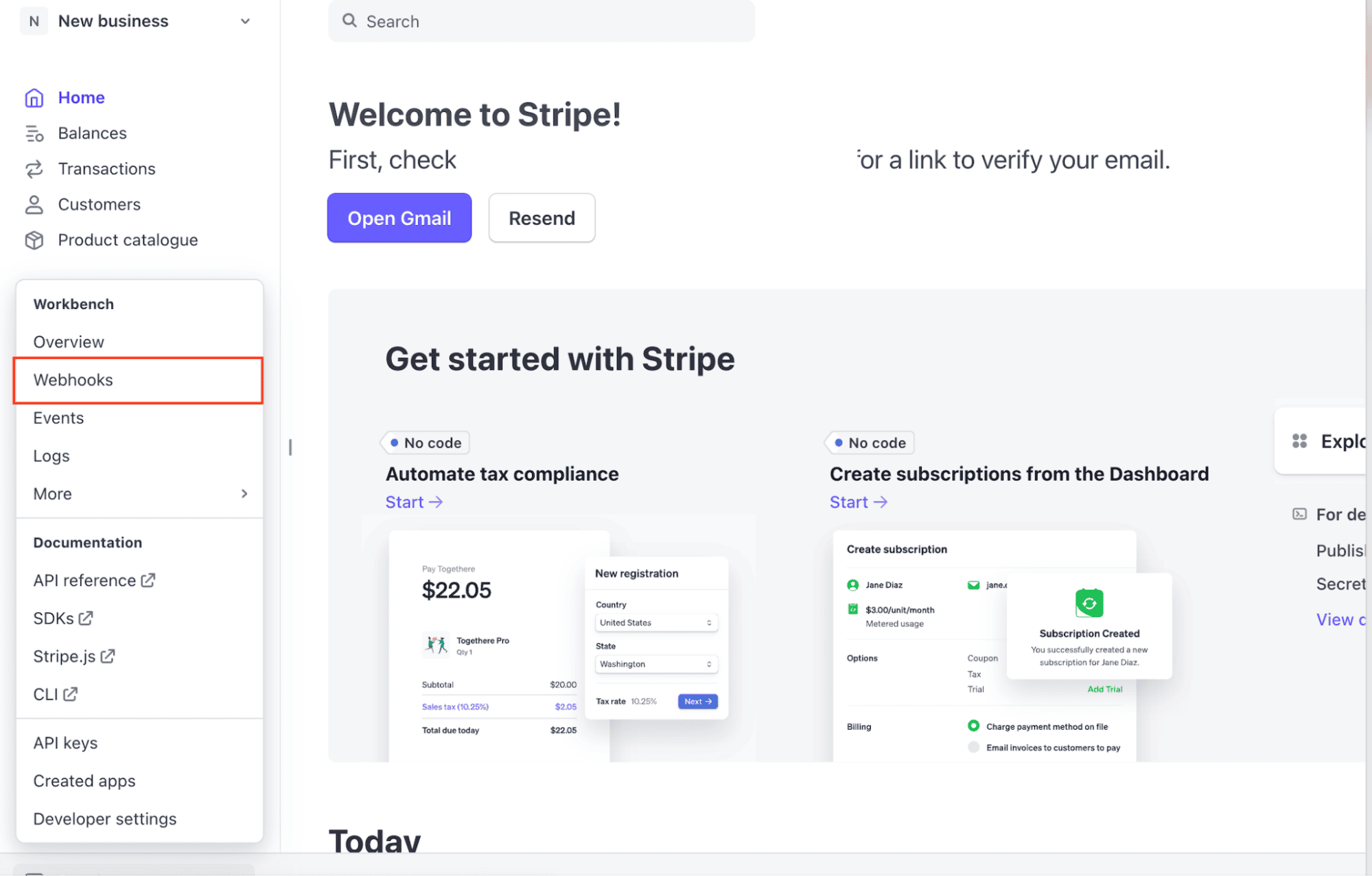
2. Create a new webhook endpoint pointing to your backend URL (`https://yourapp.com/stripe/webhook`)
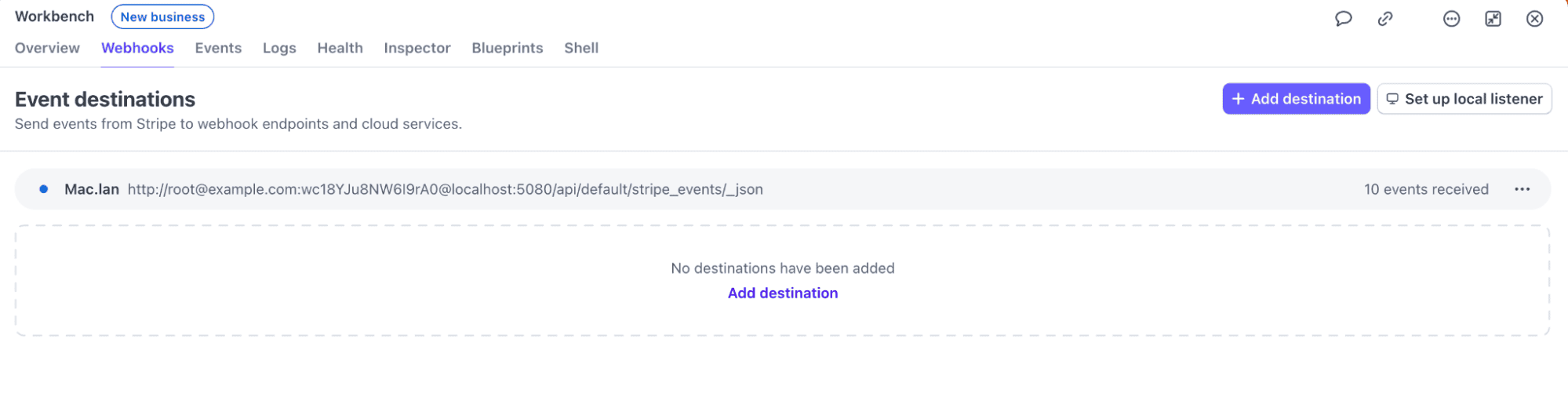
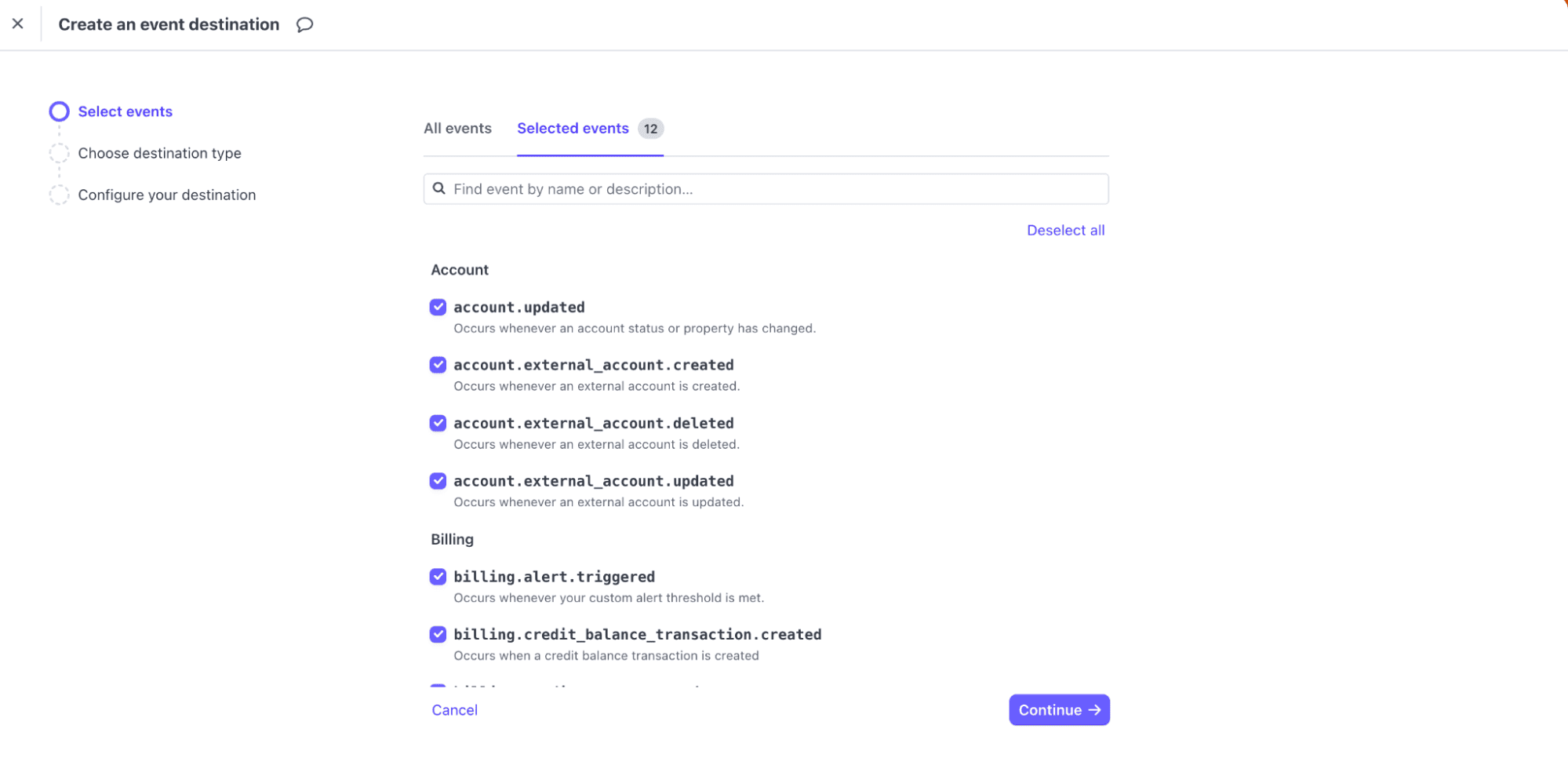
3. Select the events you want to receive (for example: `payment_intent.succeeded`, `charge.failed`, `invoice.payment_failed`)
4. Choose the Destination type as Webhook endpoint.
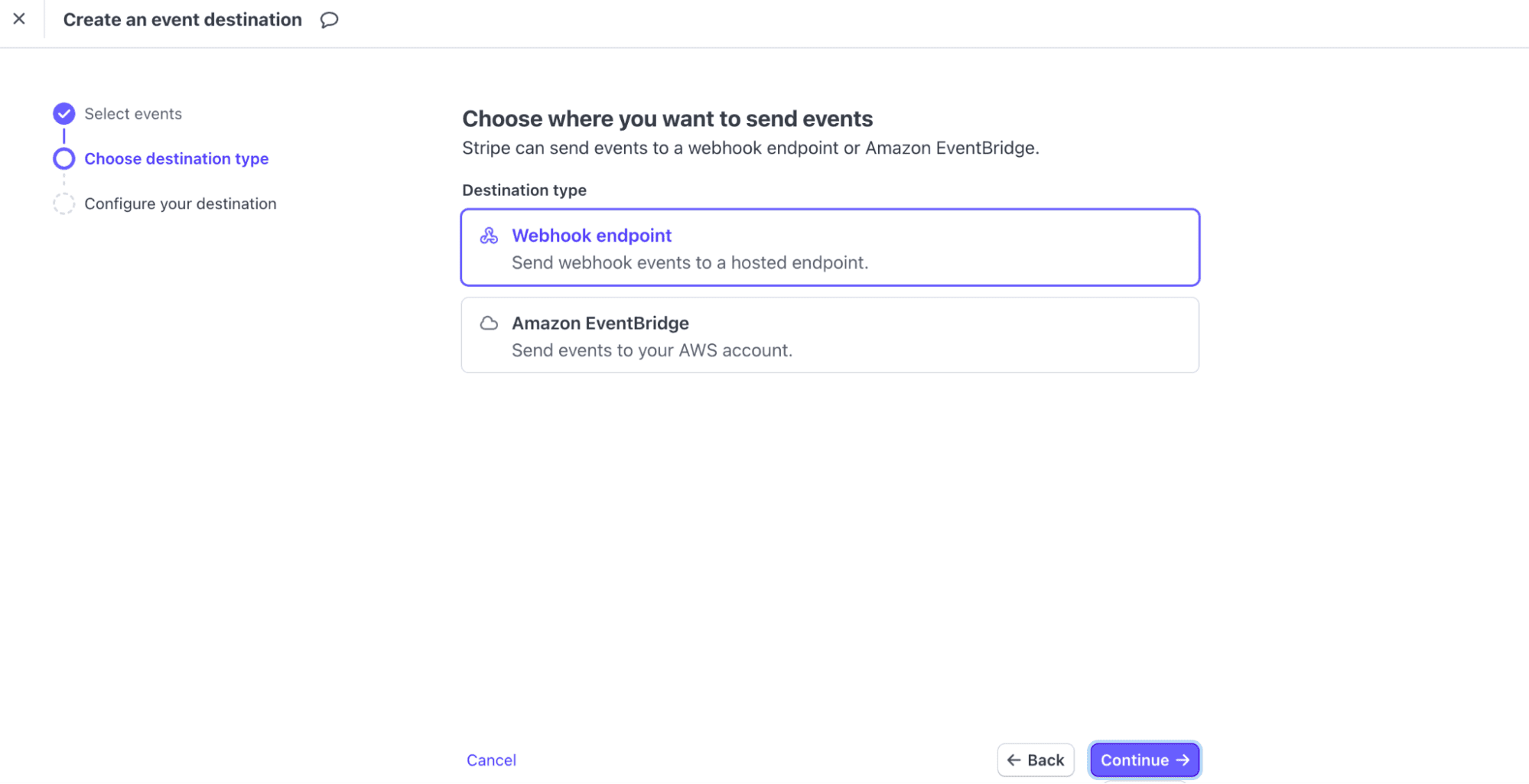
5. Set the endpoint URL to your Backend and Trigger test events to check the data is received at destination.
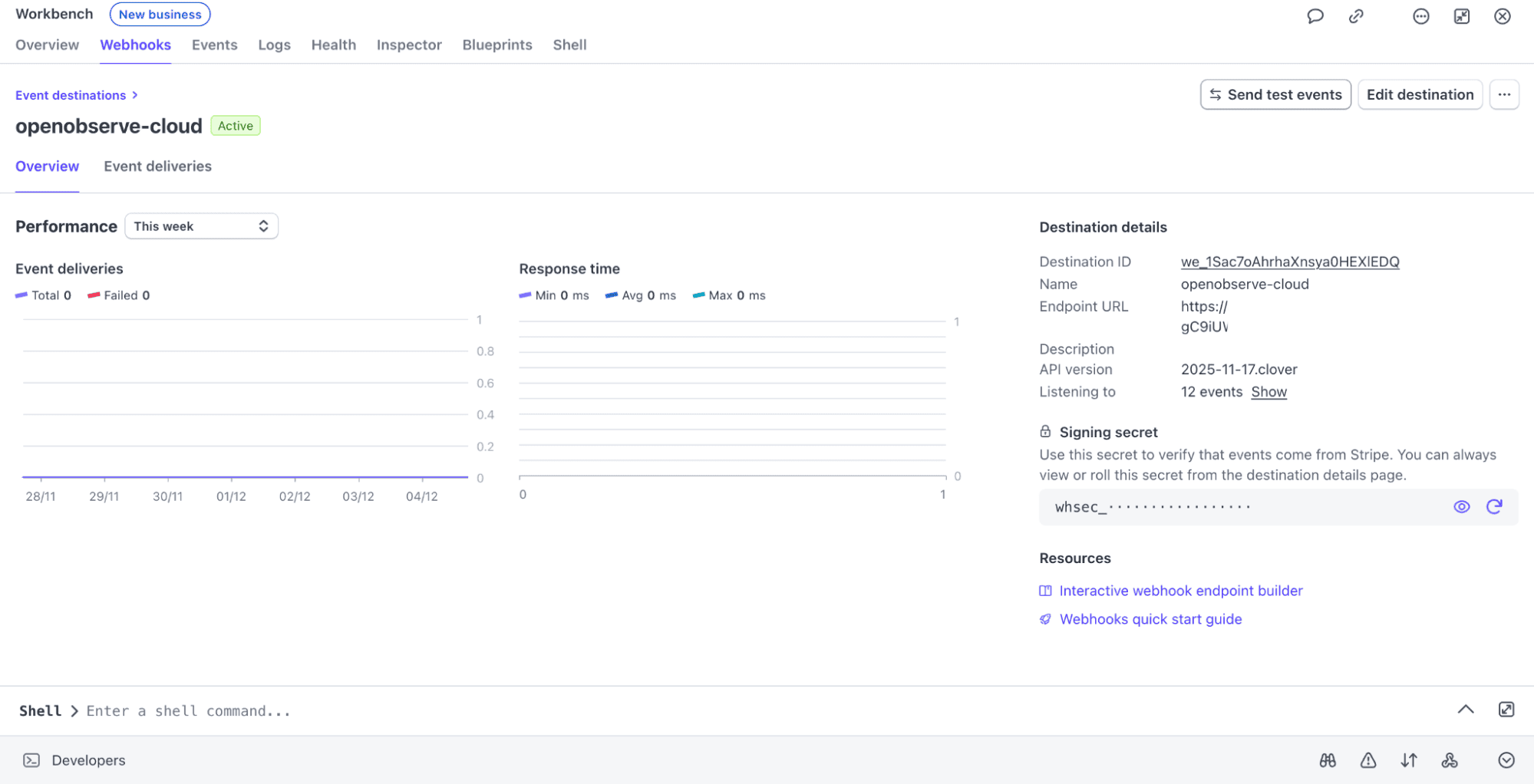
Stripe will deliver all matching events to your backend.
### Step 3: Ensure Immediate Response and Asynchronous Forwarding (Reliability)
Stripe requires an immediate 200 response (typically within 3 seconds) to prevent retries. You must perform signature verification and then return the response quickly. The task of forwarding to OpenObserve must be delegated.
A reliable production flow is:
1. Receive event.
2. Verify signature.
3. Add the verified event payload to a queue (e.g., Redis Queue, AWS SQS, or a simple setTimeout for basic async handling).
4. Immediately return 200 OK to Stripe.
Once the event is in the queue, a separate worker process will handle Step 4.
### Step 4: Forward Events to OpenObserve
Your dedicated worker process retrieves the event from the queue and sends it to OpenObserve using the ingestion API.
Here’s an example of the ingestion logic, which runs safely outside the critical webhook response path:
```
const axios = require('axios');
async function forwardToOpenObserve(event) {
// This code runs in an asynchronous worker/queue processor, NOT the
// main webhook handler, ensuring the response to Stripe is fast.
try {
await axios.post(
'https://api.openobserve.ai/api///_json',
[event], // payload must be an array of JSON objects
{
auth: {
username: 'YOUR_USERNAME',
password: 'YOUR_API_KEY'
}
}
);
console.log(`Successfully forwarded event ${event.id} to OpenObserve.`);
} catch (error) {
console.error(`Failed to forward event to OpenObserve:`, error.message);
// Implement retry logic here if needed.
}
}
```
You can call `forwardToOpenObserve(event)` from your worker process for every verified webhook.
Developers often enrich the Stripe event with internal data points **before** sending it to OpenObserve. For example, adding:
* The internal User ID associated.
* The server hostname or deploy ID that handled the webhook, etc.
### Step 5: Testing Your Setup: Use Stripe CLI
Before going live, you want to make sure your ingestion and dashboards work as expected. This is where **Stripe CLI** becomes invaluable. It simulates real Stripe events without requiring actual payments or real customers.
You can:
* Trigger `payment_intent.succeeded` or `charge.failed` events
* Replay events multiple times
* Test different card types and failure scenarios
This lets you verify that OpenObserve receives the events, that your backend forwarding works correctly, and that dashboards or alerts react as expected all in a safe sandbox environment.
Steps:
* Open Terminal and install stripe-cli:
```
brew install stripe/stripe-cli/stripe
```
* Verify installation:
```
stripe --version
```
* Login to your stripe account:
```
stripe login
```
* Then trigger test events:
```
stripe trigger payment_intent.succeeded
```
The events will be POSTed to OpenObserve.

### Step 6: Verify the Data Is In OpenObserve
Once events start flowing in, You can check the log stream:
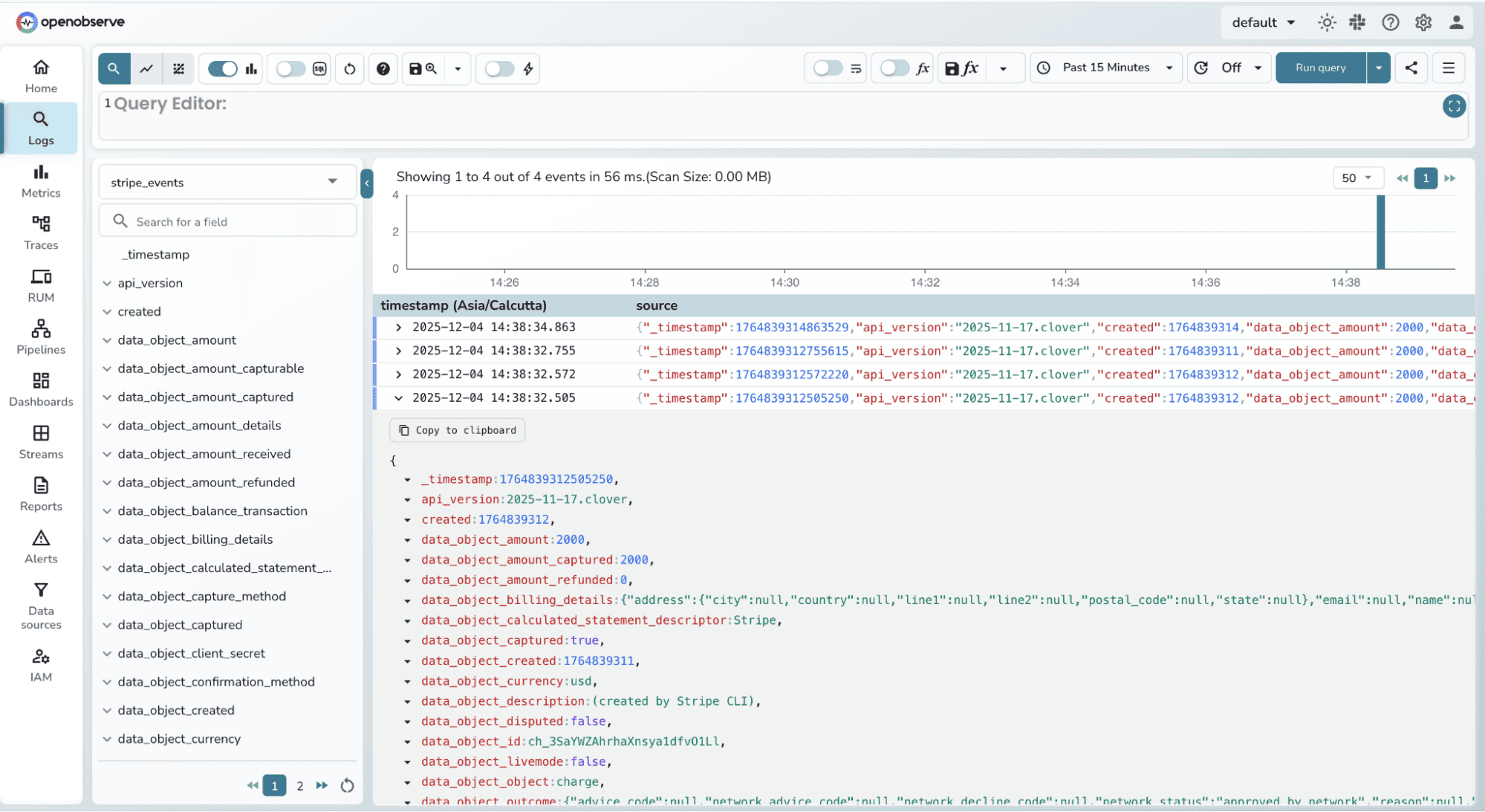
* Build dashboards to visualize payment success and failure rates over time and other data.
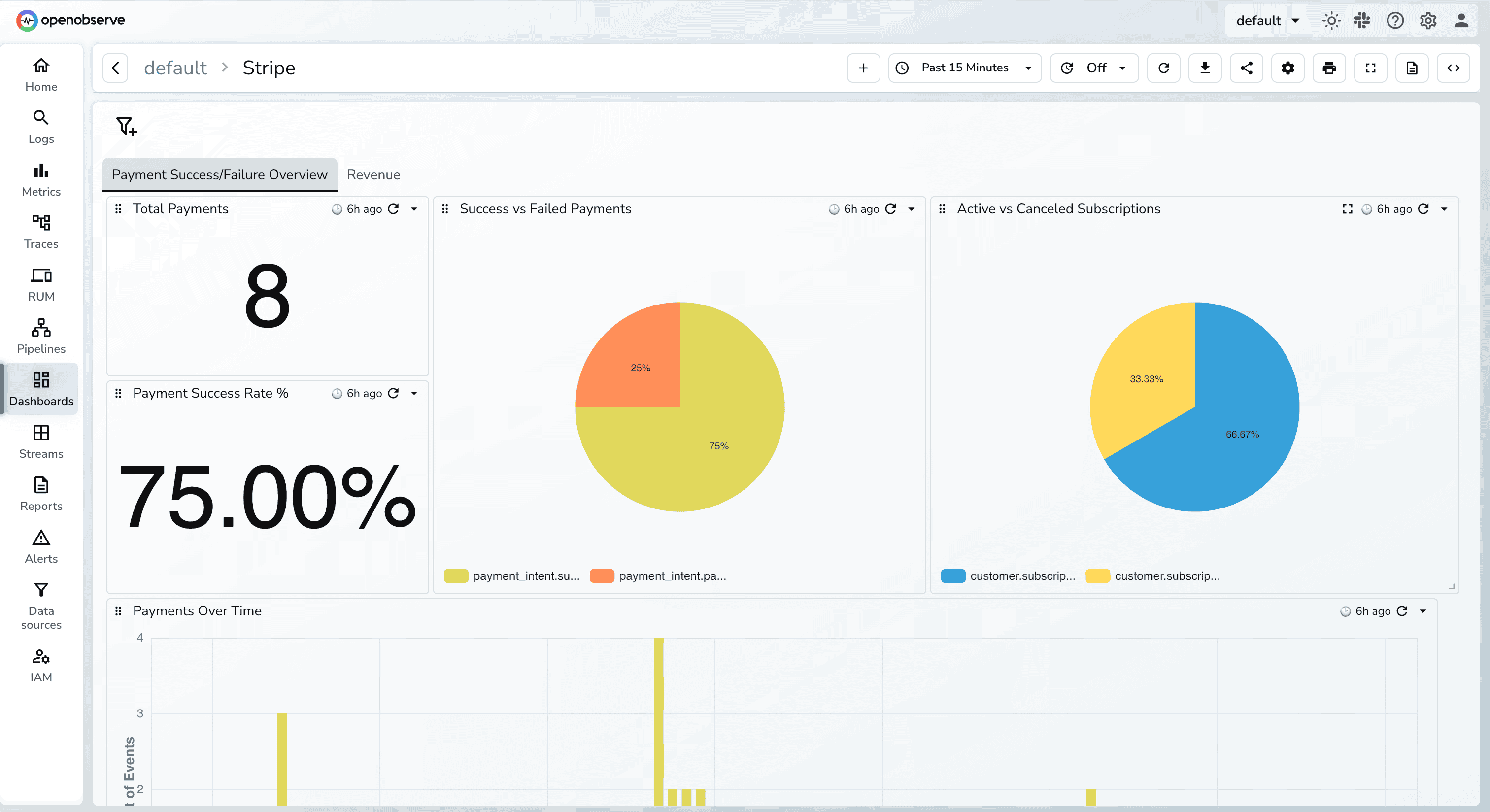
You can also import this dashboard directly from the **OpenObserve Community Dashboards**
* [Query the events using SQL](https://openobserve.ai/docs/reference/sql-reference/) to uncover trends, anomalies, or edge cases
* [Create alerts](https://openobserve.ai/docs/user-guide/analytics/alerts/) based on business rules, such as “notify me if payment failures exceed 2% in the last 10 minutes”
* Correlate Stripe events with backend logs and traces to pinpoint root causes.
## **Conclusion**
Stripe gives you excellent visibility into transactions, but real observability requires more than a dashboard. By streaming raw Stripe events into OpenObserve, you unlock full end-to-end insights: what happened, why it happened, and how it connects to the rest of your system.
With this setup:
* Engineers get real-time visibility into payment failures, latency, and anomalies.
* SREs can correlate Stripe issues with backend logs, metrics, and traces to detect problems before customers feel them.
* The business gets a single unified observability platform for the entire payment lifecycle.
Once Stripe events live inside OpenObserve, you can build dashboards, alerts, SLOs, and investigations exactly the same way you do for any other backend system giving you production-grade monitoring for your revenue pipeline.
### Related Resources
* [OpenObserve Documentation](https://openobserve.ai/docs/)
* Stripe Webhook Security Best Practices
**Give it a try!** [ Sign up for OpenObserve](https://cloud.openobserve.ai/) or[ deploy the open-source version](https://openobserve.ai/downloads/) today.
## FAQs
**1. Can I send Stripe events directly to OpenObserve without a backend?**
Technically yes , Stripe supports sending webhooks to any URL.Practically no, this is unsafe in production because you cannot verify signatures or protect your ingestion credentials. Always route Stripe webhooks through your backend.
**2. What events should I capture from Stripe?**
Most teams start with:
* `payment_intent.succeeded`
* `payment_intent.payment_failed`
* `charge.refunded`
* `invoice.payment_failed`
* `charge.dispute.created`
But production systems often log **all** events to maintain an audit trail and build richer dashboards.
**3. How much latency does this add to my system?**
Zero. Your backend *immediately* returns 200 OK to Stripe, and event forwarding happens asynchronously. Stripe never waits for your OpenObserve ingestion.
**4. Do I need to transform the Stripe event before sending it?**
No, Stripe sends clean, well-structured JSON. But many teams enrich the event with: internal user IDs, deployment version, request latency, processed_at timestamp. This helps correlate Stripe data with backend events inside OpenObserve.
**5. Is this approach scalable for high-volume Stripe apps?**
Yes. Stripe webhooks are light, your queue absorbs spikes, and OpenObserve handles large JSON ingestion at scale. This setup is used by real production systems processing thousands of events per minute.
**6. How much data volume does Stripe generate, and will it be expensive to store in OpenObserve?**
The data volume per event is very small (typically a few KB of JSON). Even high-volume apps processing thousands of transactions per minute will only generate a few GB of log data per day. Because OpenObserve is architected for extreme storage cost efficiency using columnar storage, the cost of retaining this payment history for months or years is significantly lower compared to traditional log management solutions.
**7. Is the OpenObserve API Key secure when sending webhooks?**
Yes, when implemented correctly. The ingestion process uses HTTPS (encryption) and Basic Authentication (username/API key). Since the forwarding happens from your secured backend worker (Step 4), the API key is never exposed to the public internet or to Stripe; it remains securely within your trusted network environment.