# Send Syslog logs to OpenObserve via syslog-ng
> Learn how to forward syslog-ng logs to OpenObserve using the openobserve-log() HTTP destination, test your pipeline, and tune batching, workers, and ports for production.
Source: https://openobserve.ai/blog/syslog-ng-log-forwarding/
Published: 2025-09-10
Authors: Simran Kumari
Category: How To
Tags: Logging
---
## Send Syslog logs to OpenObserve via syslog-ng
## What You Will Learn
In this guide, we’ll walk you through how to forward logs from **syslog-ng to OpenObserve**. You’ll learn how to:
1. Forward syslog-ng logs to OpenObserve using the openobserve-log() destination with HTTP, and tune for production
2. Set up syslog-ng and send logs to OpenObserve in real-time
3. Configure sources, destinations, and log paths for clean, structured logging
4. Troubleshoot common issues and scale your setup for production
By the end, you’ll have a reliable logging pipeline that’s ready for both local testing and production use.
## Introduction
System logs remain a vital part of monitoring any infrastructure. Whether it’s operating system events, application logs, or security audit trails, most environments rely on **syslog** for central log collection.
syslog-ng is one of the most popular syslog implementations. It’s flexible, supports multiple protocols, and integrates with modern backends.
But syslog on its own is limited: logs pile up in plain-text files, are hard to search, and don’t give you a unified view across systems. This is where syslog-ng together with OpenObserve becomes powerful.
In this post we will walk through how to integrate syslog-ng with OpenObserve so you can forward logs directly into OpenObserve for real-time analysis, visualization, and alerting. We’ll use the syslog-ng **openobserve-log()** destination (SCL wrapper around **http()**) to ship JSON logs to OpenObserve.
## Why syslog-ng?
syslog-ng (short for *syslog new generation*) is a modern reimplementation of syslog with powerful features:
* **Multiple input sources**:
* System logs (`system()`, `internal()` sources).
* Files (`file()` source).
* Network (`udp()`, `tcp()`, `syslog()` sources).
* Journald (`systemd-journal()` source).
* Even JSON or custom sources.
* **Flexible routing**: You can filter, parse, and transform logs before sending them to one or multiple destinations.
* **Wide range of destinations**: Local files, databases, Kafka, HTTP/HTTPS endpoints (with optional `tls()`), and observability tools like OpenObserve.
This makes syslog-ng a perfect log forwarder: it collects logs from different sources and exports them into [OpenObserve streams](https://openobserve.ai/docs/user-guide/data-processing/streams/streams-in-openobserve/) for real-time observability.
## Why OpenObserve?
[OpenObserve](https://openobserve.ai/) is an open-source observability platform that ingests logs, metrics, and traces in real-time. It gives you:
* [SQL-like queries](https://openobserve.ai/docs/reference/sql-reference/) for searching logs.
* [Dashboards](https://openobserve.ai/docs/user-guide/analytics/dashboards/dashboards-in-openobserve/) for visualization and [Alerts](https://openobserve.ai/docs/user-guide/analytics/alerts/) for anomaly detection.
* High ingestion performance at low cost.
* S3-compatible object storage with a columnar engine
* Optimized for scale and low Total Cost of Ownership (TCO)
By connecting syslog-ng to OpenObserve, you get a seamless pipeline:
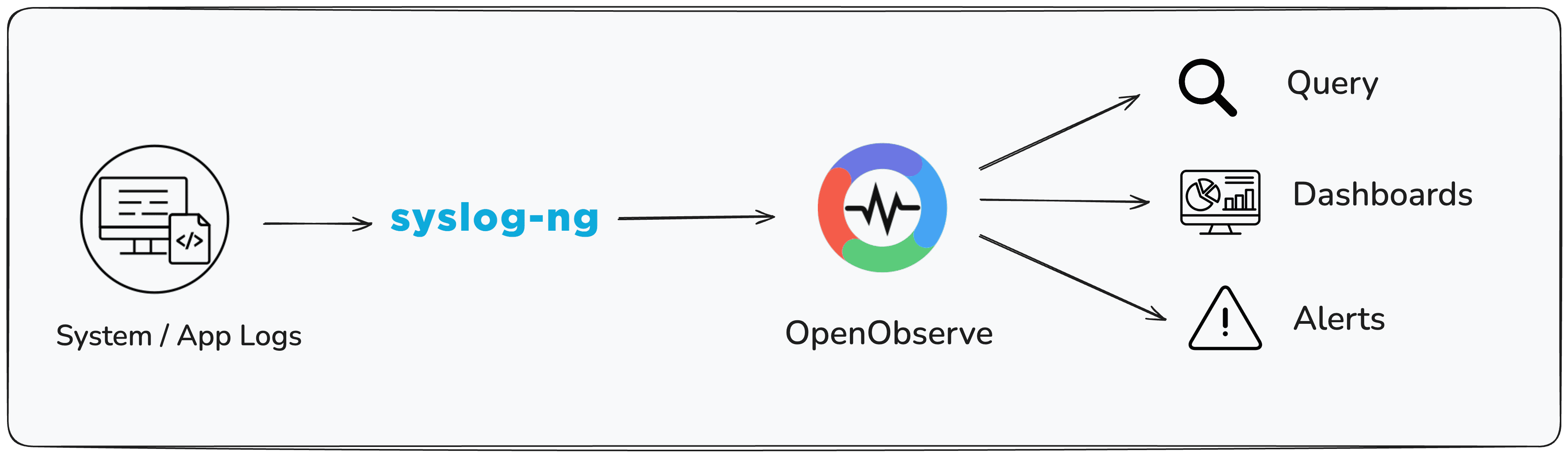
## Installation
Syslog-ng needs to be installed on your system before you can forward logs to OpenObserve. It must include support for the `http()` module, which is used by the `openobserve-log()` destination.
### macOS
On macOS, you can install syslog-ng using Homebrew:
```shell
brew install syslog-ng
```
The Homebrew package already includes the `http()` module required for OpenObserve integration.
### Linux
On Linux, you may need to ensure that the HTTP destination module is installed. This may require enabling additional repositories depending on your distribution.
To verify that the `http()` module is available, run:
```shell
syslog-ng --version | grep http
```
If you see `http` listed among the modules, syslog-ng is ready to forward logs to OpenObserve.

For detailed instructions for your operating system and version, refer to the official syslog-ng installation guide: https://www.syslog-ng.com/technical-documents/list/syslog-ng-open-source-edition
## The `openobserve-log()` Destination
syslog-ng comes with an **SCL (syslog-ng Configuration Library)**, which includes prebuilt configuration blocks. One of these is `openobserve-log()`, a wrapper around the `http()` destination that makes sending logs to OpenObserve easy.
It automatically constructs the correct ingestion endpoint:
```
http://:/api///_json
```
All you need to specify is:
* `url("http://")` (no need to add `:` in url).
* `organization("default")` (or your org name).
* `stream("syslog-ng")` (or any custom stream).
* `user()` and `password()` (your OpenObserve credentials).
## Pre-requisites
Before you begin integrating **syslog-ng** with **OpenObserve**, make sure you have the following in place:
1. Access to a system with syslog-ng installed with version **syslog-ng v4.5.0 or newer** (the `openobserve-log()` destination was introduced in 4.5)
2. An OpenObserve account ([self-hosted](https://openobserve.ai/docs/getting-started/#option-2-self-hosted-installation) or cloud; sign up at [OpenObserve Cloud](https://cloud.openobserve.ai/web/)).
## Getting Started
### Step 1: Creating Minimal Configuration
Here’s a simple config to get you started. It:
1. Reads from a test file (`/tmp/test.log`).
2. Forwards logs to OpenObserve.
3. Writes logs locally for verification.
```
@version: 4.9
@include "scl.conf"
# ---- Source: watch /tmp/test.log ----
source s_test {
file("/tmp/test.log" follow-freq(1) flags(no-parse));
};
# ---- Destination: OpenObserve ----
destination d_openobserve_http {
openobserve-log(
url("https://api.openobserve.ai") # Specify the base URL here
port("")
organization("default")
stream("syslog-ng")
user("root@example.com")
password("your-password")
);
};
# ---- Destination: local file for verification ----
destination d_forwarded {
file("/tmp/syslog-ng-forwarded.log");
};
# ---- Log path ----
log {
source(s_test);
destination(d_forwarded);
destination(d_openobserve_http);
};
```
You can find the base URL in the data sources tab:
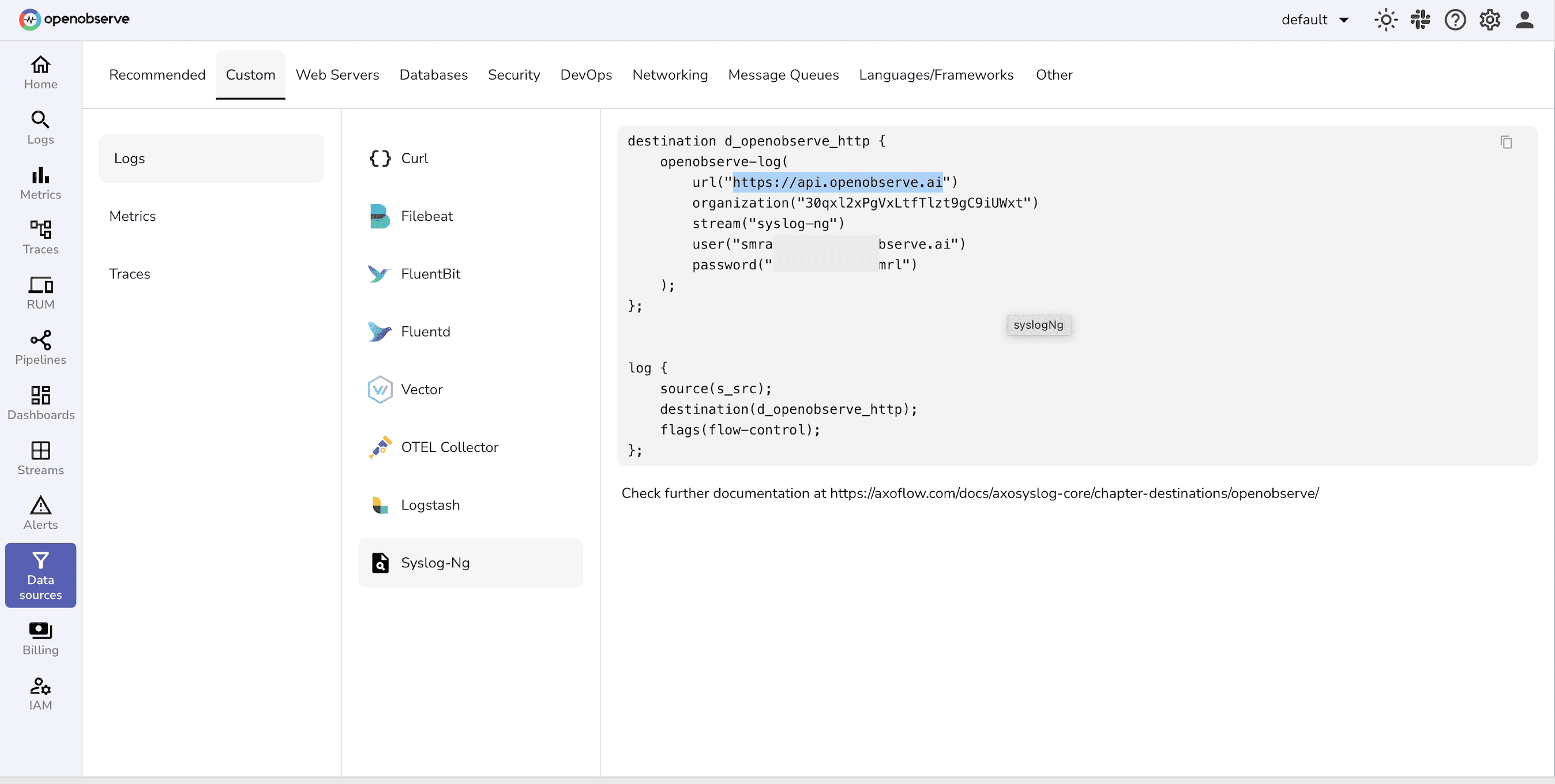
⚠️ **Note on Port Parameter**
By default, the `openobserve-log()` destination appends **`:5080`** to the URL.
* If your OpenObserve is running on another port, you must explicitly set it with the `port()` parameter.
* For HTTPS on 443, simply set `port("")`.
* If you leave `port()` undefined, it will always use the default **5080**.
### Step 2: Testing the Setup
1. **Start syslog-ng with the test config**:
```shell
syslog-ng -F -f /path/to/my-custom.conf
```
2. **Send a log line**:
```shell
echo "Hello OpenObserve from syslog-ng $(date)" >> /tmp/test.log
```
3. **Verify locally**:
```shell
cat /tmp/syslog-ng-forwarded.log
```
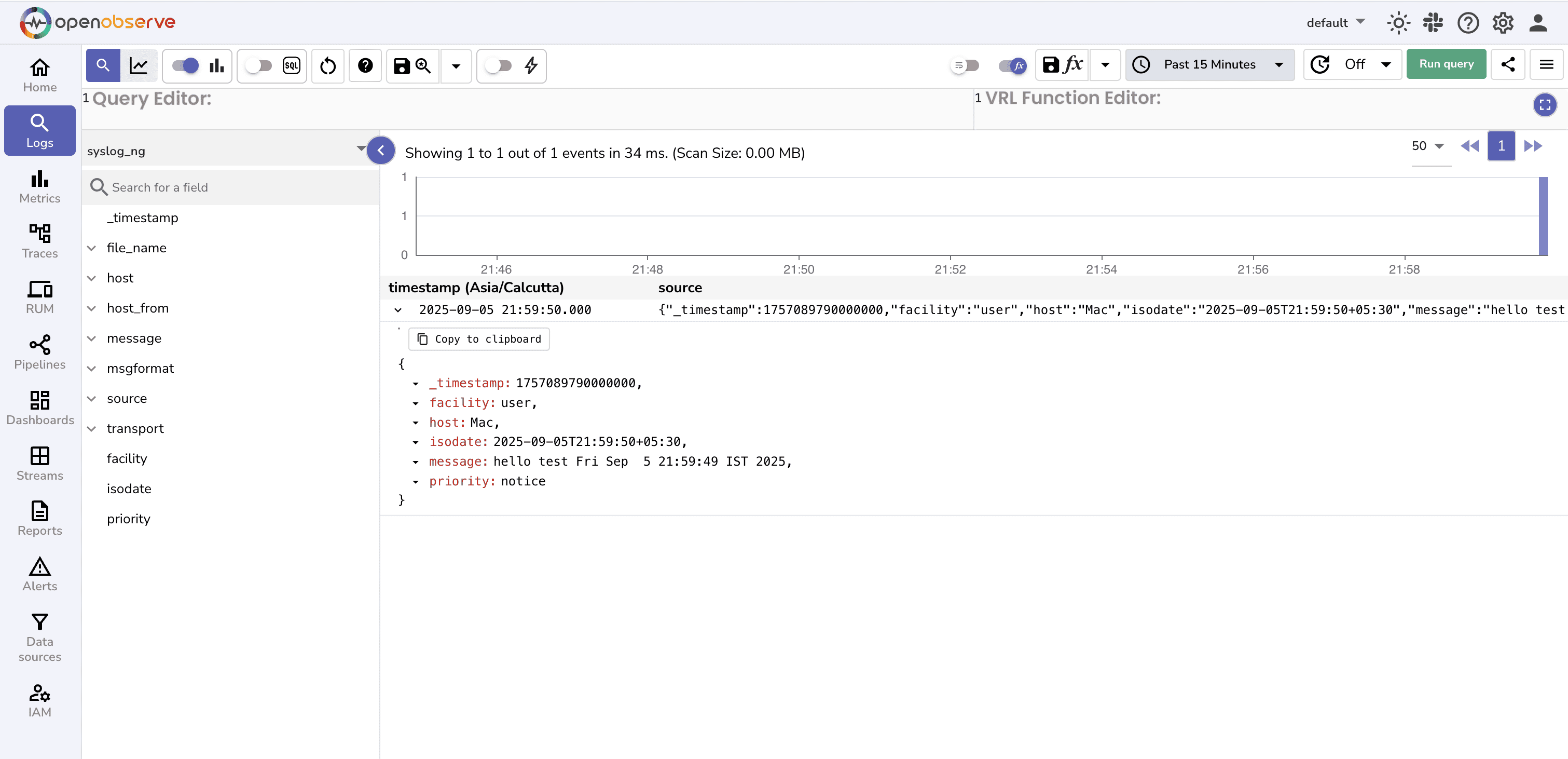
4. **Query in OpenObserve**:
1. In the OpenObserve UI, go to the Logs tab.
2. Select the stream name defined in the configuration file to see the logs
### Step 3: Troubleshooting
* **Double port issue**
In case you are using localhost, don’t specify the `url("http://localhost:5080")`. The `openobserve-log()` block already appends `:5080`, so the URL should be `url("http://localhost")`
* **Wrong stream/organization**
If you can’t query logs in OpenObserve, check that the stream matches your config.
* **Authentication errors**
Use correct authentication credentials.
* **Batching delay**
During testing, set `batch_lines(1)` to flush immediately. For production, increase to reduce overhead.
### Step 4: Scaling for Production
For production deployments, tweak the config:
```
source s_system {
system();
internal();
};
destination d_openobserve_http {
openobserve-log(
url("http://openobserve.company.internal")
organization("default")
stream("syslog-ng")
user("root@example.com")
password("your-password")
workers(4)
batch_lines(100)
batch_timeout(1000)
);
};
log {
source(s_system);
destination(d_openobserve_http);
};
```
* **Sources**: Collect from system logs, application logs, or even remote syslog sources.
* **Batching**: `batch_lines(100)` and `batch_timeout(1000)` ensure logs are sent in batches, reducing HTTP overhead and improving throughput.
* **Workers**: `workers(4)` enables concurrent HTTP requests, helping scale for higher log volumes.
* **Disk buffering**: Add reliability using disk-buffer().
## FAQs
* **Does openobserve-log() require http() in syslog-ng?**
Yes, `openobserve-log()` is an SCL wrapper around http().
* **How do I send logs over HTTPS/443?**
Use `url("https://...")` and `port("")`.
* **Why don’t my logs appear in the stream?**
Verify `organization()`, `stream()`, and credentials; check batching/flush settings.
* **How do I authenticate without a username/password?**
You can make use of token instead, which can be initialized using the environment variable: `ZO_ROOT_USER_TOKEN`
* **How do I handle TLS certificate errors?**
Configure CA bundle or disable verification in test only (not recommended for prod).
* **Can I use a proxy with the HTTP destination?**
If your environment requires routing HTTP traffic through a proxy, syslog-ng’s `http()` module supports it via the `proxy()` option (check your syslog-ng version for support). Check the detailed blog:Using a proxy with the http() destination of syslog-ng guide.
## Conclusion
syslog-ng makes it simple to collect logs from diverse sources and forward them in structured JSON format. With the built-in `openobserve-log()` destination, you can ship logs directly to OpenObserve , no external plugins required.
From there, you get the power of SQL queries, dashboards, and alerting, turning raw logs into actionable insights.
Next steps:
* Create [dashboards](https://openobserve.ai/docs/user-guide/analytics/dashboards/) in OpenObserve for authentication logs, kernel messages, or application-specific events.
* Set up [alerts](https://openobserve.ai/docs/user-guide/analytics/alerts/) to detect anomalies in syslog streams.
With syslog-ng and OpenObserve, your logging pipeline becomes both **flexible** and **observable**.
## Ready to Get More from Your Logs, Metrics, and Traces?
* Sign up for a [14-day free Cloud trial](https://cloud.openobserve.ai/) and integrate your metrics, logs, and traces into one powerful platform to boost your operational efficiency and enable smarter, faster decision-making.
* Get an [OpenObserve Demo](https://openobserve.ai/demo/)
Happy Monitoring \!\!