
On-Call Escalation
On-call escalation routes an alert firing to the people who can fix it, paging each rung of a team's escalation policy until someone acknowledges. In addition to email and webhook destinations, OpenObserve can page responders by SMS and voice call through Twilio.
Note
On-call is available in OpenObserve Enterprise and Cloud editions, and must be enabled by your operator (O2_ONCALL_ENABLED=true).
Paging channels
A page is delivered to every person named on the current rung, on every channel the team's policy pages for that priority:
| Channel | Transport | What the responder receives |
|---|---|---|
| SMTP | An HTML + plain-text page with the priority, title, reason, and an Acknowledge button | |
| Webhook | Existing alert destinations | A Slack Block Kit message (or plain JSON to any HTTP destination) with Acknowledge, Open details, and Runbook buttons |
| SMS | Twilio | A short text capped at three segments, with the acknowledge link never cut |
| Voice | Twilio | A phone call that reads the page aloud and listens for 4, 6, or 8 |
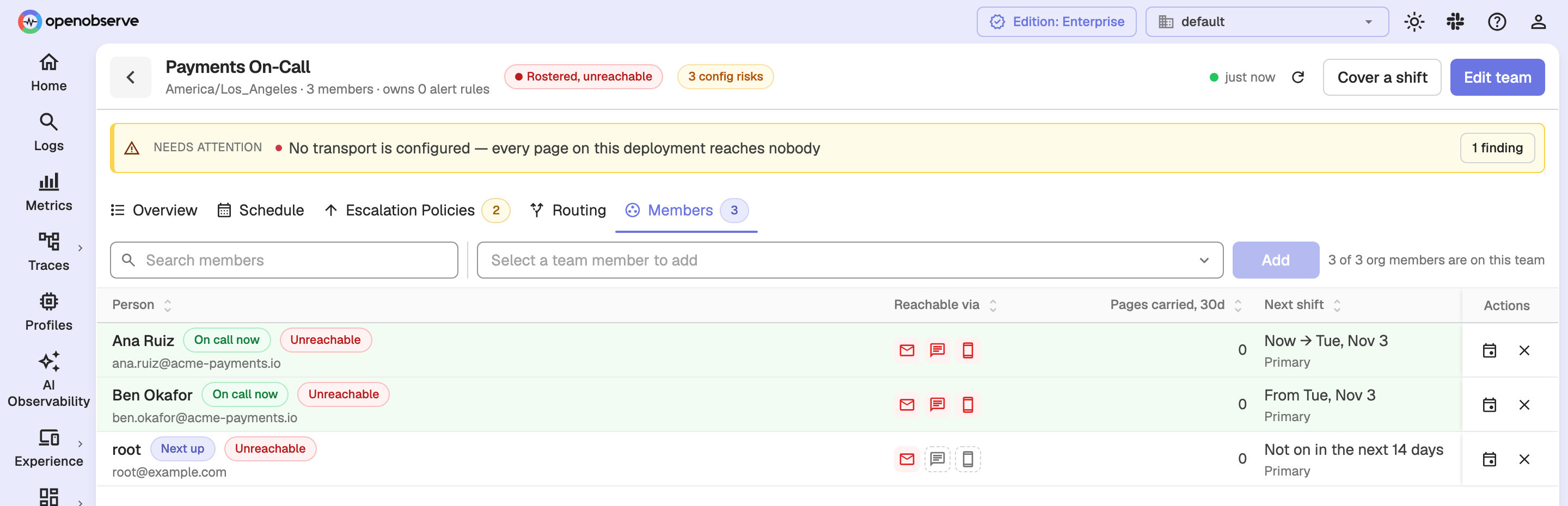
On a team's Members tab (Reliability → On-Call → Teams, then open the team), each member has a row of channel icons for Email, SMS, and Voice call, so you can see at a glance which channels can actually reach that person. Webhook is the team's channel rather than a person's, so it is not shown per member.
In the example below, no SMTP transport or phone provider is configured, so every member is marked Unreachable and their channel icons are red or dashed.
Set up telephony
SMS and voice paging go through a Twilio account. OpenObserve supports two accounts, and each organization uses one or the other:
- Deployment account: set once by your operator with environment variables, and shared by every organization that has no account of its own.
- Organization account (bring-your-own): configured per organization in Settings → Telephony, so each org can page from its own Twilio number.
An organization account always wins over the deployment account. If an org account is configured but unusable, the org gets no SMS or voice and never falls back to the deployment account, so the wrong account is never billed.
Configure the organization account
Only organization admins can change this setting.
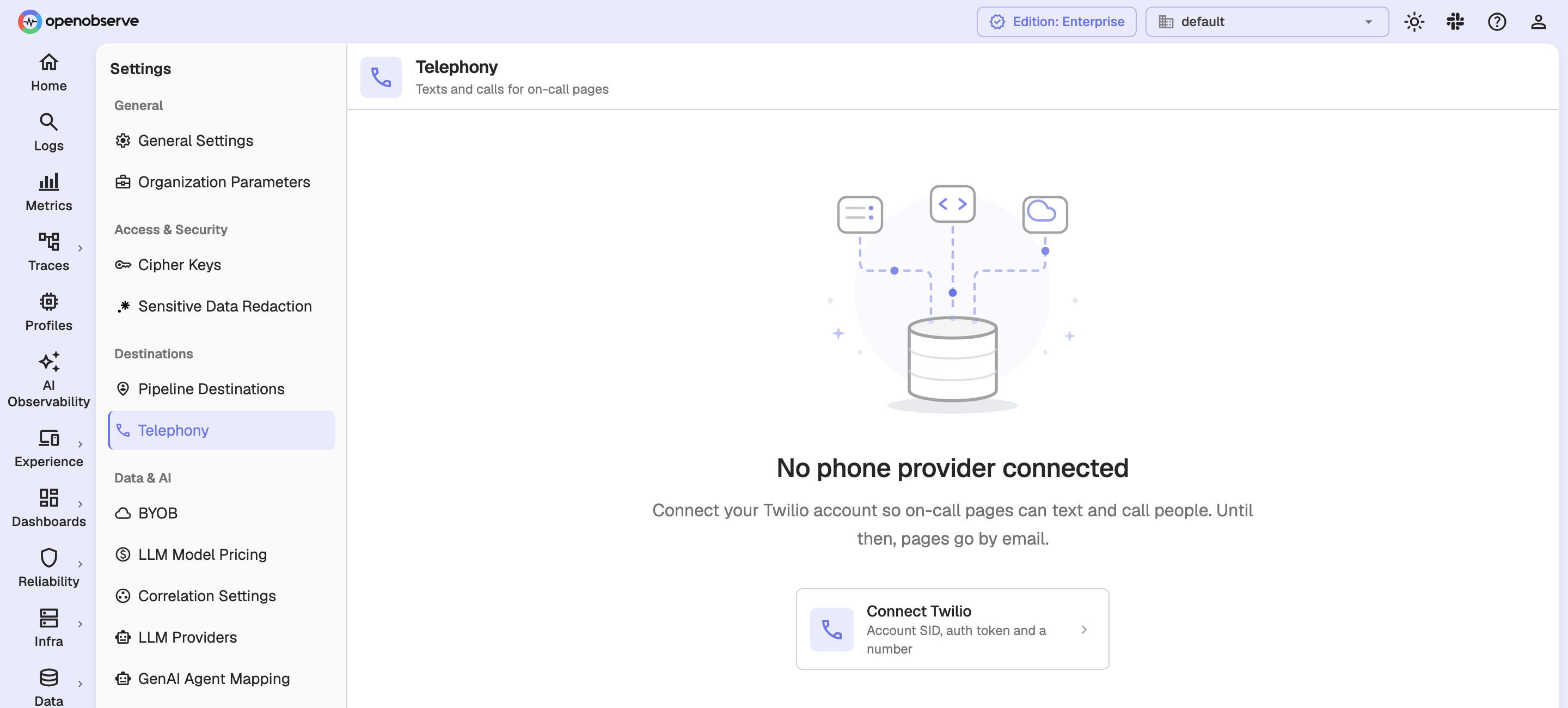
- Go to Settings → Telephony.
- Click Connect Twilio. If a deployment account is already active, click Use your own Twilio account instead.
- Enter the Account SID (starts with
AC), Auth token, and From number (with country code, in E.164 form such as+14155550100). - Click Connect.
OpenObserve checks the account with Twilio before saving it, and saving requires your operator to have set O2_MASTER_ENCRYPTION_KEY. The auth token is stored encrypted and is never returned by the API. To change the account later, click Update; leave Auth token blank to keep the stored token. Disconnect removes the org account, after which pages use the deployment account if there is one, or email only.
The page also shows whether Call keys: 4 acknowledge, 6 resolve, 8 escalate are available, which depends on O2_TELEPHONY_CALLBACK_URL (see below).
Configure the deployment account
The deployment account is set with these environment variables. The first four must be set together, or all four left empty:
| Variable | Description |
|---|---|
O2_TELEPHONY_PROVIDER | Provider of the deployment account: twilio or empty |
O2_TELEPHONY_ACCOUNT_SID | Twilio Account SID |
O2_TELEPHONY_AUTH_TOKEN | Twilio auth token |
O2_TELEPHONY_FROM_NUMBER | E.164 number the account sends SMS and places calls from |
O2_TELEPHONY_CALLBACK_URL | Optional https:// URL the provider calls back on; without it, calls cannot listen for the acknowledge key press |
A partly set account fails at boot with an error naming the missing variables. Boot also refuses a From number that is not E.164 and a callback URL that does not start with https://.
Add and verify your phone
Before SMS or voice can page a number, the number must be verified. This protects a recycled number's new owner from being woken by somebody else's outage.
- Open the user menu in the top-right corner and select My on-call.
- In the Phone card, enter your number with country code and click Send code. OpenObserve texts a 6-digit code to the number.
- Enter the code and click Confirm.
A verification code works for 10 minutes and allows five attempts. Codes are rate-limited per user and per number over a rolling 24-hour window, and each refusal (wrong code, expired code, too many requests) is shown as a message that says what to do next.
Note
Only Email decides whether a member is shown as unreachable. A member with no verified phone is still paged by email; SMS and Voice simply show as not deliverable for that person.
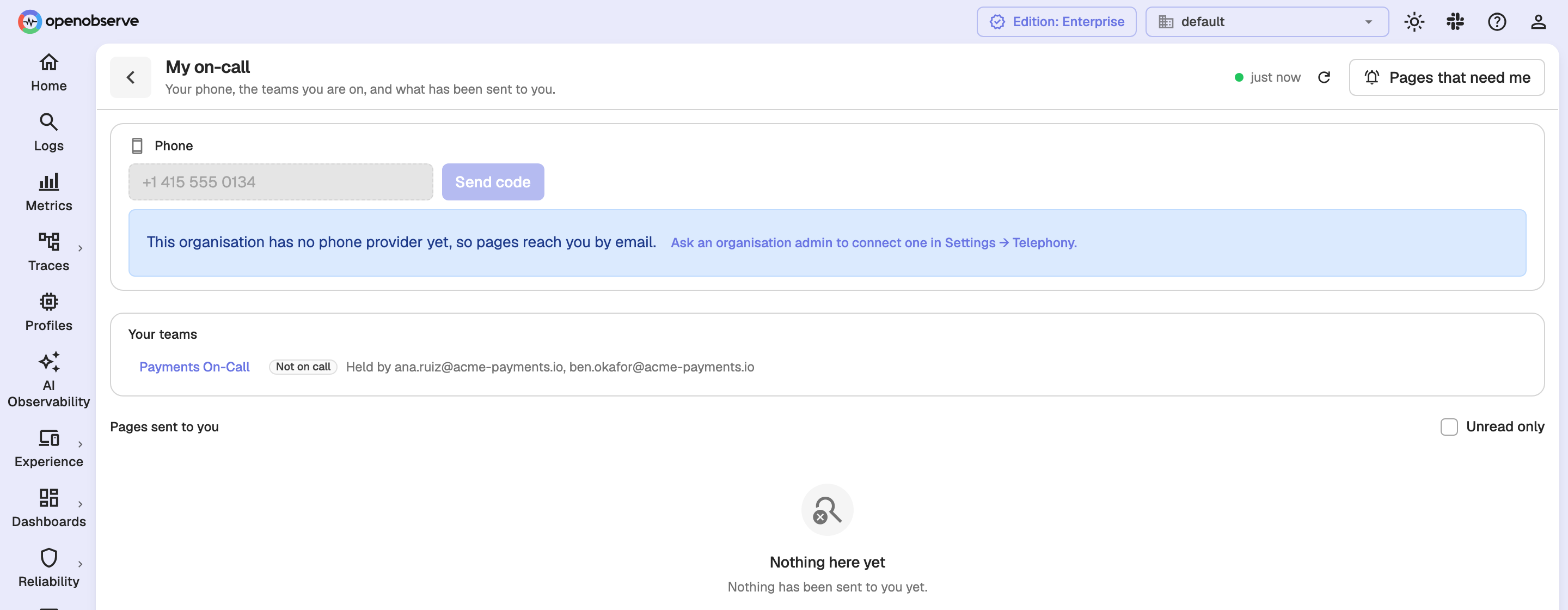
Until the organization has a phone provider, the Phone card says so and pages reach you by email only:
Acknowledge, resolve, or escalate from a call
A voice page reads the alert aloud, then prompts: "Press 4 to acknowledge, 6 to resolve, or 8 to escalate."
- Press 4 acknowledges the page as you.
- Press 6 resolves the response.
- Press 8 escalates to the next level, then waits up to 8 seconds for the next rung's pages to go out and tells you if they did not.
Key presses are protected by a signed, single-use voice token separate from the emailed or texted acknowledge link, so a link cannot be replayed to drive a call. Every outcome is answered with a spoken reply: acknowledged, already acknowledged by someone, resolved, escalated, escalated to nobody, nobody above you, or no key pressed.
Tip
Call keys require O2_TELEPHONY_CALLBACK_URL to be set. Without it, OpenObserve still places the call, but it only reads the page aloud and directs you to the acknowledge link in your text instead of listening for a key.
Review reachability
A team's Members tab answers "would a page to this person actually land?" for every member, without ringing a single phone. Each member's channel icons show a verdict per channel, computed from what actually exists; hover an icon to see the reason:
- Email is blocked if the address is not a user of the organization, is not shaped like a mailbox, uses a reserved domain (
example.com,localhost, and similar), has no SMTP transport configured, or has seen its recent sends all fail. - SMS and Voice are blocked if the member has no phone on file, the phone is not verified, or the org has no usable phone provider. On your own row, a missing phone links to My on-call so you can add it.
- A member no page can reach is marked Unreachable.
A channel is only judged by its own delivery history, so SMS failing leaves Email green, and a single recent failure does not mark someone unreachable.
Send a test page
To prove the whole path works, open Reliability → On-Call → Routing, enter the dimensions an alert would carry in Where would this route?, and click Send a test page once a team is matched. A test page goes through the real dispatch path, with the same channels and the same resolved recipients as a live page, but opens no response record, runs no escalation, and is clearly marked TEST so nobody mistakes it for a real page. A message then reports how many people the test page reached, or why nothing was delivered.
Delivery behavior
Dispatch is designed to get one page out fast and to keep a broken provider from slowing every other page:
- Every person on a rung is paged on every channel in parallel, with at most 16 sends in flight at once and a 15-second limit per send.
- A transient failure (connection reset, 429, 5xx) is retried with a short backoff; a permanent failure (no SMTP configured, rejected account, rejected recipient) is not.
- A circuit breaker is kept per channel and per provider account, so a hard-down provider stops charging its failure to every recipient of every ladder. A rejected recipient never counts against the breaker.
- SMS is capped at three segments using a conservative GSM-7/UCS-2 count, and the acknowledge link is never truncated.
Configuration reference
| Variable | Default | Description |
|---|---|---|
O2_ONCALL_ENABLED | false | Enable on-call paging and escalation |
O2_ONCALL_ESCALATION_CONCURRENCY | 5 | How many escalation jobs one node runs at a time |
O2_ONCALL_ESCALATION_TIMEOUT_SECS | 60 | How long an escalation job holds its lease before another node may retry it |
O2_ONCALL_ACK_TOKEN_TTL_HOURS | 24 | How long an acknowledgement link stays valid |
O2_ONCALL_EVENT_RETENTION_DAYS | 90 | How long a closed response keeps its timeline and delivery ledger |
O2_ONCALL_FLAP_DAMPENING_SECS | 300 | How long after a record closes a re-firing counts as the same firing |
O2_ONCALL_RECOVERY_GATE_SECS | 43200 | How long a record whose root cause is fixed waits on impacted teams before closing |
legend-and-gridline
Legend and gridline settings control legend position, type, height, width, chart alignment, gridline visibility, and axis label rotation in OpenObserve panels.
RUM Source Maps
Upload JavaScript source maps to resolve minified error stack traces back to original files, function names, and line numbers in RUM Error Tracking.