
RUM Source Maps
Translate minified JS error stack traces back to original source file paths, function names, and line numbers — automatically, in the Error Tracking UI.
Enterprise only. Requires an API token with
sourcemapsRBAC permissions.
How it works
The OpenObserve RUM SDK captures errors from production, but minified stack traces (e.g. main.abc123.js:1:186484) are unreadable. You upload the .map files from your build, tagged with service, env, and version. OpenObserve matches these against incoming errors and resolves frames automatically.
Quickstart
1. Enable source maps in your bundler
Vite
// vite.config.ts
export default { build: { sourcemap: true } };
webpack
// webpack.config.js
module.exports = { devtool: 'source-map' };
2. Zip the .map files
cd dist/assets
zip sourcemaps.zip *.map   # .js files are not required
3. Upload to OpenObserve
curl -X POST "https://<host>/api/{org}/sourcemaps" \
  -H "Authorization: Basic <token>" \
  -H "Content-Length: $(wc -c < sourcemaps.zip)" \
  -F "file=@sourcemaps.zip" \
  -F "service=my-web-app" \
  -F "env=production" \
  -F "version=1.4.2"
Success: HTTP 201 — "successfully stored sourcemaps"
service,env, andversionmust exactly match your RUM SDK config (case-sensitive).
4. Verify in the UI
RUM → Error Tracking → select an error — stack frames now show original source locations (e.g. src/components/Checkout.vue:42).
Using the UI
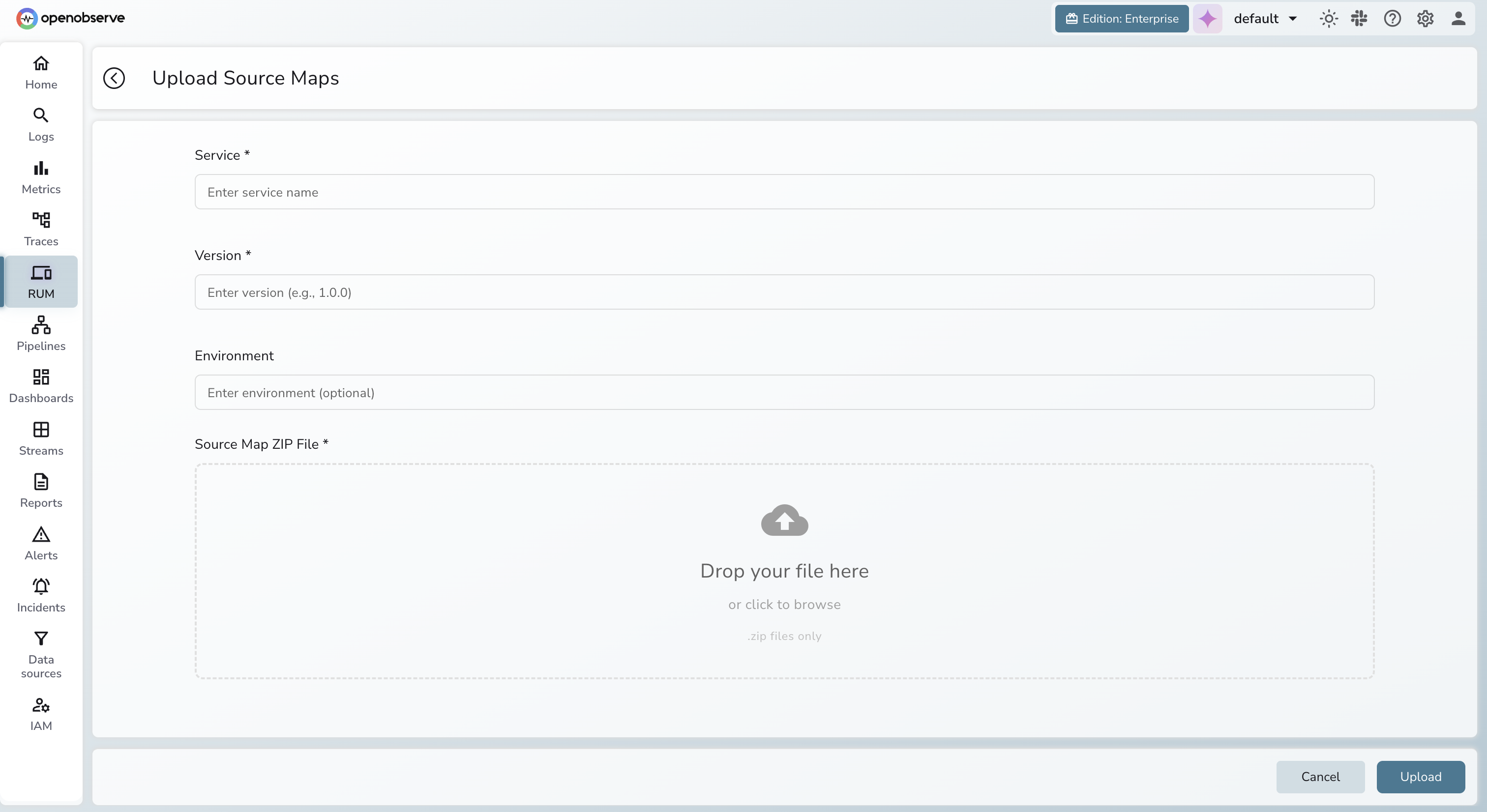
You can also upload source maps without the API:
- Navigate to RUM → Source Maps.
- Click Upload Source Maps.
- Fill in Service, Env, and Version.
- Attach the source-map ZIP.
- Submit.
Resolved stack traces then appear in Error Tracking.
API Reference
List source maps
# All
curl "https://<host>/api/{org}/sourcemaps" -H "Authorization: Basic <token>"

# Filtered
curl "https://<host>/api/{org}/sourcemaps?service=my-web-app&env=production" \
  -H "Authorization: Basic <token>"

# Distinct service/env/version combinations
curl "https://<host>/api/{org}/sourcemaps/values" -H "Authorization: Basic <token>"
Response
[{
  "service": "my-web-app",
  "env": "production",
  "version": "1.4.2",
  "file_type": "javascript",
  "source_file_name": "main.abc123.js",
  "source_map_file_name": "main.abc123.js.map",
  "created_at": 1743000000
}]
Delete source maps
curl -X DELETE \
  "https://<host>/api/{org}/sourcemaps?service=my-web-app&env=production&version=1.3.0" \
  -H "Authorization: Basic <token>"
Omitting a filter broadens the deletion scope. Omitting all three deletes everything — use with care.
Resolve a stack trace via API
curl -X POST "https://<host>/api/{org}/sourcemaps/stacktrace" \
  -H "Authorization: Basic <token>" \
  -H "Content-Type: application/json" \
  -d '{
    "service": "my-web-app",
    "env": "production",
    "version": "1.4.2",
    "stacktrace": "TypeError: Cannot read properties of undefined\n    at main.abc123.js:1:186484"
  }'
Response
{
  "stacktrace": {
    "error": "<error message>",
    "stack": [
      {
        "line": "<original stack line>",
        "source_info": {
          "source": "<source file>",
          "source_line_start": <n>,
          "source_line_end": <n>,
          "stack_line": <n>,
          "stack_col": <n>
        }
      }
    ]
  }
}
Limits & matching
| Setting | Value |
|---|---|
| Max ZIP size | 100 MB |
Max individual .map file | 5 MB |
| Memory cache | 10,000 entries |
Resolution requires an exact match on all three fields:
| Field | RUM SDK key | Upload param |
|---|---|---|
| Application | service | service |
| Environment | env | env |
| Build version | version | version |
Permissions
| Role | Allowed operations |
|---|---|
| Viewer | List, resolve |
| Editor | Upload, list, resolve |
| Admin | Upload, list, resolve, delete |
Best practices
- Use a stable version — git SHA or semver tag, never
latest. - Upload before deploying — source maps should be available before errors arrive.
- Delete stale versions — clean up retired builds to reduce storage clutter.
- Keep
serviceconsistent — same casing and format in both SDK and upload. - Never expose source maps publicly — the upload endpoint requires authentication.
Troubleshooting
Stack trace still minified
- Run
GET /sourcemaps/values— confirm the expectedservice/env/versionis listed. - Compare values against RUM SDK config exactly (case-sensitive).
- Re-upload if missing; check for a non-
201response. - Confirm the
.mapfile inside the ZIP corresponds to the file referenced in the trace.
400 file is too large
Split into multiple uploads using a version suffix (e.g. 1.4.2-chunk1), or drop third-party/vendor maps you don't own.
400 Missing content-length header
Add -H "Content-Length: $(wc -c < sourcemaps.zip)" to your curl command, or use an HTTP client that reports file size automatically.
400 on service / env / version fields
Fields must be plain ASCII multipart form fields — not JSON. Ensure none are empty strings.
Last updated on
legend-and-gridline
Legend and gridline settings control legend position, type, height, width, chart alignment, gridline visibility, and axis label rotation in OpenObserve panels.
pipeline-history
Pipeline History in OpenObserve tracks every pipeline run with execution time, status, duration, retries, and error details to help monitor and debug failures.