
UI Languages in OpenObserve
OpenObserve supports multiple UI languages. You can switch the interface language to your preference in just a few clicks.
Key Points
- OpenObserve’s UI language is user-specific. Any user accessing the instance can set their own preferred language from the profile menu, regardless of the language in which the instance was originally created.
- Changing the language does not affect logs, metrics, traces, or queries.
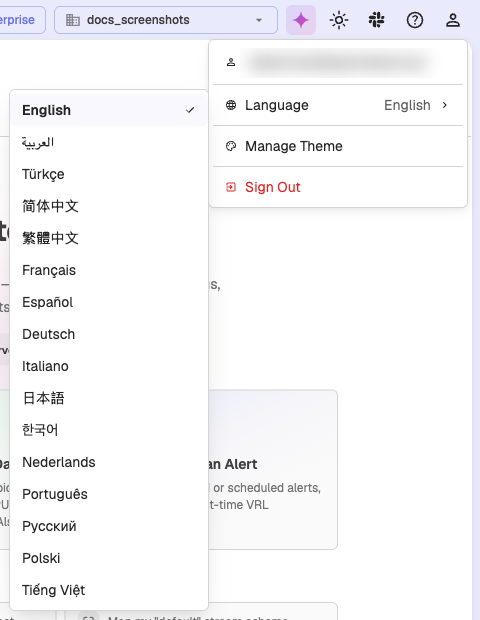
How to Change the UI Language
- Go to the top-right corner of the screen.
- Click your profile icon.
- In the dropdown, open the Language submenu.
- Choose your preferred language from the list.
The UI will instantly update to reflect your selected language.
Supported Languages
- English (Default)
- العربية
- Türkçe
- 简体中文
- 繁體中文
- Français
- Español
- Deutsch
- Italiano
- 日本語
- 한국어
- Nederlands
- Português
- Русский
- Polski
- Tiếng Việt
- ไทย
What Gets Translated
All built-in user interface (UI) elements, including labels, menus, buttons, settings, tooltips, and other components, are translated into the selected language.
What Does Not Get Translated
Dynamic and user-generated content such as pipelines, dashboards, alerts, charts, and ingested data remains in the original language in which it was created or received.
Profile Overview
The Profile section in OpenObserve lets users view their identity details, choose the user interface language, and access sign-out controls from one place.
Building a SIEM Platform with OpenObserve
Build a SIEM platform on OpenObserve with threat detection, security monitoring, incident response, and SOC operations.