
External Alert Sources
OpenObserve can receive alerts from external monitoring systems such as Grafana, Prometheus Alertmanager, or any tool that can POST a JSON webhook. It correlates them into incidents alongside the alerts OpenObserve evaluates itself.
Availability
This feature is available in Enterprise and Cloud editions. On self-hosted Enterprise it requires incidents to be enabled with O2_INCIDENTS_ENABLED=true (default false).
Overview
When an external system sends an alert to an alert source's webhook URL, OpenObserve:
- Authenticates the request with the alert source's
o2iat_token. - Detects the payload format (Grafana, Alertmanager, or generic JSON).
- Normalizes the payload: status, severity, labels, timestamp, and deduplication key.
- Stores the alert and correlates it into an incident with the same correlation engine that groups OpenObserve alerts.
- Resolves the incident automatically once every external alert in it has reported
resolved.
Every organization has a default alert source that accepts any supported format. You can add more alert sources, for example to give each upstream system its own token or incident destination.
Prerequisites
- OpenObserve Enterprise or Cloud.
- Incidents enabled (
O2_INCIDENTS_ENABLED=trueon self-hosted Enterprise). - Permission on the
incidentsresource. Managing alert sources uses the same permission as managing incidents.
Open External Alert Sources
In the left navigation, go to Reliability > External Alert Sources.
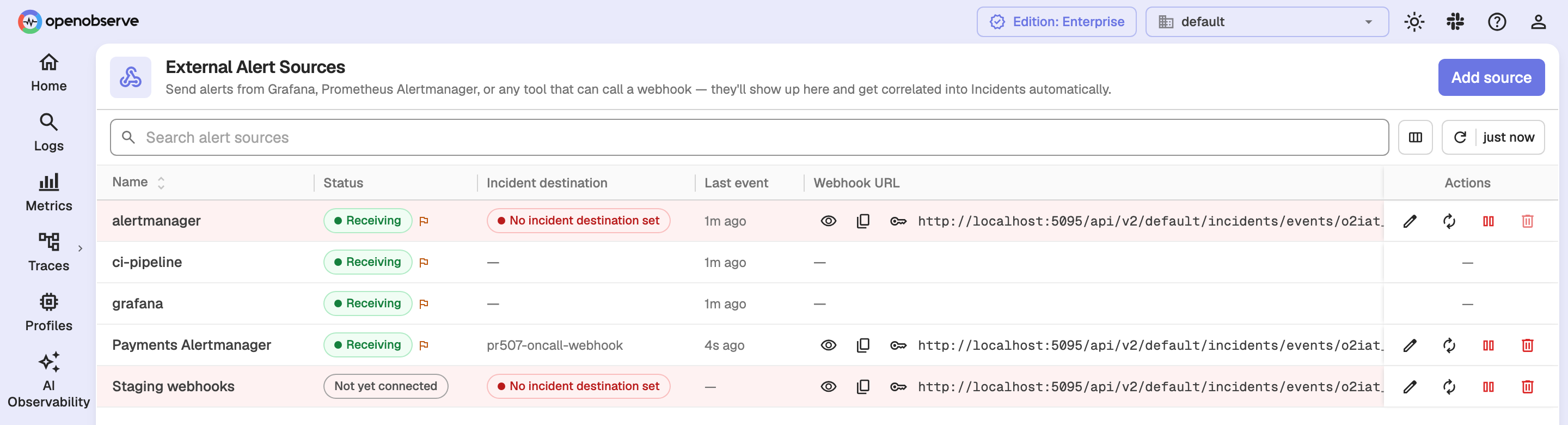
Each row shows the source Name, Status, Incident destination, Last event, and Webhook URL, with actions on the right.
The default alert source
OpenObserve creates the default alert source for each organization the first time the page or the list API is opened. The default source:
- Has its own webhook URL and
o2iat_-prefixed token. - Detects the payload format automatically, so any supported sender can use it.
- Cannot be deleted. Disable it instead if you do not want to accept alerts through it.
When several upstream systems send through the default source's token, each sender appears as its own row. A sender is named after the source label of its alerts, or after the detected format (grafana, alertmanager, generic) when there is no such label. Only the first of these rows carries the URL and token actions, because they all share one token.
Add an alert source
-
Click Add source.
-
Enter a Name. It is only a label; every source uses the same setup.
-
Optionally choose an Incident destination. This is where notifications go when this source's alerts create or join an incident. Leave it empty to use the organization default. If neither is set, matching incidents are created without a notification.
-
Click Save.
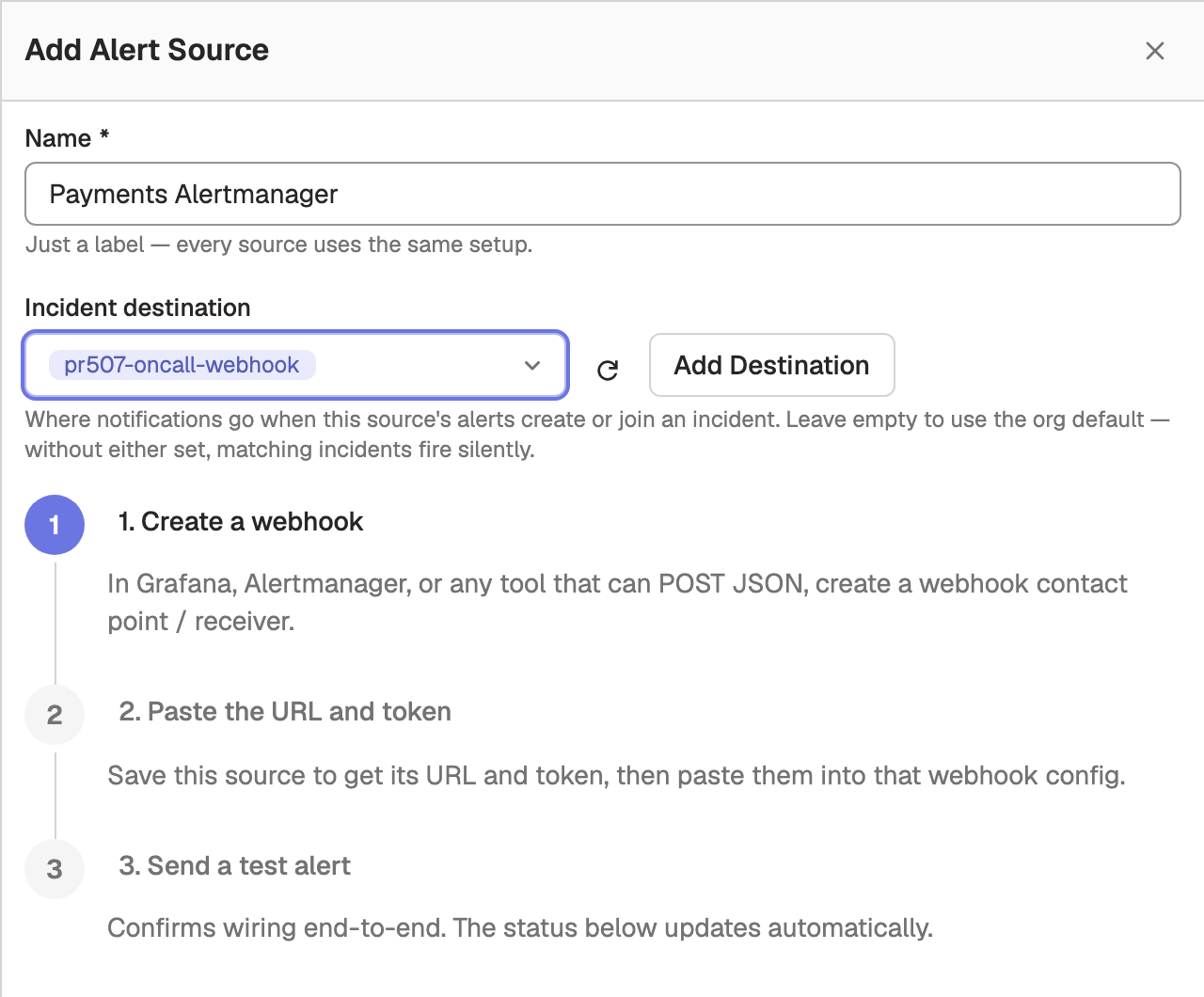
After saving, step 2 of the drawer shows the URL and the Authorization header to paste into the sending system, plus a curl command that sends a test alert. Step 3 shows Waiting for first event… until the first alert arrives, then Connected — format detected: with the detected format. Click Done to close the drawer.
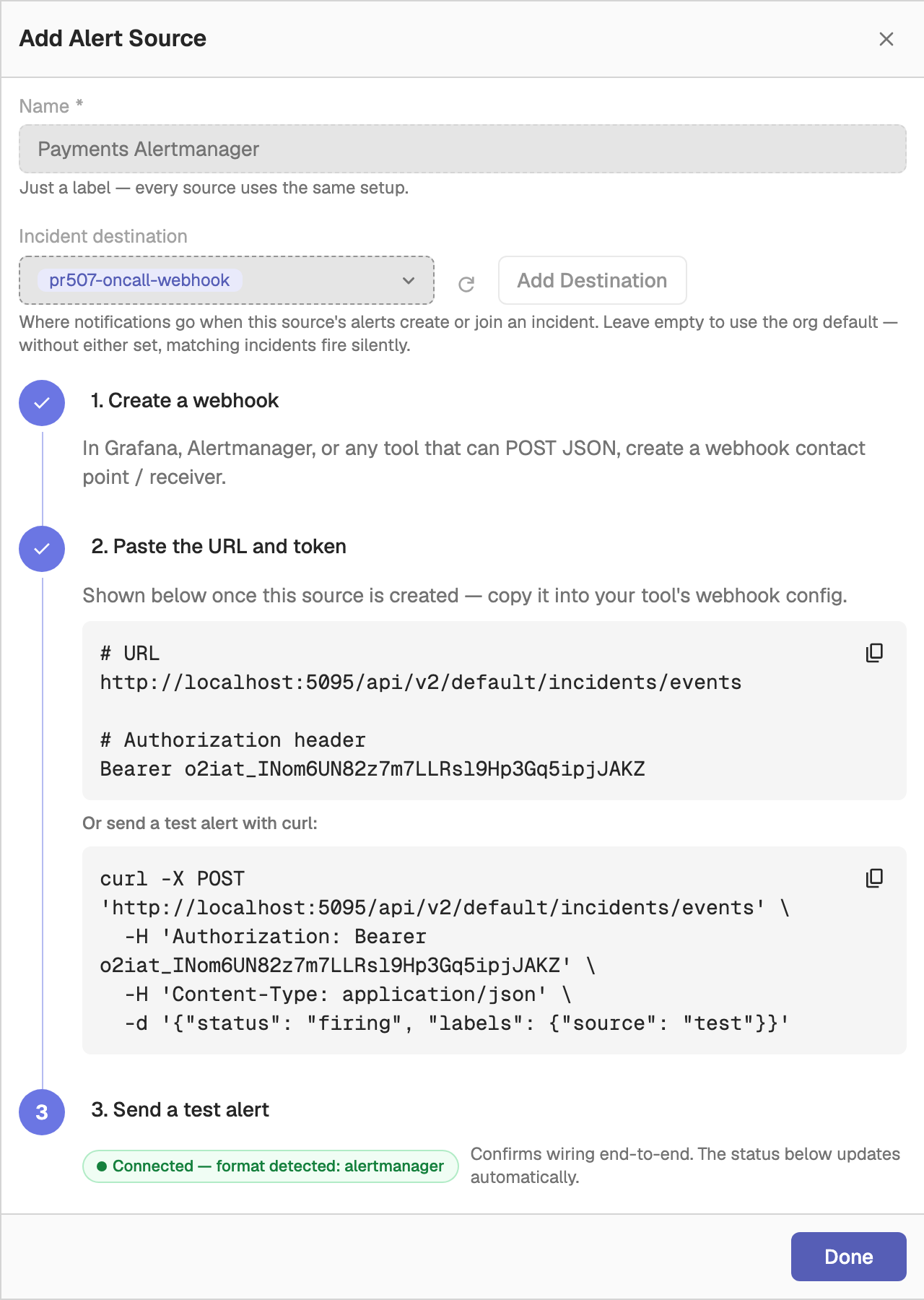
Alert sources created from the UI detect the format automatically. To pin a source to one format, create it through the API with source_type.
Webhook URL and authentication
Each alert source has a webhook URL that embeds its token:
https://<your-openobserve-host>/api/v2/<org_id>/incidents/events/<o2iat_token>Senders that support custom headers can instead POST to /api/v2/<org_id>/incidents/events and pass the token as Authorization: Bearer <o2iat_token>. If both are present, the header wins.
A request returns 202 Accepted with a summary:
{"accepted": 1, "rejected": 0, "errors": []}Limits per request: a body of at most 1 MiB, and at most 200 alerts. An unknown or mismatched token returns 404.
Configure the sending system
Grafana
In Grafana, create a contact point of type Webhook, paste the alert source's webhook URL, and attach the contact point to a notification policy. Grafana's default payload is detected automatically; no template changes are needed.
Alertmanager
Add the webhook URL as a receiver:
receivers:
  - name: openobserve-incidents
    webhook_configs:
      - url: "<your-webhook-url>"
        send_resolved: true
Keep send_resolved: true. Without resolve notifications, incidents can only close by timeout.
Generic webhook
POST a JSON object, or an array of objects, to the webhook URL. Each alert needs status and labels:
curl -X POST '<your-webhook-url>' \
  -H 'Content-Type: application/json' \
-d '{"status":"firing","labels":{"alertname":"HighCPU","service":"checkout"},"severity":"critical","title":"High CPU on checkout"}'| Field | Required | Description |
|---|---|---|
status | Yes | firing or resolved. |
labels | Yes | Key-value pairs used for correlation and, by default, deduplication. |
title | No | Alert title. Falls back to one of the label values. |
severity | No | Mapped to incident severity (see Severity mapping). Defaults to warning. |
dedup_key | No | Stable identifier for the alert. Defaults to a hash of the sorted labels. |
source_url | No | Link back to the alert in the sending system. |
event_ts | No | Event time as Unix epoch microseconds. Defaults to the time of receipt. |
Source status
The Status column shows whether each source or sender is delivering alerts:
| Status | Meaning |
|---|---|
| Receiving | The sender has delivered alerts recently. |
| Stale | The sender delivered alerts in the past but has not done so recently. |
| Not yet connected | No alerts have been received yet. |
A flag icon next to the status (or a Never resolves tag) means the sender has fired alerts but never sent a resolved event. Matching incidents then close only by timeout, so check that the sender's resolve or recovery notifications are turned on.
Manage alert sources
Each row offers these actions:
| Action | Description |
|---|---|
| Reveal full URL / Hide full URL | Show or mask the token in the webhook URL. |
| Copy URL | Copy the full webhook URL. |
| Copy token | Copy only the token. |
| Edit source | Change the name or incident destination. |
| Rotate token | Generate a new token. The current token stops working immediately, so update the URL in every sender that uses it. |
| Enable / Disable | Resume or stop accepting alerts through this source. |
| Delete | Remove the source and its webhook URL. Senders still using the URL are rejected. The default source cannot be deleted. |
How external alerts become incidents
- Deduplication: each alert has a deduplication key. Grafana and Alertmanager alerts use their
fingerprint; generic alerts usededup_keyor a hash of their labels. Repeat deliveries with the same key update the existing alert instead of creating a new one. - Correlation: the alert's labels (for example
service,namespace,cluster) are matched against the same dimensions used for OpenObserve alerts to find or create an incident. See Automatic alert correlation. - Severity: the severity is mapped to an incident priority. See Severity mapping.
- Auto-resolution: when every external alert linked to an incident has reported
resolved, OpenObserve resolves the incident.
Severity mapping
Grafana and Alertmanager alerts use their severity label; generic alerts use the severity field. Matching is case-insensitive.
| Value | Incident severity |
|---|---|
critical, crit, fatal, p1 | P1 |
error, major, high, p2 | P2 |
warning, warn, minor, p3 | P3 |
info, low, ok, p4 | P4 |
| anything else, or missing | P3 |
View external alerts in an incident
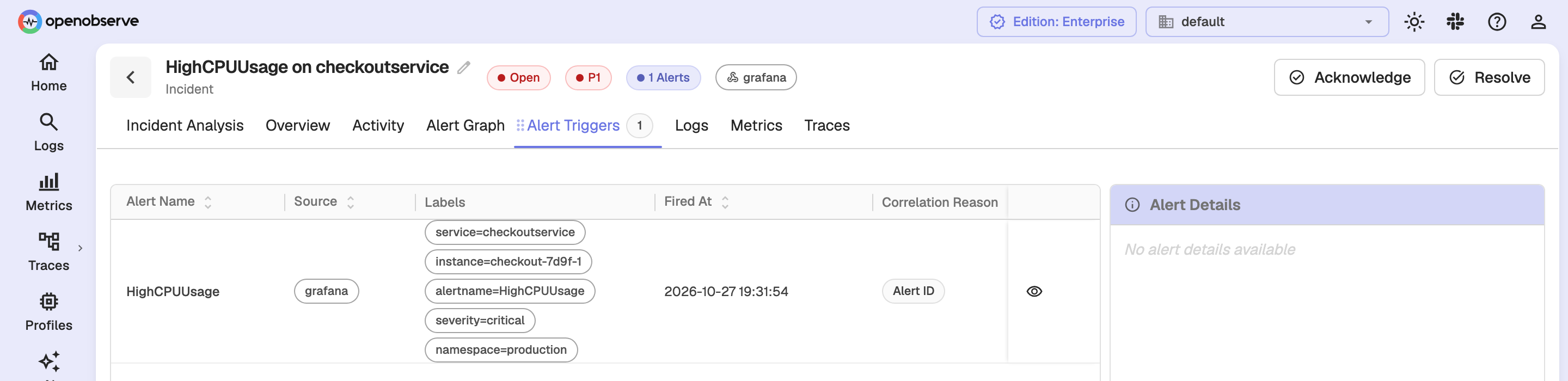
An incident that contains external alerts shows the sending system as a badge in its header. Hover over the badge to see the external source names.
External alerts appear in the incident's Alert Triggers tab, with the sending system in the Source column and the alert's labels.
View the raw payload
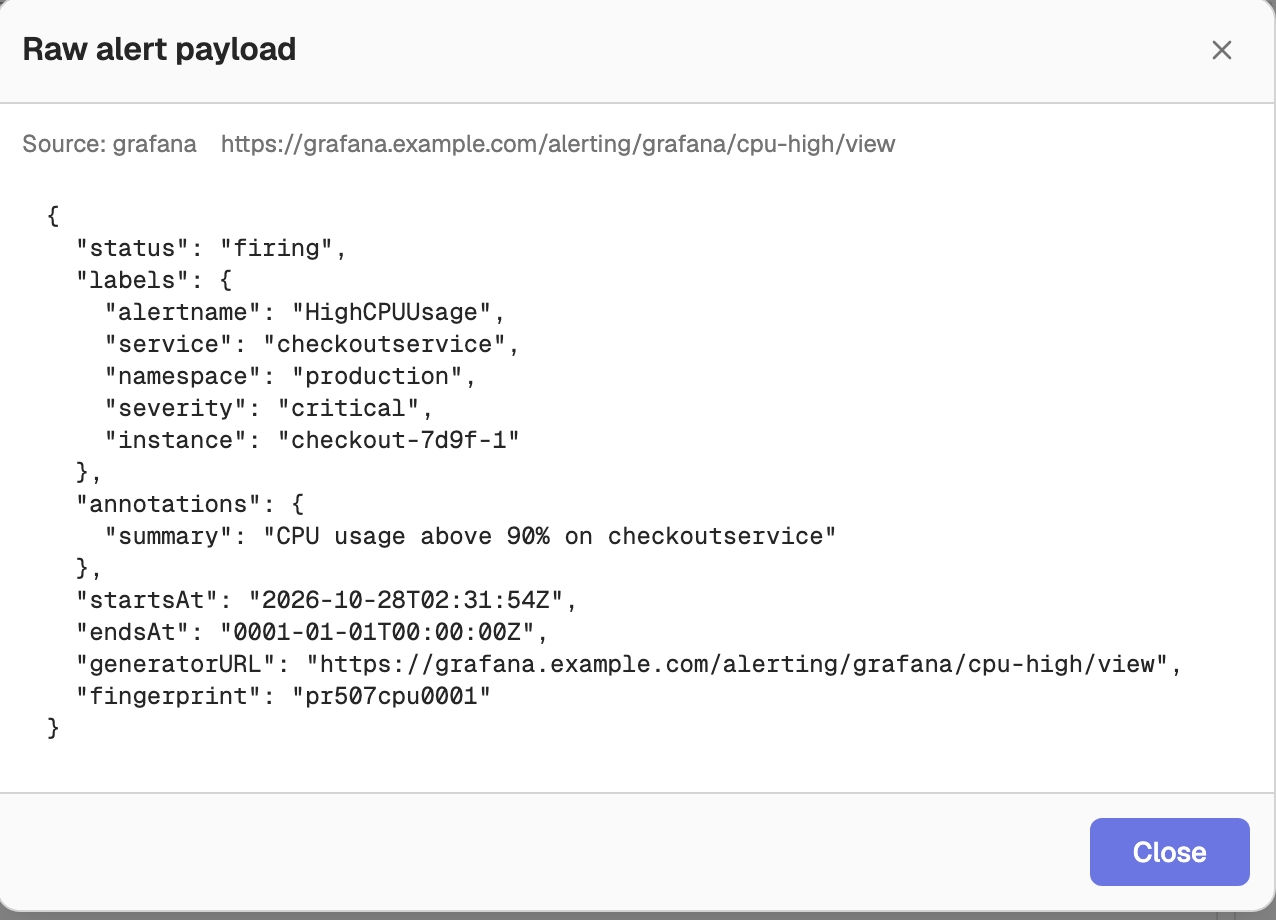
To see exactly what the sending system sent, click the View raw payload icon on an external alert's row in Alert Triggers. The Raw alert payload dialog shows the original webhook body, which helps when debugging a sender's format or labels.
API reference
All management endpoints require permission on the incidents resource.
| Method | Path | Description |
|---|---|---|
GET | /api/v2/{org_id}/incidents/integrations | List alert sources, including the default. |
POST | /api/v2/{org_id}/incidents/integrations | Create an alert source. |
PATCH | /api/v2/{org_id}/incidents/integrations/{integration_id} | Update the name and/or incident destinations. |
DELETE | /api/v2/{org_id}/incidents/integrations/{integration_id} | Delete an alert source. Returns 400 for the default source. |
PATCH | /api/v2/{org_id}/incidents/integrations/{integration_id}/enable | Enable or disable: {"enabled": false}. |
POST | /api/v2/{org_id}/incidents/integrations/{integration_id}/rotate | Rotate the token. The response contains the new token. |
GET | /api/v2/{org_id}/incidents/integrations/{integration_id}/senders | List senders with accepted and rejected counts and last-received times. |
GET | /api/v2/{org_id}/alerts/incidents/external-alerts/{external_alert_id}/payload | Get the raw payload of an external alert. |
Create an alert source
{
  "name": "grafana-prod",
  "source_type": "grafana",
  "destinations": ["oncall-slack"]
}name: required, up to 100 characters.source_type: optional, one ofauto(default),grafana,alertmanager, orgeneric. Anything other thanautopins the parser to that format.destinations: optional list of alert destination names to notify when this source's alerts create or join an incident. Omit it to use the organization default.
The response includes the generated token and the webhook url.
Incident Management
Incident Management correlates related alert firings into unified incidents with AI root cause analysis, alert graphs, and correlated logs, metrics, and traces.
Reports Overview
Reports schedule recurring PDF, PNG, or CSV exports of OpenObserve dashboards, delivered by email with folders, inline or file attachments, and custom sizes.