
Aggregate Functions
Aggregate functions compute a single result from a set of input values. For usage of standard SQL aggregate functions such as COUNT, SUM, AVG, MIN, and MAX, refer to PostgreSQL documentation.
Function index
| Function | Purpose |
|---|---|
histogram | Group records into fixed time buckets |
summary_percentile | Percentile of values that come with occurrence counts |
sequence_depth | How many steps of an ordered sequence a group completes |
sequence_step_times | Time from the first step to each later step |
sequence_step_match | Window function: marks the rows that are step k of a sequence |
For approx_topk and approx_topk_distinct, see Approximate aggregate functions.
histogram
Syntax: histogram(field) or histogram(field, 'interval')
Description:
Use the histogram() function to divide your time-based log data into fixed intervals and apply aggregate functions such as COUNT() or SUM() to analyze time-series patterns. This helps visualize trends over time and supports meaningful comparisons.
Syntax:
histogram(timestamp_field, 'interval')timestamp_field: A valid timestamp field, such as _timestamp.interval: A fixed time interval in readable units such as '30 seconds', '1 minute', '15 minutes', or '1 hour'.
Histogram with aggregate function
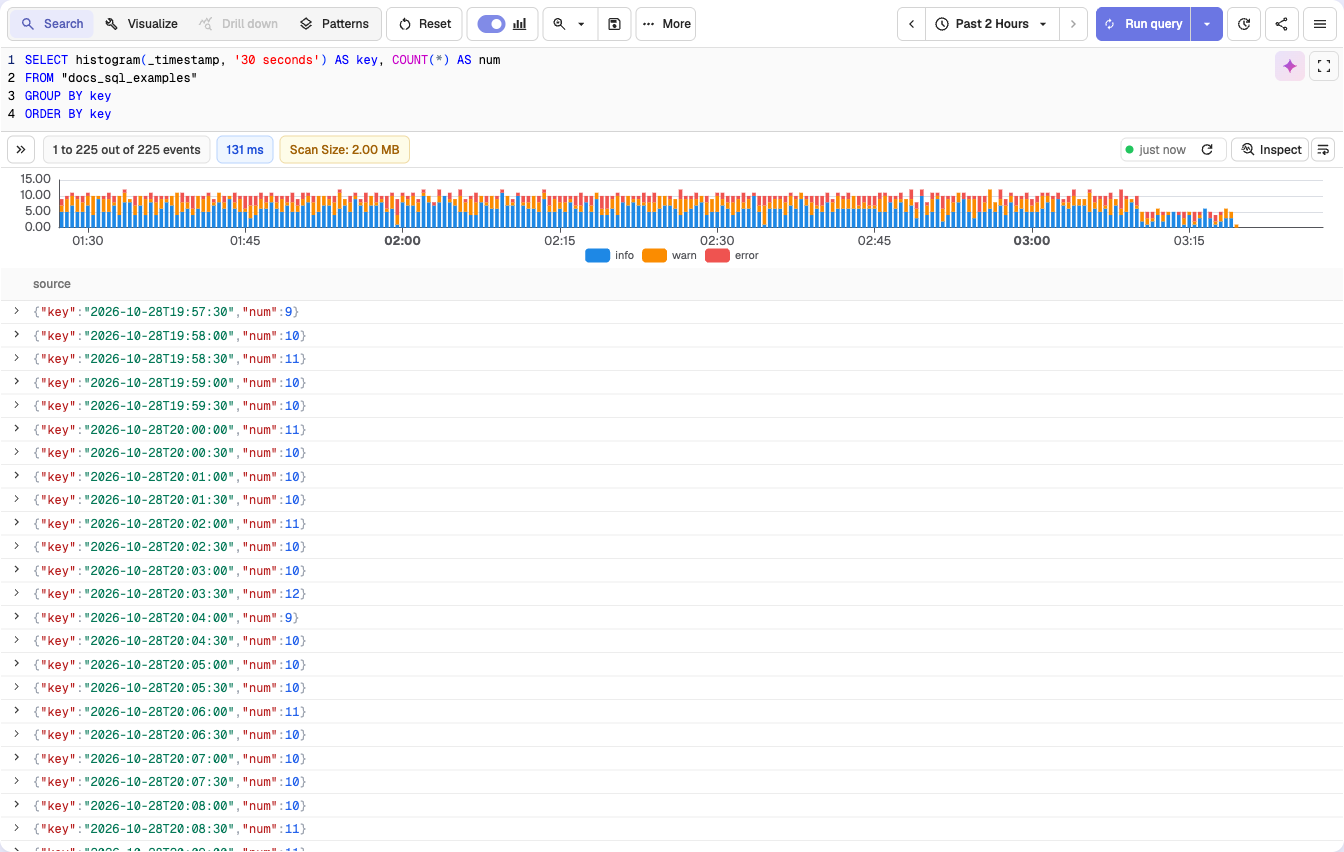
SELECT histogram(_timestamp, '30 seconds') AS key, COUNT(*) AS num
FROM "docs_sql_examples"
GROUP BY key
ORDER BY key
Expected Output:
This query divides the log data into 30-second intervals. Each row in the result shows:
key: The start time of the 30-second bucket.num: The count of log records that fall within that time bucket.
Note
- If you do not specify an interval, the backend automatically determines a suitable value.
- To ensure consistent bucket sizes and avoid unexpected behavior, it is recommended to always define the interval explicitly.
summary_percentile
Syntax: summary_percentile(value, count, percentile)
Description:
- Returns the
percentileofvalue, where each row stands forcountoccurrences ofvalue. - Use it on pre-aggregated data, such as a stream that stores one row per latency value with a count, where
approx_percentile_contwould treat every row as one occurrence. percentileis a fraction from0.0to1.0, for example0.95for p95.- The result is one of the input values (no interpolation), with the same type as
value.
Example:
SELECT service_name, summary_percentile(latency_ms, CAST(hits AS BIGINT), 0.95) AS p95_ms FROM "api_latency_buckets" GROUP BY service_nameIn a stream where each row holds a latency_ms value and the number of requests (hits) that took that long, this query returns the 95th percentile latency per service.
Gotchas
countmust be a 64-bit integer. Cast it withCAST(hits AS BIGINT)if the field has another type.percentilemust be a literal decimal.95or a column fails the query; use0.95.NaNvalues are skipped.
Sequence functions
The sequence functions find ordered sequences of events within a group, such as the steps of a funnel within a user session. The Product Analytics funnels in RUM are built on them.
All three take the same core arguments:
window: the largest allowed time from the first step to the last step, in the units ofts.0means no limit. Must be a literal.ts: the event time as an integer, for example_timestamp(microseconds).c1, ..., cN: 1 to 20 boolean conditions, one per step, in order. A condition may repeat.
Each step must be strictly later than the step before it. Events with the same timestamp never advance the sequence by more than one step.
sequence_depth
Syntax: sequence_depth(window, ts, c1, ..., cN)
Description:
- Aggregate function. Returns the number of leading steps that the group's events complete in order:
0when no event matchesc1,Nwhen the whole sequence completes withinwindow.
Example:
SELECT session_id, sequence_depth(1800000000, _timestamp, view_url LIKE '%/cart', view_url LIKE '%/checkout', view_url LIKE '%/order-confirmed') AS depth FROM "_rumdata" WHERE type = 'view' GROUP BY session_idThis query returns, per session, how far the visitor got through cart, checkout, and order confirmation within 30 minutes (1,800,000,000 microseconds). To build a funnel, count the sessions per depth:
SELECT depth, COUNT(*) AS sessions FROM (SELECT session_id, sequence_depth(1800000000, _timestamp, view_url LIKE '%/cart', view_url LIKE '%/checkout', view_url LIKE '%/order-confirmed') AS depth FROM "_rumdata" WHERE type = 'view' GROUP BY session_id) GROUP BY depth ORDER BY depthsequence_step_times
Syntax: sequence_step_times(window, ts, c1, ..., cN)
Description:
- Aggregate function. Returns an array with one entry per condition: the shortest time from the first step to that step, in the units of
ts. - The first entry is
0. Steps never reached areNULL, so the number of non-null entries equalssequence_depth.
Example:
SELECT session_id, sequence_step_times(0, _timestamp, view_url LIKE '%/cart', view_url LIKE '%/checkout') AS step_times FROM "_rumdata" WHERE type = 'view' GROUP BY session_idstep_times[2] (1-based) is the time in microseconds from the cart view to the checkout view, or NULL if the session never reached checkout.
sequence_step_match
Syntax: sequence_step_match(window, k, ts, c1, ..., cN) OVER (PARTITION BY unit)
Description:
- Window function. Returns
trueon each row that matches conditionkand is stepkof an in-order sequence: steps 1 tokmatched in order withinwindow. Later steps do not need to happen. kis a literal from1to the number of conditions.- Use it to look at the events at a given step, for example which pages visitors saw at the checkout step.
Example:
SELECT * FROM (SELECT _timestamp, session_id, view_url, sequence_step_match(0, 2, _timestamp, view_url LIKE '%/cart', view_url LIKE '%/checkout') OVER (PARTITION BY session_id) AS is_step_2 FROM "_rumdata" WHERE type = 'view') WHERE is_step_2This query returns the checkout views that came after a cart view in the same session.
Gotchas
windowandkmust be non-negative integer literals. A column or expression fails the query.windowuses the units ofts. With_timestamp, one minute is60000000.sequence_depthandsequence_step_timesalso work as window functions withOVER (PARTITION BY ...).- More than 20 conditions fail the query.
Date and Time Functions
OpenObserve SQL date and time functions: filter by a time range, format timestamps in a time zone, and parse text into microsecond timestamps.
Approximate Aggregate Overview
Analyze high-cardinality data at scale in OpenObserve with approximate aggregate SQL functions like approx_topk and approx_topk_distinct for top-k results.