
approx-topk-distinct
This page provides instructions on using the approx_topk_distinct() function.
If you only need to find the top K most frequently occurring values in a field, refer to the approx_topk() function.
What is approx_topk_distinct?
The approx_topk_distinct() function returns an approximate list of the top K values from one field (field1) that have the most number of distinct values in another field (field2). It is designed to handle large-scale, high-cardinality datasets efficiently by combining two algorithms:
- HyperLogLog: Used to estimate the number of distinct values in field2 per field1.
- Space-Saving: Used to select the top K field1 values with the highest estimated distinct counts.
Because both algorithms are probabilistic and the computation is distributed across multiple query nodes, the results are approximate.
Query Syntax
SELECT approx_topk_distinct(field1, field2, K) FROM "stream_name"Here:
field1: The field to group by and return top results for.field2: The field whose distinct values are counted per field1.K: Number of top results to return (at most 100,000).- An optional fourth argument,
cap, sets how many candidate values each partition keeps in memory (default: the larger ofK × 4and1000).
Both field1 and field2 must be string fields.
stream_name: The stream containing the data
Example
SELECT approx_topk_distinct(clientip, user_agent, 5) FROM "docs_sql_examples"This query returns an approximate list of the top 5 clientip values that have the most number of distinct user_agent values in the docs_sql_examples stream.
Note: The result is returned as an array of objects, where each object includes the value of field1 and its corresponding distinct count based on field2.
{
  "item": [
    { "value": "192.168.1.100", "count": 1450 },
    { "value": "203.0.113.50", "count": 1170 },
    { "value": "10.0.0.5", "count": 1160 },
    { "value": "198.51.100.75", "count": 1040 },
    { "value": "172.16.0.10", "count": 1010 }
  ]
}
Use approx_topk_distinct With unnest
To convert the nested array into individual rows for easier readability or further processing, use the unnest() function.
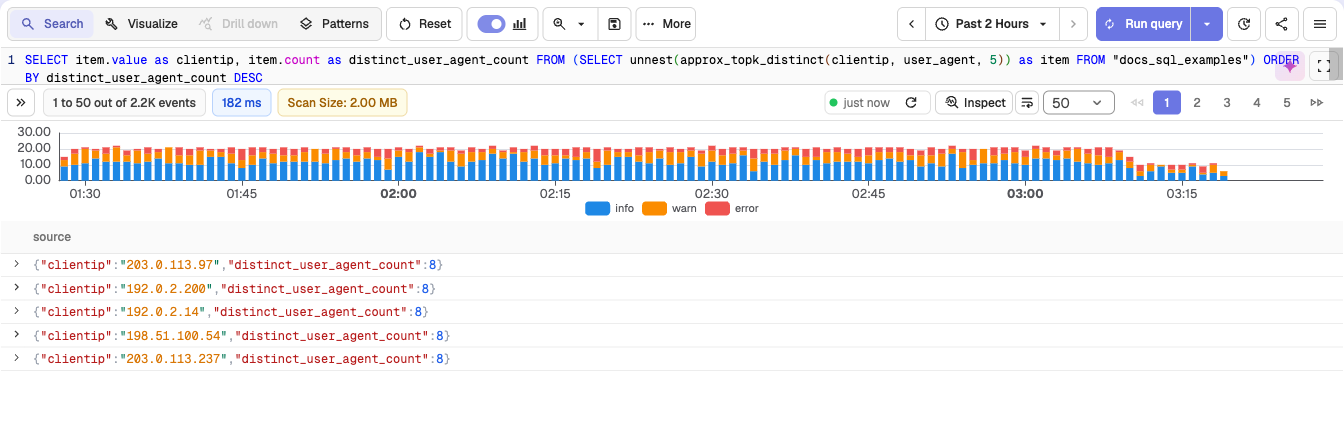
SELECT item.value as clientip, item.count as distinct_user_agent_count
FROM (
  SELECT unnest(approx_topk_distinct(clientip, user_agent, 5)) as item
  FROM "docs_sql_examples"
)
ORDER BY distinct_user_agent_count DESC
Result
This query using approx_topk_distinct() with unnest() returns a flat result, where each row represents a value from field1 and its corresponding approximate distinct count from field2:
Performance Considerations
The approx_topk_distinct() function is designed for high-cardinality fields and large datasets. It uses the same distributed and memory-efficient architecture as approx_topk().
For details on how this approach compares to traditional GROUP BY queries in terms of performance and memory usage, see the approx_topk() guide.
Limitations
The following are the known limitations of approx_topk_distinct() function:
- Results are approximate, not guaranteed to be exact.
- Accuracy depends on data distribution across partitions.
approx_topk
Use approx_topk() to find the most frequent values in high-cardinality fields. Syntax, example, result structure, and comparison with GROUP BY.
Other SQL Functions
Call your saved VRL functions from SQL in OpenObserve, and fold unsymbolized native frames in profiling stacks with fold_native_frames.