
Variable Types
This page describes the types of variables, their use cases, and the configuration required for each type.
OpenObserve supports the following variable types:
1. Query Values
This variable dynamically fetches values from a selected field in a stream. It supports both single-select and multi-select options.
When to use: When the available values depend on data already ingested, such as identifiers, names, or categories.
Use Case: Filter the dashboard panels by Pod name using values from logs.
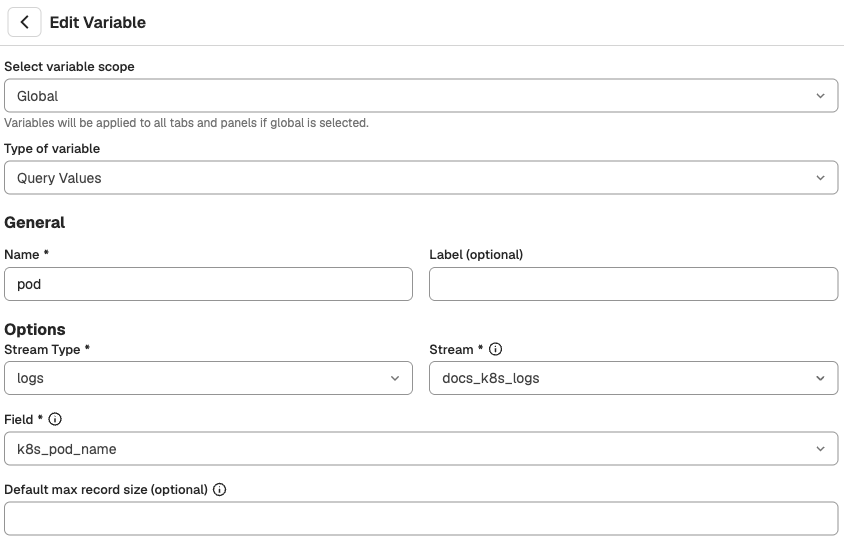
Configuration
General:
- Type of variable: Query Values
- Name: pod
- Label (optional): Pod
- Stream Type: Logs
- Stream:
default - Field:
k8s_pod_name - Default max record size (optional):
20
Options:
- Allow multiple selection: Enabled
- By Default Select: First value
- Hide On Dashboard: Disabled
- Escape Single Quotes: Disabled
Result:
- This configuration allows users to dynamically select one or more Kubernetes pod names from the logs stream to apply that selection across dashboard panels.
- The variable dropdown will display up to
20pod names retrieved from thek8s_pod_namefield in the default log stream. These values are based on the most recently ingested records. - The multi-selection option is enabled. Users can select more than one value, and all dashboard panels using
$podwill update accordingly.
Note
Dropdown menu on the dashboard populated with live values from the data.
2. Constant
This variable allows you to set a fixed value that cannot be changed by dashboard users. The constant variables are shown on the dashboard as plain text.
When to use: When the value should always stay the same and must not be changed by anyone using the dashboard.
Use case: Building a dashboard that focuses only on logs from a specific Kubernetes namespace named ziox.
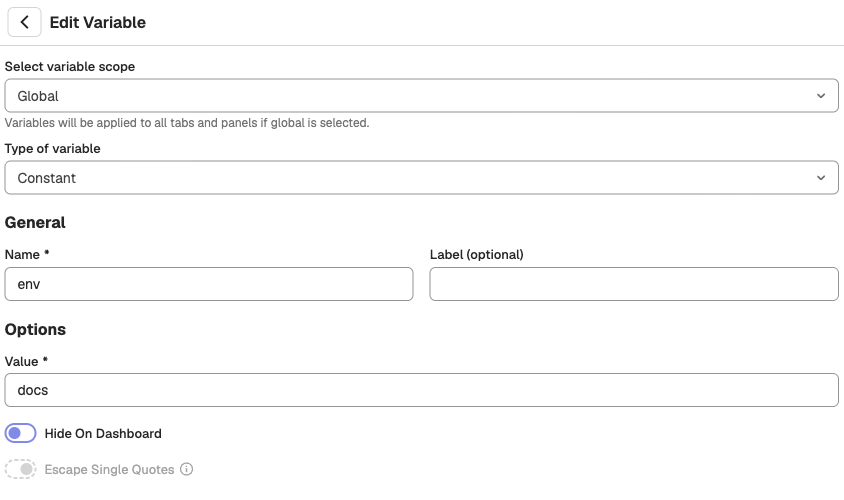
Configuration
General:
- Type of variable: Constant
- Name: constant-ziox
- Label (optional): Namespace-name-ziox-constant
- Value:
ziox
Options:
- Hide On Dashboard: Disabled
- Escape Single Quotes: Disabled
Result:
- After saving, this variable always uses
zioxas the namespace value during query execution. Users cannot modify it from the dashboard interface. - All queries referencing
$constant-zioxwill consistently apply thezioxnamespace filter.
3. Textbox
This variable provides a free-form text input field on the dashboard.
When to use: When users need to manually enter a value that may not exist in the dropdown, such as custom IDs or strings.
Use Case: You want users to manually enter the cluster name they want to filter logs by.
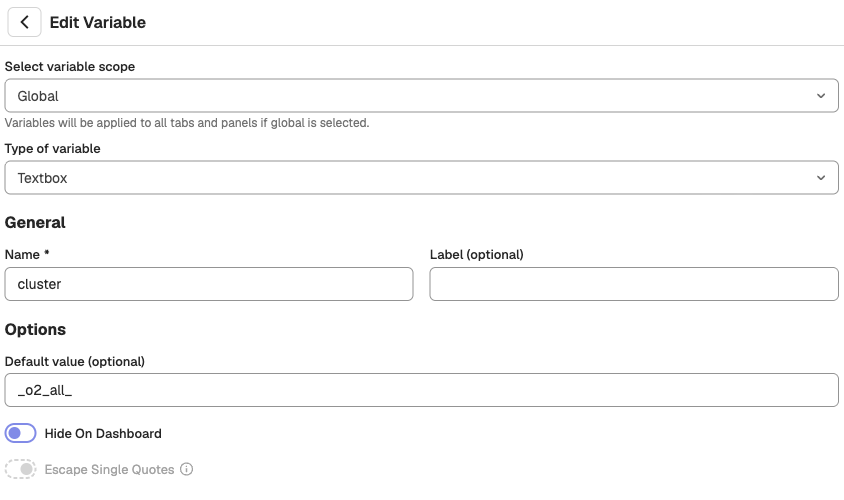
Configuration
General:
- Type of variable: Textbox
- Name: input-cluster-name
- Label (optional): Enter Cluster Name
- Default value (optional):
_o2_all_
Options:
- Hide On Dashboard: Disabled
- Escape Single Quotes: Disabled
Result:
- Users will see a text input field labeled Enter Cluster Name on the dashboard.
- The default value is
_o2_all_, but users can replace it with any cluster name, such asprodordev, at runtime. - All queries using
$input-cluster-namewill include the user-provided input when executed.
What is _o2_all_?
_o2_all_is a special keyword used to match all values during query execution.- If this is set as the default value, the dashboard will include data from all clusters unless the user enters a specific one.
Notes
- No validation is performed on the input. The value is passed directly into the query.
- To match all values, users must enter exactly
_o2_all_. WritingALL,all, or<ALL>will not match all values.
4. Custom
This variable lets you predefine a list of selectable values.
When to use: When values are known in advance and should not be fetched from data.
Use Case: You want to allow users to select a predefined service from a list, such as openobserve or ingress-nginx. This is useful when the possible values are known and limited, and you want to control what the user can select.
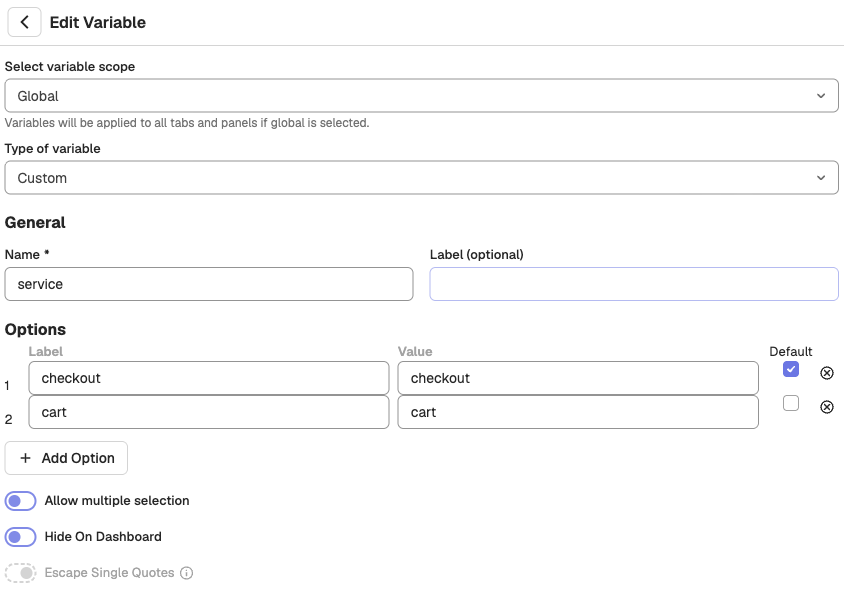
Configuration
General:
-
Type of variable: Custom
-
Name: service-name
-
Label (optional): Service Name
- Label:
openobserve - Value:
openobserve - Default: Checked
- Label:
-
Label:
ingress-nginx- Value:
ingress-nginx - Default: Unchecked
- Value:
Options:
- Allow multiple selection: Disabled
- Hide On Dashboard: Disabled
- Escape Single Quotes: Disabled
Result:
- Users will see a dropdown named Service Name with the default selection set to
openobserve. - They can switch to
ingress-nginxif needed. The multiple selection option is disabled, so only one option can be selected. - All queries using
$service-namewill include the selected value when executed.
Note
- One value must be selected as the default.
- Labels are shown on the dashboard, while values are used in the query.
- The values are injected into queries as-is. No validation or transformation is applied.
Next Steps
- Learn how to apply variables to a panel.
- Learn about variable dependencies.
Variables in OpenObserve
Dashboard variables filter OpenObserve panels dynamically; create them, apply to panels, and use substitution syntax, multi-select, type-ahead, and defaults.
Variable Dependencies
Build interactive dashboards with variable dependencies, filtering data through parent-child relationships such as Namespace, Pod, and Container.