
Splunk HEC Log Ingestion
OpenObserve provides a Splunk-compatible HTTP Event Collector (HEC) endpoint, so Splunk forwarders and other HEC clients can send events to OpenObserve using the standard Splunk HEC protocol. Authentication uses a Splunk HEC token, a GUID generated in OpenObserve, instead of an o2oi_ ingestion token or a user password.
The organization is resolved from the token, so no organization identifier appears anywhere in the request. A Splunk forwarder can point at a bare host without any OpenObserve-specific path.
Generate a Splunk HEC token
A Splunk HEC token belongs to an org ingestion token. Navigate to IAM > Ingestion Tokens and either:
- click Create New Token and check Also create a Splunk HEC token in the Create Token dialog, or
- click the Generate Splunk token action (link icon) in the row of an existing token.
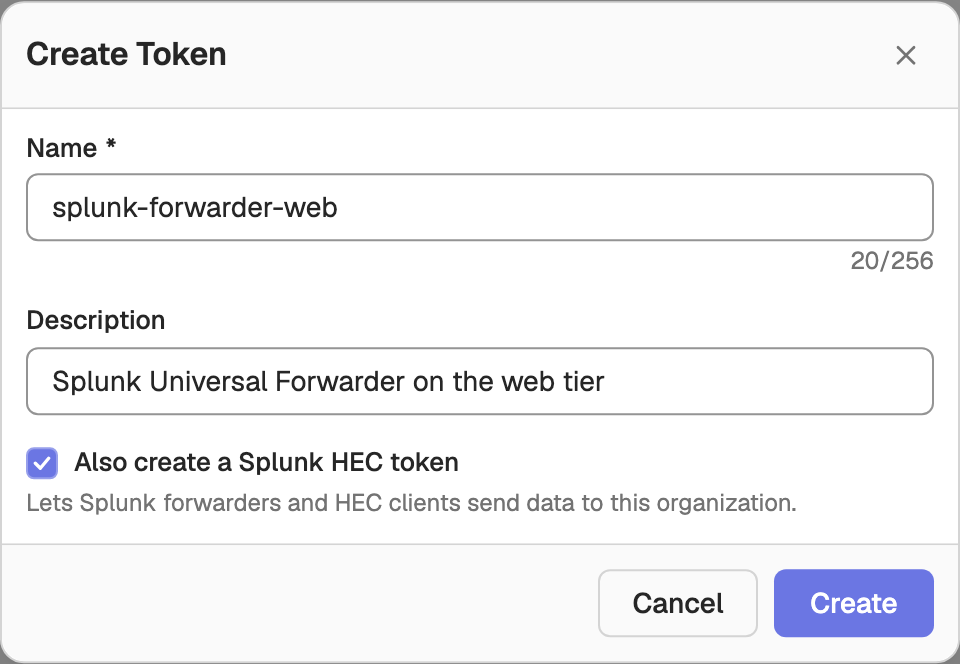

The Splunk HEC token is a lowercase hyphenated GUID, for example 7b3d9f2c-4a11-4e55-9c8b-2f6a01c34d90. It is shown in the Splunk HEC token column of the token list. Tokens without one show Not enabled.
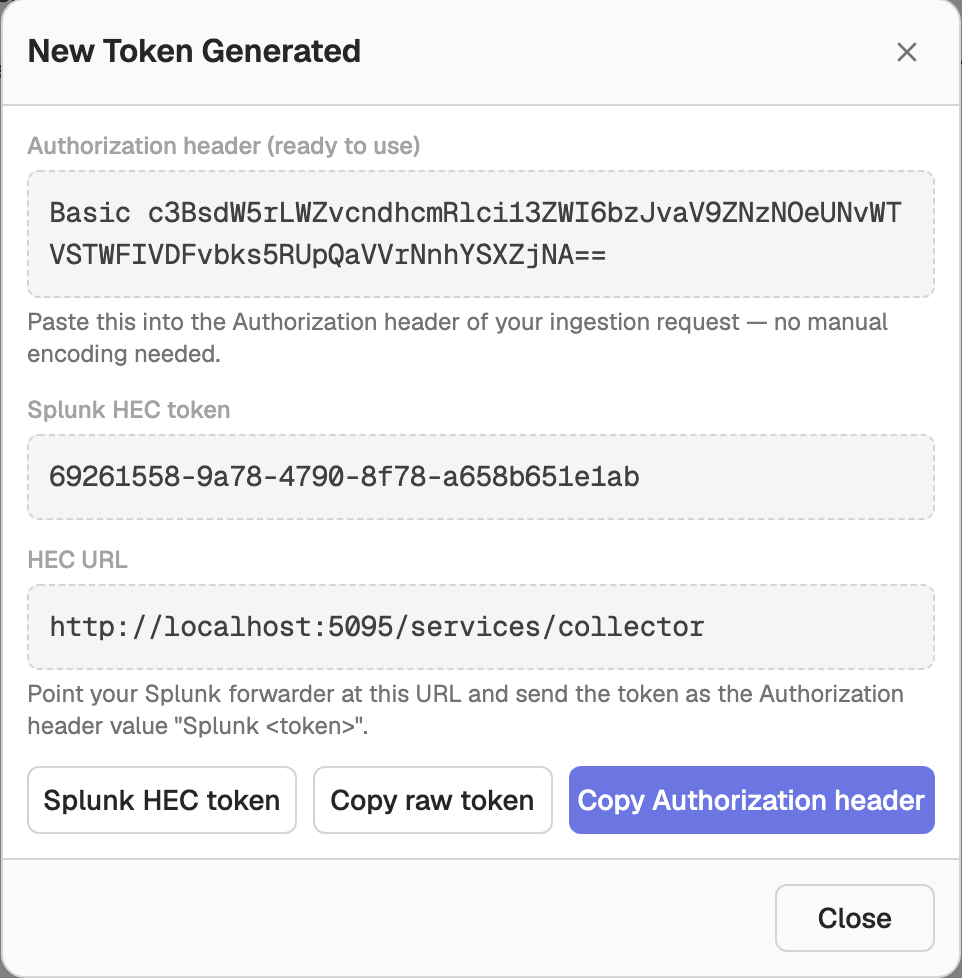
When you create a token with Also create a Splunk HEC token checked, the New Token Generated dialog shows the Splunk HEC token together with the HEC URL to point your forwarder at.
Revoke a Splunk HEC token
Click the Revoke Splunk token action (broken-link icon) in the token's row and confirm. Forwarders using that Splunk HEC token start receiving 403 errors immediately, and this cannot be undone. You can generate a new Splunk HEC token for the same ingestion token afterwards; it gets a new GUID.
Disabling the underlying ingestion token also stops its Splunk HEC token from authenticating.
Endpoint
Send POST requests to:
| Field | Value |
|---|---|
| Endpoint | https://<your-openobserve-host>/services/collector |
| Alias | /services/collector/event (identical, accepts the same payload) |
| Health check | GET /services/collector/health |
Do not add an organization or /api/ segment to the path.
The collector is registered like every other route, so a deployment that sets ZO_BASE_URI serves it at <ZO_BASE_URI>/services/collector. Splunk forwarders append /services/collector to a bare host themselves, so they need a deployment without ZO_BASE_URI, which is the default.
Authentication
Send the token in the Authorization header using the Splunk scheme:
Authorization: Splunk <splunk-hec-token>OpenObserve maps the GUID to its org ingestion token and authorizes ingestion through the same org-scoped path as every other ingestion token. The Splunk HEC token is accepted only on the /services/collector endpoints; it never authenticates an /api/ route.
Example request
curl https://<your-openobserve-host>/services/collector \
  -H "Authorization: Splunk <splunk-hec-token>" \
  -d '{"event":{"level":"info","log":"test message for openobserve"},"index":"default"}'
A successful request answers {"text":"Success","code":0}.
Event payload
Each event is a JSON object. Several events can be sent in one request, concatenated or one per line.
{
  "event": { "level": "info", "log": "test message for openobserve" },
  "index": "application",
  "host": "web-01",
  "source": "/var/log/app.log",
  "sourcetype": "app:json"
}event: the log record, either an object or a string (a string is stored in thelogfield). It is required and must not be empty.index: the stream to write to. Events without anindexgo to the stream set byZO_INGEST_DEFAULT_HEC_STREAM(default_hec).time: epoch seconds; a fractional value is accepted. When it is missing or not positive, the receipt time is used.host,source,sourcetype: stored as columns on the event.fields: additional key/value pairs to attach.fieldshas the lowest precedence: it can add keys but never overwrite the event body or the envelope metadata.
Timestamps outside the ingestion window are discarded
Events older than ZO_INGEST_ALLOWED_UPTO (5 hours by default) or further ahead than ZO_INGEST_ALLOWED_IN_FUTURE (24 hours by default) are dropped, and the request still answers code 0, because a Splunk client does not retry an error. A hardcoded or stale time therefore looks like a successful send that stores nothing.
Health check
GET /services/collector/health requires no authentication and answers:
{"text":"HEC is healthy","code":17}Response codes
The collector returns Splunk's status codes, which differ from the responses of the /api/{org_id}/_hec route:
| HTTP status | code | text |
|---|---|---|
| 200 | 0 | Success |
| 403 | 1 | Token disabled |
| 401 | 2 | Token is required |
| 401 | 3 | Invalid authorization |
| 403 | 4 | Invalid token |
| 400 | 5 | No data |
| 400 | 6 | Invalid data format |
| 400 | 7 | Incorrect index |
| 500 | 8 | Internal server error |
| 503 | 9 | Server is busy |
| 400 | 12 | Event field is required |
| 400 | 13 | Event field cannot be blank |
| 413 | 6 | Request entity too large |
Splunk Edge Processor
Splunk Edge Processor configuration
- Disable
useACKon the destination. Indexer acknowledgement is not supported, and a client waiting for one will block. - Edge Processor forwards the upstream client's token for any data that reached it over HEC, and uses the destination token only when the data carries none. Have upstream clients send this organization's Splunk HEC token, or send to Edge Processor without an
Authorizationheader. Getting this wrong looks like total silent data loss, because every request answers403.
Use HTTPS
Use HTTPS
The Splunk HEC token is a bearer credential that can be replayed if sent over plaintext HTTP. Terminate TLS at OpenObserve (ZO_HTTP_TLS_ENABLED, disabled by default) or at a trusted proxy in front of it.
Verify ingestion
Once your forwarder is shipping, open the OpenObserve UI, click Logs in the sidebar, and select the stream named by the index field (or _hec). New entries should appear within a few seconds. If nothing appears, confirm that the Authorization header uses the Splunk scheme, that the endpoint has no organization or /api/ segment, and that event timestamps are current.
Next steps
- Ingestion Tokens: create and manage org-level ingestion tokens.
- Logs UI: search and explore ingested logs.
- Other log ingestion options: OpenTelemetry, Vector, Fluent Bit, and language SDKs.
Need some help?
- Join our Community Slack
- Or Contact support
Kinesis Firehose
Complete AWS Kinesis Firehose guide for ingesting CloudWatch logs, VPC Flow Logs, WAF logs, and AWS service logs to OpenObserve for AWS log management.
Syslog
Configure syslog server integration to collect system, server, and network device logs over TCP or UDP with OpenObserve for centralized logging.