
O2 SRE Agent Setup
Overview
The O2 SRE Agent is a background service that powers AI-driven features in OpenObserve Enterprise. It handles AI request processing, tool execution, and intelligence for observability workflows.
Features Enabled by SRE Agent
AI Assistant
- Natural language querying of logs, metrics, and traces
- Automated SQL/PromQL/VRL query generation
- Resource creation (dashboards, alerts) via chat
- Multi-data source correlation and troubleshooting
- Script generation (Python/VRL)
- Query validation before execution
- Context-aware on the Traces page (picks up the current stream, time range, search mode, and selected trace) and presents summarized tool results for readability
Custom Toolsets & Skills (Enterprise)
The SRE Agent can be extended with org-scoped custom toolsets that are loaded into the agent's available tools for chat and RCA requests. Supported toolset kinds are MCP, CLI, skill, and generic. Manage them under Management > AI Toolsets.
Incident Management & RCA
- Automated incident detection and grouping
- AI-powered Root Cause Analysis
- Automated RCA reanalysis (append-only delta analysis triggered on incident lifecycle events)
- Alert correlation and event tracking
- Incident lifecycle management
Prerequisites
- OpenObserve Enterprise License (v0.60.0+)
- AI Provider API Key with available quota (Anthropic, OpenAI, or Google Gemini)
O2_AI_ENABLEDset to"true"in your OpenObserve configuration
Configuration Methods
Method 1: Helm Chart Deployment (Recommended)
If you're deploying OpenObserve using the official Helm charts, the SRE Agent is already included. You just need to enable and configure it.
Official Helm Charts:
Step 1: Add Helm Repository
helm repo add openobserve https://charts.openobserve.ai
helm repo update
Step 2: Update Values File
Update your values.yaml with the following configuration:
Minimal Configuration (Direct API - No Gateway):
enterprise:
  enabled: true

  # Required when O2_AI_ENABLED is "true"
  sreagent:
    enabled: true
    config:
      O2_SRE_HOST: "0.0.0.0"
      O2_SRE_PORT: "8000"
      O2_SRE_LOG_LEVEL: "INFO"
      ADK_ENABLE_JSON_SCHEMA_FOR_FUNC_DECL: "true"
      O2_AI_GATEWAY_ENABLED: "false"
      O2_AI_PROVIDER: "anthropic"  # Options: anthropic, openai, gemini
      O2_AI_MODEL: "claude-3-5-sonnet-20241022"
      O2_AI_GATEWAY_URL: ""  # Leave empty when not using gateway
      O2_AGENT_URL: ""  # Leave empty - auto-generated
      O2_TOOL_API_URL: ""  # Leave empty - auto-generated
      # MCP validation settings
      O2_MCP_VALIDATION_ENABLED: "true"
      O2_MCP_VALIDATION_RETRY: "true"
      O2_MCP_CONTENT_VALIDATION_ENABLED: "true"
      O2_MCP_CONTENT_VALIDATION_MODE: "hybrid"
      O2_MCP_RESPONSE_VALIDATION_ENABLED: "true"

  # IMPORTANT: Requires sreagent.enabled to be true
  parameters:
    O2_AI_ENABLED: "true"
    O2_AGENT_URL: ""  # Leave empty - auto-generated
    O2_TOOL_API_URL: ""  # Leave empty - auto-generated

# AI API Key (REQUIRED)
auth:
  O2_AI_API_KEY: "your-api-key-here"
Configuration with AI Gateway:
# Enable AI Gateway
aiGateway:
  enabled: true
  gatewayServiceName: "ai-gateway"
  port: 80

enterprise:
  enabled: true

  sreagent:
    enabled: true
    config:
      O2_SRE_HOST: "0.0.0.0"
      O2_SRE_PORT: "8000"
      O2_SRE_LOG_LEVEL: "INFO"
      ADK_ENABLE_JSON_SCHEMA_FOR_FUNC_DECL: "true"
      O2_AI_GATEWAY_ENABLED: "true"  # Auto-set when aiGateway.enabled: true
      O2_AI_PROVIDER: "anthropic"  # Can be omitted when using gateway
      O2_AI_MODEL: "claude-3-5-sonnet-20241022"
      O2_AI_GATEWAY_URL: ""  # Auto-configured when aiGateway.enabled: true
      O2_AGENT_URL: ""
      O2_TOOL_API_URL: ""
      O2_MCP_VALIDATION_ENABLED: "true"
      O2_MCP_VALIDATION_RETRY: "true"
      O2_MCP_CONTENT_VALIDATION_ENABLED: "true"
      O2_MCP_CONTENT_VALIDATION_MODE: "hybrid"
      O2_MCP_RESPONSE_VALIDATION_ENABLED: "true"

  parameters:
    O2_AI_ENABLED: "true"
    O2_AGENT_URL: ""
    O2_TOOL_API_URL: ""

auth:
  O2_AI_API_KEY: "your-api-key-here"
With Incidents & RCA:
enterprise:
  enabled: true

  sreagent:
    enabled: true
    config:
      O2_SRE_HOST: "0.0.0.0"
      O2_SRE_PORT: "8000"
      O2_SRE_LOG_LEVEL: "INFO"
      ADK_ENABLE_JSON_SCHEMA_FOR_FUNC_DECL: "true"
      O2_AI_GATEWAY_ENABLED: "false"
      O2_AI_PROVIDER: "anthropic"
      O2_AI_MODEL: "claude-3-5-sonnet-20241022"
      O2_AI_GATEWAY_URL: ""
      O2_AGENT_URL: ""
      O2_TOOL_API_URL: ""
      O2_MCP_VALIDATION_ENABLED: "true"
      O2_MCP_VALIDATION_RETRY: "true"
      O2_MCP_CONTENT_VALIDATION_ENABLED: "true"
      O2_MCP_CONTENT_VALIDATION_MODE: "hybrid"
      O2_MCP_RESPONSE_VALIDATION_ENABLED: "true"

  parameters:
    # AI Features
    O2_AI_ENABLED: "true"
    O2_AGENT_URL: ""
    O2_TOOL_API_URL: ""

    # Incidents and RCA
    O2_INCIDENTS_ENABLED: "true"
    O2_INCIDENTS_RCA_ENABLED: "true"
    O2_INCIDENTS_AUTO_RESOLVE_AFTER_MINUTES: "-1"
    O2_INCIDENTS_ALERT_GRAPH_ENABLED: "true"
    O2_INCIDENTS_REANALYSIS_COOLDOWN_MINUTES: "30"  # Minimum minutes between automatic reanalysis runs (user-triggered reanalysis bypasses it)

auth:
  O2_AI_API_KEY: "your-api-key-here"
  # Optional: MCP Authentication
  O2_MCP_USERNAME: "root@example.com"
  O2_MCP_PASSWORD: "SecurePassword123"
Step 3: Deploy
Multi-node deployment:
helm upgrade --install openobserve openobserve/openobserve \
  -f values.yaml \
  --namespace openobserve \
  --create-namespace
Standalone deployment:
helm upgrade --install openobserve openobserve/openobserve-standalone \
  -f values.yaml \
  --namespace openobserve \
  --create-namespace
Step 4: Verify Deployment
# Check SRE Agent pod
kubectl get pods -n openobserve | grep sreagent

# View logs
kubectl logs -n openobserve deployment/openobserve-sreagent --tail=50

# Check health
kubectl exec -n openobserve deployment/openobserve-router -- \
  curl -s http://openobserve-sreagent:8000/health
Method 2: Manual Deployment
For deployments not using the official Helm charts. Requires deploying two components separately.
Docker Image: public.ecr.aws/zinclabs/o2-sre-agent:latest
Step 1: Create Kubernetes Secret
apiVersion: v1
kind: Secret
metadata:
  name: o2-sre-agent-secrets
  namespace: openobserve
type: Opaque
stringData:
  ai-api-key: "your-api-key-here"
  # Optional
  mcp-username: "root@example.com"
  mcp-password: "SecurePassword123"
kubectl apply -f secret.yamlStep 2: Deploy SRE Agent
apiVersion: apps/v1
kind: Deployment
metadata:
  name: o2-sre-agent
  namespace: openobserve
spec:
  replicas: 2
  selector:
    matchLabels:
      app: o2-sre-agent
  template:
    metadata:
      labels:
        app: o2-sre-agent
    spec:
      containers:
      - name: o2-sre-agent
        image: public.ecr.aws/zinclabs/o2-sre-agent:latest
        ports:
        - containerPort: 8000
          name: http

        env:
        # Server Configuration
        - name: O2_SRE_HOST
          value: "0.0.0.0"
        - name: O2_SRE_PORT
          value: "8000"
        - name: O2_SRE_LOG_LEVEL
          value: "INFO"

        # AI Provider Configuration
        - name: O2_AI_PROVIDER
          value: "anthropic"
        - name: O2_AI_MODEL
          value: "claude-sonnet-4-5-20250929"
        - name: O2_AI_API_KEY
          valueFrom:
            secretKeyRef:
              name: o2-sre-agent-secrets
              key: ai-api-key

        # MCP Tool Server URL (points to OpenObserve)
        - name: O2_TOOL_API_URL
          value: "http://openobserve-router.openobserve.svc.cluster.local:5080/api/default/mcp"

        # MCP Validation
        - name: O2_MCP_VALIDATION_ENABLED
          value: "true"
        - name: O2_MCP_CONTENT_VALIDATION_ENABLED
          value: "true"

        # Optional: MCP Authentication
        - name: O2_MCP_USERNAME
          valueFrom:
            secretKeyRef:
              name: o2-sre-agent-secrets
              key: mcp-username
              optional: true
        - name: O2_MCP_PASSWORD
          valueFrom:
            secretKeyRef:
              name: o2-sre-agent-secrets
              key: mcp-password
              optional: true

        resources:
          requests:
            memory: "256Mi"
            cpu: "250m"
          limits:
            memory: "512Mi"
            cpu: "500m"

---
apiVersion: v1
kind: Service
metadata:
  name: o2-sre-agent
  namespace: openobserve
spec:
  type: ClusterIP
  ports:
  - port: 8000
    targetPort: http
    name: http
  selector:
    app: o2-sre-agent
kubectl apply -f deployment.yamlStep 3: Configure OpenObserve
Update your OpenObserve deployment configuration:
# OpenObserve configuration
enterprise:
  enabled: true
  parameters:
    # AI Features
    O2_AI_ENABLED: "true"
    O2_AGENT_URL: "http://o2-sre-agent.openobserve.svc.cluster.local:8000"
    O2_TOOL_API_URL: "http://openobserve-router.openobserve.svc.cluster.local:5080/api/default/mcp"

    # Optional: Incident Management
    O2_INCIDENTS_ENABLED: "true"
    O2_INCIDENTS_RCA_ENABLED: "true"
    O2_INCIDENTS_ALERT_GRAPH_ENABLED: "true"
Restart OpenObserve services to apply changes.
Environment Variables Reference
For detailed information about all available environment variables and their configurations, refer to the official documentation:
AI Provider Selection
| Provider | Model | Use Case |
|---|---|---|
| Anthropic | claude-3-5-sonnet-20241022 | Best reasoning, complex analysis (Recommended) |
| OpenAI | gpt-4-turbo, gpt-4o | Wide compatibility, strong performance |
| Google Gemini | gemini-1.5-pro | Cost-effective option |
Configuration:
O2_AI_PROVIDER: "anthropic"  # or "openai", "gemini"
O2_AI_MODEL: "claude-3-5-sonnet-20241022"
O2_AI_API_KEY: "your-api-key"
AI Gateway Configuration
An AI Gateway provides rate limiting, response caching, load balancing, and usage tracking. Use it for production deployments, high query volumes (>100/day), or cost-sensitive environments. Development/testing can skip the gateway for simplicity.
Configuration Flows
Flow 1: OpenObserve Built-in Gateway (Recommended)
Uses the O2 Envoy Gateway for AI request management.
aiGateway:
  enabled: true
  gatewayServiceName: "ai-gateway"
  port: 80

enterprise:
  sreagent:
    enabled: true
    # O2_AI_PROVIDER not needed
    # Gateway settings auto-configured
Flow 2: External/Self-hosted Gateway
enterprise:
  sreagent:
    enabled: true
    config:
      O2_AI_GATEWAY_ENABLED: "true"
      O2_AI_GATEWAY_URL: "http://my-gateway.custom.svc.cluster.local:80"
      # O2_AI_PROVIDER not needed
Flow 3: Direct API (No Gateway)
enterprise:
  sreagent:
    enabled: true
    config:
      O2_AI_PROVIDER: "anthropic"
      O2_AI_MODEL: "claude-sonnet-4-5-20250929"
      # No gateway configuration
MCP Validation & Security
Model Context Protocol (MCP) handles communication between the SRE Agent and OpenObserve. Validation ensures secure and reliable AI tool execution.
Recommended for Production:
-
Enable all validation settings (
O2_MCP_VALIDATION_ENABLED: "true") -
Use
hybridvalidation mode for balanced security and flexibility -
Configure MCP authentication for multi-tenant environments
Development: Can disable validation (O2_MCP_VALIDATION_ENABLED: "false") for faster iteration.
MCP Authentication (optional):
O2_MCP_USERNAME: "root@example.com"
O2_MCP_PASSWORD: "SecurePassword123"
Using the AI Assistant
Access
-
Log into OpenObserve
-
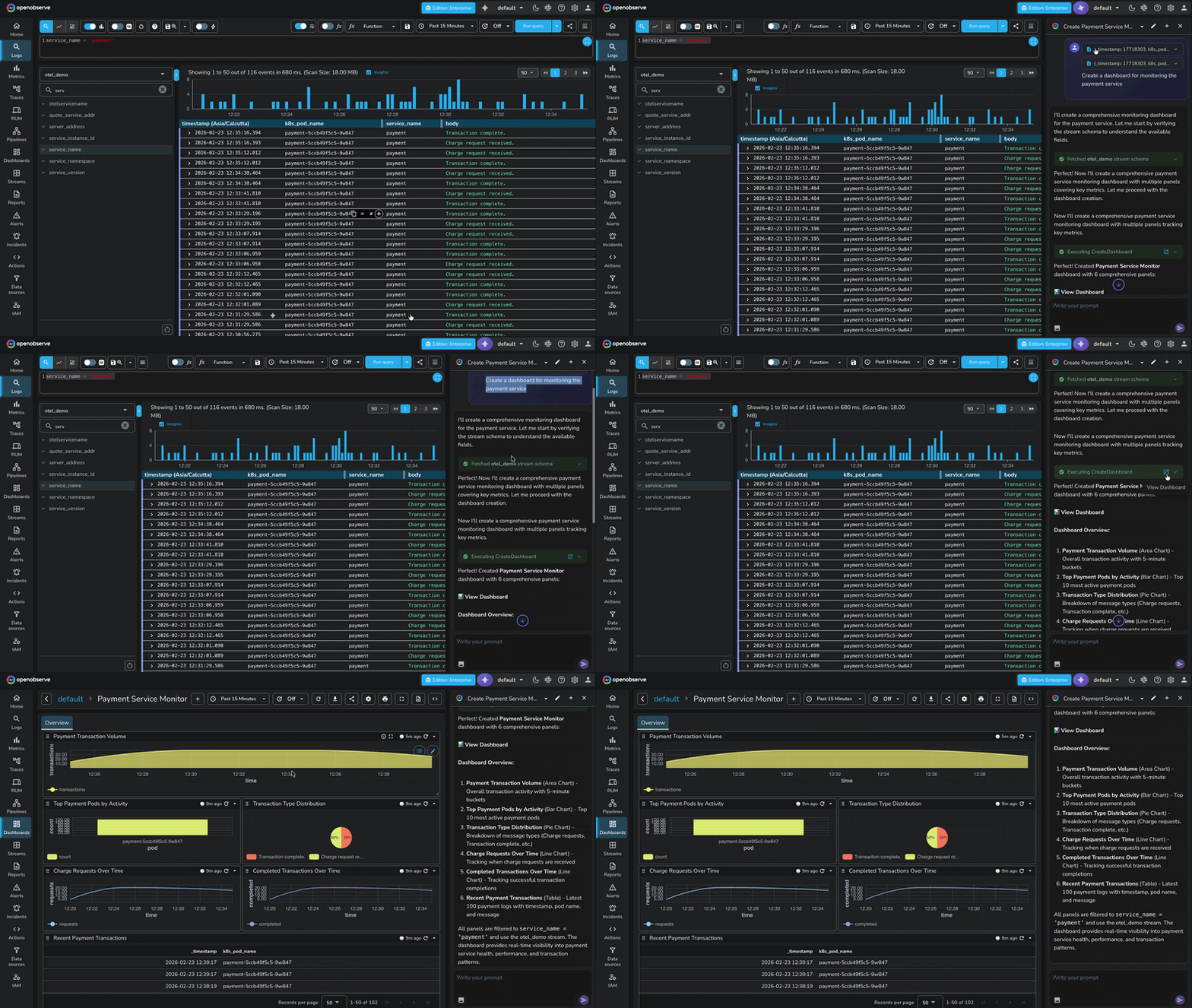
Click the AI Assistant icon in the sidebar
-
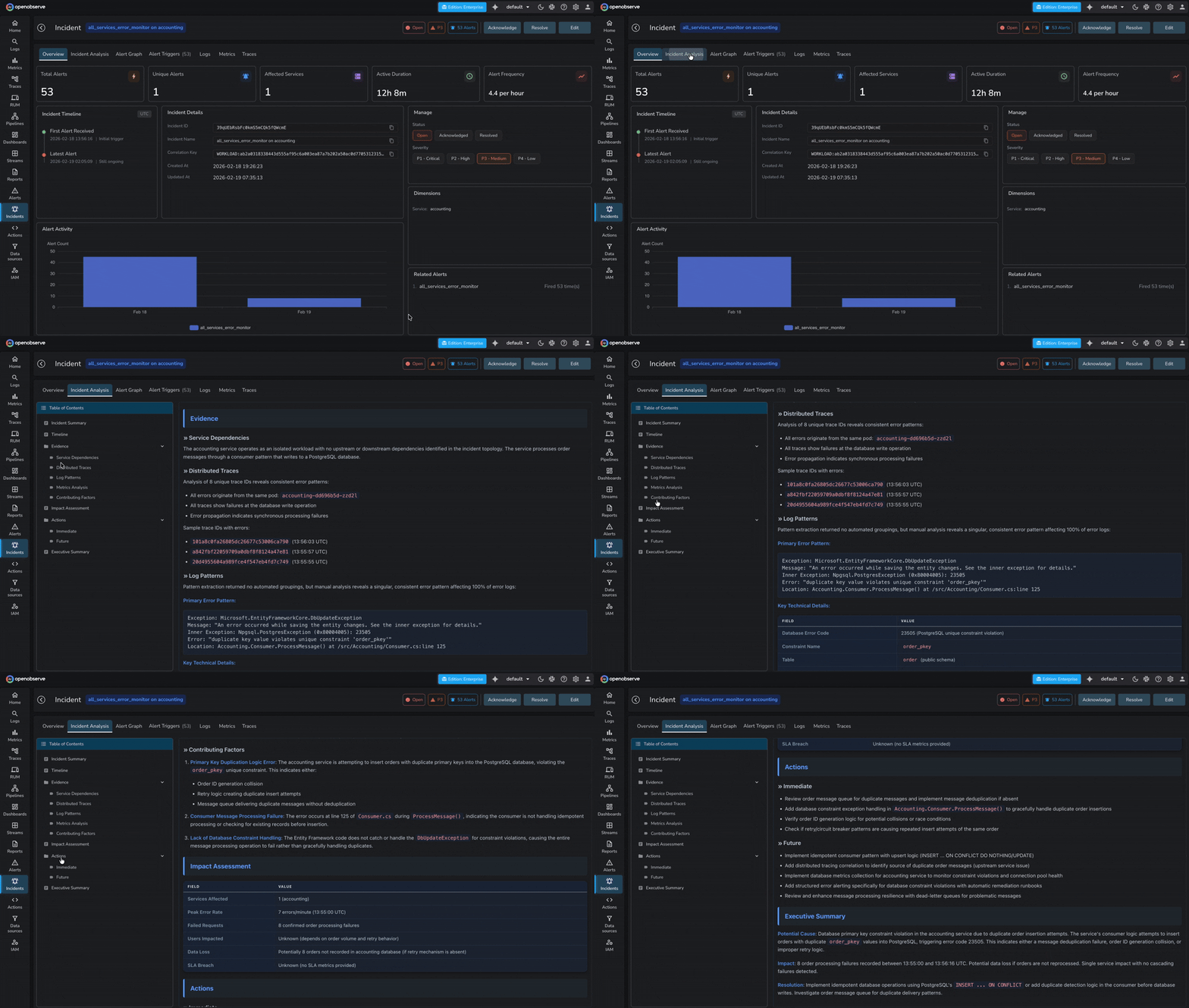
Navigate to Incidents page in OpenObserve side-menu
Example Queries
Log Analysis:
Show me all error logs from the payment service in the last hour
Find authentication failures grouped by IP address
Metrics:
What's causing high CPU usage on the API pods?
Show me latency trends for the checkout endpoint
Resource Creation:
Create a dashboard for monitoring the payment service
Set up an alert for when error rate exceeds 5%
Troubleshooting:
Analyze the root cause of the recent outage
Why is the database connection pool exhausted?
Troubleshooting
Common issues and fixes
-
SRE Agent Pod Not Starting
Check pod status:
kubectl get pods -n openobserve | grep sreagent
kubectl logs -n openobserve deployment/openobserve-sreagent --tail=100
Common causes:
- Invalid API key
- Incorrect AI provider name
- Network connectivity issues
Verify configuration:
# Check API key exists kubectl get secret -n openobserve openobserve-auth -o jsonpath='{.data.O2_AI_API_KEY}' | base64 -d # Check environment variables kubectl exec -n openobserve deployment/openobserve-sreagent -- env | grep O2_ -
AI Assistant Not Responding
Check connectivity:
# Health check
kubectl exec -n openobserve deployment/openobserve-router -- \
  curl -s http://openobserve-sreagent:8000/health

# Check logs
kubectl logs -n openobserve deployment/openobserve-sreagent --tail=50
Common causes:
O2_AI_ENABLEDnot set to"true"- Network policy blocking communication
- AI provider API rate limiting
- Service misconfiguration
-
MCP Tool Execution Failures
Verify MCP endpoint:
# Check O2_TOOL_API_URL
kubectl exec -n openobserve deployment/openobserve-sreagent -- env | grep O2_TOOL_API_URL

# Test connectivity
kubectl exec -n openobserve deployment/openobserve-sreagent -- \
  curl -s http://openobserve-router:5080/api/default/mcp
Common causes:
- Incorrect
O2_TOOL_API_URLformat - Wrong organization name in URL
- Missing MCP credentials
- Service not reachable
Correct URL format:
http://<service-name>.<namespace>.svc.cluster.local:<port>/api/<org-name>/mcp - Incorrect
-
AI Gateway Issues
Check gateway:
# Verify gateway service
kubectl get svc -n <gateway-namespace> | grep ai-gateway

# Test connectivity
kubectl exec -n openobserve deployment/openobserve-sreagent -- \
  curl -s http://ai-gateway:80
Common causes:
- Gateway not deployed
- Conflicting configuration (both
O2_AI_PROVIDERandO2_AI_GATEWAY_ENABLEDset) - Wrong gateway URL or port
Fix:
- With gateway: Remove
O2_AI_PROVIDER, setO2_AI_GATEWAY_ENABLED="true" - Without gateway: Remove all
O2_AI_GATEWAY_*variables, setO2_AI_PROVIDER
-
Incident Management Not Working
Check configuration:
kubectl get configmap -n openobserve openobserve-config -o yaml | grep O2_INCIDENTSRequired settings (in OpenObserve, not SRE Agent):
O2_AI_ENABLED: "true"
O2_INCIDENTS_ENABLED: "true"
O2_INCIDENTS_RCA_ENABLED: "true"
Best Practices
- API Key Security: Store in Kubernetes Secrets; use secret managers (Vault, AWS Secrets Manager) for production; rotate every 90 days
- MCP Validation: Enable in production (
O2_MCP_VALIDATION_ENABLED: "true"); use MCP authentication for multi-tenant setups - Network Security: Apply network policies to restrict traffic; enable TLS for service communication
- High Availability: Deploy with 2+ replicas; enable HPA for auto-scaling in production
- Logging: Use
INFOlevel for production,DEBUGonly when troubleshooting - Cost Optimization: Use AI Gateway with caching to reduce API calls; choose cost-effective models for simple queries
- Updates: Keep SRE Agent image updated; test in non-production environments first
Support diagnostics
# Check pod and logs
kubectl get pods -n openobserve | grep sreagent
kubectl logs -n openobserve deployment/openobserve-sreagent --tail=100

# Verify configuration (redact sensitive data)
kubectl get configmap -n openobserve openobserve-config -o yaml | grep O2_
Next steps
- Model Context Protocol (MCP): connect IDEs and agents to OpenObserve through the SRE Agent.
- AI Integration env vars: full reference for AI-related settings.
- Incidents and RCA env vars: tune incident detection and root cause analysis.
Need some help?
- Join our Community Slack
- Or Contact support
Last updated on
Terraform
Manage OpenObserve alerts, SLOs, streams, dashboards, users as code with the official Terraform provider, and deploy the platform with the Kubernetes module.
Enterprise Features
Overview of OpenObserve Enterprise Edition features — Security & Access Control, Performance & Scalability, AI & Intelligence, Data Processing & Integration.