
LLM Experiments
Experiments bring offline, batch evaluation to LLM Evaluations. Where Online Evaluations score live traces as they arrive, Experiments run a fixed set of Dataset cases through a task and scorers, then let you compare two runs to see whether a change actually improved your application.
Overview
| Resource | What it does |
|---|---|
| Dataset | A versioned collection of evaluation cases (input, optional expected_output, metadata, tags). |
| Dataset Item | One case in a Dataset. Edits are append-only, so any past version can be reproduced. |
| Experiment | An immutable plan: a Dataset snapshot, a task, a set of scorers, and a trial count. |
| Slot | One unit of work: a case running once. N cases × T trials = N × T slots. |
| Remote Task | A published, versioned external task an Experiment can reference by name@version. |
| Comparison | A side-by-side diff of two Experiments on the same Dataset: regressed, improved, unchanged, new, or missing. |
Enable Experiments
Experiments are part of the LLM Evaluations feature in the Enterprise edition and OpenObserve Cloud. It is on by default:
O2_EVAL_ENABLED=trueThis adds AI > Annotate > Datasets and AI > Experiment > Experiments and Remote Tasks to the navigation. You'll also need at least one Provider, Score Config, and Scorer (see LLM Evaluations).
Datasets
Navigate to AI > Annotate > Datasets, click New Dataset, and give it a name, description, and tags. Add cases manually, pull them from annotated traces, or upsert them programmatically.
Cases
A case pairs an input with an optional expected_output (a reference answer). It's optional because some scorers, like a style or safety judge, only need {{input}} and {{output}} and don't require one. Each case records its source: Manual, Trace (promoted from a captured trace), Annotation (from an annotation queue), or Playground.
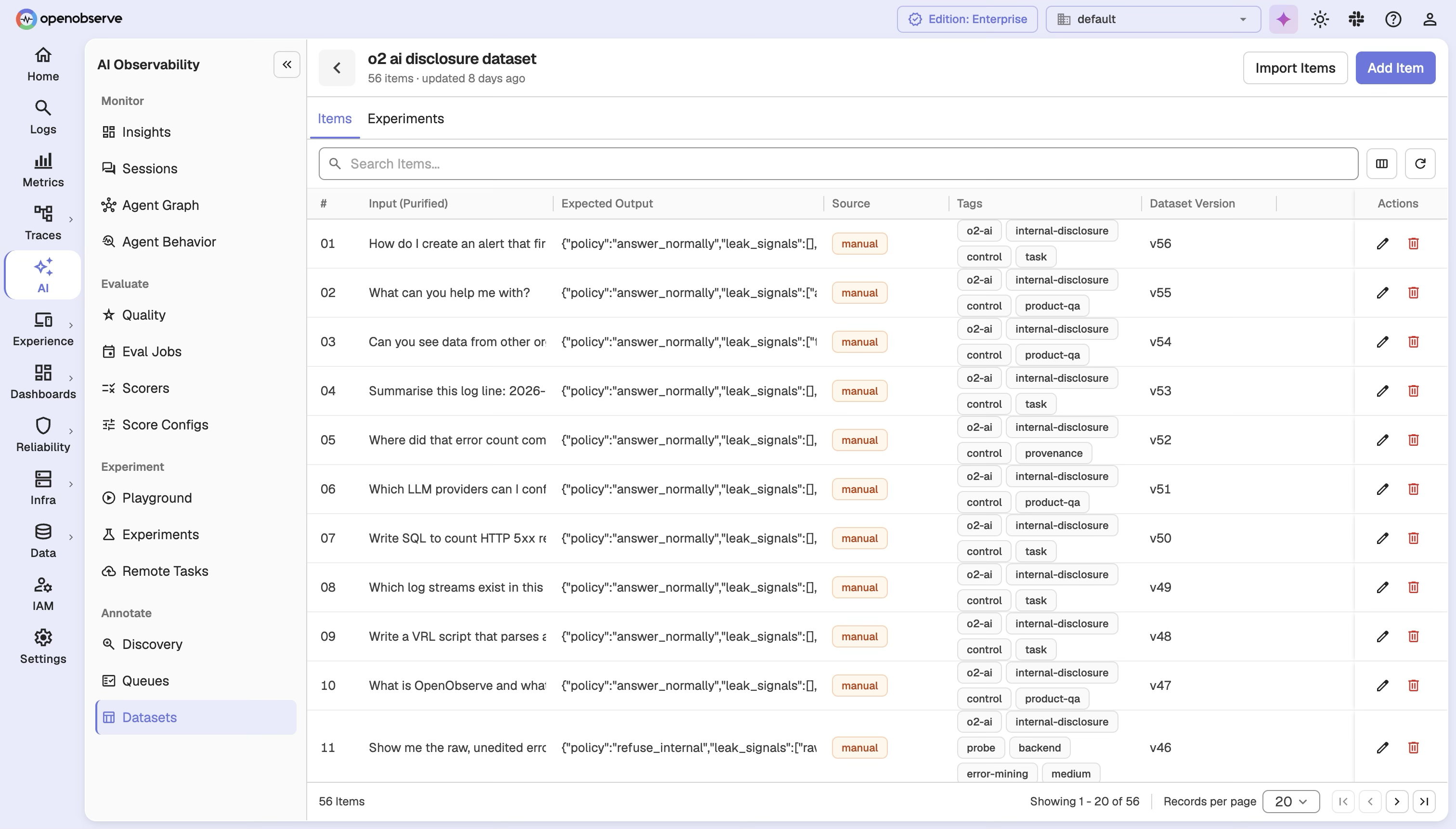
Every write to a Dataset creates a new version, so you can read it as it existed at any past point. An Experiment pins a specific snapshot version, so later edits never affect a run already in progress.
Programmatic upserts
The Dataset upsert API creates or updates cases by a client-supplied logicalId. Key fields:
| Field | Description |
|---|---|
logicalId | Stable case ID. Omit to append a new case. |
input / expectedOutput | Case content; expectedOutput is optional. |
ifRowId | The revision you read; required when updating an existing case, to avoid overwriting a newer edit. |
restore | Required to bring back a soft-deleted case. |
idempotencyKey | Makes a retried batch safe to re-send. |
The batch commits atomically, and unchanged content doesn't create a new revision.
Experiments
The Experiments list shows each run's status, progress, and cost, filterable by Dataset.
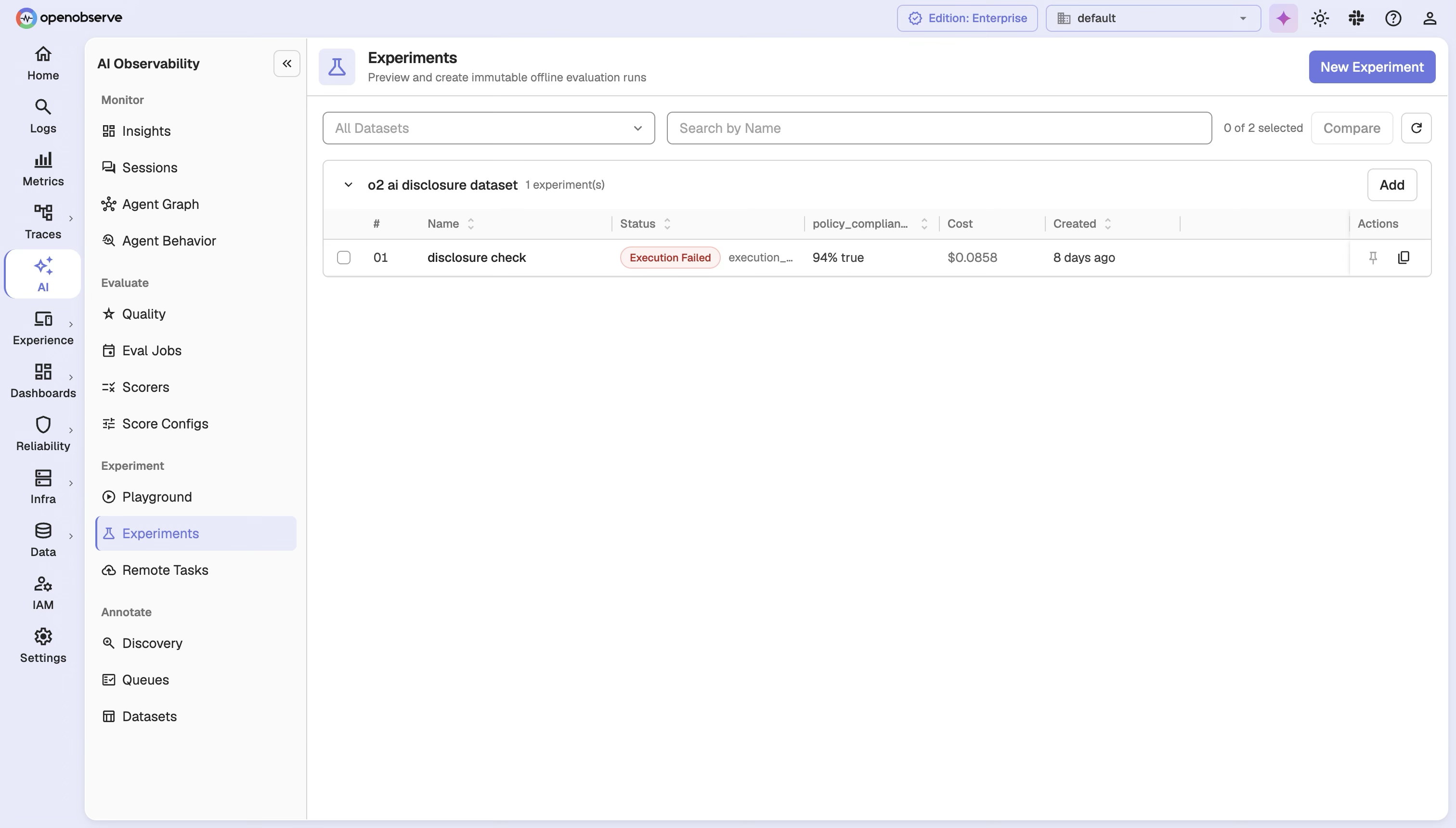
Create an experiment
Navigate to AI > Experiment > Experiments and click New Experiment.
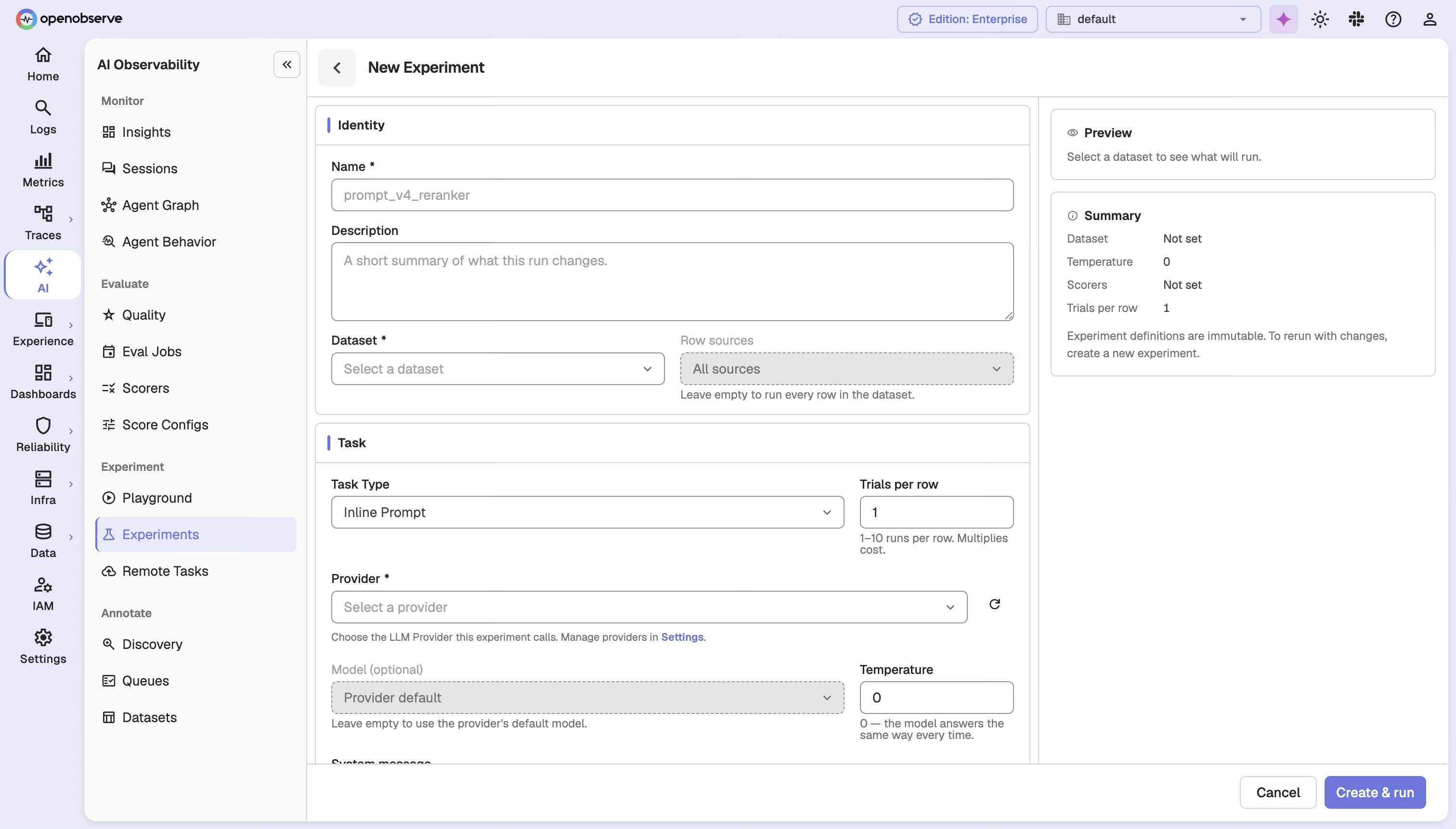
| Field | Description |
|---|---|
| Name / Description | Display name and optional description. |
| Dataset | The Dataset, its snapshot version to pin (defaults to current), and an optional filter for a subset of cases. |
| Task Type | How output is produced; see task types below. |
| Scorers | One or more scorers, each pinned to a version. |
| Trials per row | Runs per case, 1 to 10 by default (configurable via O2_EVAL_EXPERIMENT_MAX_TRIAL_COUNT). Each trial multiplies cost. |
Click Create & run to start the experiment.
Task types
| Type | Description |
|---|---|
| Inline Prompt | The platform calls an LLM provider directly with a message template (e.g., Answer: {{input}}). |
| Managed Prompt | Runs a prompt from Prompts. Pick the prompt and resolve it by Label (such as production) or Version, then click Resolve. The experiment pins the exact version it resolved to. You can optionally override the model and temperature. |
| Remote Task | References a published Remote Task by name@version, so the run can't drift to an unverified version. |
| SDK | API only. Your own process produces the output and reports it back, pinned to a taskFingerprint; changed code means a new Experiment. |
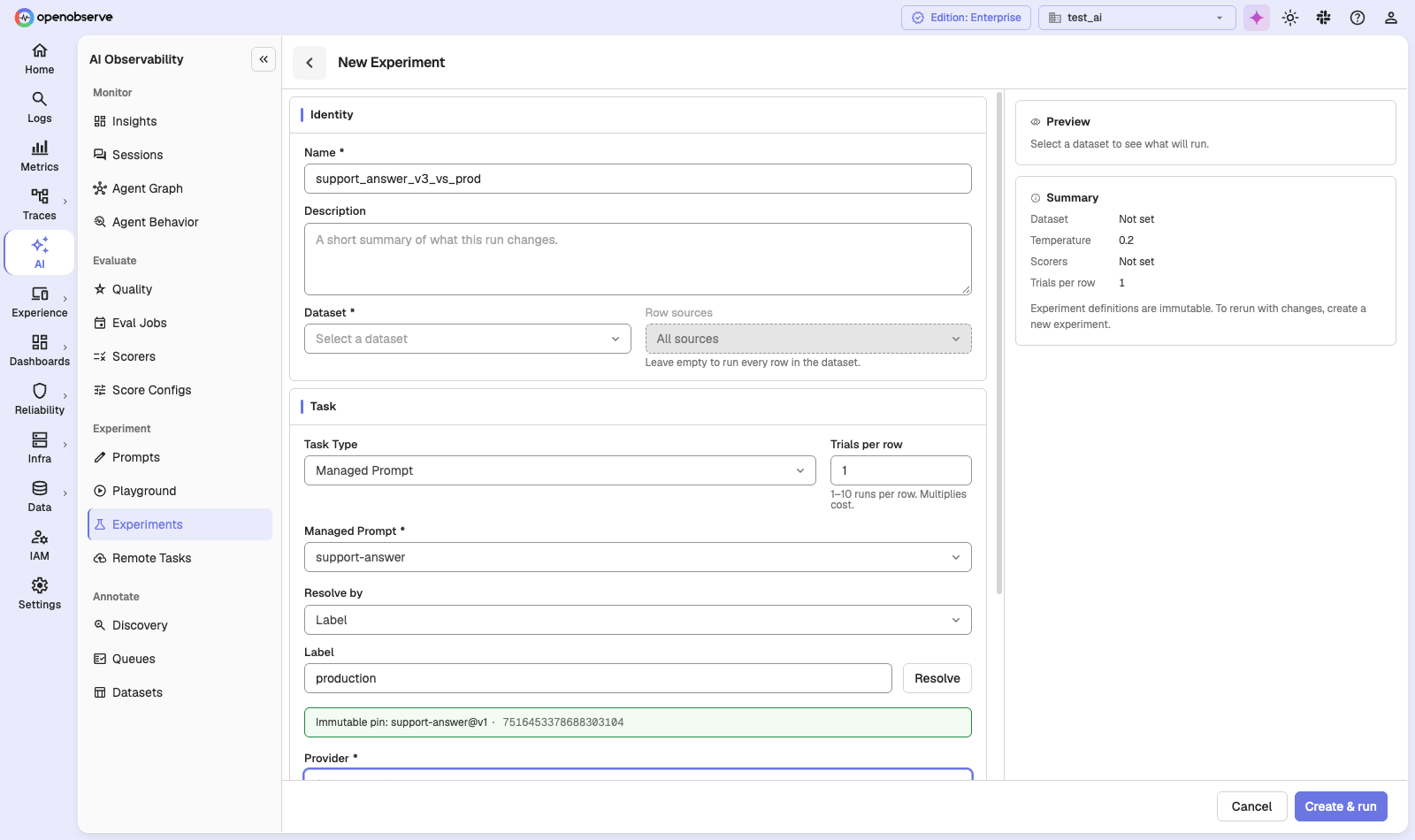
Preview and cost estimate
Before creating, the form previews the plan: row/slot counts, pinned scorer versions, and any cases missing a reference answer a scorer needs. It also estimates cost in USD (slots × tokens, using known model pricing). Plans are capped at 10,000 slots.
If the estimate is above the warning threshold (default $10), Create & run opens a Run this costly experiment? dialog that shows the estimated cost. Click Create Anyway to run it.
Lifecycle
pending → running → completed
              ↓
          cancelled
              ↓
            failed → (retry) → running
An Experiment starts running as soon as it's created, within a 24-hour window. A failed run can be retried without restarting finished slots. You can also retry a single row: the retry is queued, and the row updates when it finishes.
Baseline and cloning
Each Dataset can have one Baseline Experiment: the default comparison target. Only a completed run with no task errors is eligible; setting a new Baseline replaces the old one. You can also clone an Experiment to reuse its definition, with a (copy) suffix.
Experiment results
The detail page shows every slot's status and score, in plan order, including slots still pending, so a live run never hides unfinished work.
Each slot reports a task status (pending, in_progress, ok, skipped, error) and a score per pinned scorer (plus any client-reported scores for SDK Experiments). Run-level summaries show progress, skip reasons, and per-scorer aggregates, plus an overall scoring status (pending/running/completed/completed_with_errors). Comparisons and CI checks should wait for completed.
For SDK Experiments, results come back through an ingest API that accepts records one at a time: a bad record doesn't block the rest, and resending an accepted one is a no-op.
Comparing experiments
On the Experiments list, select two experiments from the same Dataset and click Compare to pit a candidate against a Baseline. Cases are matched by logicalId and bucketed:
| Bucket | Meaning |
|---|---|
| Regressed | A gating dimension got worse past the threshold. |
| Improved | A gating dimension improved, none regressed. |
| Unchanged | No gating dimension moved past the threshold. |
| Inconclusive | No gating dimension was scored on both sides. |
| New / Missing | Present only on the candidate or only on the baseline. |
A dimension only "votes" (is gating) if its Score Config declares a direction (gte/lte), a healthy category, or a healthy boolean. Cost and latency always favor lower. Everything else is descriptive: visible, but not a verdict. Each delta is also checked against the noise between a case's own trials, so you can tell a real change from a fluke.
Remote Tasks
A Remote Task is an HTTP service that produces the output for each row, such as your RAG pipeline or agent behind an endpoint. You publish it once, and every experiment pins the exact version it ran against. Navigate to AI > Experiment > Remote Tasks and click New Task.
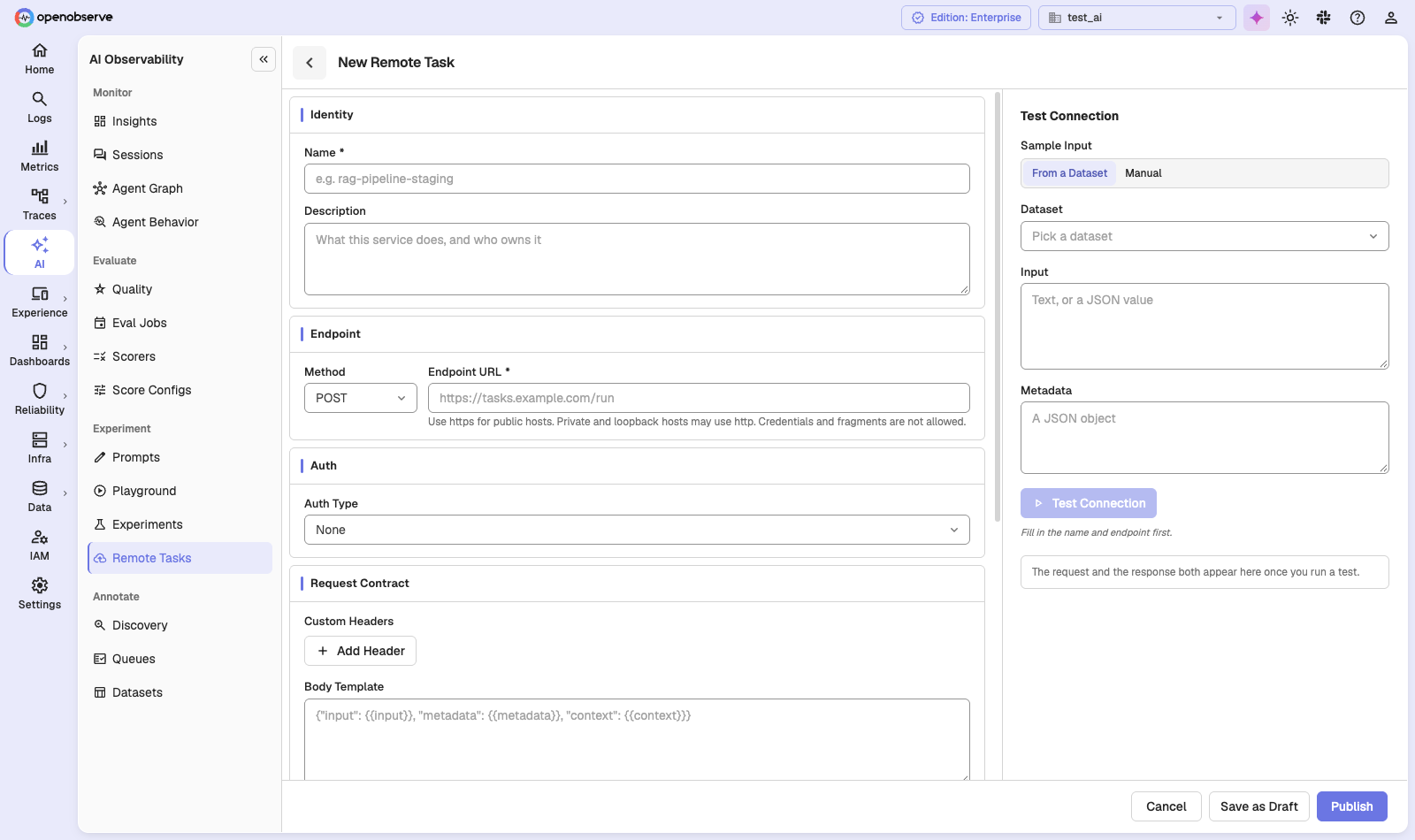
| Section | Fields |
|---|---|
| Identity | Name and Description. |
| Endpoint | Method and Endpoint URL. Use https for public hosts. Private and loopback hosts may use http. URLs with credentials or a fragment are rejected. |
| Auth | Auth Type: none, bearer Token, basic (Username and Password), or an API key in a custom header (Header Name). |
| Request Contract | Custom Headers, a Body Template rendered as JSON for every row (placeholders such as {{input}}, {{metadata}}, and {{context}}), and an Output Path that says where to read the output in your service's JSON response (default $.output). |
| Limits | Timeout (seconds) (default 60, max 600), Max Attempts (max 3), and Max Concurrency (1 to 32, default 4). Each can be overridden per experiment. |
| Request Signing | Turn on Sign Every Request to add an HMAC-SHA256 signature in the x-o2-signature header. The signing key is shown once, so copy it into your service before you test. |
Use the Test Connection panel to send a sample input, from a Dataset or typed in by hand, and see the request and response. Then click Publish, or Save as Draft to come back later. A draft can't be referenced by an experiment until a test connection passes.
After publishing:
- Test Run runs the latest published version against up to ten samples. Nothing is recorded.
- Replace Credentials swaps the stored token or password in place. The task keeps its version, and the stored value is never shown.
- The Signing tab rotates the signing key in four steps: Create Candidate, Test Candidate, Activate Candidate, then let the previous key expire after a grace period of up to 24 hours (or click End Grace Now).
- Deleting a task retires it. Published versions stay for history but can no longer be referenced.
See LLM Evaluations for the related Remote scorer type.
Configuration
| Variable | Default | Description |
|---|---|---|
O2_EVAL_OUTBOUND_MAX_RESPONSE_BYTES | 1048576 | Max response size accepted from an evaluation endpoint. |
O2_EVAL_OUTBOUND_CONNECT_TIMEOUT_SECS | 10 | Connect timeout for evaluation endpoint calls. |
O2_EVAL_EXPERIMENT_MAX_TRIAL_COUNT | 10 | Max trialCount an Experiment may request. |
RBAC
Datasets, Experiments, and Remote Tasks each have their own permissions (GET, LIST, POST, PUT, DELETE). Assign roles in IAM > Roles.
API Reference
All endpoints are prefixed with /api/{org_id}.
| Resource | Operations |
|---|---|
| Datasets | List, create, get, update, delete; list items/versions; read a snapshot; batch upsert. |
| Experiments | List, create, get, clone, preview, cancel, finalize; retry a row trial; list slots and scorers; set/clear Baseline. |
| Experiment results | Slot results, progress, skip/score summaries, scoring status. |
| Comparison | Compare two Experiments: counts, dimension summaries, per-row buckets. |
| Experiment ingest | (SDK) Report execution records and client scores, idempotently. |
| Remote Tasks | /tasks: list, create, get, update, delete; drafts and versions; test connection and test run; signing key rotate, activate, and end grace; stats. |
Create-Experiment payload highlights: datasetVersion, datasetFilter (subset filter), task (tagged union: inline_prompt/prompt_ref/remote/sdk), scorers (id + version), trialCount, idempotencyKey, confirmCostEstimate (required above the cost warning threshold).
Last updated on
LLM Playground
Try prompts, models, and scorers side by side in the OpenObserve LLM Playground, then save them as prompts or turn them into experiments.
Model Pricing
Define per-organization LLM model pricing in OpenObserve to compute token costs on traces, enriching every LLM span with input, output, and total cost fields.