Datadog Pricing: The Hidden Costs Every Engineering Team Should Know

Simran Kumari
March 10, 2026
12 min read
Don’t forget to share!



Try OpenObserve Cloud today for more efficient and performant observability.
Datadog is one of the most widely adopted observability platforms on the market. Its dashboards are polished, its integrations are broad, and its feature set spans infrastructure monitoring, APM, security, and real user monitoring. For many teams, it was the de-facto choice for years.
But one thing comes up again and again in engineering communities, Slack channels, and Reddit threads: the bill.
Teams report receiving invoices that were 3x, 5x, even 10x what they budgeted, not because they misunderstood the product, but because Datadog's pricing model has layers of complexity that only reveal themselves at scale or during unexpected traffic spikes.
At OpenObserve, we've spoken with hundreds of engineering teams who came to us after a Datadog billing shock. This article breaks down how Datadog's pricing actually works, where the pain points are, and what a more transparent model looks like.
This article covers: the main pricing caveats in Datadog, a simplified breakdown of core product costs, and how OpenObserve approaches pricing differently.
Most SaaS tools charge you for one thing - seats, API calls, or storage. Datadog charges for many things simultaneously, each with its own pricing metric, allotment structure, and overage calculation. You're not buying one product; you're buying a bundle of sub-products that each generate their own line items.
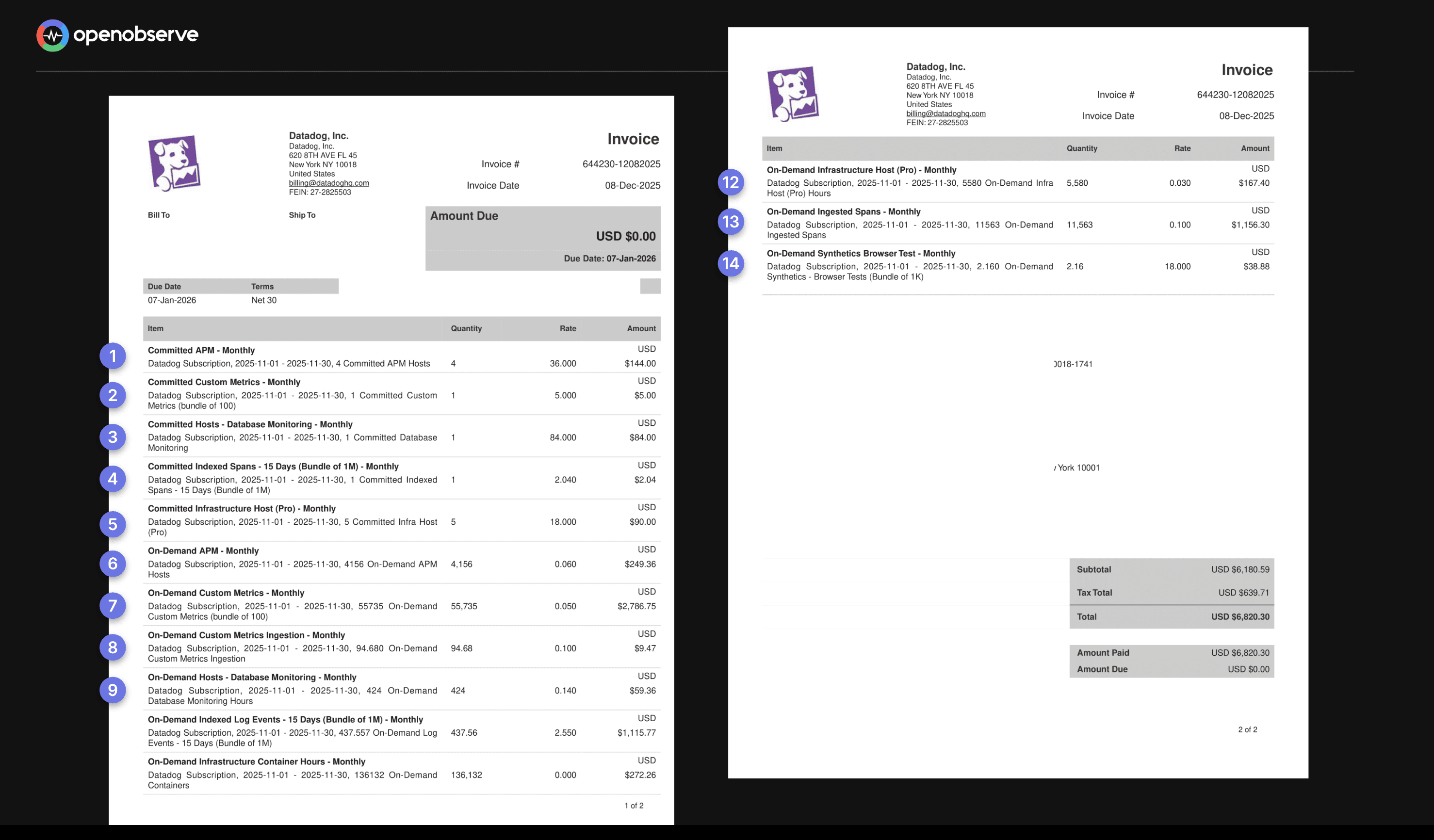
This creates a situation where forecasting your monthly bill requires understanding a dozen interrelated variables. A configuration change, a new service deployment, or a temporary traffic spike can silently trigger significant cost increases that only appear on next month's invoice.
If you’re trying to estimate or reduce these costs, try our pricing calculator to see how much you could save by switching to OpenObserve.
Datadog prices its core Infrastructure Monitoring and APM products on a per-host basis. In a world of containerized microservices and auto-scaling Kubernetes clusters, this model creates a structural mismatch between how you run software and how you get billed for monitoring it.
Infrastructure monitoring starts at $15 per host/month. APM with continuous profiler starts at $31 per host/month. The definition of a "host" is deliberately broad: a VM, a Kubernetes node, an Azure App Service Plan, or an AWS Fargate task can all count.
Billing isn't based on your average host count or even your peak. Datadog uses a high-water mark model: it measures your host count every hour, discards the top 1% of hours, and bills you for the entire month based on the next highest hour.
Example: Your application normally runs on 50 hosts. For a 5-day product launch, you scale to 200 hosts. Datadog ignores roughly 7 hours of your absolute peak but for the remainder of that 5-day stretch, your count was consistently 200.
You pay for your peak period for the entire month regardless of the fact that your infrastructure returned to normal for the other 25 days.
This issue is amplified in containerized environments. The intended setup is one Datadog Agent per Kubernetes node. But if the agent is mistakenly deployed inside every pod, each pod is billed as a separate host. A misconfiguration on a 50-node cluster running hundreds of pods can multiply your bill by 10x or more overnight.
This is frequently cited as the most unpredictable part of a Datadog bill. Datadog charges a premium for "custom metrics" any metric that doesn't come from a native Datadog integration. That includes virtually every application-level metric you create yourself, and critically, all metrics sent via OpenTelemetry are billed as custom metrics.
On Datadog's Pro plan, you receive 100 custom metrics per host as part of your allotment. Beyond that, overages are billed at $5.00 per 100 custom metrics/month, based on your monthly average.
Note: These metrics are pooled across your infrastructure. If you have 10 hosts on the Pro plan, you have a "bucket" of 1,000 custom metrics. You aren't penalized if one host sends 500 and the others send none, as long as the total remains under 1,000.
At scale, custom metrics billing can constitute up to 52% of your total Datadog invoice.
The cost is driven by cardinality the number of unique combinations of a metric name and its associated tags. Adding a single tag with many unique values can cause your metric count to multiply dramatically.
Example: You track API latency with one metric: api.request.latency. You have 10 endpoints, 3 HTTP status codes, and 3 customer tiers. That's already 90 unique custom metrics from a single metric name. Add a customer_id tag with 1,000 unique values and you instantly have 90,000 custom metrics generating roughly $4,500/month in overages from one metric.
Datadog's answer to cardinality costs is a feature called Metrics Without Limits™, which lets you control which tag combinations are indexed. But it adds another billing layer:
You pay to send the data, and pay again to make it queryable two separate charges for the same observability signal.
Datadog's log management follows a two-part tariff. You pay first to ingest your logs, then again to make them searchable.
Example: Your application generates 200 GB of logs per month (~100 million events).
| Cost Component | Amount |
|---|---|
| Ingestion (200 GB × $0.10) | $20 |
| Indexing (100M events × $1.70) | $170 |
| Total | $190/month |
To cut costs, you might index only 20% of your logs. But that means 80% of your data is invisible during an incident precisely when you need full visibility most.
This pricing structure creates a perverse incentive: the teams that most need comprehensive logging are punished most heavily for it. Budget constraints lead to strategic under-logging, which leads to longer incident resolution times.
If you use Cloud SIEM (Security), Datadog charges a third time. They charge an additional fee (approx. $0.10 to $0.20 per million events) to "analyze" the logs you’ve already paid to ingest and index. This is often called the "Security Tax."
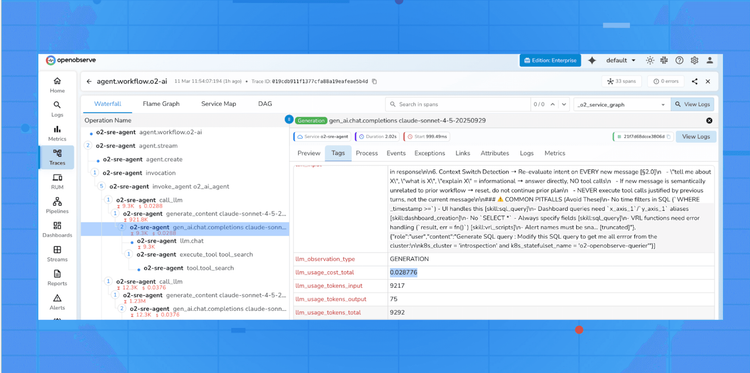
As teams move AI-powered applications into production using OpenTelemetry (OTel), Datadog’s LLM Observability introduces a specialized billing layer that operates differently from standard APM tracing.
The "Auto-Mapping" Trigger
Datadog now natively supports OpenTelemetry GenAI Semantic Conventions. This means if your application emits spans with standard OTel tags (like gen_ai.system, gen_ai.request.model, or gen_ai.usage.input_tokens), Datadog's ingestion pipeline is designed to automatically recognize and route this data into the LLM Observability product. While this provides "instant" dashboards, it also triggers a volume-based fee that is separate from your existing APM contract.
The Cost Breakdown Unlike the flat per-host fee of APM, LLM Observability is billed on a high-granularity usage model:
The Configuration Trap The "opt-out" is not a simple toggle in the Datadog UI. Because the billing is triggered by the presence of specific metadata in your OTel spans:
Bottom Line: If you use OTel to monitor an LLM and don't explicitly filter your spans, you are effectively "opted-in" to token-based billing by default.
Prices based on publicly available information for annual billing as of early 2026. Always verify against Datadog's official pricing page.
| Product | Pricing Metric | Starting Price | Key Risk |
|---|---|---|---|
| Infrastructure Monitoring | Per host/month | $15 | High-water mark billing; container misconfiguration multiplies costs |
| APM & Continuous Profiler | Per host/month | $31 | Expensive in microservices; same high-water mark risk |
| Log Management Ingest | Per GB | $0.10/GB | You pay even for logs you never search |
| Log Management Index | Per million events | $1.70/M events | Double-billing to make logs searchable; 15-day default retention |
| Custom Metrics | Per 100 metrics/month (overage) | $5.00/100 | High-cardinality tags cause exponential growth; OTel metrics land here |
| Real User Monitoring (RUM) | Per 1,000 sessions | $1.50 | Scales directly with user traffic; can spike unpredictably |
| Database Monitoring | Per DB host/month | $70 | Expensive at scale; separate from infrastructure billing |
| Synthetic API Tests | Per 10,000 test runs | $5.00 | Frequency and multi-location tests multiply costs |
| Cloud Security Management | Per host/month | $15 | Adds to existing per-host costs |
OpenObserve was built specifically to address the pain points teams experience with platforms like Datadog. The core philosophy is simple: you should be able to instrument your systems comprehensively, without making financial trade-offs about what data to keep.
OpenObserve Cloud pricing is tied to data volume not infrastructure topology. No per-host charges, no custom metric taxes, no tiered indexing structures.
| What You Use | Price |
|---|---|
| Logs, Metrics, Traces, RUM, Session Replay, Error tracking Ingestion | $0.50 per GB |
| Logs, Metrics, Traces, RUM, Session Replay, Error tracking Query | $0.01 per GB queried |
| Pipelines Data Processed | $0.20 per GB |
| Additional Retention (beyond 15 days) | $0.10 per 30 days |
| AI Assistant , AI SRE Agent | $0 during preview |
No per-host multipliers. No separate indexing tier for log search. No custom metric allotments or overage fees. No automatic premium activation for LLM spans.
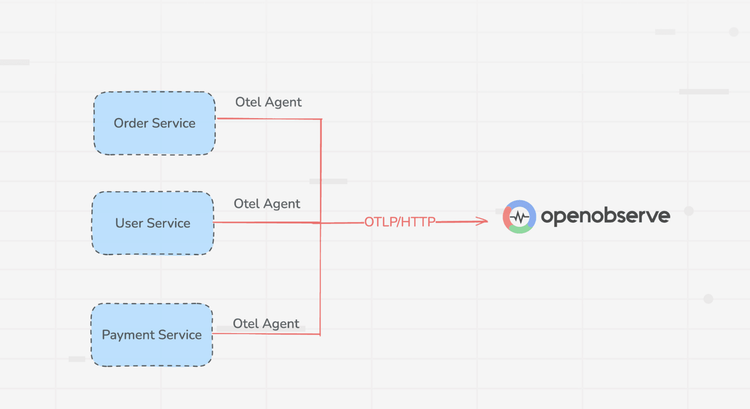
OpenObserve is designed from the ground up to work natively with OpenTelemetry. Logs, metrics, and traces sent via OTel are treated as standard data not as premium "custom metrics." There is no financial penalty for adopting open standards.
Teams using OTel on Datadog often face unexpected custom metric charges because every OTel metric bypasses Datadog's native integrations and lands in the custom metrics bucket. On OpenObserve, OTel is the default path, not an expensive edge case.
OpenObserve uses Apache Parquet columnar storage with approximately 40x compression, backed by S3-compatible object storage. This architecture delivers dramatically lower storage costs compared to index-heavy alternatives like Elasticsearch, and enables petabyte-scale observability without requiring specialized infrastructure.
The stateless architecture also means very low RPO/RTO: nodes can be rapidly restarted, and data durability is backed by S3's 11-nines (99.999999999%) reliability.
LLM traces and spans are treated as standard trace data in OpenObserve. There is no separate product tier, no automatic activation charge, and no per-day premium. Teams building AI-powered applications are billed the same way as any other workload: by data volume ingested.
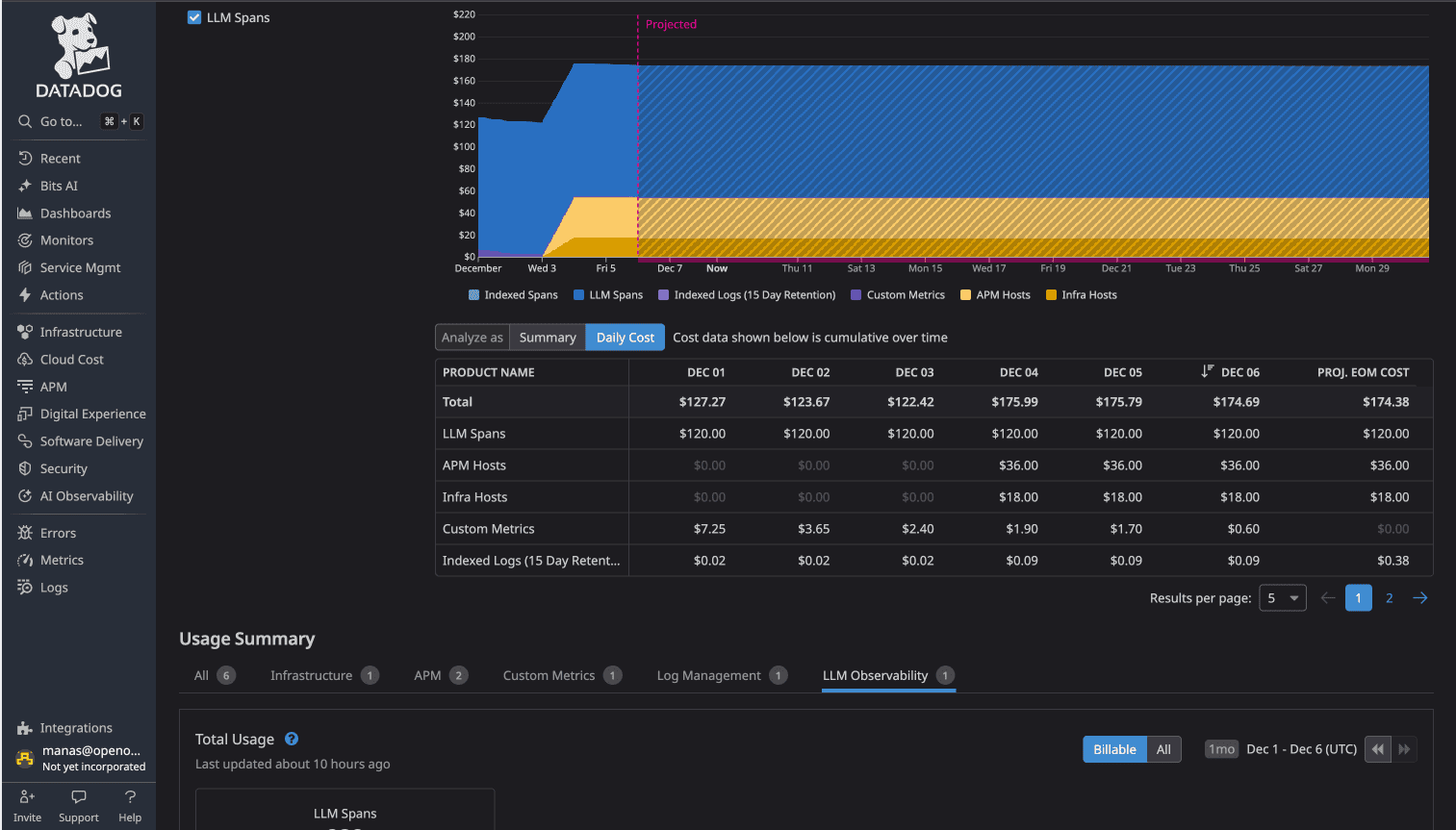
Real-world comparison: Using the OpenTelemetry Demo application (16 microservices, Kafka, PostgreSQL, OpenAI instrumentation), a side-by-side test showed Datadog costing approximately $174/day vs OpenObserve at approximately $3/day for identical telemetry data a 58x cost difference. The gap is driven not by feature differences but by architectural choices: per-host pricing, custom metric overages, LLM observability activation, and tiered retention all compound simultaneously on Datadog.
Datadog is a powerful platform with deep integrations and strong brand recognition. For organizations with large budgets, dedicated DevOps teams, and well-understood infrastructure, it can be worth the investment.
But for teams running modern cloud-native architectures with auto-scaling, OpenTelemetry instrumentation, LLM-powered features, and cost sensitivity Datadog's pricing model creates friction at every layer. The per-host model discourages architectural flexibility. The custom metric tax penalizes comprehensive instrumentation. The log indexing structure forces a trade-off between cost and visibility.
Observability should help you understand your systems better, not constrain how you build them. When engineering decisions start being shaped by monitoring costs fewer tags, smaller instance counts, less comprehensive logging the tool has become an obstacle.
OpenObserve is built on the premise that you should be able to instrument everything, retain data as long as you need it, and pay predictably based on the volume of data you actually send not on the topology of your infrastructure or the cardinality of your metric tags.
OpenObserve Cloud includes a 14-day free trial.

Passionate about observability, AI systems, and cloud-native tools. All in on DevOps and improving the developer experience.