DataDog vs OpenObserve Part 6: Real User Monitoring - Session Replay, SQL Analytics, Core Web Vitals

Manas Sharma
February 02, 2026
12 min read
Don’t forget to share!



Try OpenObserve Cloud today for more efficient and performant observability.
Get Started For Free
We tested DataDog and OpenObserve as Real User Monitoring platforms for production web applications. The results show how these platforms differ in query flexibility, correlation capabilities, error analysis, and operational workflows for understanding user behavior and debugging frontend issues.
OpenObserve transforms the fundamental question from "can we afford to monitor this?" to "what do we need to monitor?" The platform provides comprehensive system visibility without cost-driven compromises.
Beyond basic RUM capabilities, query language and data analysis flexibility matter. SQL support for user analytics, correlation with backend telemetry through unified queries, and programmatic data access directly impact how teams debug production issues and optimize user experience.
This hands-on comparison tests capabilities across both platforms: session tracking, performance monitoring, error detection, query flexibility, and full-stack correlation.
This is Part 6 in a series comparing DataDog and OpenObserve for observability (security use cases excluded):
mask, mask-user-input, allow). Feature parity on visual debugging capabilities.Real User Monitoring captures actual user interactions with web applications in production. Unlike synthetic monitoring (simulated tests), RUM tracks real users: page load times, click interactions, JavaScript errors, navigation patterns, and device/browser characteristics.
RUM answers critical questions:
Both DataDog and OpenObserve provide comprehensive RUM capabilities. The comparison focuses on query flexibility, correlation capabilities, and operational workflows.
Both platforms provide Browser SDKs via npm packages (@openobserve/browser-rum) with familiar configuration patterns. Installation and initialization follow standard practices for modern RUM tools, with core configuration options for applicationId, clientToken, service, env, version, and tracking settings (trackResources, trackLongTasks, trackUserInteractions).
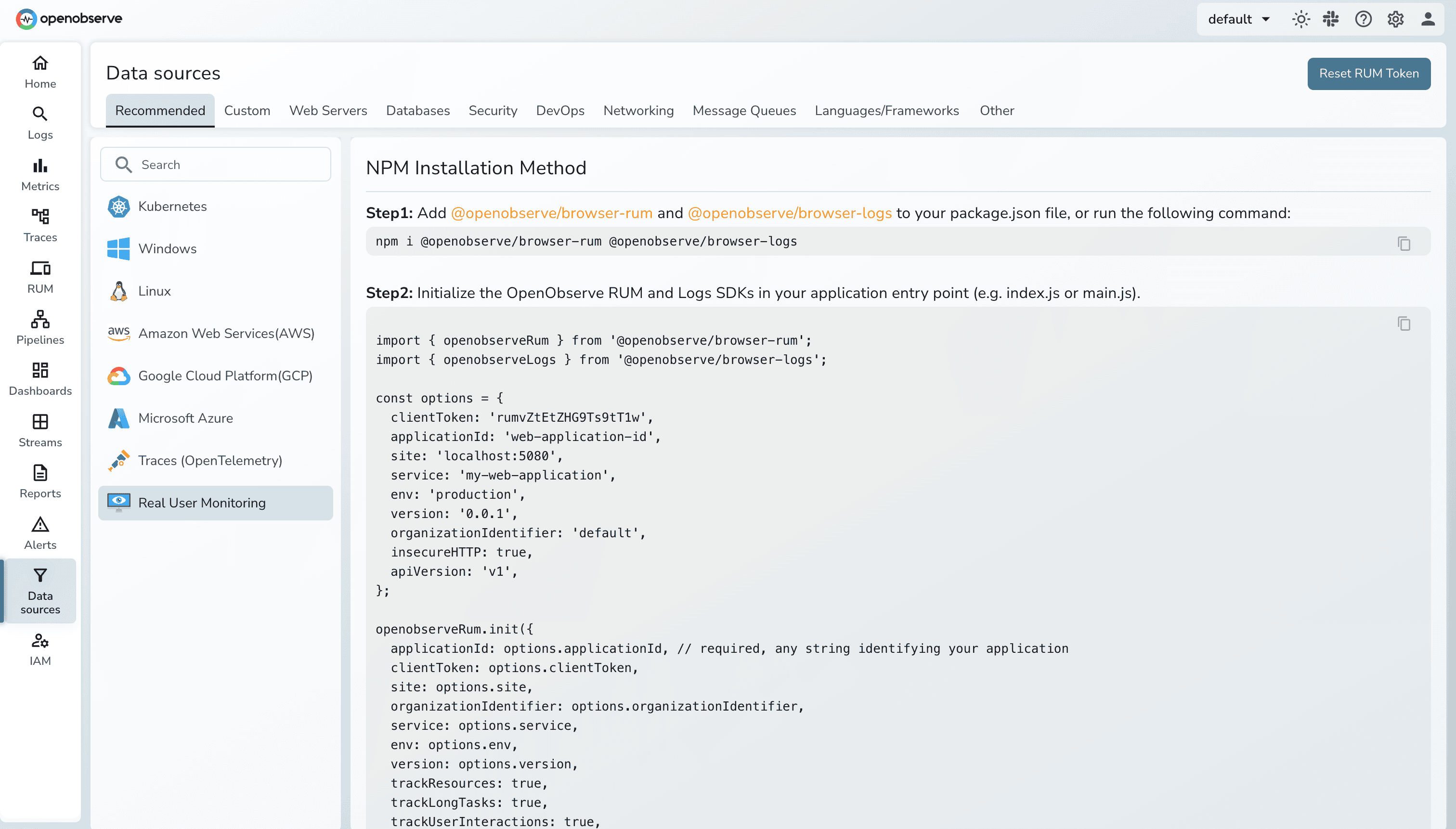
Both support privacy masking levels (mask, mask-user-input, allow), session sampling, and automatic error forwarding to logs. Setup time for both platforms: ~15-30 minutes for initial instrumentation.
Learn more: RUM Setup Guide
Both platforms automatically collect Core Web Vitals: the Google-defined metrics that measure user experience.
Core Web Vitals:
Additional Metrics:
DataDog RUM automatically collects Core Web Vitals for every user session, surfacing key performance indicators in an intuitive dashboard. The Web App Performance dashboard shows p75 values for each Core Web Vital as it relates to Google's defined thresholds.
Element-level tracking: DataDog reports the CSS selector of elements contributing to poor metrics. For LCP, see which image or text block caused slow rendering. For CLS, identify which element shifted unexpectedly.
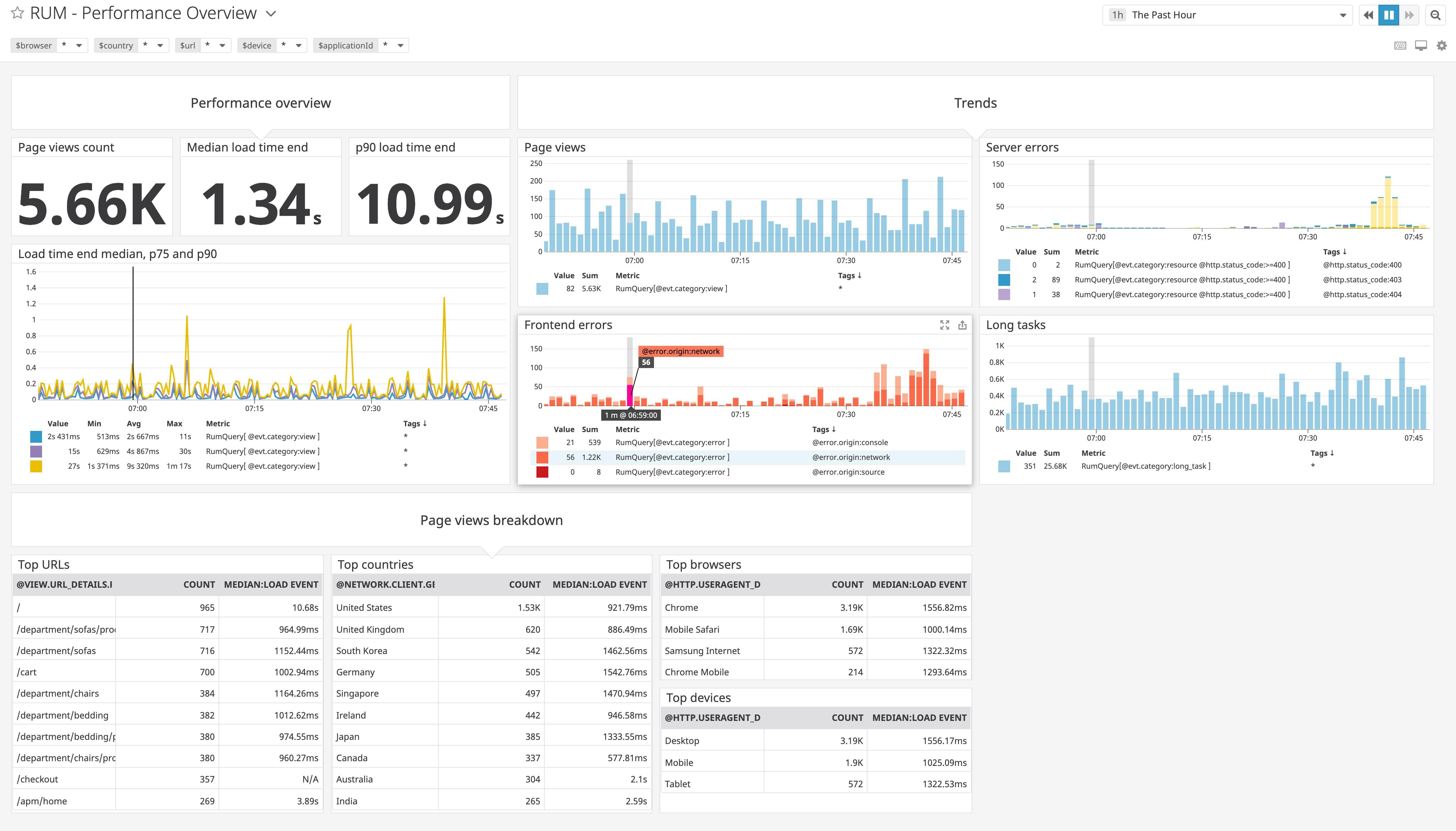
Optimization page: DataDog RUM includes the Optimization page, a tool that helps teams pinpoint the root cause of browser performance issues using real traffic data. The Optimization workflow provides deep insights about performance trends, resource loading for URL groups, and recurring errors.
Out-of-the-box dashboards: Pre-built performance dashboards cover standard use cases: page load analysis, resource timing, user experience trends.
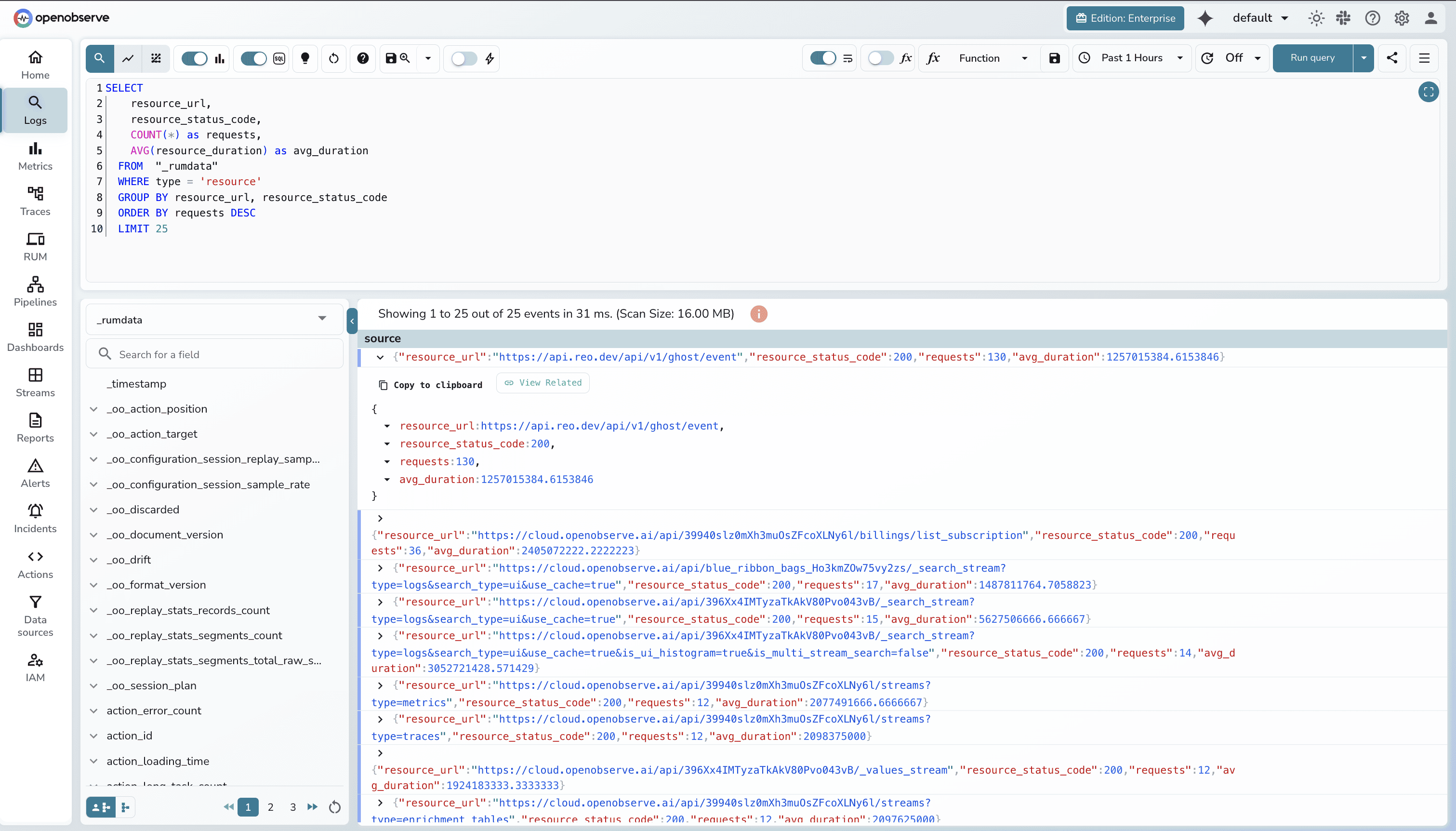
OpenObserve RUM collects the same Core Web Vitals metrics, storing them as structured data queryable via SQL.
SQL-based analysis:
SELECT
    resource_url,
    resource_status_code,
    COUNT(*) as requests,
    AVG(resource_duration) as avg_duration
  FROM  "_rumdata"
  WHERE type = 'resource'
  GROUP BY resource_url, resource_status_code
  ORDER BY requests DESC
  LIMIT 25
Custom analysis capabilities:
Custom dashboards: Build performance dashboards using SQL queries. Visualize Web Vitals by browser, region, device type, or custom user segments.
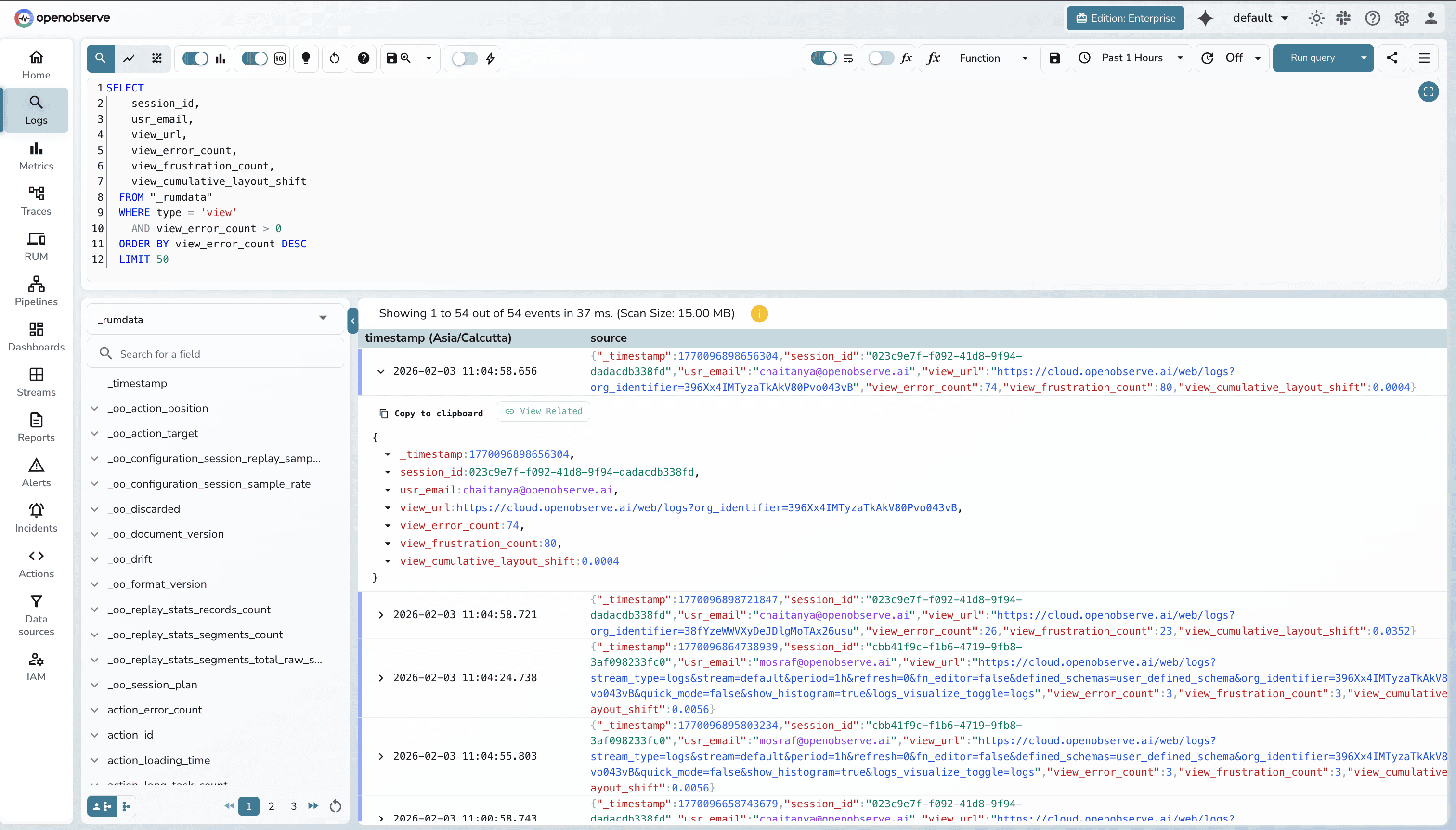
Both platforms collect Core Web Vitals effectively. DataDog provides out-of-the-box optimization dashboards and UI-driven analysis. OpenObserve provides SQL query flexibility for custom analysis and programmatic export.
Available in OpenObserve Cloud.
Session replay records user interactions, replaying them as video-like recordings. Debug issues by watching exactly what users experienced: clicks, scrolls, page transitions, errors.
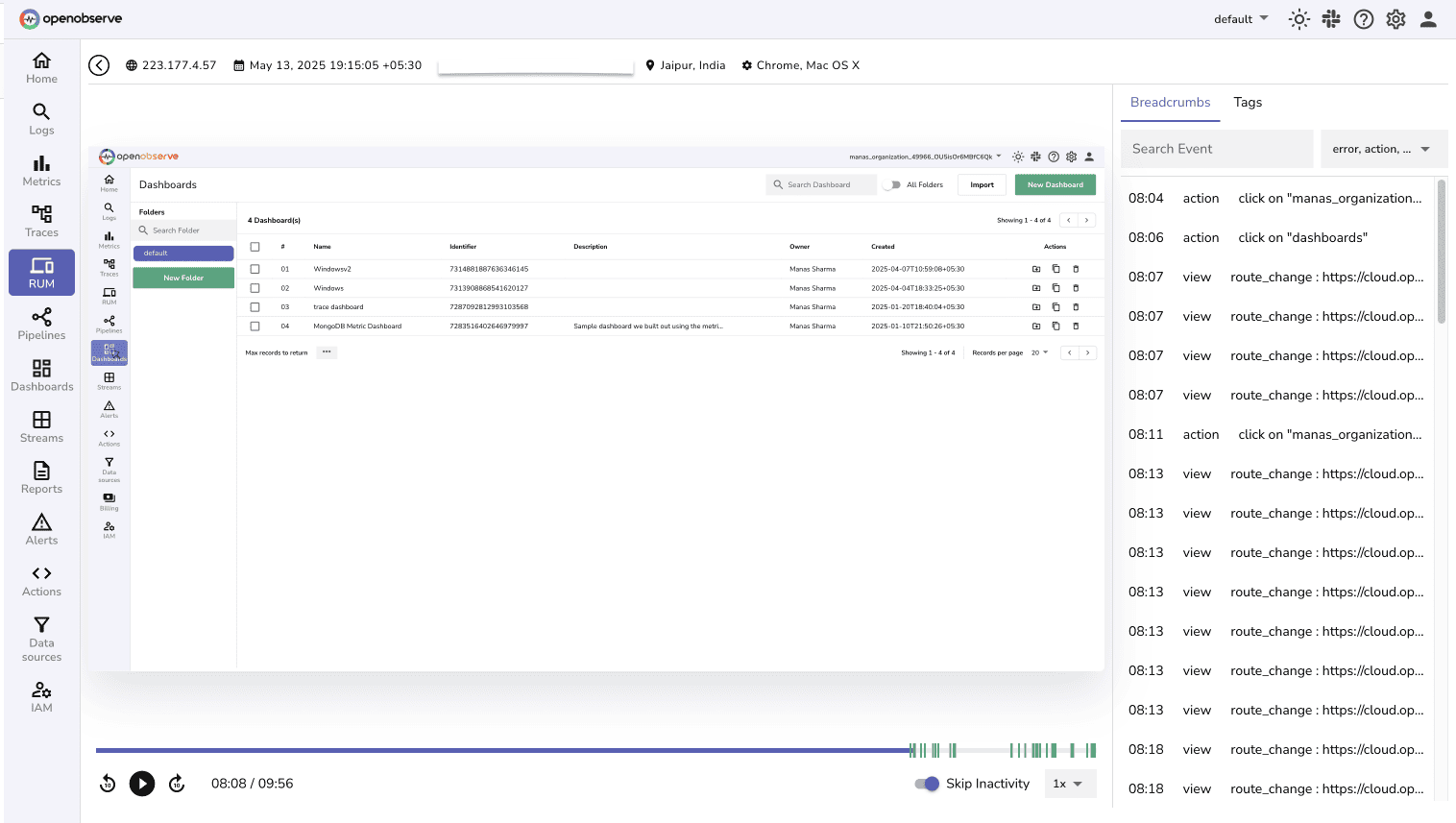
Feature parity on session replay capabilities and privacy controls. DataDog uses UI-based search. OpenObserve adds SQL flexibility for complex session queries.
Available in OpenObserve Cloud.
Both platforms automatically capture JavaScript errors, unhandled promise rejections, and network failures.
DataDog collects frontend errors from multiple sources, including manual error collection and React error boundaries. Errors appear in the RUM Explorer with stack traces, user context, and correlated sessions.
Frustration signals: DataDog tracks user frustration patterns that indicate UX problems:
These signals identify UX friction points and help prioritize fixes based on actual user frustration.
OpenObserve captures JavaScript errors with automatic forwarding to logs for centralized error management. SQL-based error analysis aggregates by error message, affected sessions, affected users, and performance impact:
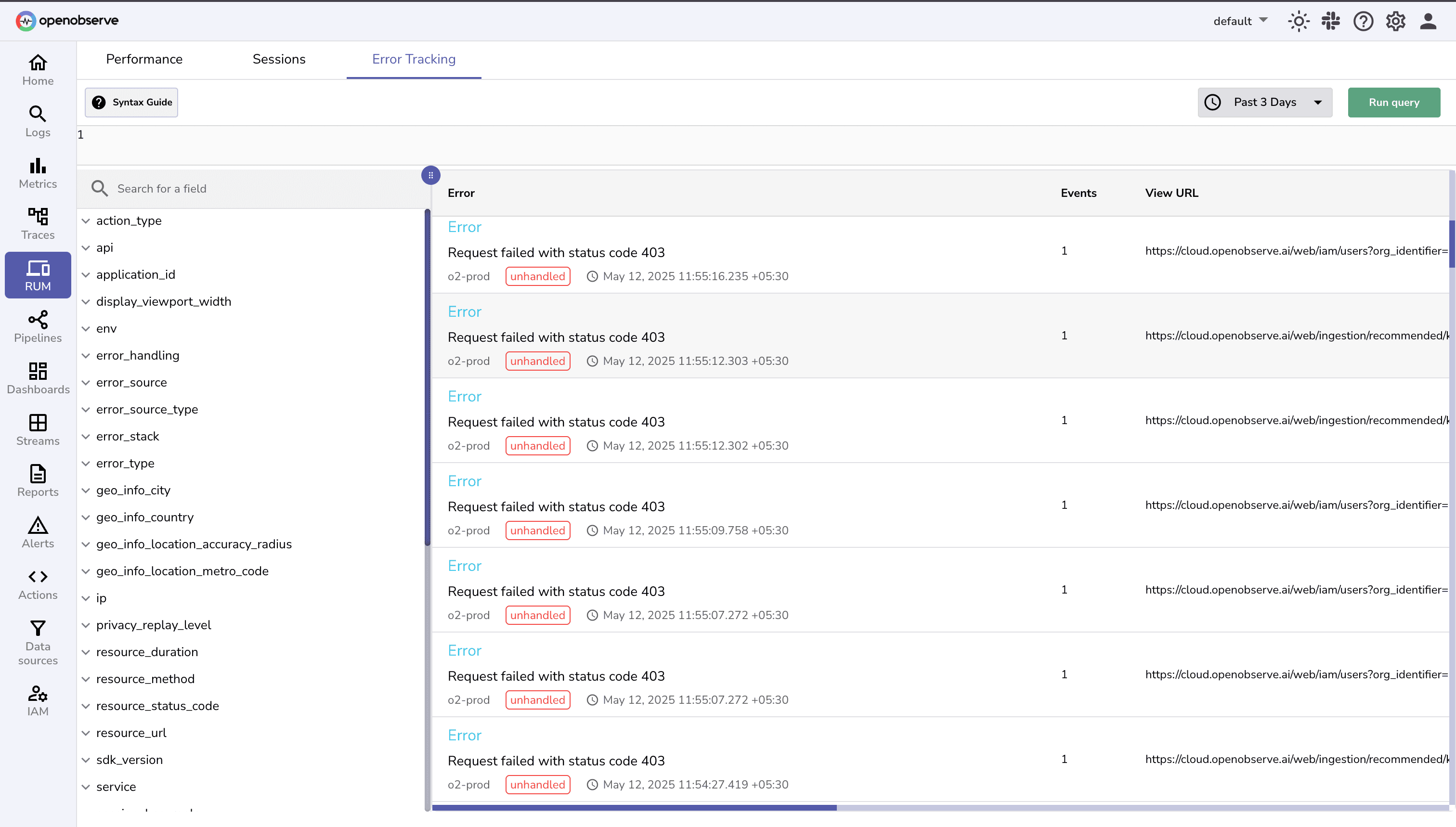
Correlation with backend errors: Since OpenObserve uses SQL for all signals (logs, metrics, traces, RUM), correlate frontend errors with backend issues in a single query:
SELECT
  rum.error_message as frontend_error,
  logs.error_message as backend_error,
  rum.session_id,
  rum.user_id,
  rum.view_name,
  logs.service_name,
  traces.duration_ms as backend_latency
FROM "_rumdata"
JOIN logs logs ON rum.trace_id = logs.trace_id
JOIN traces traces ON rum.trace_id = traces.trace_id
WHERE rum._timestamp > now() - interval '1 hour'
  AND logs.level = 'ERROR'
ORDER BY rum._timestamp DESC
This cross-signal analysis reveals whether frontend errors stem from backend failures or client-side issues.
Use case: SQL correlation discovered that checkout errors only occurred when backend payment API response time exceeded 3 seconds, causing frontend timeouts. The issue wasn't frontend code but slow backend service.
DataDog provides frustration signals for UX-specific analysis. OpenObserve provides SQL for custom error analysis and backend correlation through unified queries.
Both platforms support user identity tracking (setUser()) and global context attributes (setGlobalContext(), setGlobalContextProperty()) for session analysis. Add custom attributes like user plan, feature flags, A/B test variants, or business context to all RUM events.
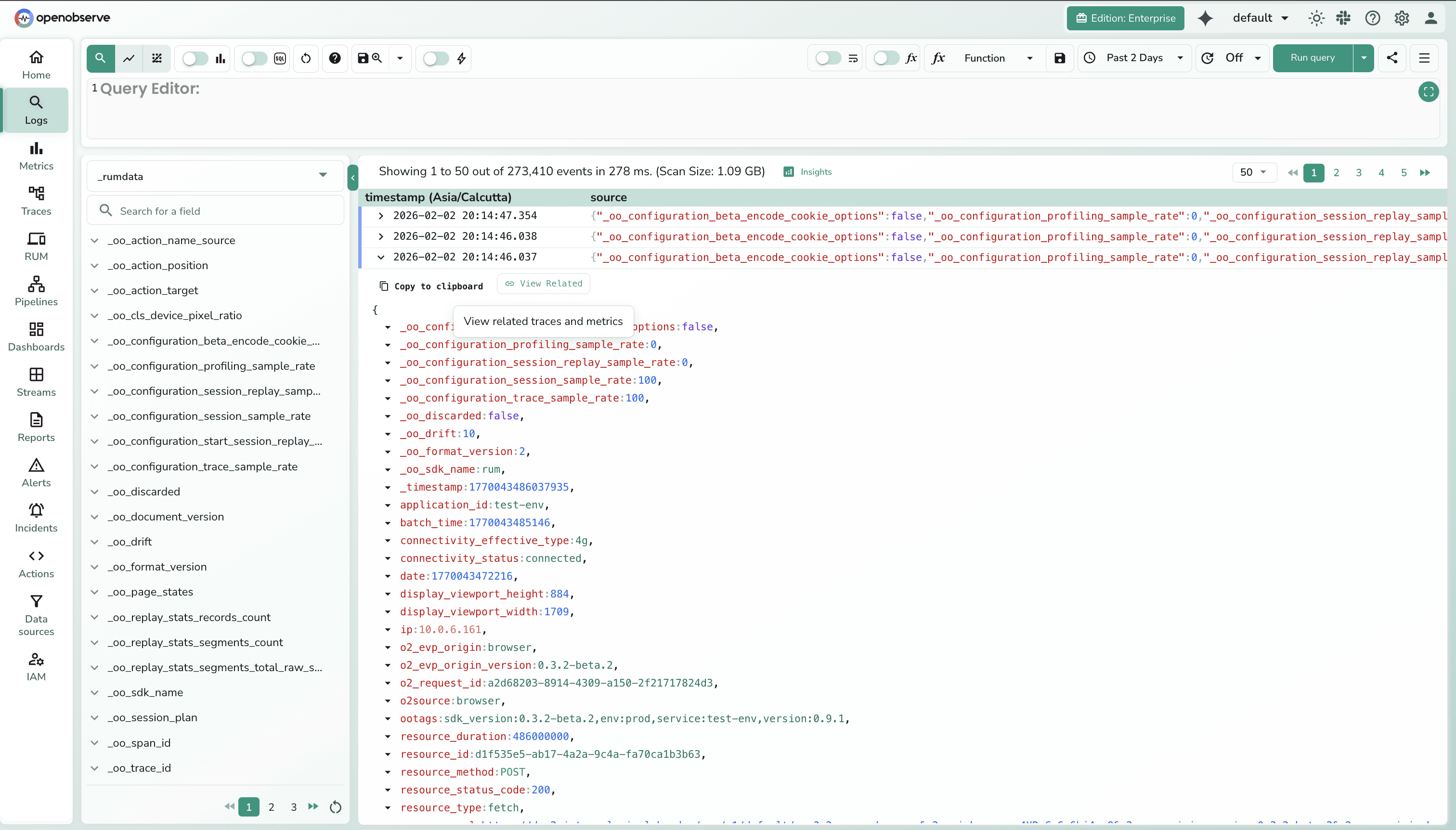
This reveals whether performance varies by user segment (free vs. premium, region, device type). Export segmentation data for business analysis.
Use case: Segmentation analysis showed premium users in APAC experienced 2x slower LCP than premium users in US/EU. Investigation revealed CDN configuration issue specific to APAC region.
Both platforms provide user tracking capabilities. OpenObserve adds SQL flexibility for segmentation analysis and programmatic export.
The most significant operational difference: how you query and analyze RUM data.
DataDog uses the RUM Explorer with tag-based proprietary search syntax:
This works for filtering and searching sessions. Build dashboards through UI with drag-and-drop widgets.
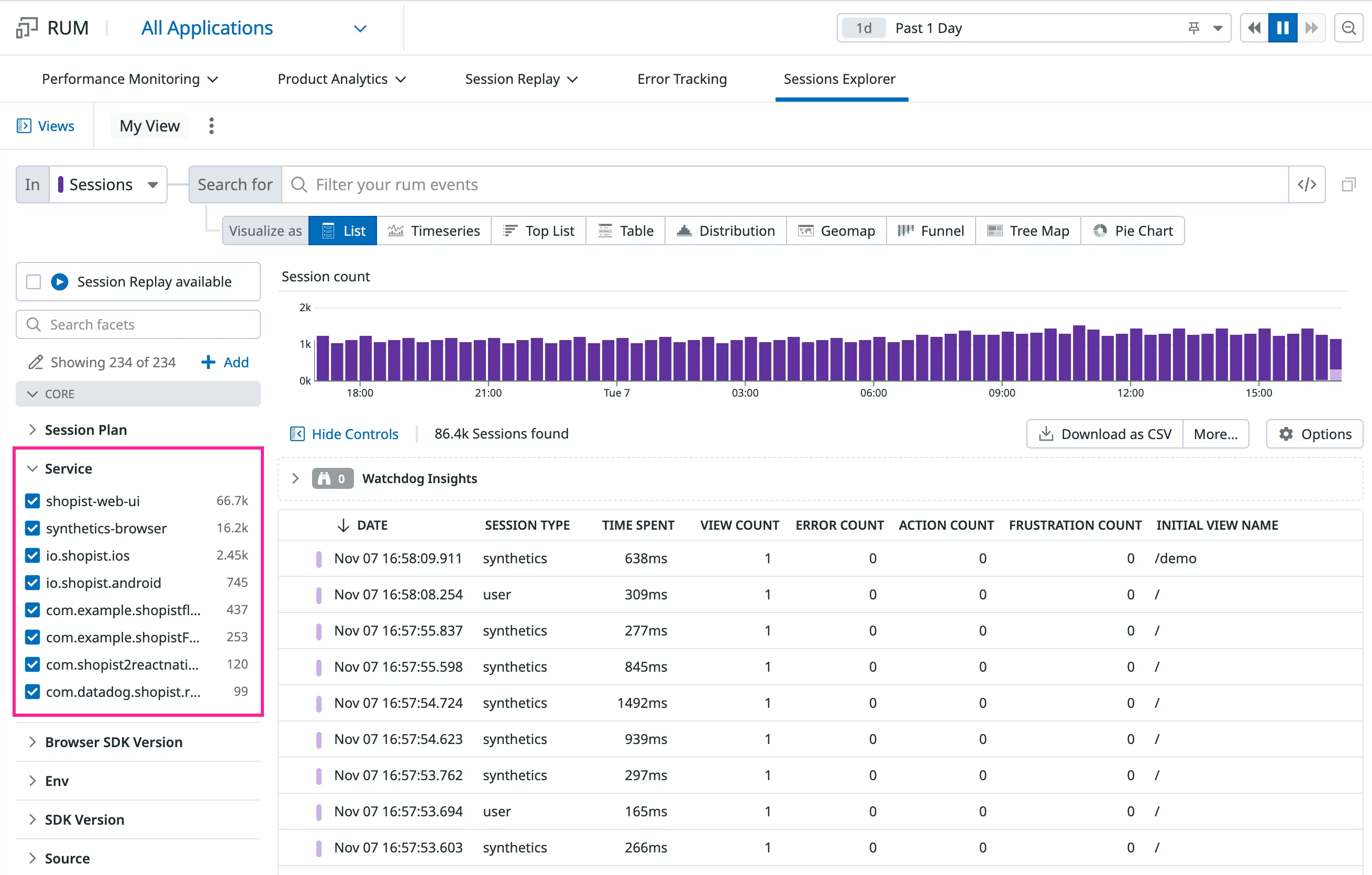
Capabilities:
Limitations:
DataDog's RUM Explorer works for standard use cases and provides excellent UI-driven workflows. OpenObserve's SQL handles complex analysis, conversion funnels, cohort analysis, and business metric correlation with programmatic export.
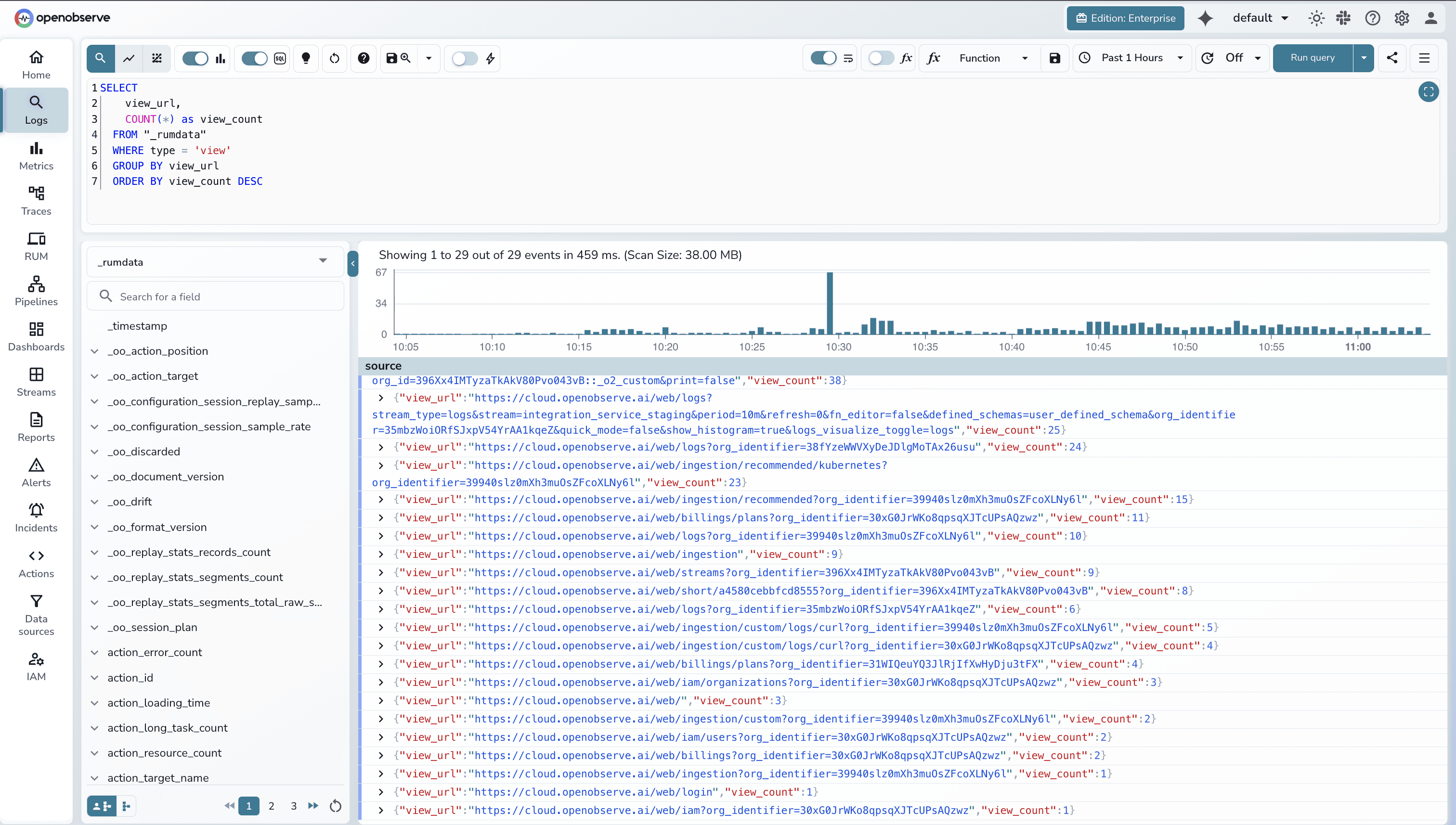
OpenObserve treats RUM data as structured tables queryable via SQL:
Simple View Count by URL
ELECT
    view_url,
    COUNT(*) as view_count
  FROM "_rumdata"
  WHERE type = 'view'
  GROUP BY view_url
  ORDER BY view_count DESC
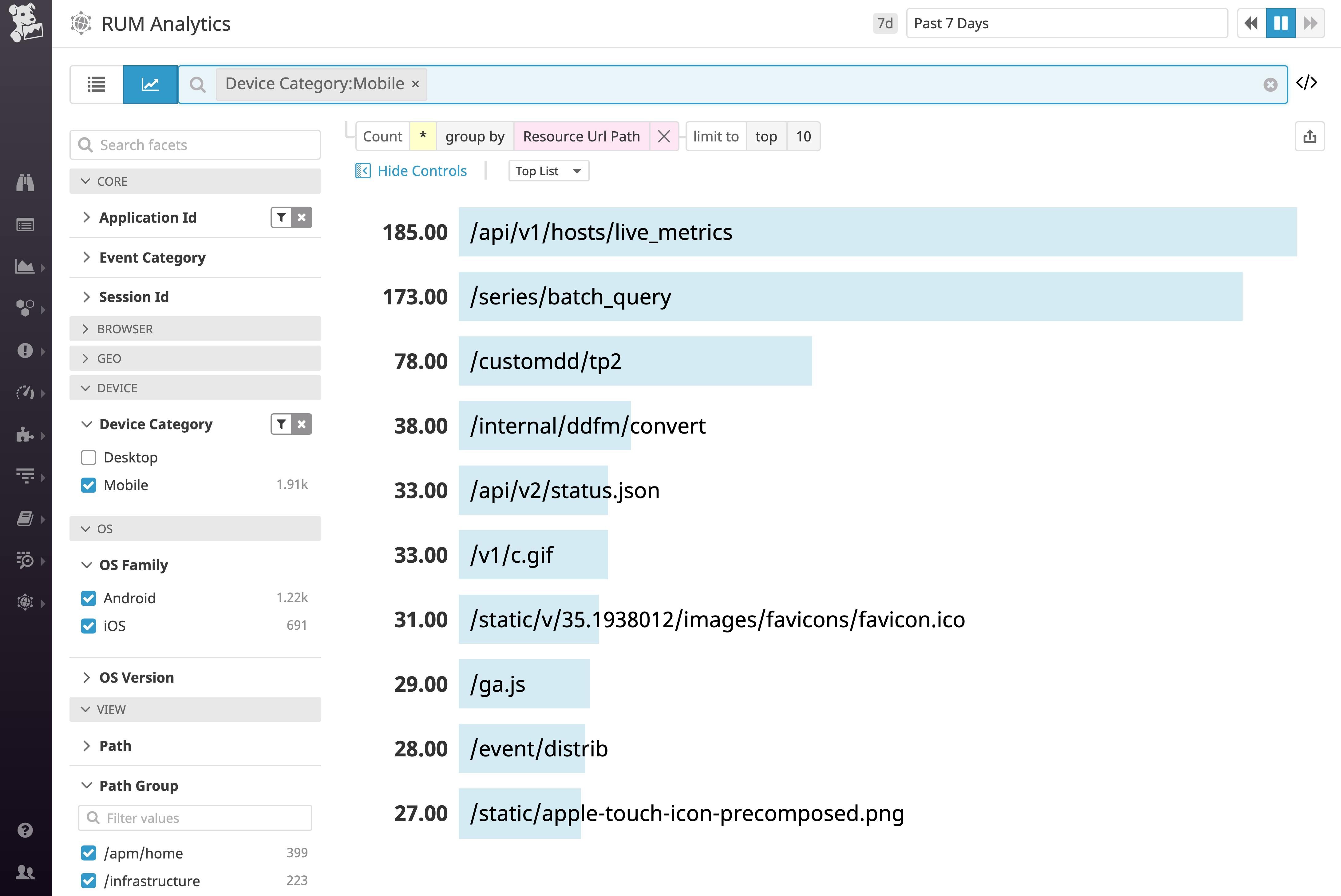
DataDog automatically injects trace IDs, span IDs, and service information into logs for seamless correlation. When viewing a RUM session, click the Traces or Logs tabs to see correlated backend data.
How it works:
Why SQL correlation matters:
Both platforms provide:
trackingConsent configuration| Capability | DataDog | OpenObserve |
|---|---|---|
| SDK Setup | npm packages, standard config | npm packages, standard config |
| Core Web Vitals | LCP, INP, CLS tracked automatically | LCP, INP, CLS tracked automatically |
| Session Replay | Yes, with privacy masking | Yes, with privacy masking |
| Frustration Signals | Rage clicks, dead clicks, error clicks | Error tracking (frustration signals roadmap) |
| Query Language | Proprietary RUM Explorer syntax | SQL for all RUM data |
| Conversion Funnels | Through UI configuration | SQL queries (unlimited flexibility) |
| Cohort Analysis | Through UI filtering | SQL window functions, CTEs, subqueries |
| User Segmentation | RUM Explorer filters | SQL GROUP BY with custom dimensions |
| Backend Correlation | UI tabs (single session focus) | SQL joins (aggregate analysis) |
| Data Export | Limited export through UI | SQL export to any BI tool |
| Custom Dashboards | RUM Explorer + drag-and-drop | SQL queries + visualizations |
| Programmatic Access | Limited API access | Full SQL access via connectors |
| Automated Reporting | Through UI scheduling | SQL-based scheduled queries |
If evaluating Real User Monitoring platforms, the differentiation comes from query flexibility, correlation capabilities, and operational workflows.
OpenObserve delivers additional capabilities if:
OpenObserve transforms the fundamental question from "can we afford to monitor this?" to "what do we need to monitor?" The platform provides comprehensive system visibility without cost-driven compromises.
The choice comes down to query flexibility and operational workflows: UI-driven exploration (DataDog) vs SQL-based programmatic analysis (OpenObserve).
This is Part 6 in a series comparing DataDog and OpenObserve for observability (security use cases excluded):
Sign up for a free cloud trial or schedule a demo to test OpenObserve RUM with your web application.


Manas is a passionate Dev and Cloud Advocate with a strong focus on cloud-native technologies, including observability, cloud, kubernetes, and opensource. building bridges between tech and community.