Upcoming Webinar:

Getting Started with OpenObserve

November 05, 2026
11:00 AM ET
Register

Communicate Real-Time Status to Your Users

Built-in uptime monitoring and status pages for SaaS products, APIs and websites.

Talk to a Human
One platform to
  1. Monitor your services
  2. Fix incidents with your team
  3. Share your status with customers
OpenObserve status page showing component health, an active incident and 90-day uptime bars

What is a status page?

A status page is a public web page that shows whether a service and its components are working, lists active incidents and scheduled maintenance, and keeps a history of past uptime. Customers check it during an outage instead of opening support tickets, so one update reaches everyone at once.

Read the full guide: how status pages work and how to run one

Fewer Support Tickets

Users check one page during an outage instead of asking support if you're down.

No Manual Updates

Failed checks open the incident and update the page. Nobody copies status by hand.

One Platform, Not Three

Monitoring, incident response and your status page live in the tool you already use.

Detect, Fix and Communicate Outages in One Place

Built-in Uptime Monitoring

Checks Drive the Page

HTTP, TCP, TLS and SSH checks run from once a minute to once a day, mapped to components users recognize, like Checkout.

No False Alarms

A component turns red only after 2 failed runs in a row, and green after 2 passes. One flaky probe never reaches customers.
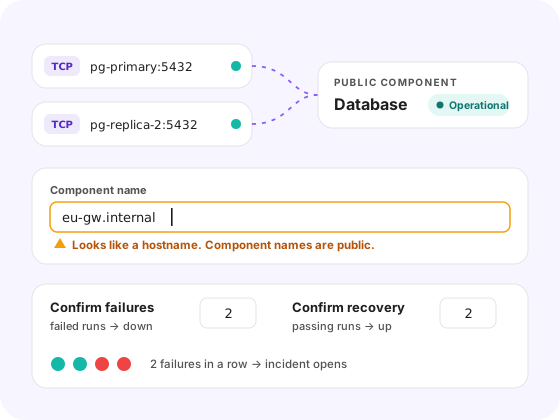
Uptime checks mapped to status page components

Incident Response

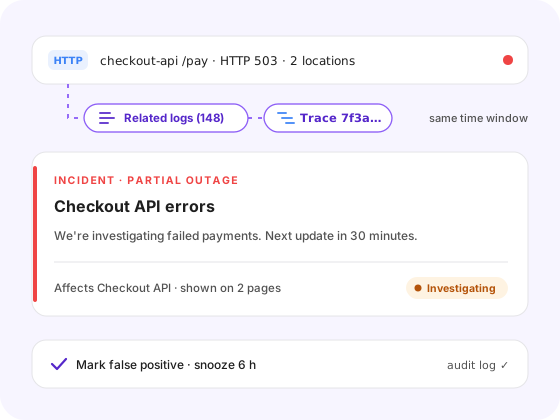
Root Cause in the Same Tool

Every check result is a stream. Pull the logs and traces behind a failed run without switching tools.

One Update, Every Page Cloud & Enterprise

Post an incident or maintenance notice once. It appears on every page that shows the affected components.

Incident timeline with logs and traces from a failed check

Customer-Facing Status

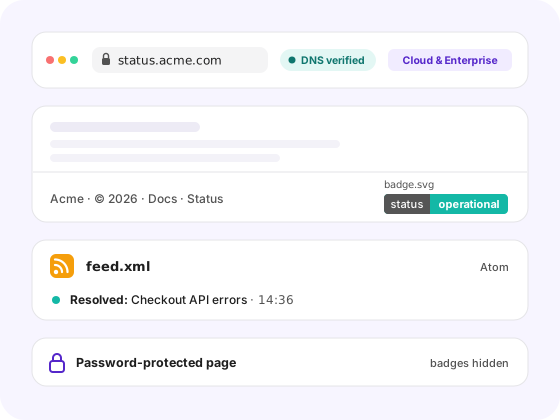
Your Domain, Your Brand Cloud & Enterprise

Serve the page on status.yourcompany.com with your logo and colors. Domains are DNS-verified before they go live.

Public, Private or Embedded

Open a page to everyone, password-protect it for key accounts, or embed a live badge and Atom feed in your app and docs.

Branded public status page on a custom domain

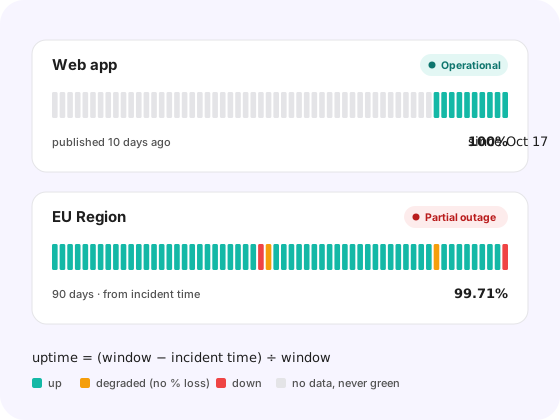
Honest Uptime History

Uptime From Real Incidents

Uptime is calculated from confirmed incident time, so the percentage always matches the bars. Maintenance never counts as downtime.

Built for Outage Traffic

Visitors read a cached snapshot rebuilt every 60 seconds. A rush of users during an outage never touches your data.

90-day uptime bars calculated from confirmed incidents
OpenObserve Cloud pricing

How much does a status page cost?

Status page
$0
per page

Incidents, notices, branding, password protection and 90-day history included.

Included monthly
43,200
check runs

Enough for 5 checks every 5 minutes, or 1 check every minute.

Beyond the allowance
$0.00025
per check run

Billed on Pay-as-you-go and Enterprise plans. Free and trial plans pause checks.

Example page Runs / month Cost / month
10 checks every 5 min86,400$10.80
20 checks every 5 min172,800$32.40
10 checks every minute432,000$97.20

How a run is counted

  • One check at one location is one run. Each extra location adds a run.
  • Runs from your private locations are never billed.

Self-hosting? Open-source OpenObserve includes status pages.

See OpenObserve Cloud pricing

Frequently Asked Questions

Keep Exploring

Tell Users What's Happening Before They Ask

Monitor your services, fix incidents with your team, and share your status with customers.

Read the docs