A Beginner’s Guide to OpenTelemetry (OTel) OTLP Exporters




Ready to get started?
Try OpenObserve Cloud today for more efficient and performant observability.

A Beginner’s Guide to OpenTelemetry (OTel) OTLP Exporters
Monitoring your applications effectively starts with understanding how your data flows from your apps to a monitoring system. OTLP (OpenTelemetry Protocol) exporters are the tools that make this possible. They send traces, metrics, and logs from your applications to platforms like OpenObserve, allowing you to visualize performance, detect issues early, and respond quickly.
Use the OpenTelemetry Collector with an OTLP exporter (HTTP or gRPC) to send traces, metrics, and logs to OpenObserve’s OTLP endpoints. Start with HTTP for simplicity; switch to gRPC for sustained high volume/low latency. Then build dashboards and alerts.
This guide explains OTLP and its setup in a simple step-by-step format.
Understanding the OTLP Protocol
OTLP stands for OpenTelemetry Protocol. The OpenTelemetry Protocol (OTLP) is the standard method used to send telemetry data traces, metrics, and logs from your applications to a monitoring backend. It acts as the bridge between your applications and observability platforms like OpenObserve, ensuring that your performance data arrives reliably and efficiently.
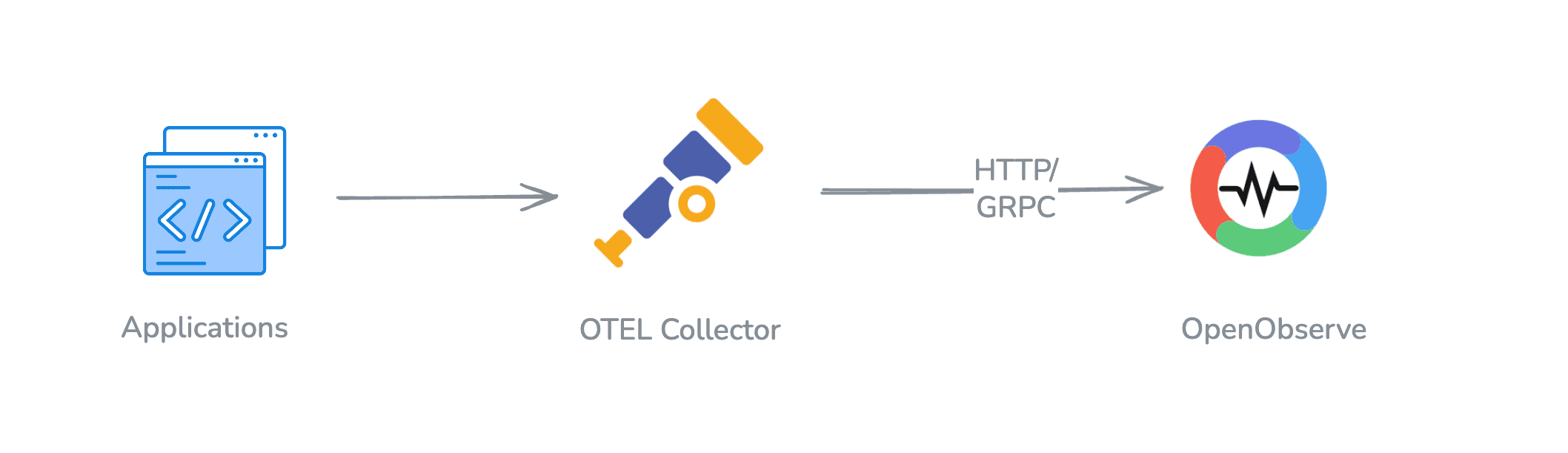
OTLP is designed to be:
- Open and standard: It works across different tools and platforms, reducing vendor lock-in.
- Unified: Handles traces, metrics, and logs in a single format, making integration simpler.
- Efficient: Optimized for high-performance data transmission, even for applications with high volumes of telemetry.
With OTLP, you don’t need separate tools for different types of telemetry. Everything flows through the same protocol, which simplifies setup and monitoring.
- See: OpenTelemetry → OpenObserve (OTLP ingestion)
- Next steps: Dashboards · Alerts
How OTLP Sends Data
OTLP sends data efficiently using three key concepts: encoding, transport, and delivery.
- Encoding: OTLP uses Protocol Buffers (protobuf) to serialize telemetry data. This ensures compact and fast encoding and decoding.
- Transport: Supports both gRPC and HTTP protocols, allowing you to choose the best transport mechanism for your environment. gRPC is preferred for its performance at high volume, while HTTP is more widely supported and easier to debug.
Delivery: Employs mechanisms like compression and batching to optimize data delivery, reducing the load on both the network and the backend systems.
Request and Response Model
OTLP operates on a straightforward request and response model:
- Request: The client sends a request containing telemetry data to the backend.
- Response: The backend processes the request and sends a response indicating success or failure.
This model ensures reliable data transmission and provides feedback on the status of each data export operation.
For a short definition of OTLP, see What is OTLP?. For its ports, encodings, and endpoint paths, and which backends accept it, see our guide to OTLP backends.
What is an OTLP Exporter?
An OTLP exporter is the component that sends your telemetry data from the OpenTelemetry Collector to a backend like OpenObserve. Exporters handle authentication, compression, and batching and can be configured for either HTTP or gRPC transport. Essentially, they act as the bridge between your application’s telemetry and your monitoring platform.
OTel exporters exist in two places:
- Collector exporters are configured in the Collector's YAML file. The two OTLP ones are
otlp_http(formerlyotlphttp, OTLP/HTTP) andotlp_grpc(formerlyotlp, OTLP/gRPC). The Collector also ships exporters for other destinations, such asprometheus_remote_write,kafka,file, anddebug(which prints telemetry to the console). - SDK exporters live inside your application and send telemetry either to a Collector or straight to a backend. Each language packages them separately, for example
opentelemetry-exporter-otlpin Python and Java, and@opentelemetry/exporter-trace-otlp-httpin Node.js.
Most SDKs also read a standard set of environment variables, so you can often configure the exporter without code changes. Support varies by language, so check your SDK's documentation and the OpenTelemetry SDK configuration reference:
OTEL_EXPORTER_OTLP_ENDPOINT=https://api.openobserve.ai/api/your-org
OTEL_EXPORTER_OTLP_PROTOCOL=http/protobuf
OTEL_EXPORTER_OTLP_HEADERS=Authorization=Basic%20<base64-credentials>
The spec defines grpc, http/protobuf, and http/json as values for OTEL_EXPORTER_OTLP_PROTOCOL, but JSON support is optional, so not every SDK accepts http/json. The space in the header value is URL-encoded as %20. For language-by-language SDK setup, see the OpenTelemetry guides. The rest of this guide focuses on the Collector's OTLP exporters.
OTLP Transport Options: HTTP vs gRPC
OTLP can send data using two main transport methods: HTTP and gRPC. Each has its own strengths depending on your needs.
Quick comparison table
| Aspect | OTLP/HTTP | OTLP/gRPC |
|---|---|---|
| Default port | :4318 |
:4317 |
| Payload | Protobuf or JSON | Protobuf (binary) |
| Pattern | POST request/response | Unary RPC per export |
| When to use | Simple, debug‑friendly | High‑volume, low latency |
OTLP over HTTP
HTTP is the simpler option and widely supported across networks. It works well if you want ease of setup and easy debugging.
Key features of OTLP/HTTP:
- Data formats: Can send telemetry using binary protobuf (efficient) or JSON (human-readable).
- POST requests: Sends data via standard HTTP POST requests.
- Fallback mechanism: If HTTP/2 is not available, it can automatically fall back to HTTP/1.1.
- Flexibility: Works in almost any environment, making it ideal for development, testing, and simpler production setups.
HTTP is perfect for teams that are starting with OTLP and don’t need maximum throughput.
Setting Up OTLP/HTTP Exporter
To set up OTLP over HTTP in the OpenTelemetry Collector, you define an HTTP exporter and configure your pipelines for traces, metrics, and logs.
Example configuration:
exporters:
  otlphttp:
    endpoint: "http://localhost:4318"
    headers:
      Authorization: "Basic <base64-credentials>"
    compression: gzip
    timeout: 10s
  debug:
    verbosity: basic

service:
  pipelines:
    traces:
      receivers: [otlp]
      exporters: [debug, otlphttp]
    metrics:
      receivers: [otlp]
      exporters: [debug, otlphttp]
    logs:
      receivers: [otlp]
      exporters: [debug, otlphttp]
HTTP is simple, widely compatible, and allows you to use either binary protobuf for efficiency or JSON for easy debugging.
OTLP over gRPC
gRPC is a high-performance transport suited to high-volume telemetry. It is especially useful when you have high-volume applications or need low-latency monitoring.
Key features of OTLP/gRPC:
Binary data only: Uses protobuf for compact and fast transmission.
Unary requests: Each export is a single RPC that gets an immediate response from the server, and the exporter can keep several requests in flight at once over one HTTP/2 connection.
Robustness: Built-in support for retries, deadlines, and cancellation.
gRPC is the preferred choice when you need fast, reliable delivery at high volume, such as monitoring a high-traffic web application or microservices.
Common pitfalls (HTTP)
- Point
endpointto your OpenObserve ingest URL (see Data Sources) not the Collector’s receiver port. - Include the
Authorizationheader. OpenObserve uses HTTP Basic auth:Authorization: Basic <base64-credentials>. - Keep
compression: gzipandprocessors: [batch]enabled.
Setting Up OTLP/gRPC Exporter
For higher performance, OTLP over gRPC is recommended. gRPC keeps a long-lived HTTP/2 connection and a compact binary encoding, which reduces overhead at high volume.
Example configuration:
exporters:
  otlp:
    endpoint: "localhost:4317"
    tls:
      insecure: true
    compression: gzip
  debug:
    verbosity: basic

service:
  pipelines:
    traces:
      receivers: [otlp]
      exporters: [debug, otlp]
    metrics:
      receivers: [otlp]
      exporters: [debug, otlp]
    logs:
      receivers: [otlp]
      exporters: [debug, otlp]
gRPC delivers high throughput, low latency, and reliability with built-in retry mechanisms.
Common pitfalls (gRPC)
- Use port
:4317and the gRPC exporter (exporters.otlp), nototlphttp. tls.insecure: trueonly for local/self-signed labs; prefer proper TLS in prod.
HTTP vs gRPC
Choosing between HTTP and gRPC depends on your needs. HTTP is great for simplicity, debugging, and broad compatibility. gRPC offers better performance and low latency at sustained high volume.
Here are the key differences:
- HTTP: Uses POST requests, can transmit binary or JSON data, and falls back from HTTP/2 to HTTP/1.1 if needed.
- gRPC: Uses unary RPCs over a long-lived HTTP/2 connection, binary protobuf data, supports retries, and is more efficient for high-volume telemetry.
If your goal is easy setup and debugging, start with HTTP. If you need high-volume, low-latency telemetry, gRPC is the better choice.
You can explore other exporters:
- OpenTelemetry: Exporter documentation
- HTTP exporter reference: OTLP/HTTP to OpenObserve
- gRPC exporter reference: OTLP/gRPC to OpenObserve
Setting Up OTLP Integration with OpenObserve
OpenObserve can receive OTLP data from both HTTP and gRPC exporters. For HTTP, you configure the collector with the OpenObserve endpoint and authentication headers.
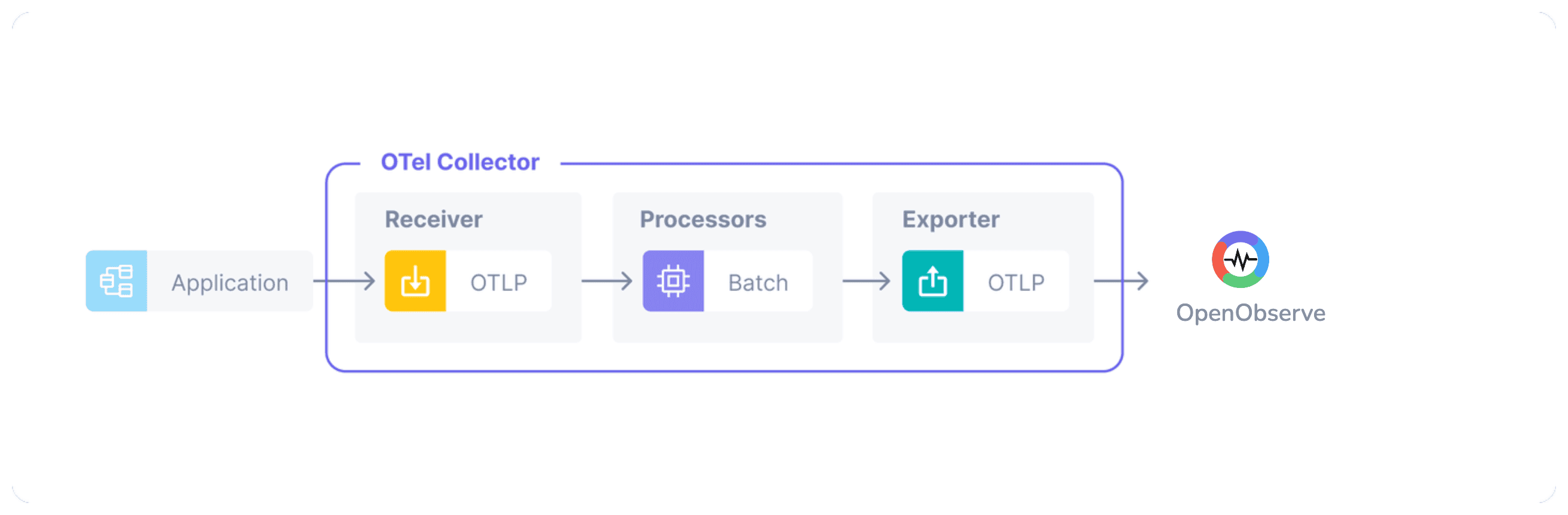
- First, you need the OpenTelemetry Collector to receive and forward telemetry data. Install the OpenTelemetry Collector.
- Next, you need to have an OpenObserve instance running. You can run either a self-hosted instance or a cloud one.
- Create a Configuration file for OTEL Collector. For a full breakdown of every section in this file, see our OpenTelemetry Collector Configuration Guide:
- Define the OTLP receiver. You need a receiver so the collector knows where to accept telemetry data.
receivers: otlp: protocols: http: endpoint: "0.0.0.0:4318" grpc: endpoint: "0.0.0.0:4317" - Define your exporters with endpoint and authentication details. You can refer to the Data Sources page in OpenObserve for credentials.
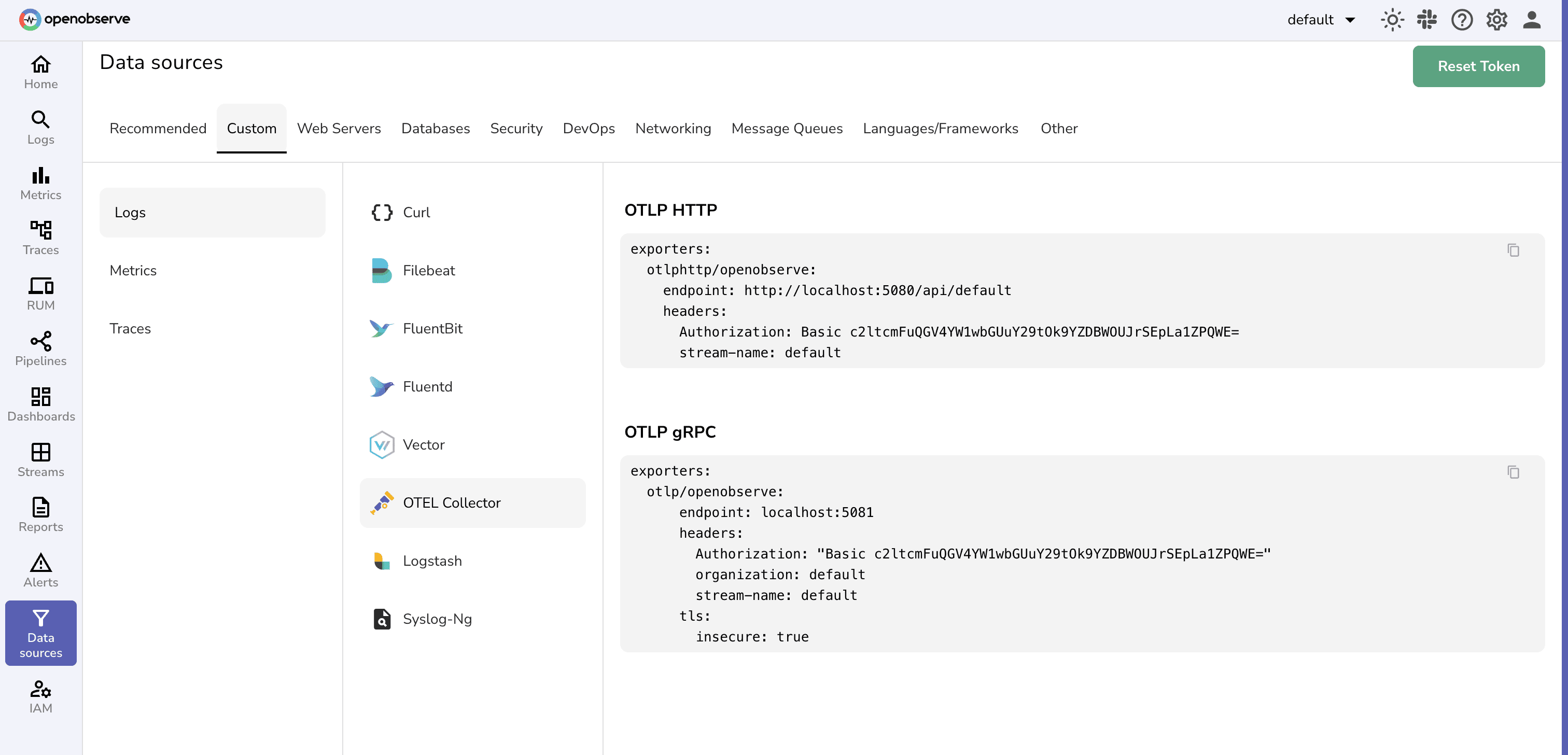
- Configure pipelines for traces, metrics, and logs.
- Define the OTLP receiver. You need a receiver so the collector knows where to accept telemetry data.
service:
  pipelines:
    traces:
      receivers: [otlp]
      processors: [batch]
      exporters: [debug, otlphttp] # Use `otlp` for gRPC
    metrics:
      receivers: [otlp]
      processors: [batch]
      exporters: [debug, otlphttp]
    logs:
      receivers: [otlp]
      processors: [batch]
      exporters: [debug, otlphttp]
- Start the collector with your configuration file:
otelcol --config=otel-config.yml
OTel Setup Tips:
- Replace
otlphttpwithotlpin pipelines if using the gRPC exporter. batchprocessor improves performance by sending multiple events together.
Next steps:
- OpenObserve OTLP ingestion for your code: OpenTelemetry → OpenObserve
- Dashboards to visualize data: Dashboards
- Proactive notifications: Alerts
Import tip: start with HTTP, confirm data is flowing, then switch to gRPC if you need lower latency or sustained high throughput.
Benefits of Using OpenObserve with OTLP
Integrating OTLP with OpenObserve provides several advantages:
- Comprehensive Observability: Collect and visualize logs, metrics, and traces in a unified platform, gaining deeper insights into your application’s performance.
- Advanced Visualization and Alerting: Use OpenObserve’s powerful dashboarding and alerting features to monitor your systems in real-time and set up proactive alerts.
- Scalability and Performance: Leverage OpenObserve’s efficient storage and processing capabilities to handle large volumes of telemetry data with ease.
Pair OTLP with OpenObserve’s columnar/object storage so petabyte‑scale signals stay searchable and affordable.
Conclusion
Integrating OpenTelemetry OTLP Exporters with OpenObserve is a powerful way to enhance your telemetry setup. By following the detailed configurations for both OTLP HTTP and OTLP gRPC, you can seamlessly transmit traces, metrics, and logs to OpenObserve, unlocking comprehensive observability features such as advanced visualization and real-time alerting.
This integration not only standardizes your telemetry data transmission but also ensures you have robust tools to monitor and analyze your system's performance.
OTLP Exporter FAQs
- Do I need both HTTP and gRPC? No, pick one. Start with HTTP for simplicity; choose gRPC for high-volume, low-latency pipelines.
- Where do I put auth? In the exporter's
headersblock. For OpenObserve, that isAuthorization: "Basic <base64-credentials>". - What is the difference between the
otlp_grpcandotlp_httpexporters?otlp_grpcsends OTLP over gRPC andotlp_httpsends OTLP over HTTP; 4317 and 4318 are the conventional OTLP ports for each. Neither exporter has a default endpoint, so you must always setendpoint.otlp_httpalso appends/v1/traces,/v1/metrics, or/v1/logsto the endpoint. - Why do some configs say
otlpandotlphttp? Those are the older names of the same exporters. Recent Collector releases renamed them tootlp_grpcandotlp_httpand keep the old names as deprecated aliases, so the examples in this guide still work. - What happened to the
loggingexporter? It was deprecated and then removed from the Collector. Use thedebugexporter instead to print telemetry to the console. - How do I visualize? Use Dashboards and wire Alerts.
Ready to Get More from Your Logs, Metrics, and Traces?
- Sign up for a 14-day free Cloud trial and integrate your metrics, logs, and traces into one powerful platform to boost your operational efficiency and enable smarter, faster decision-making.
About the Author
Simran Kumari

Passionate about observability, AI systems, and cloud-native tools. All in on DevOps and improving the developer experience.
Follow OpenObserve on Google
Add OpenObserve as a preferred source to see more of our articles in Google Search and Top Stories.