OpenObserve vs Elasticsearch: Performance Benchmarking at 1.1 TB Scale




Ready to get started?
Try OpenObserve Cloud today for more efficient and performant observability.
OpenObserve vs Elasticsearch: Benchmark at 1.1 TB Scale
TLDR
We streamed 1.1 TB of synthetic Kubernetes-format log data to both systems simultaneously on identical AWS hardware. On ingestion: Elasticsearch dropped 62% of the data due to schema mapping conflicts, throttled at 96% CPU, and used 10x more RAM. OpenObserve accepted everything, compressed it 9.5x, ran at 15% CPU, and was 87x cheaper on storage. On queries: OpenObserve won 14 out of 15 - up to 32x faster on aggregations. The one area Elasticsearch wins is COUNT(*) queries, by 1.5-1.6x.
Overview
The ELK stack has been one of the most popular logging backends for the last decade. But running Elasticsearch at scale (we're talking terabytes of daily ingestion) demands significant resources and ongoing operational effort. Tuning JVM heap, managing index mappings, handling shard rebalancing, and keeping the cluster healthy under load are all real costs that teams absorb continuously.
OpenObserve is a highly efficient alternative built for exactly this scale. It is designed to minimize storage footprint and reduce compute overhead compared to Elasticsearch. We wanted to measure whether that holds up, rather than take it on faith.
To put that to the test, we ran a full performance benchmark: same AWS hardware, same 1.1 TB of Kubernetes-format log data, both systems receiving identical log streams simultaneously. The results cover storage efficiency, CPU utilization, RAM usage, and query performance.
The dataset: Log data was generated synthetically using a custom Python script based on the Kubernetes log schema from OpenObserve's sample K8s dataset. Generated logs were written to a file and forwarded through Fluent Bit to both systems simultaneously using a dual-output configuration, ensuring both Elasticsearch and OpenObserve received identical log streams at the same time. A fixed random seed (random.seed(42)) was used to ensure reproducibility; anyone running the benchmark with the same script will get identical data distribution. Total raw data sent: 1,122 GB (~1.1 TB). To replicate the benchmark yourself, check the repo: github.com/openobserve/o2-vs-elasticsearch-benchmark.
Infrastructure
| Machine | Role | Instance | vCPU / RAM | Storage |
|---|---|---|---|---|
| bench-generator | K8s-format log generator | c5.2xlarge | 8 / 16 GB | 30 GB EBS |
| bench-elasticsearch | Elasticsearch 8.19 | r7gd.2xlarge | 8 / 64 GB | 474 GB NVMe |
| bench-openobserve | OpenObserve v0.90.3 EE | r7gd.2xlarge | 8 / 64 GB | 474 GB NVMe |
Both systems ran on identical hardware: the same instance type, RAM, and NVMe storage.
Part 1: Storage Efficiency
The Numbers
| Metric | Elasticsearch | OpenObserve |
|---|---|---|
| Raw data sent | 1,122 GB | 1,122 GB |
| Docs accepted | 487 million (38%) | 1.27 billion (100%) |
| Docs dropped | 780 million (62%) | 0 |
| Raw data accepted | ~429 GB | 1,122 GB |
| Stored on disk | 375 GB | 118 GB |
| True compression ratio | 1.14x | 9.5x |
| Disk used (actual) | 375 GB / 434 GB (86%) | 211 GB (indexing included) / 434 GB (49%) |
Why Did Elasticsearch Drop 62% of the Data?
This is the most critical finding of the entire benchmark. Elasticsearch rejected 780 million documents, and the cause was strict field type mapping conflicts rather than any hardware limit.
In Kubernetes-format logs, fields like kubernetes.labels.app can appear as both a string and a nested object across different log lines from different pods. Elasticsearch locks in the field type on first write. Every subsequent document where the type differs gets rejected with a mapping conflict error.
OpenObserve accepted all 1.27 billion documents with zero configuration changes. No schema management. No mapping templates. No pre-configuration required.
What we did next: To continue the benchmark beyond this finding, we deleted the Elasticsearch indexes, explicitly set the conflicting fields (e.g. kubernetes.labels.app) to the flattened type in the mapping, and re-ingested the full dataset. The flattened type tells Elasticsearch to treat the entire field as a single flat value, bypassing the type conflict. This allowed ingestion to proceed, but it required manual intervention before a single byte of data could be reliably stored.
If you have ever run K8s at scale, you'll know Kubernetes log schemas are inherently inconsistent. Different deployments and helm chart versions, along with the many teams that own those applications, all push logs with varying field shapes. The generated dataset intentionally reflected this real-world variability. Elasticsearch requires upfront schema engineering every time a new field shape appears, whereas OpenObserve handles it out of the box.
Compression Ratio at Scale
OpenObserve maintained a consistent 9.5-10x compression ratio from 10 GB all the way to 1 TB. Elasticsearch barely compressed at all, ending at 1.14x at full scale.
| Raw Data Accepted | ES Stored | O2 Stored | ES Ratio | O2 Ratio |
|---|---|---|---|---|
| 10 GB | ~10 GB | ~1 GB | 1x | 10x |
| 43 GB | ~34 GB | ~4.3 GB | 1.3x | 10x |
| 150 GB | ~127 GB | ~15 GB | 1.2x | 10x |
| 250 GB | ~199 GB | ~25 GB | 1.3x | 10x |
| 429 GB (ES) / 1,122 GB (O2) | 375 GB | 118 GB | 1.14x | 9.5x |
Part 2: CPU Utilization
Server Utilization
This is what the CPU graphs looked like during active ingestion. Elasticsearch (blue) climbed to ~94% and stayed there. OpenObserve (orange) held steady at ~48%.
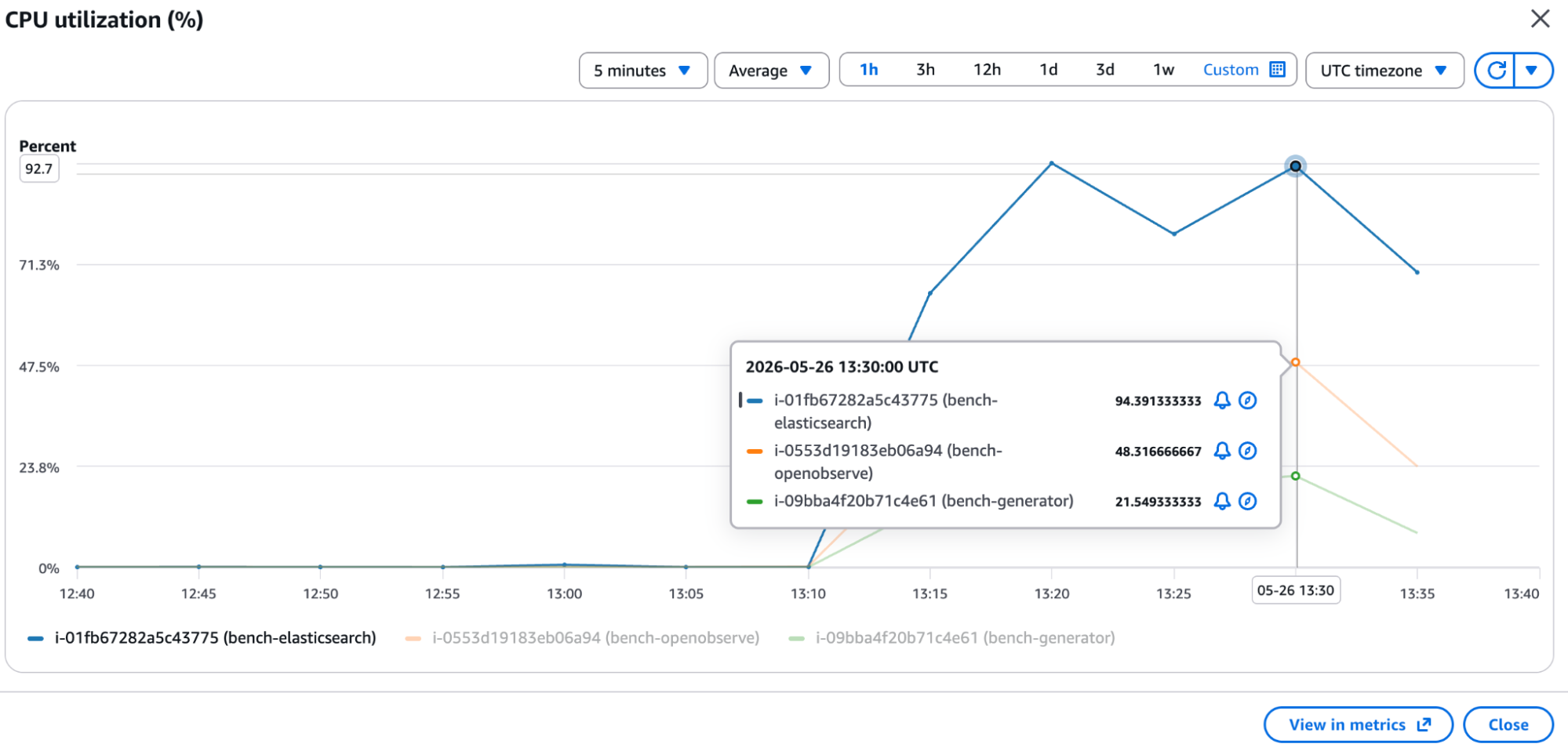
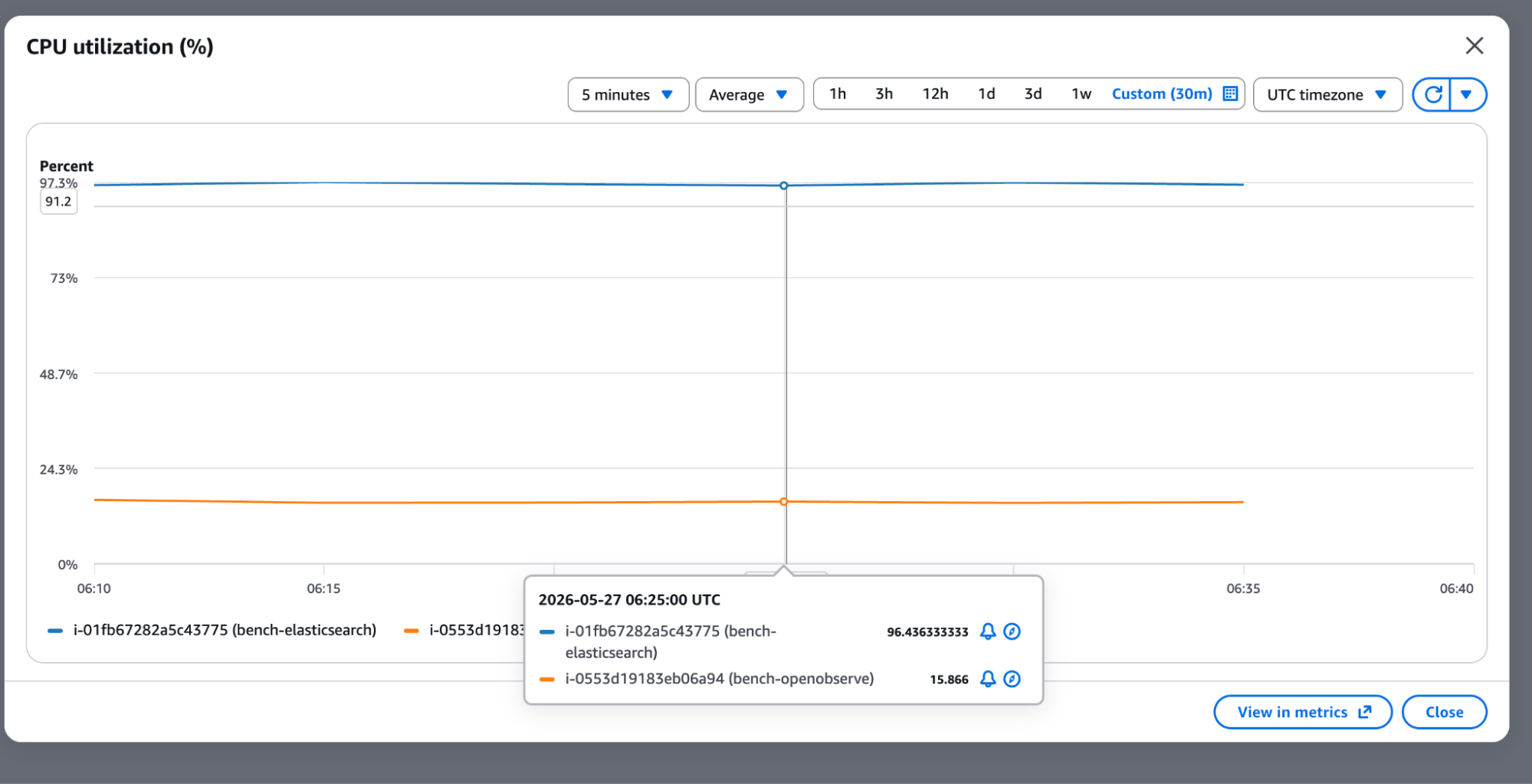
The sustained picture was even more stark. Over a 30-minute custom window, Elasticsearch sat at a flat ~96%, actively throttling. OpenObserve held at ~15%.
CPU Summary Table
| Phase | Elasticsearch | OpenObserve | Advantage |
|---|---|---|---|
| Peak ingestion | 95-96% | 49% | 2x less |
| Sustained ingestion | ~96% (throttling) | ~15% | 6x less |
| Idle baseline | ~19-20% | ~3-5% | 4-7x less |
At 96% sustained CPU, Elasticsearch was throwing 429 (Too Many Requests) errors and slowing down ingestion, while OpenObserve never came close to a resource ceiling.
Part 3: RAM Usage
| Metric | Elasticsearch | OpenObserve |
|---|---|---|
| Total RAM | 64 GB | 64 GB |
| RAM used (peak ingestion) | 19 GB | 1.9 GB |
| RAM available | 43 GB | 61 GB |
| Difference | baseline | 10x less RAM |
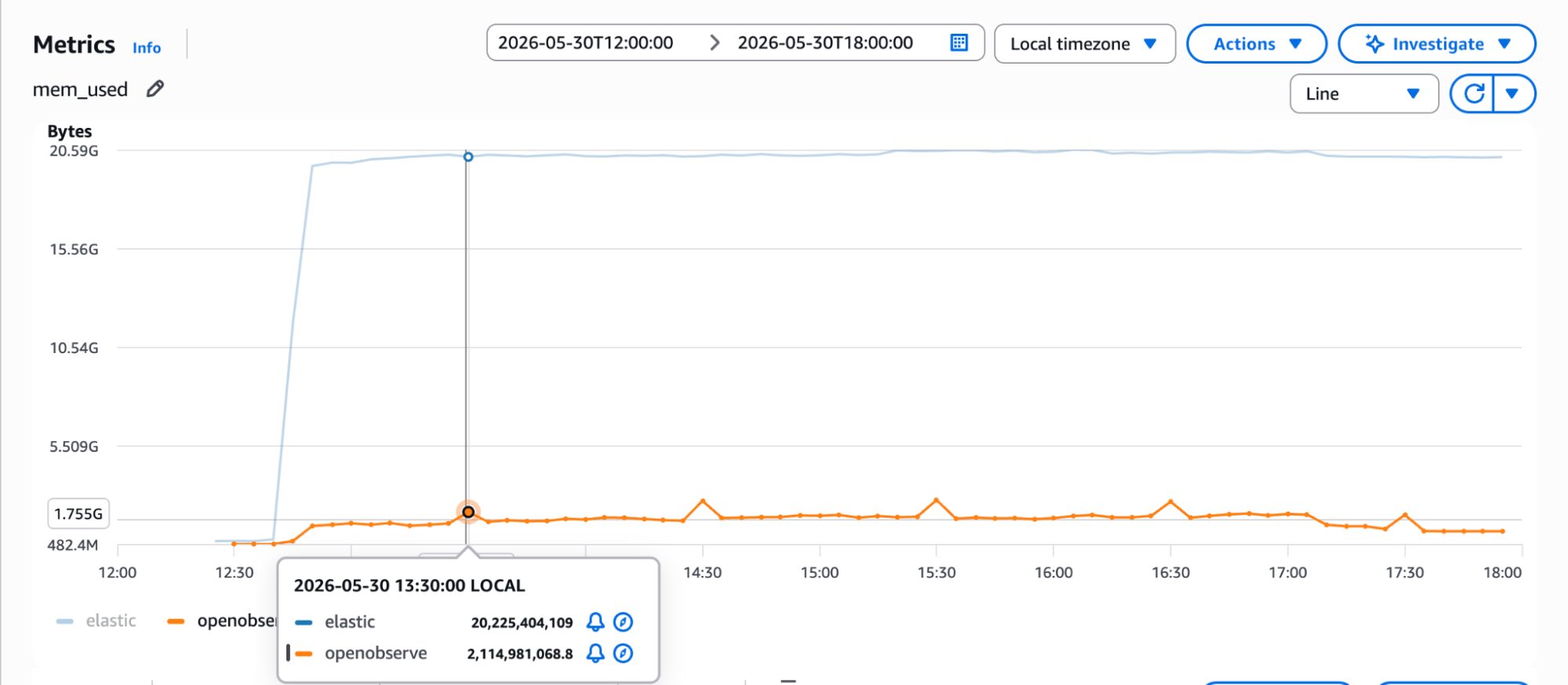
OpenObserve used 1.9 GB of RAM at peak ingestion. Elasticsearch consumed 19 GB, 10x more on the same 64 GB machine. This isn't a rounding-error difference. It has direct implications for instance sizing, cluster memory requirements, and overall infrastructure cost.
The memory metrics from AWS confirm this visually:
Part 4: Ingestion Speed
The ingestion speed test was a separate run from the 1,122 GB storage benchmark above. The generator streamed continuously for 8.08 hours, so the document counts below are larger than the storage benchmark's corpus and are not directly comparable to it.
For this test, Elasticsearch was deliberately given an advantage: it ran on an m7gd.4xlarge (16 vCPU, 64 GB RAM, 950 GB NVMe). OpenObserve remained on the original r7gd.2xlarge (8 vCPU, 64 GB RAM, 474 GB NVMe). ES had double the CPU.
| Metric | Elasticsearch | OpenObserve |
|---|---|---|
| Instance | m7gd.4xlarge (16 vCPU) | r7gd.2xlarge (8 vCPU) |
| Total docs ingested | 2.07 billion | 2.75 billion |
| Duration | 8.08 hours | 8.08 hours |
| Ingestion speed | ~71,300 events/sec (16 vCPU) | ~94,900 events/sec (8 vCPU) |
| CPU utilization | ~57% | ~18% (plus hourly flush spikes) |
| Per vCPU provisioned | baseline | 2.7x more events/sec |
| Per unit CPU used | baseline | ~8x more events/sec |
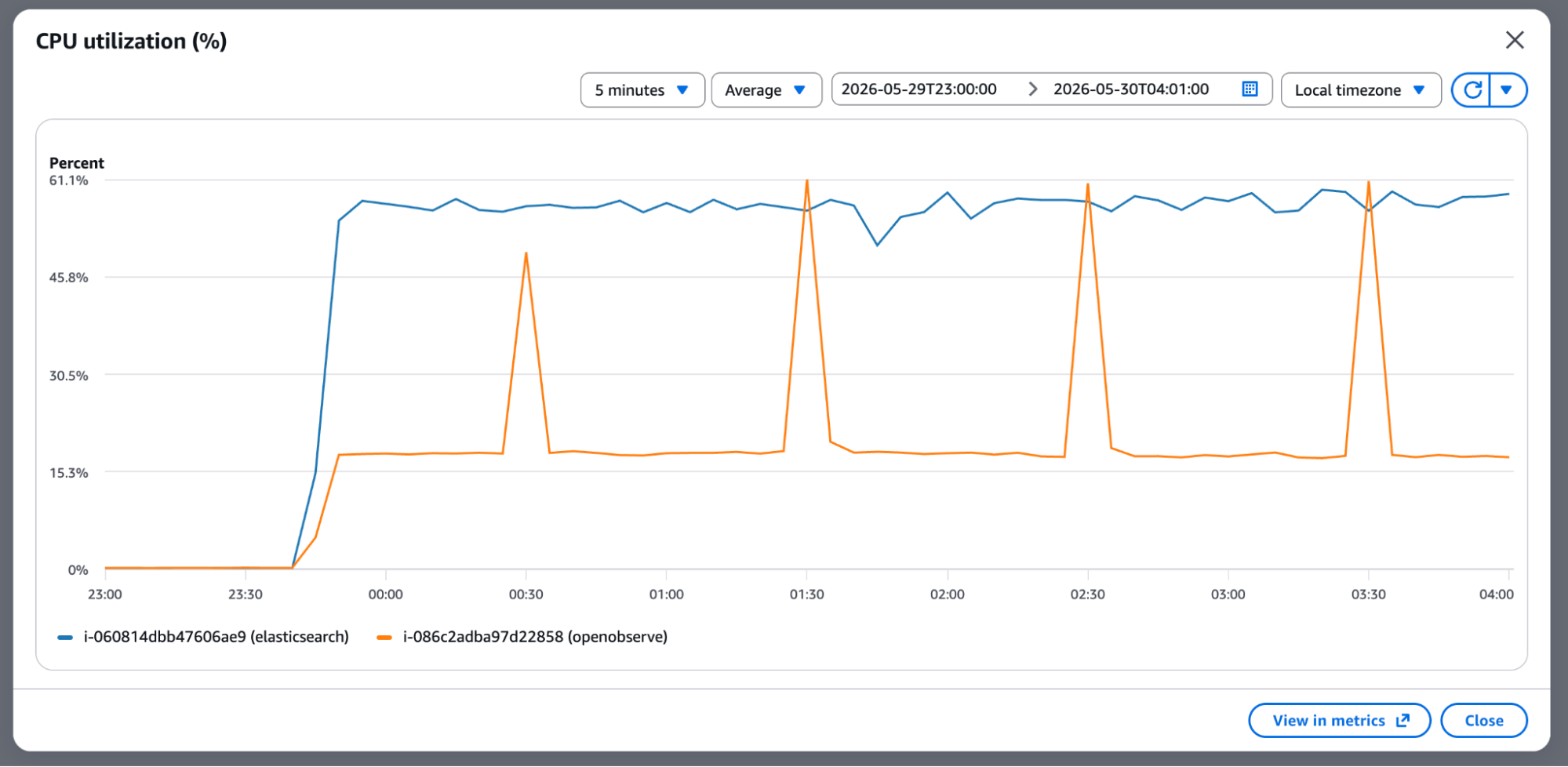
Elasticsearch ran at ~57% CPU across 16 vCPU. OpenObserve sat at ~18% across 8, with brief hourly spikes as it flushed to disk. So there are two ways to read the efficiency gap, and both are worth stating: per vCPU provisioned, OpenObserve ingested 2.7x more events per second; per unit of CPU actually consumed, roughly 8x. If both ran on identical hardware, the gap would be even larger.
These CPU figures belong to this run, on the upgraded Elasticsearch node. They are not the ~96% from Part 2, which was the storage benchmark with Elasticsearch on the smaller r7gd.2xlarge.
The AWS CPU graph for this test period shows it clearly, with Elasticsearch (blue) staying elevated throughout and OpenObserve (orange) spiking briefly then running efficiently at a fraction of the CPU:
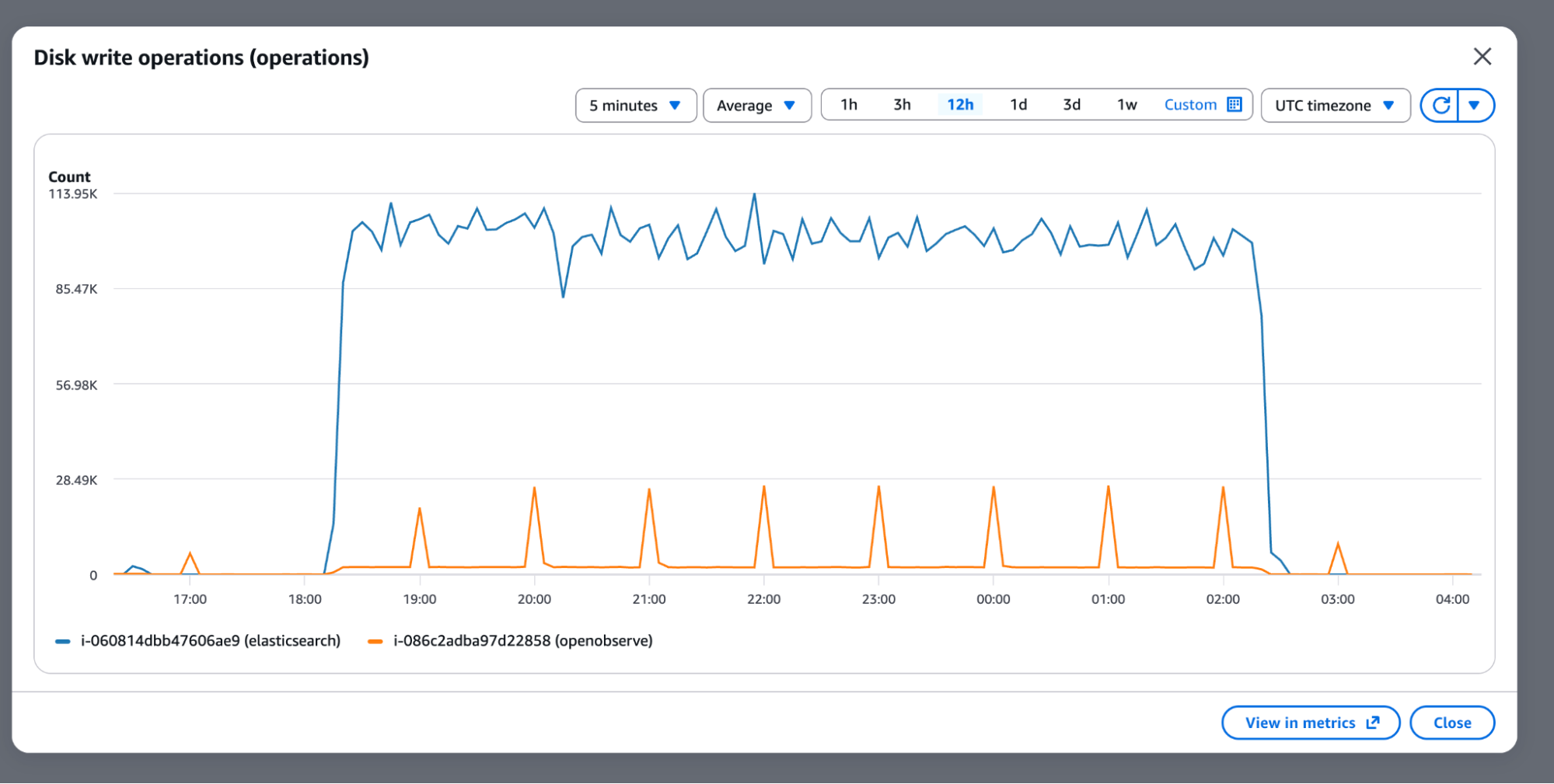
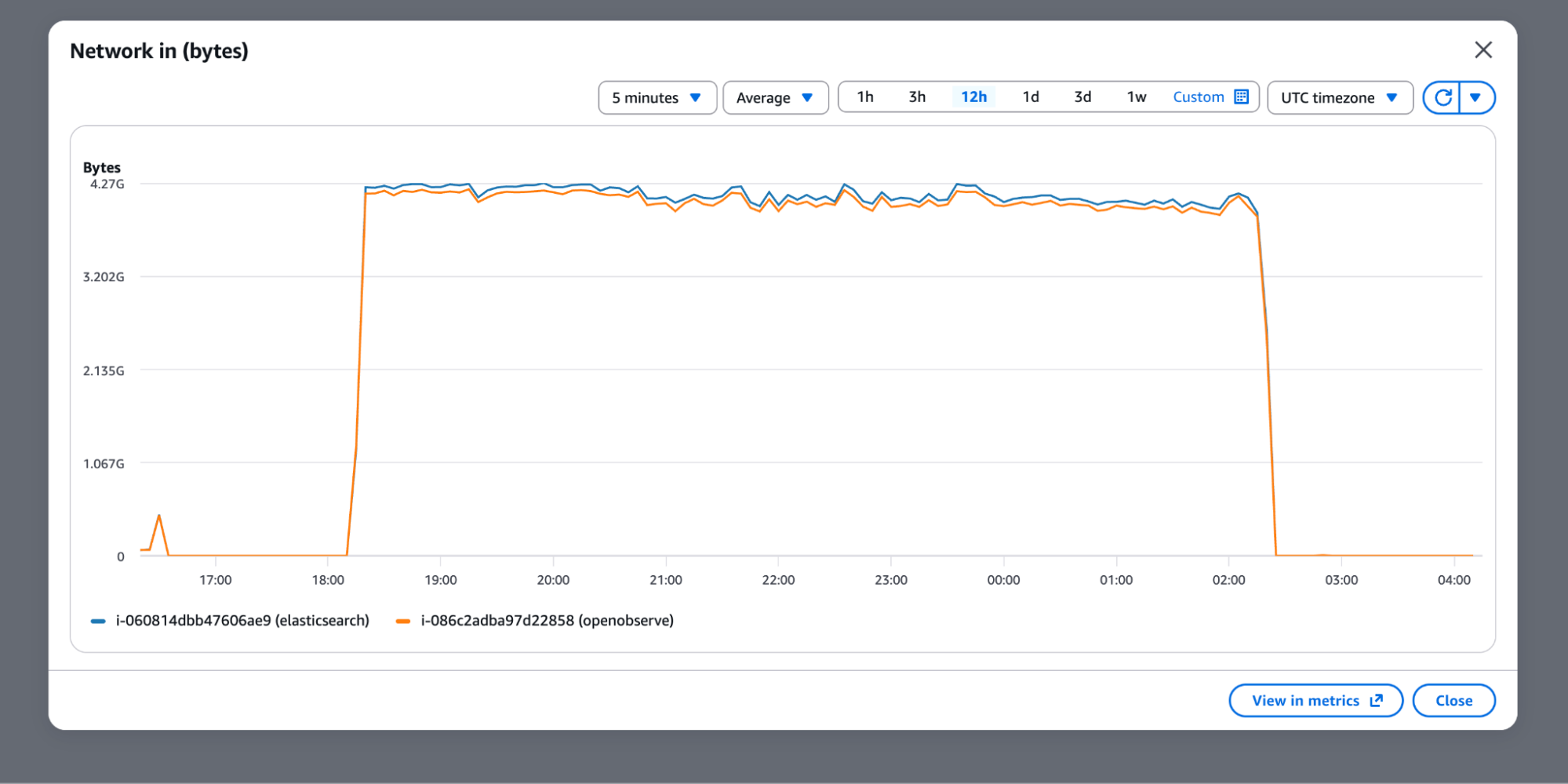
The disk write operations and network throughput charts confirm that both systems were receiving the same input - identical network ingress, but very different storage behavior:
Storage Headroom and Hardware Upgrade
Elasticsearch finished the storage benchmark using 375 GB of the 434 GB usable NVMe (86%), consuming roughly 8.3x more storage than OpenObserve per unit of raw data. For the ingestion speed and query benchmarks that followed, the Elasticsearch node was moved to an m7gd.4xlarge (16 vCPU, 950 GB NVMe). OpenObserve remained on the original r7gd.2xlarge throughout.
Part 6: Storage Cost Comparison
These numbers use a fair comparison: assume Elasticsearch accepts 100% of the data (ignoring the 62% drop rate from the real benchmark) and compare just the storage economics.
Assumptions:
- Elasticsearch: HA mode with 1 primary + 2 replicas = 3x replication on EBS (
$0.08/GB/month) - OpenObserve: Single copy on S3; AWS natively replicates across 3 AZs (
$0.023/GB/month) - Raw data: 1,122 GB
| Elasticsearch | OpenObserve | |
|---|---|---|
| Compression ratio | 1.14x | 9.5x |
| After compression | 984 GB | 118 GB |
| Replication | × 3 (HA) | × 1 (S3 native) |
| Total storage | 2,952 GB | 118 GB |
| Storage cost/month | $236.16 | $2.71 |
| Cost ratio | baseline | 87x cheaper |
At scale, storage cost is one of the largest line items in observability infrastructure, and an 87x gap on identical raw data reshapes the economics of running it.
Part 7: Query Performance
All queries used in this benchmark are available on GitHub: benchmark_queries.md
Elasticsearch kept its upgraded hardware for this test. OpenObserve stayed on the original r7gd.2xlarge, so the results below were produced on half the CPU. OpenObserve also held more data: 1.71 billion documents against Elasticsearch's 1.32 billion, so it scanned roughly 30% more rows per query.
Test environment:
| Component | Details |
|---|---|
| Elasticsearch | v8.19.16, m7gd.4xlarge (16 vCPU, 64 GB RAM, 950 GB NVMe) |
| OpenObserve | v0.90.3 Enterprise, r7gd.2xlarge (8 vCPU, 64 GB RAM, 474 GB NVMe) |
Full Results
| Query | Type | ES Cold | O2 Cold | Cold Winner | ES Warm | O2 Warm | Warm Winner |
|---|---|---|---|---|---|---|---|
| Q01 Filter-Namespace | Simple Filter | 5,549ms | 38ms | ✅ O2 146x | 46ms | 32ms | ✅ O2 1.4x |
| Q02 Filter-Container | Simple Filter | 67ms | 31ms | ✅ O2 2.2x | 47ms | 29ms | ✅ O2 1.6x |
| Q03 Filter-Host | Simple Filter | 56ms | 30ms | ✅ O2 1.9x | 62ms | 30ms | ✅ O2 2.1x |
| Q04 Filter-Stream | Simple Filter | 69ms | 30ms | ✅ O2 2.3x | 40ms | 30ms | ✅ O2 1.3x |
| Q05 Filter-Role | Simple Filter | 51ms | 30ms | ✅ O2 1.7x | 47ms | 30ms | ✅ O2 1.6x |
| Q06 FTS-Failed | Full Text Search | 748ms | 30ms | ✅ O2 24.9x | 498ms | 30ms | ✅ O2 16.6x |
| Q07 FTS-Connection | Full Text Search | 183ms | 31ms | ✅ O2 5.9x | 187ms | 30ms | ✅ O2 6.2x |
| Q08 FTS-Scrape | Full Text Search | 168ms | 30ms | ✅ O2 5.6x | 151ms | 31ms | ✅ O2 4.9x |
| Q09 Agg-Namespace | Aggregation | 3,134ms | 744ms | ✅ O2 4.2x | 3,305ms | 615ms | ✅ O2 5.4x |
| Q10 Agg-Container | Aggregation | 3,253ms | 737ms | ✅ O2 4.4x | 3,476ms | 612ms | ✅ O2 5.7x |
| Q11 Agg-Host | Aggregation | 21,239ms | 951ms | ✅ O2 22.3x | 21,590ms | 678ms | ✅ O2 31.8x |
| Q12 Filter+Agg | Combined | 722ms | 556ms | ✅ O2 1.3x | 812ms | 478ms | ✅ O2 1.7x |
| Q13 FTS+Filter | Combined | 480ms | 31ms | ✅ O2 15.5x | 455ms | 31ms | ✅ O2 14.7x |
| Q14 Count-All | Heavy | 35ms | 55ms | ✅ ES 1.6x | 36ms | 54ms | ✅ ES 1.5x |
| Q15 Agg-Role | Heavy | 3,544ms | 713ms | ✅ O2 5.0x | 3,568ms | 602ms | ✅ O2 5.9x |
Score: OpenObserve wins 14/15 on both cold and warm cache.
Summary by Query Type
| Query Type | ES Cold Avg | O2 Cold Avg | Cold Winner | ES Warm Avg | O2 Warm Avg | Warm Winner |
|---|---|---|---|---|---|---|
| Simple Filter | 1,158ms | 32ms | O2 36x | 48ms | 30ms | O2 1.6x |
| Full Text Search | 366ms | 30ms | O2 12x | 279ms | 30ms | O2 9.3x |
| Aggregation | 9,209ms | 811ms | O2 11x | 9,457ms | 635ms | O2 14.9x |
| Combined | 601ms | 294ms | O2 2x | 634ms | 255ms | O2 2.5x |
| Heavy | 1,790ms | 384ms | O2 4.7x | 1,802ms | 328ms | O2 5.5x |
Key Query Observations
Full text search is where the gap is most dramatic. OpenObserve's columnar storage with inverted index handles substring search 5-25x faster cold and 5-17x faster warm. The Q06 result (748ms vs 30ms cold) shows how badly ES struggles with match queries on large datasets at cold cache.
Aggregations are the other standout. Q11 (high-cardinality host field, 200 unique values) ran in 21 seconds on Elasticsearch. OpenObserve returned 951ms cold and 678ms warm. That's a 31.8x warm speedup for a query type that shows up constantly in real dashboards. Columnar format is purpose-built for GROUP BY operations.
ES aggregations show no caching benefit -warm times were nearly identical to cold (Q11: 21,239ms cold vs 21,590ms warm). ES result cache simply wasn't effective for these aggregation shapes. O2 showed clear improvement on warm cache across all aggregation queries.
Elasticsearch wins only COUNT(*). Pre-computed document counts give it a 1.5-1.6x edge on pure count queries. This is the one area where ES's inverted index architecture has a structural advantage.
Summary
| Metric | Elasticsearch | OpenObserve | Advantage |
|---|---|---|---|
| Storage compression | 1.14x | 9.5x | ✅ 8.3x better compression |
| Stored on disk | 375 GB | 118 GB | ✅ 3.2x smaller footprint |
| RAM (peak ingestion) | 19 GB | 1.9 GB | ✅ 10x less RAM |
| CPU sustained | 96% | 15% | ✅ 6x less CPU |
| Data accepted | 38% | 100% | ✅ 2.6x more data ingested |
| Schema flexibility | Manual mapping | Automatic | ✅ Zero config |
| Storage cost/month | $236.16 | $2.71 | ✅ 87x cheaper |
| Query performance | baseline | 14/15 queries faster | ✅ Clear winner |
| Ingestion speed | 71,300 ev/sec at ~57% CPU | 94,900 ev/sec at ~18% CPU | ✅ 2.7x per vCPU, ~8x per CPU used |
Workload Recommendations
| Workload | Recommended |
|---|---|
| Full text / substring search | OpenObserve (5-25x faster) |
| Aggregations / GROUP BY | OpenObserve (4-32x faster) |
| Simple field filters | OpenObserve (1.3-146x faster) |
| Combined FTS + filter | OpenObserve (15x faster) |
| COUNT(*) queries | Elasticsearch (1.5-1.6x faster) |
| K8s-format logs (mixed schema) | OpenObserve (ES drops 62%) |
| Cost-sensitive observability at scale | OpenObserve (87x cheaper storage) |
Conclusion
This benchmark started as a validation exercise. It ended up revealing something more significant than performance numbers: Elasticsearch has fundamental architectural mismatches with Kubernetes-format log workloads at scale.
The 62% document drop rate is structural. It is what happens when a row-oriented search engine with strict schema enforcement meets the schema variability inherent in Kubernetes-format logs, and no amount of tuning removes that. The 96% CPU during sustained ingestion means Elasticsearch is operating at the edge of its capacity on hardware that OpenObserve uses at 15%.
OpenObserve's columnar storage, automatic schema handling, and S3-native architecture produced order-of-magnitude differences on the metrics that matter most: storage cost, CPU headroom, RAM consumption, query latency on aggregations and full-text search, and whether the system reliably accepts all your data in the first place.
The one area where Elasticsearch retains an edge, COUNT(*) queries, is real but narrow (1.5-1.6x). For the overwhelming majority of log analytics workloads, the numbers in this report tell a clear story.
About the Author
Simran Kumari

Passionate about observability, AI systems, and cloud-native tools. All in on DevOps and improving the developer experience.
Follow OpenObserve on Google
Add OpenObserve as a preferred source to see more of our articles in Google Search and Top Stories.