How to Monitor OpenAI API Costs and Token Usage with OpenTelemetry




Ready to get started?
Try OpenObserve Cloud today for more efficient and performant observability.
TL;DR
- Capture
gen_ai.*semantic convention attributes on every OpenAI call: request model, input tokens, output tokens. Addfeature,user_id, andteamon every span so you can break down cost by who and what is spending. - Compute
gen_ai.usage.cost_usdfrom a pricing table you control and emit it as both a span attribute (for per-request drill-down) and a histogram metric (for aggregation and alerting). - Alert on cost anomalies relative to your historical baseline, not just static budget thresholds. Retry loops and runaway agents show up as deviations before they ever cross a daily spend limit.
Why OpenAI bills are impossible to predict without instrumentation
Running an LLM app in production without instrumentation is a slow way to find out your margins are negative. Token consumption is non-obvious: a single user with a verbose system prompt and long chat history can cost 20x more per interaction than an average user. A bug in a retry loop can 10x your daily spend in an hour. A single new feature that adds RAG context to every call can double your input token count overnight.
The OpenAI dashboard tells you what you spent yesterday. It does not tell you which feature, which user, which prompt template, or which model variant drove the spend. By the time you notice a cost spike in your billing dashboard, you have already paid for it.
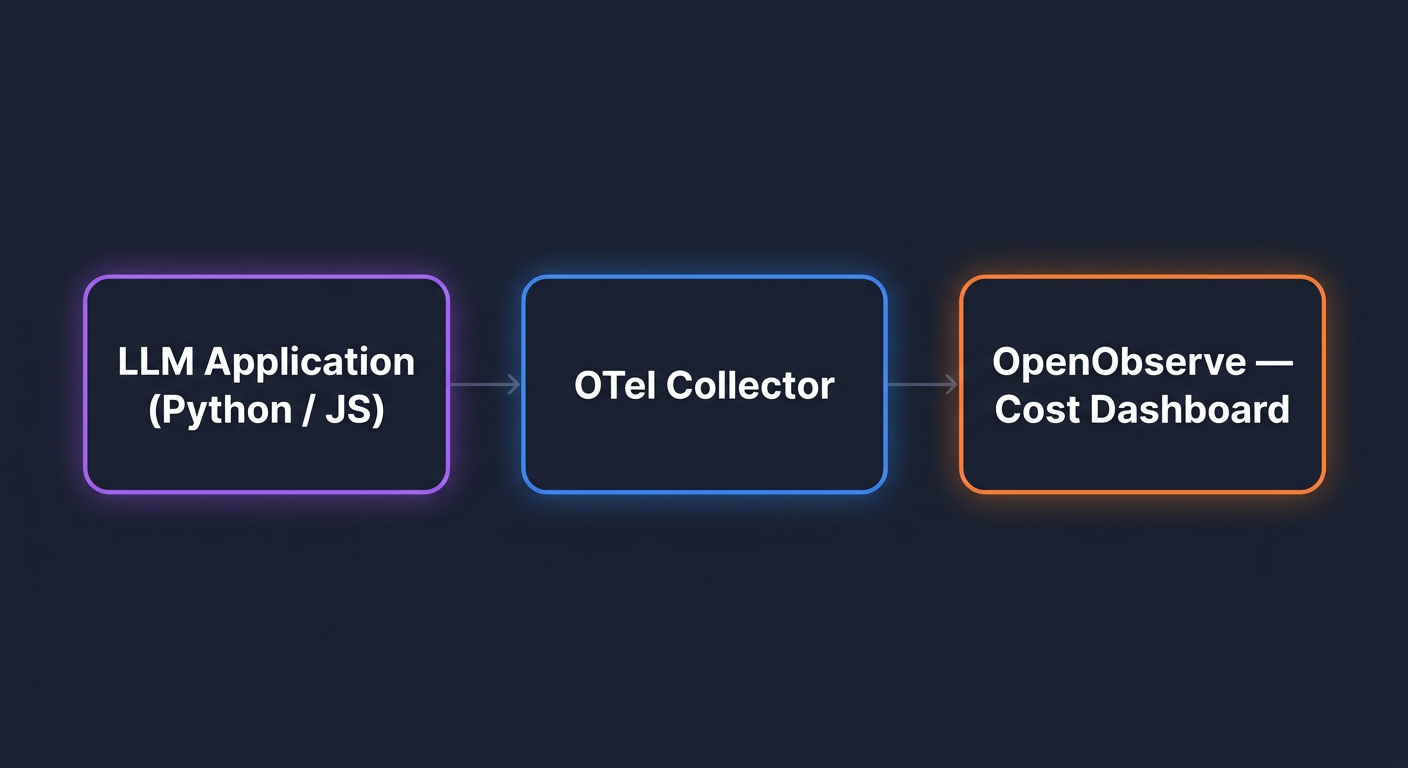
The fix is the same fix you use for any production system: emit structured telemetry at the point of the API call and make it queryable. OpenTelemetry gives you a vendor-neutral way to do this, and a growing set of GenAI-specific conventions means the fields you emit today will still be meaningful in two years. For a broader view of what good LLM observability looks like, see our guide on LLM monitoring best practices.
Quick start: Jump to the Python setup or Node.js setup if you just need the code.
The three signals you actually need to track
For LLM cost monitoring, three signals carry almost all the value:
- Token usage tells you how much capacity you consumed. Input tokens and output tokens, always separately, because they price differently.
- Cost is the dollar-denominated derivative of token usage. You compute it at emit time using a pricing table you control.
- Latency tells you how long users waited. For streaming endpoints, split this into time to first token and total duration.
Everything else (error rate, finish reason, response model) is useful context for these three. Start with the three and add context as you need it.
What OpenTelemetry's GenAI semantic conventions give you
OpenTelemetry has a dedicated set of semantic conventions for generative AI workloads, living under the gen_ai.* namespace. The point of conventions is that the same attribute names work across providers and observability backends, so your queries do not break when you swap from OpenAI to Anthropic or from one backend to another.
The attributes you will use most:
| Attribute | What it holds |
|---|---|
gen_ai.provider.name |
Provider name: openai |
gen_ai.request.model |
Model requested by your code: gpt-4o, gpt-4o-mini |
gen_ai.response.model |
Model the provider actually used (can differ if provider routes) |
gen_ai.operation.name |
chat, text_completion, embeddings |
gen_ai.usage.input_tokens |
Prompt tokens consumed |
gen_ai.usage.output_tokens |
Completion tokens generated |
gen_ai.request.temperature |
Temperature parameter (useful when debugging determinism) |
gen_ai.request.max_tokens |
Max tokens parameter |
gen_ai.response.finish_reasons |
Why the model stopped: stop, length, content_filter |
One attribute worth noting: gen_ai.system has been renamed to gen_ai.provider.name in the current OTel GenAI spec. Most instrumentation libraries still emit gen_ai.system today. Your backend should accept both until library adoption catches up.
Instrumenting a Python app with the official OTel OpenAI SDK
This guide uses opentelemetry-instrumentation-openai-v2, the official OTel package maintained in opentelemetry-python-contrib. It follows the GenAI semantic conventions closely and is the right choice for OpenAI instrumentation.
Install the three packages
pip install opentelemetry-distro
pip install opentelemetry-exporter-otlp
pip install opentelemetry-instrumentation-openai-v2
Then run the bootstrap command once to install auto-instrumentation for any other libraries in your app (Flask, FastAPI, requests, and so on):
opentelemetry-bootstrap --action=install
Set the OTLP endpoint for OpenObserve
Grab your OTLP HTTP endpoint and Authorization header from the OpenObserve UI under Data Sources -> Traces (OpenTelemetry) -> OTLP HTTP. Set these environment variables:
export OTEL_SERVICE_NAME=my-llm-app
export OTEL_EXPORTER_OTLP_ENDPOINT="https://api.openobserve.ai/api/<your-org>"
export OTEL_EXPORTER_OTLP_HEADERS="Authorization=Basic <your-auth-token>"
export OTEL_EXPORTER_OTLP_PROTOCOL=http/protobuf
export OTEL_PYTHON_LOGGING_AUTO_INSTRUMENTATION_ENABLED=true
If you are self-hosting OpenObserve, the endpoint is typically http://localhost:5080/api/<your-org>.
Run with opentelemetry-instrument
Wrap your existing run command:
opentelemetry-instrument python app.py
No code changes to app.py. The OpenAI SDK is wrapped at import time, and every chat.completions.create call emits a span with the gen_ai.* attributes populated.
A minimal example app
# app.py
import os
from openai import OpenAI

client = OpenAI()

resp = client.chat.completions.create(
    model="gpt-4o-mini",
    messages=[{"role": "user", "content": "Summarize observability in one sentence."}],
)

print(resp.choices[0].message.content)
print("Input tokens:", resp.usage.prompt_tokens)
print("Output tokens:", resp.usage.completion_tokens)
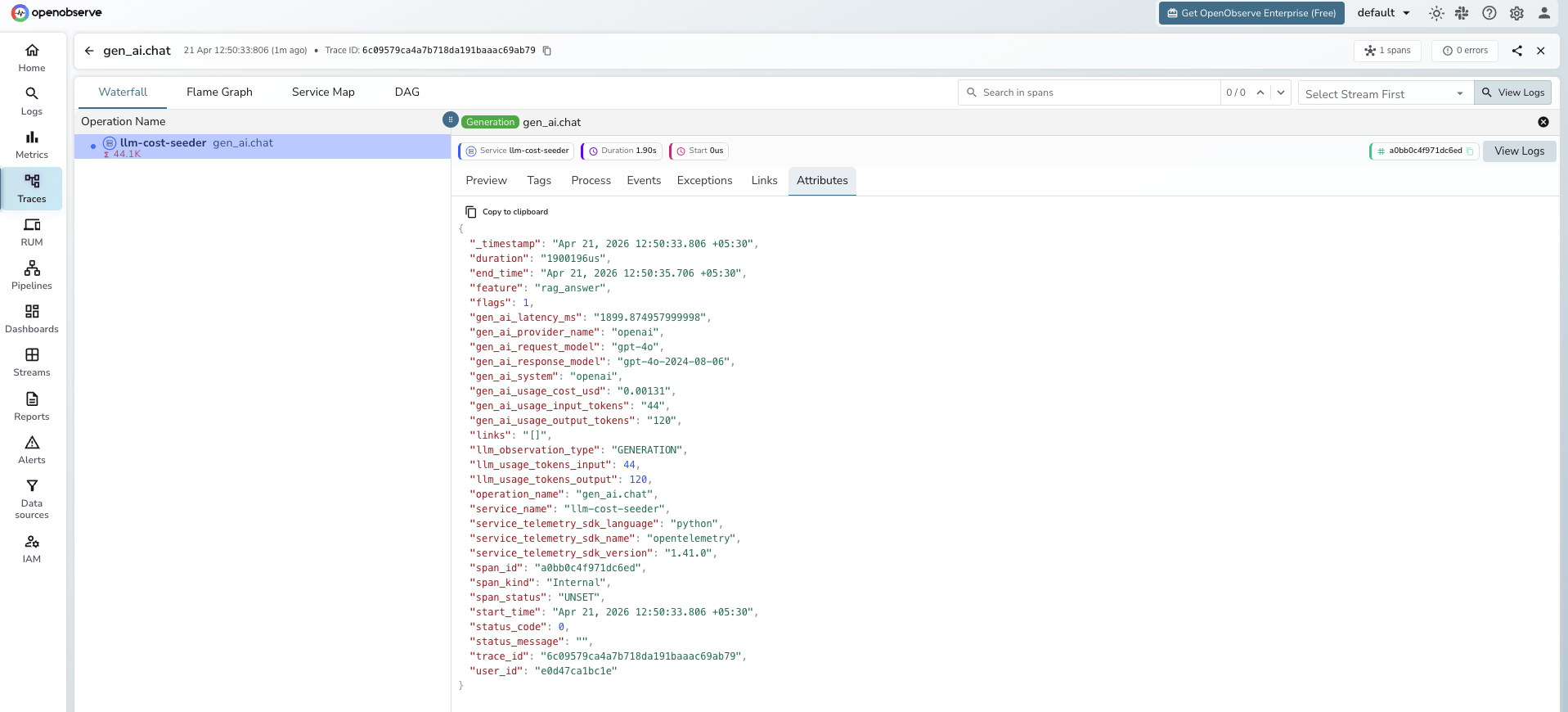
Run it with opentelemetry-instrument python app.py and check the Traces tab in OpenObserve. You should see a span named chat gpt-4o-mini with the token counts attached.
Capturing message content (and the privacy tradeoff)
The instrumentation does not capture the prompt or completion text by default. To enable it:
export OTEL_INSTRUMENTATION_GENAI_CAPTURE_MESSAGE_CONTENT=true
This ships the full prompt and completion as log events. It is useful for debugging but has real privacy implications: you are now logging whatever your users typed, including anything they pasted in. If your app handles regulated data (health, finance, anything under GDPR or HIPAA), do not enable this globally. Enable it per-environment or per-feature flag, and scrub sensitive fields before the exporter sees them.
Instrumenting a Node.js app
For Node.js, the pattern is the same. Install the packages:
npm install @opentelemetry/api \
  @opentelemetry/sdk-node \
  @opentelemetry/exporter-trace-otlp-http \
  @opentelemetry/instrumentation-openai
Create a tracing.js bootstrap file:
// tracing.js
const { NodeSDK } = require('@opentelemetry/sdk-node');
const { OTLPTraceExporter } = require('@opentelemetry/exporter-trace-otlp-http');
const { OpenAIInstrumentation } = require('@opentelemetry/instrumentation-openai');
const { Resource } = require('@opentelemetry/resources');

const sdk = new NodeSDK({
  resource: new Resource({
    'service.name': 'my-llm-app-node',
    'deployment.environment': process.env.NODE_ENV || 'development',
  }),
  traceExporter: new OTLPTraceExporter({
    url: `${process.env.OTEL_EXPORTER_OTLP_ENDPOINT}/v1/traces`,
    headers: {
      Authorization: process.env.OTEL_EXPORTER_OTLP_HEADERS,
    },
  }),
  instrumentations: [new OpenAIInstrumentation()],
});

sdk.start();
Then preload it when you run your app:
node --require ./tracing.js app.js
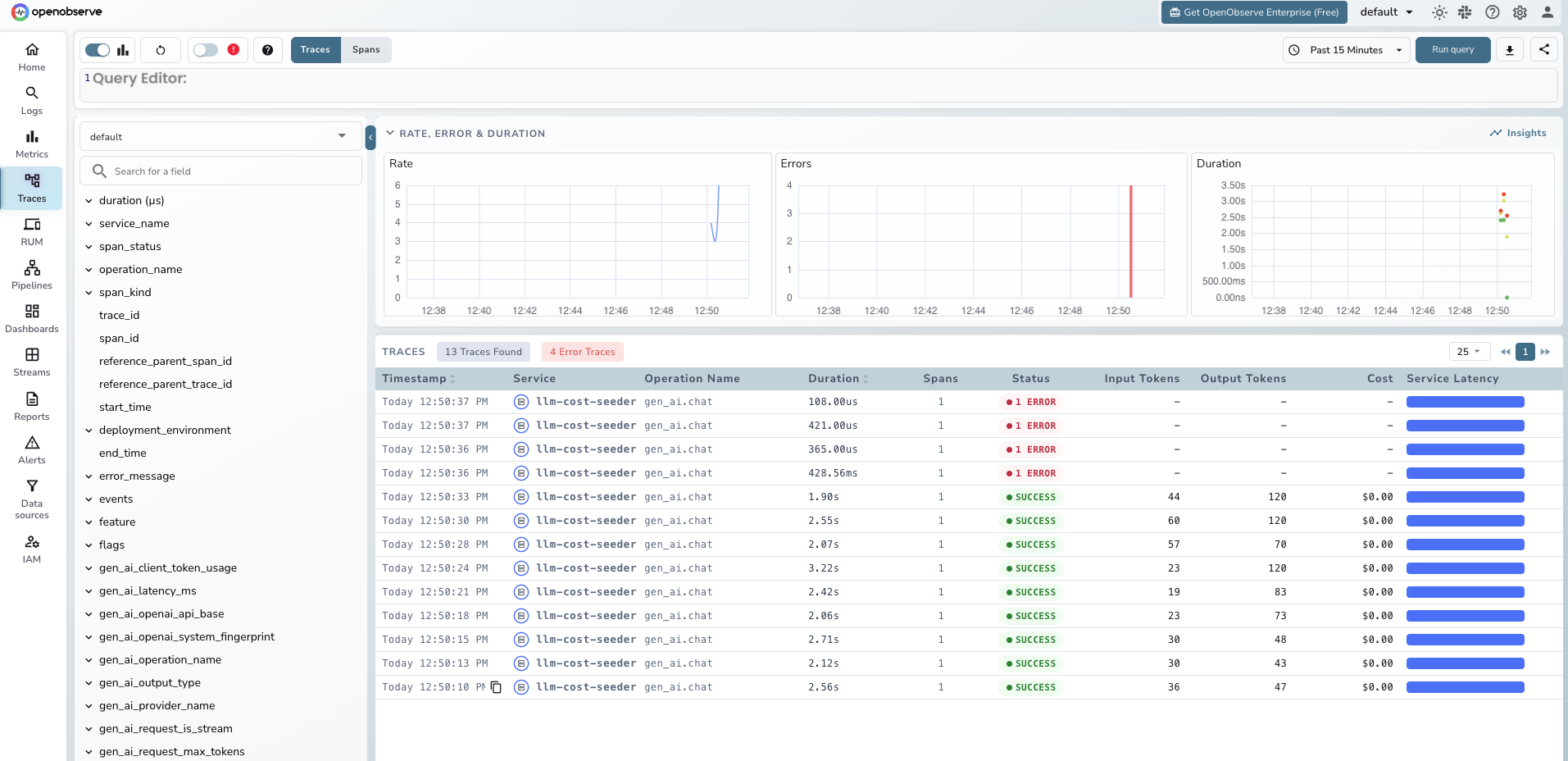
Same result: every OpenAI call produces a span in OpenObserve with the GenAI attributes populated.
Building a cost calculation layer
OpenAI's SDK gives you token counts. It does not give you dollars. You have to multiply tokens by a price, and that price changes. Build this as a small, updatable module.
Pricing table as code
Keep this in source control. Review it every quarter, or every time a provider announces a price change.
# pricing.py
# Prices in USD per 1 million tokens, as of April 2026.
# Verify against provider pricing pages before each release.

MODEL_PRICING = {
    "gpt-4o":      {"input": 2.50,  "output": 10.00},
    "gpt-4o-mini": {"input": 0.15,  "output": 0.60},
    "o1":          {"input": 15.00, "output": 60.00},
    "o1-mini":     {"input": 3.00,  "output": 12.00},
}


def calculate_cost(model: str, input_tokens: int, output_tokens: int) -> float:
    """Return the estimated cost in USD for a single LLM call."""
    pricing = MODEL_PRICING.get(model)
    if not pricing:
        # Unknown model. Emit 0 and alert separately so you can add pricing.
        return 0.0
    input_cost = (input_tokens / 1_000_000) * pricing["input"]
    output_cost = (output_tokens / 1_000_000) * pricing["output"]
    return round(input_cost + output_cost, 6)
Emitting cost as a custom metric
The official -v2 package does not emit cost, only tokens. Add cost yourself with a thin wrapper that runs after each call:
# tracked_llm.py
import time
from opentelemetry import trace, metrics
from openai import OpenAI
from pricing import calculate_cost

tracer = trace.get_tracer("llm-cost")
meter = metrics.get_meter("llm-cost")

cost_histogram = meter.create_histogram(
    name="gen_ai.usage.cost_usd",
    description="Estimated cost of a single LLM call in USD",
    unit="USD",
)

client = OpenAI()


def tracked_chat(messages, model="gpt-4o-mini", feature="unknown", user_id="anon"):
    with tracer.start_as_current_span("gen_ai.chat") as span:
        span.set_attribute("gen_ai.provider.name", "openai")
        span.set_attribute("gen_ai.request.model", model)
        span.set_attribute("feature", feature)
        span.set_attribute("user_id", user_id)

        start = time.perf_counter()
        response = client.chat.completions.create(model=model, messages=messages)
        elapsed_ms = (time.perf_counter() - start) * 1000

        input_tokens = response.usage.prompt_tokens
        output_tokens = response.usage.completion_tokens
        cost = calculate_cost(model, input_tokens, output_tokens)

        # Span attributes for per-request investigation
        span.set_attribute("gen_ai.usage.input_tokens", input_tokens)
        span.set_attribute("gen_ai.usage.output_tokens", output_tokens)
        span.set_attribute("gen_ai.usage.cost_usd", cost)
        span.set_attribute("gen_ai.latency.duration_ms", elapsed_ms)
        span.set_attribute("gen_ai.response.model", response.model)

        # Metric for aggregation
        cost_histogram.record(cost, {
            "gen_ai.provider.name": "openai",
            "gen_ai.request.model": model,
            "feature": feature,
            "user_id": user_id,
        })

        return response
You now have cost on the span (for drill-down) and cost as a metric (for aggregation, alerting, and dashboards). Both are labeled with feature so you can break them down later.
Attributing cost to users, features, and teams
This is the section most readers came for. Raw token counts do not answer "who is spending our money." Attribution does.
Adding attributes on every span
Every LLM call should carry four attribution dimensions:
feature: which product path triggered the call (document_summary,chat_reply,rag_answer)user_id: hashed user identifier for per-user rollupsteam: which internal team or product area owns the featureenvironment:prod,staging,dev
Wire them through as keyword arguments on your wrapper:
result = tracked_chat(
    messages=[{"role": "user", "content": prompt}],
    model="gpt-4o",
    feature="document_summary",
    user_id=hashed_user_id,
)
Building the cost attribution dashboard
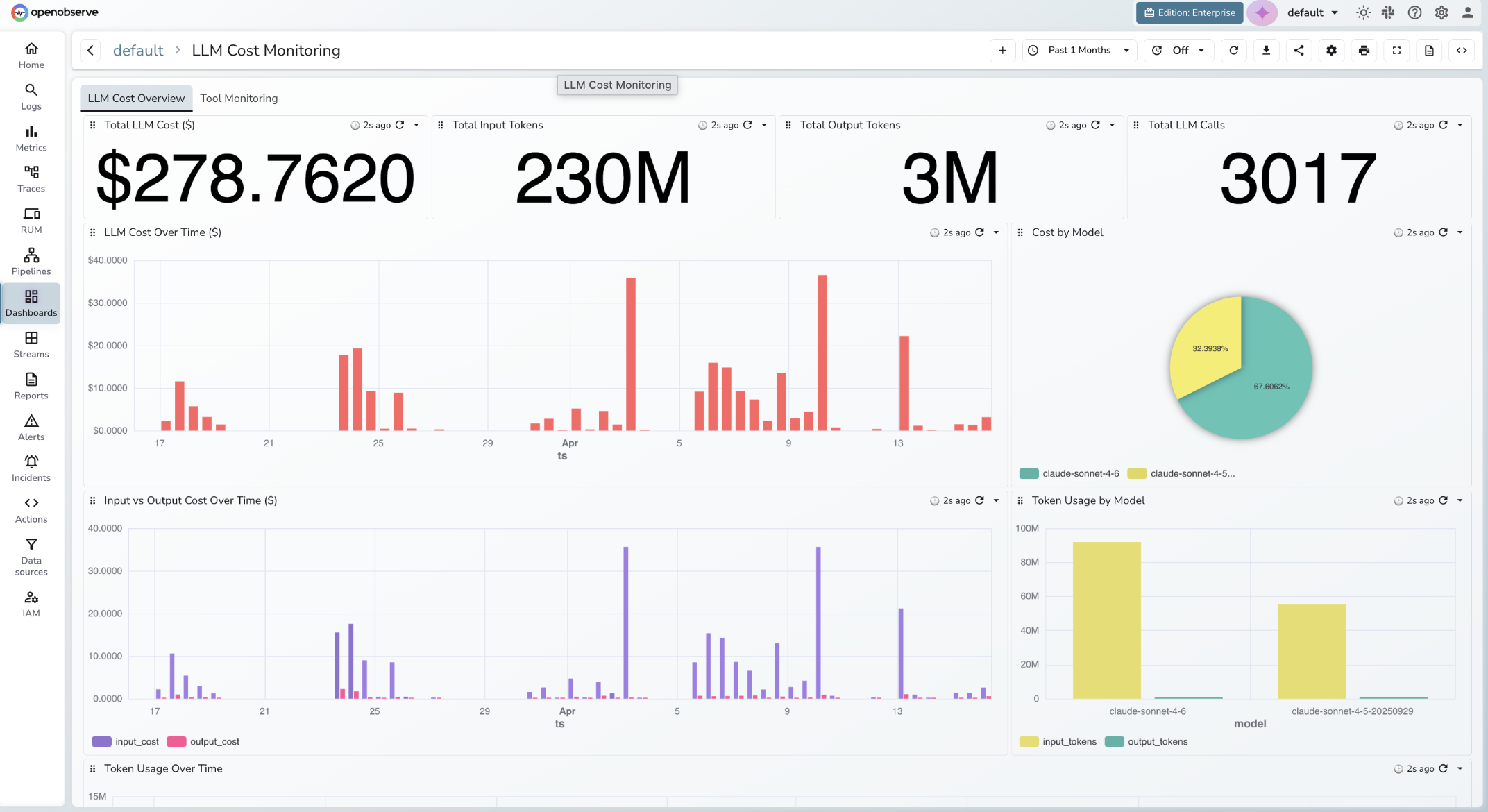
A complete LLM cost dashboard covers two concerns: spend attribution and token efficiency. Organize it across two tabs.
Tab 1: LLM Cost Overview
Four single-stat tiles at the top give you the headline numbers at a glance: Total LLM Cost ($), Total Input Tokens, Total Output Tokens, and Total LLM Calls. These are the first things you check when something looks off.
Below the tiles:
- LLM Cost Over Time ($): bar chart over the selected time range. Reveals bursty spend patterns and days that are trending above baseline.
- Cost by Model: pie chart, one slice per
gen_ai.request.model. Shows your model mix and whether a cheaper model is handling the bulk of traffic. - Input vs Output Cost Over Time ($): grouped bar chart with two series,
input_costandoutput_cost. Output tokens cost 3-4x more than input tokens on most models; this panel tells you which side is driving cost growth. - Token Usage by Model: grouped bar chart of
input_tokensandoutput_tokensper model. Cross-reference this with Cost by Model to spot models that are expensive relative to their token volume. - Token Usage Over Time: time series of token counts. Useful for capacity planning and catching prompt inflation.
Tab 2: Tool Monitoring
If your application uses function calling or tool use, track it separately. Tool calls are often the highest-cost path because they trigger multi-turn completions. Panels here should cover tool call volume by tool name, cost per tool invocation, and error rate.
Alerting on cost anomalies and rate-limit errors
Static budget thresholds are table stakes. The interesting failures are the ones that do not cross a static threshold until it is too late.
Threshold alerts vs anomaly detection
A threshold alert fires when daily spend exceeds $500. It works for the blunt cases. It misses three common failure modes:
- A retry loop that 3x's a specific feature's token usage in an hour. The daily threshold may still be fine by end of day, but you paid 3x for that hour.
- A prompt injection that triggers a long runaway completion on a single request, burning 100k output tokens in one call.
- Seasonal growth that quietly pushes baseline from $300/day to $600/day over a month, outpacing capacity plans.
Anomaly detection catches all three by comparing current behavior to historical baseline rather than to a fixed number. For a deep dive on how this works in practice, see our AI anomaly detection guide, which walks through a runaway LLM cost scenario specifically.
A daily budget threshold
Set this first. In OpenObserve, create an alert on the gen_ai.usage.cost_usd metric:
- Trigger:
SUM(gen_ai_usage_cost_usd)over24his greater than500 - Evaluation frequency: every 5 minutes
- Action: Slack or PagerDuty, routed to the LLM-platform team
An anomaly-based alert for cost spikes
This is more valuable. Create an anomaly alert on gen_ai.usage.cost_usd grouped by feature, with a training window of the last 14 days and a sensitivity tuned to catch 3x deviations. A retry loop in the document_summary feature shows up in minutes, before it hits your daily threshold.
Alert on rate-limit errors (HTTP 429)
When OpenAI rate-limits you, downstream calls fail and retries pile up. Fire an alert when gen_ai.response.error.type = rate_limit_exceeded exceeds a low threshold (say, 5 in 5 minutes). This usually surfaces a runaway loop before a cost anomaly does.
Alerts are what turn passive observability into active cost control. Without them, you are checking dashboards manually, which means you find out about a runaway loop after it has already doubled your bill. A well-configured alert on gen_ai.usage.cost_usd catches the spike within minutes, before it becomes a billing surprise. For a step-by-step walkthrough of how to configure alerts in OpenObserve, including conditions, evaluation windows, and notification destinations, see Alerting 101: From Concept to Demo.
Reconciling estimated cost with the OpenAI billing API
Your OTel-derived cost is an estimate. It is usually within a couple of percent, but it drifts from the real bill for three reasons:
- Cached input tokens. Repeat prompts are billed at a discount. Your naive pricing math assumes full price.
- Reasoning tokens.
o1and similar models emit internal reasoning tokens that count toward billing but may not appear in the standardusageobject. - Batch API discounts. If you use the async batch endpoint, those requests are priced lower.
Reconcile monthly. Pull the OpenAI usage endpoint and compare total cost for the window against your OTel sum. If the drift is more than 5 percent, dig in and adjust your pricing table. This is the pattern production teams use: OTel for real-time signal, billing API for ground truth.
If you are new to the OpenTelemetry Collector itself and want the broader context on how data flows from your app to a backend, the walkthrough in our distributed tracing guide covers the fundamentals.
Measuring time to first token for streaming
For chat UIs, users feel time to first token (TTFT), not total duration. If you use streaming responses, capture it:
import time

def stream_with_ttft(messages, model="gpt-4o"):
    with tracer.start_as_current_span("gen_ai.chat") as span:
        span.set_attribute("gen_ai.provider.name", "openai")
        span.set_attribute("gen_ai.request.model", model)
        span.set_attribute("gen_ai.response.streaming", True)

        start = time.perf_counter()
        ttft_ms = None

        stream = client.chat.completions.create(
            model=model,
            messages=messages,
            stream=True,
        )

        chunks = []
        for chunk in stream:
            if ttft_ms is None and chunk.choices[0].delta.content:
                ttft_ms = (time.perf_counter() - start) * 1000
                span.set_attribute("gen_ai.latency.ttft_ms", ttft_ms)
            chunks.append(chunk)

        total_ms = (time.perf_counter() - start) * 1000
        span.set_attribute("gen_ai.latency.duration_ms", total_ms)
        return chunks
Now you can alert on TTFT regressions separately from total-duration regressions.
Production checklist
Before shipping this to prod:
- Retention policy set on your LLM telemetry stream. Full prompt/completion content (if captured) has different retention needs than raw token counts.
- PII scrubbing pipeline in place if
OTEL_INSTRUMENTATION_GENAI_CAPTURE_MESSAGE_CONTENT=true. Do not rely on "we probably don't have PII." - Sampling strategy decided. Head-based sampling at 100% for LLM spans is usually fine (they are low-volume and high-value). Do not aggressively sample LLM spans the way you might sample DB queries.
- Pricing table in source control with a quarterly review reminder.
- Budget threshold alert and at least one anomaly-based alert configured.
- Monthly reconciliation against the OpenAI billing API scheduled.
Send your LLM telemetry to OpenObserve
OpenObserve is an open-source observability platform that accepts standard OTLP over HTTP and gRPC. There is no proprietary SDK to adopt and no special instrumentation to learn. Point your OTLP exporter at OpenObserve Cloud or a self-hosted instance, and your LLM spans, logs, and metrics land in the same place as your infrastructure telemetry, ready to query, dashboard, and alert on.
If you want to see this working end to end without setting up a server, spin up a free account at OpenObserve Cloud or read the LLM Observability overview for the product view.
Further reading
Frequently Asked Questions
About the Author
Gorakhnath Yadav


Gorakhnath is a passionate developer advocate, working on bridging the gap between developers and the tools they use. He focuses on building communities and creating content that empowers developers to build better software.
Follow OpenObserve on Google
Add OpenObserve as a preferred source to see more of our articles in Google Search and Top Stories.