How to Monitor AI Agents in Production




Ready to get started?
Try OpenObserve Cloud today for more efficient and performant observability.
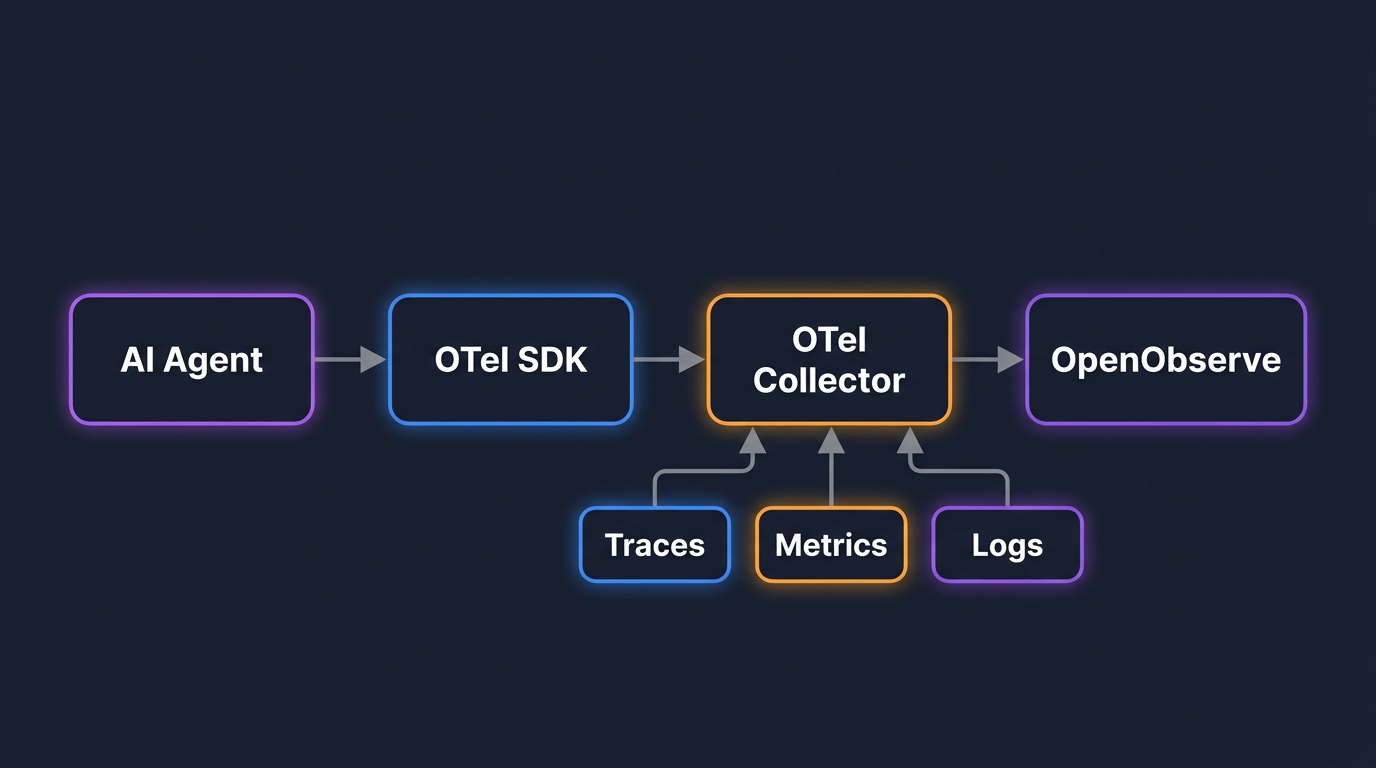
TLDR
- Monitoring AI agents in production requires distributed tracing: a single user request fans out into 10 or more internal operations, and logs alone cannot show you which step is slow, failing, or burning your token budget.
- OpenTelemetry's
gen_ai.*semantic conventions give you standardized span attributes for LLM calls, tool invocations, and agent steps. Some are stable today; others are still experimental. - Auto-instrumentation libraries (OpenLLMetry, OpenInference, OpenLIT) cover most agent frameworks with two to three lines of initialization code. You do not change your agent code.
- Traces ship to OpenObserve over OTLP. From there you get SQL-queryable trace data, token usage dashboards, cost attribution by agent and model, and alerting on latency and cost anomalies.
- OpenObserve also exposes an MCP server. You can query your live agent traces from a Claude or GPT session without opening a dashboard.
Why Agents Are Harder to Monitor Than a Single LLM Call
A single LLM call is straightforward to observe. One HTTP request, one response, one latency number. You can log the input and output and call it done.
An agent is different. When a user sends a message, the agent calls an LLM to decide what to do, invokes a tool, processes the result, calls the LLM again, possibly calls another tool, and eventually returns a response. That one user message becomes ten or more internal operations. Some of those operations call external APIs. Some retry. Some spawn sub-agents.
Without distributed tracing, you see none of this structure. You know the response took 8 seconds. You do not know whether the LLM took 7 of those seconds or whether a tool made three retries before timing out.
Four categories of problems appear in production agents that you cannot debug without traces:
- Latency. Which step is slow? The LLM call? The tool execution? A retry loop the agent entered because the tool returned ambiguous output?
- Cost. Which agent, which task, which model is consuming tokens? A single misconfigured prompt can bloat your monthly bill.
- Failures. Did the tool fail silently and return an empty result? Did the agent exhaust its step limit and return to a fallback?
- Quality. Did the agent complete the task, or did it reason its way to a confident-sounding wrong answer?
Distributed tracing gives you a complete record of every operation, in order, with timing and attributes. That record is what makes these questions answerable.
The OTel Data Model for AI Agents
OpenTelemetry's GenAI semantic conventions define a standard set of span attributes for AI workloads. The stable attributes you can build on today:
| Attribute | What it captures |
|---|---|
gen_ai.system |
LLM provider: openai, anthropic, cohere |
gen_ai.operation.name |
Operation type: chat, embeddings, text_completion |
gen_ai.request.model |
Model name: gpt-4o, claude-3-5-sonnet-20241022 |
gen_ai.usage.input_tokens |
Tokens consumed by the prompt |
gen_ai.usage.output_tokens |
Tokens in the model response |
gen_ai.response.finish_reasons |
Why the model stopped: stop, tool_calls, length |
For agent-specific spans, the conventions extend to gen_ai.agent.name, gen_ai.agent.description, gen_ai.tool.name, and gen_ai.tool.description. These are still marked experimental as of early 2026 but are already implemented by the major instrumentation libraries and are stable enough to use in production.
For a full breakdown of what OpenTelemetry captures for LLM workloads, including how SRE teams use the three signal types together, see OpenTelemetry for LLMs: Complete SRE Guide.
Spans: LLM calls, tool invocations, and agent steps
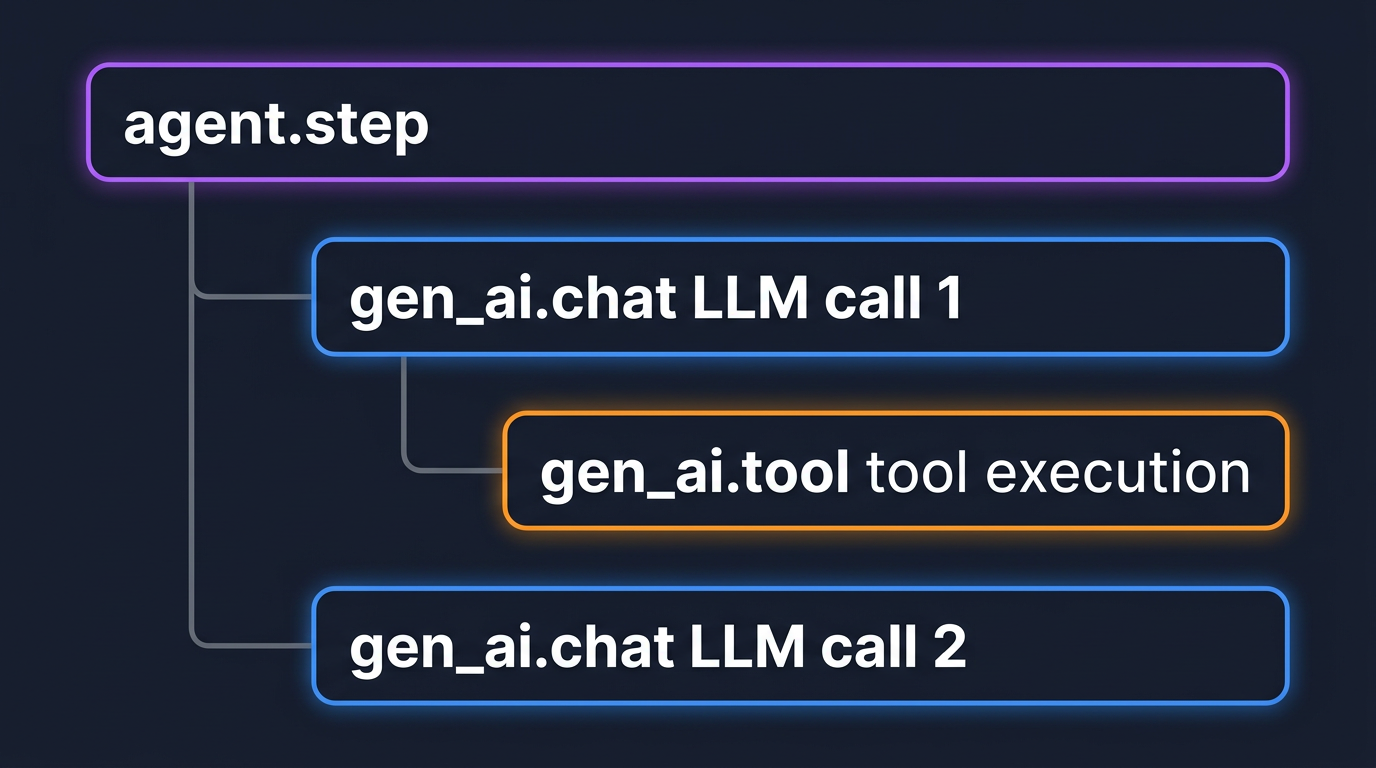
Every significant operation in an agent's lifecycle becomes a span:
gen_ai.chat: wraps a single LLM API call. Carries model name, token counts, and finish reason.gen_ai.tool: wraps a single tool invocation. Child of the LLM call span that requested it.agent.step: wraps one full reasoning cycle. Parent of all LLM and tool spans within that cycle.
Events vs. attributes for prompt and response content
Prompt and completion content is large. Storing it as span attributes inflates trace payloads and storage costs. The OTel GenAI convention puts prompt and completion content into span events (typed gen_ai.content.prompt and gen_ai.content.completion) rather than attributes. Events attach to the span but are stored separately, keeping the attribute payload small while preserving full content for debugging.
In practice: leave content capture enabled during development. Before shipping to production, disable it at the application level or route it through the Collector for redaction.
Trace context propagation across agent boundaries
When an orchestrator delegates to a worker agent, the worker's spans need to appear under the same root trace. For HTTP-based delegation, include the W3C traceparent header in the outgoing request and extract it in the worker. For in-process delegation (LangGraph node transitions, OpenAI Agents SDK handoffs), auto-instrumentation handles this automatically.
Picking Your Auto-Instrumentation Library
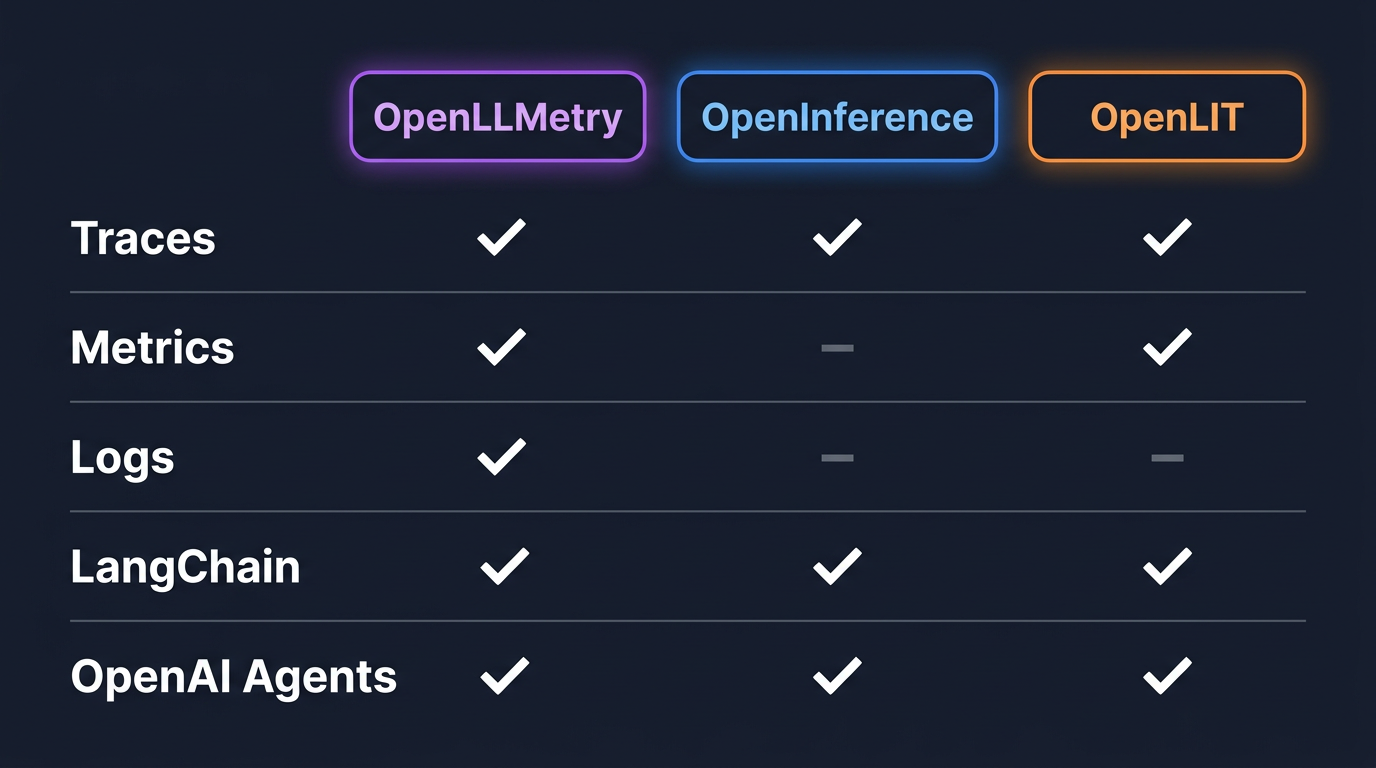
Three libraries sit between your agent code and the OTel SDK. The examples in this blog use LangChain and the OpenAI Agents SDK, both supported by all three libraries. For support across other frameworks (CrewAI, AutoGen, DSPy, and more), check each library's docs.
| Library | Signals | LangChain | OpenAI Agents | Config overhead |
|---|---|---|---|---|
OpenLLMetry (traceloop-sdk) |
Traces + Metrics + Logs | Yes | Yes | Medium |
| OpenInference | Traces only | Yes | Yes | Low |
| OpenLIT | Traces + Metrics | Yes | Yes | Minimal |
OpenLLMetry captures the most signals and covers the widest framework catalog. OpenLIT is the easiest entry point: one import, one function call. OpenInference is traces-only but has the closest alignment with OTel GenAI semantic conventions.
For teams starting out: use OpenLLMetry. For teams already running an OTel SDK setup: use the official opentelemetry-instrumentation-* packages from opentelemetry-python-contrib, which include opentelemetry-instrumentation-langchain and opentelemetry-instrumentation-openai-agents-v2.
For a full walkthrough of OpenLIT with OpenObserve, including pre-built dashboards for GPU and vector database monitoring, see LLM Observability for AI Applications with OpenObserve and OpenLIT.
For a broader comparison of open-source LLM observability tooling, see Top Open Source LLM Observability Tools.
Example 1: Instrumenting a LangChain Agent
The following examples use LangChain and the OpenAI Agents SDK. The instrumentation pattern is the same for virtually every other agent framework: install a library, initialize before importing framework classes, point the exporter at your backend.
LangChain's current recommended approach for building agents uses LangGraph as the execution runtime. The opentelemetry-instrumentation-langchain package instruments both.
Install:
pip install opentelemetry-sdk \
    opentelemetry-exporter-otlp-proto-http \
    opentelemetry-instrumentation-openai \
    langgraph langchain-openai
Initialize before any LangChain imports:
from opentelemetry.sdk.trace import TracerProvider
from opentelemetry.sdk.trace.export import BatchSpanProcessor
from opentelemetry.exporter.otlp.proto.http.trace_exporter import OTLPSpanExporter
from opentelemetry.instrumentation.openai import OpenAIInstrumentor

exporter = OTLPSpanExporter(
    endpoint="<your-openobserve-otlp-endpoint>",
    headers={
        "Authorization": "Basic <base64(email:password)>",
        "stream-name": "default",
    },
)

provider = TracerProvider()
provider.add_span_processor(BatchSpanProcessor(exporter))

OpenAIInstrumentor().instrument(tracer_provider=provider)
Note:
opentelemetry-instrumentation-langchainhas a known compatibility issue with current LangGraph versions.OpenAIInstrumentorcovers the spans that matter: LLM calls with token counts, model name, and finish reason. LangChain graph-level spans can be added manually if needed.
A simple ReAct agent with a tool:
from langchain.agents import create_react_agent
from langchain_openai import ChatOpenAI
from langchain_core.tools import tool

@tool
def get_stock_price(ticker: str) -> str:
    """Get the current stock price for a ticker symbol."""
    # Replace with your actual data source
    return f"{ticker}: $142.50"

llm = ChatOpenAI(model="gpt-4o-mini")
agent = create_react_agent(llm, [get_stock_price])

result = agent.invoke({
    "messages": [{"role": "user", "content": "What is the price of AAPL?"}]
})
You did not add a single line to the agent code. The instrumentation wraps LangChain's framework classes at import time and emits spans for every LLM call and tool invocation.
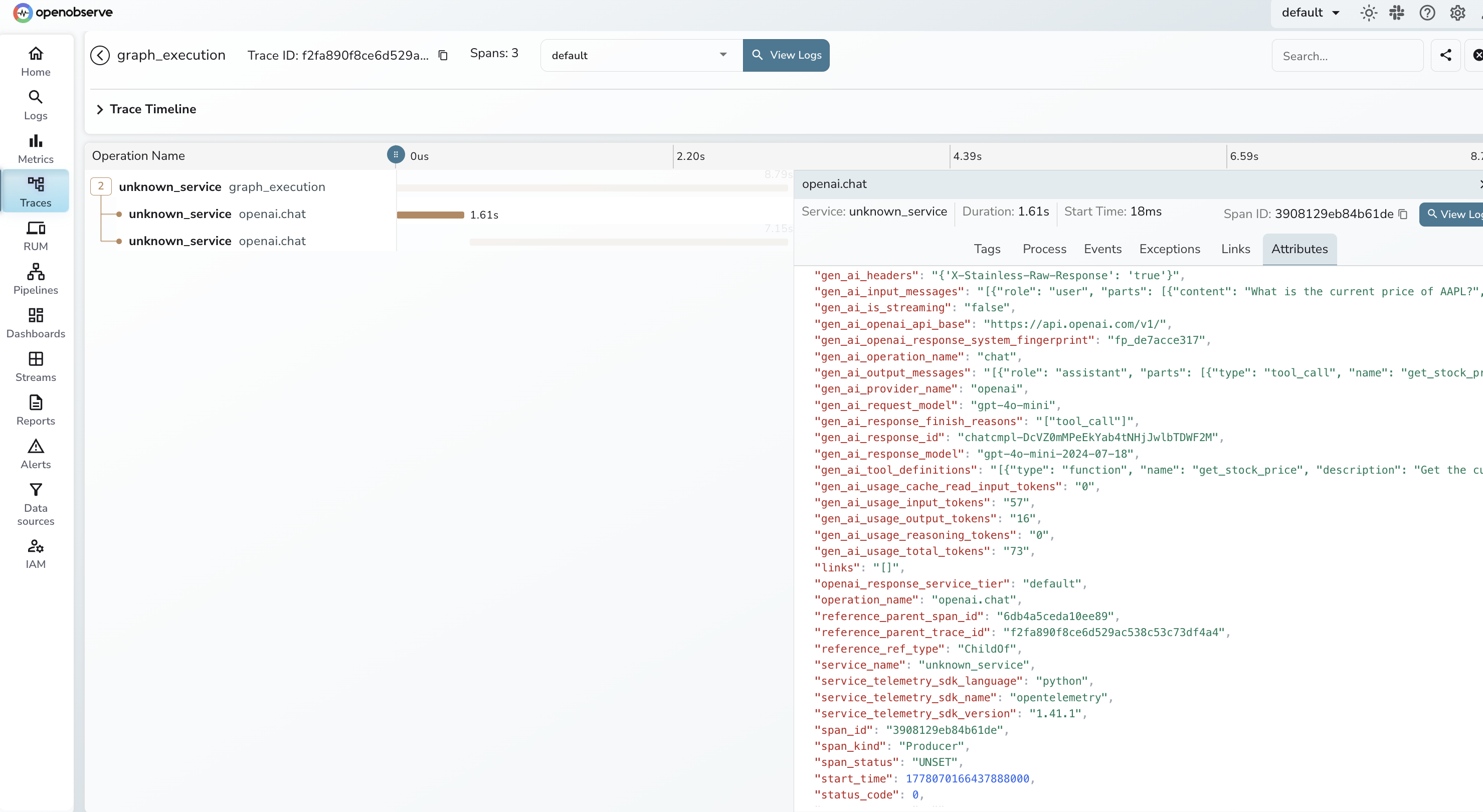
What you get in OpenObserve:
- Root span for the graph execution
- One child span per LLM call with
gen_ai.request.model,gen_ai.usage.input_tokens, andgen_ai.usage.output_tokens - One child span per tool invocation with the tool name and execution result
- Wall clock timing on every span
By default, prompt and completion content is captured. Disable it for production:
OTEL_INSTRUMENTATION_GENAI_CAPTURE_MESSAGE_CONTENT=no_content
Example 2: Instrumenting an OpenAI Agents SDK App
Install:
pip install opentelemetry-sdk \
    opentelemetry-exporter-otlp-proto-http \
    opentelemetry-instrumentation-openai-agents \
    openai-agents
Initialize:
from opentelemetry.sdk.trace import TracerProvider
from opentelemetry.sdk.trace.export import BatchSpanProcessor
from opentelemetry.exporter.otlp.proto.http.trace_exporter import OTLPSpanExporter
from opentelemetry.instrumentation.openai_agents import OpenAIAgentsInstrumentor

exporter = OTLPSpanExporter(
    endpoint="<your-openobserve-otlp-endpoint>",
    headers={
        "Authorization": "Basic <base64(email:password)>",
        "stream-name": "default",
    },
)

provider = TracerProvider()
provider.add_span_processor(BatchSpanProcessor(exporter))
OpenAIAgentsInstrumentor().instrument(tracer_provider=provider)
A two-agent handoff:
from agents import Agent, handoff, Runner, function_tool

@function_tool
def search_knowledge_base(query: str) -> str:
    """Search the internal knowledge base for product information."""
    return f"Results for '{query}': Feature Y has been available since v2.3."

support_agent = Agent(
    name="support_agent",
    instructions="Answer customer questions using the knowledge base.",
    tools=[search_knowledge_base],
    model="gpt-4o-mini",
)

triage_agent = Agent(
    name="triage_agent",
    instructions="Route incoming requests to the correct specialist.",
    handoffs=[handoff(support_agent)],
    model="gpt-4o-mini",
)

result = Runner.run_sync(triage_agent, "How do I enable feature Y?")
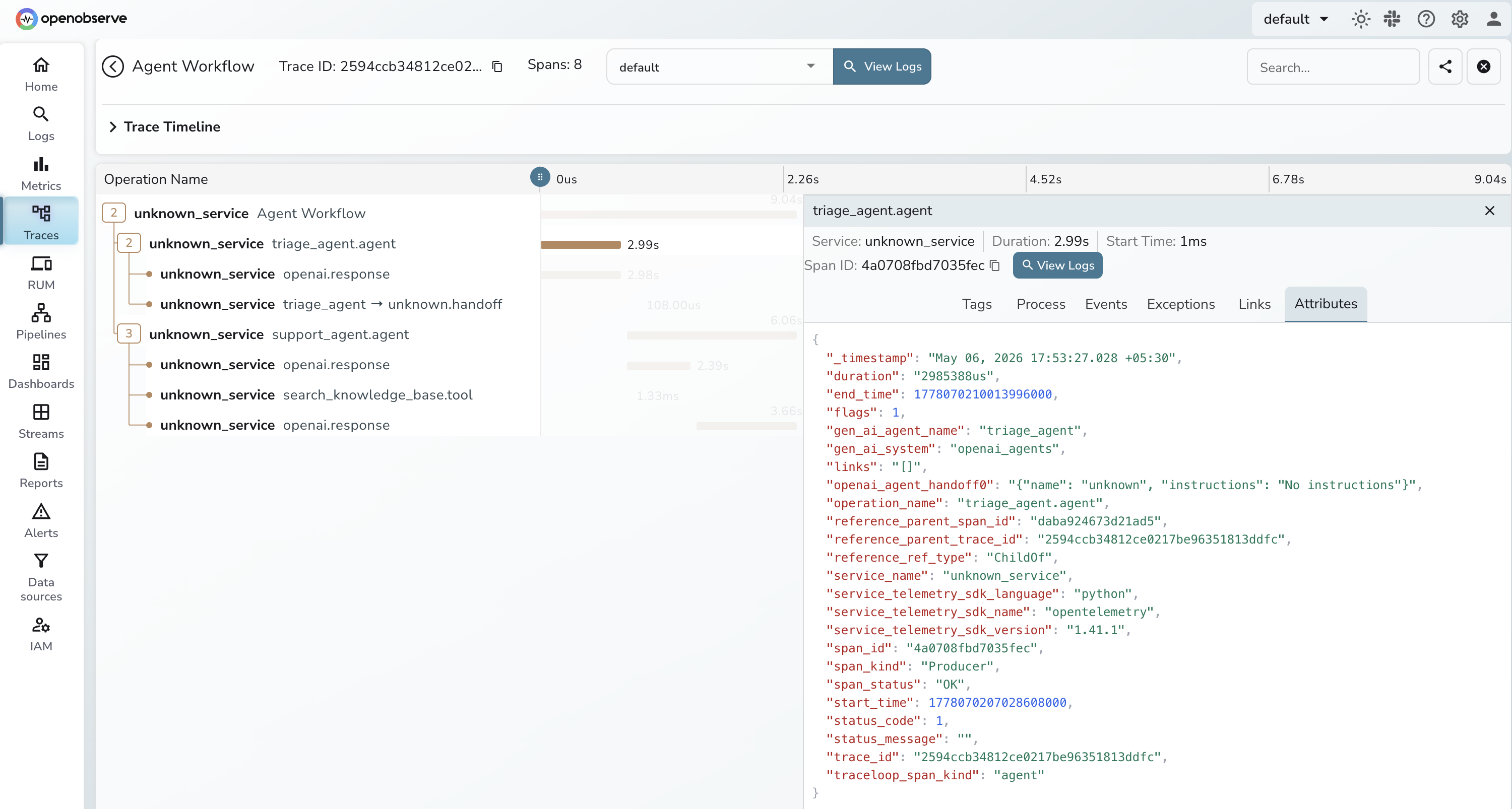
The instrumentation generates spans for each agent activation (tagged with gen_ai.agent.name), each LLM generation (with model and token counts), each tool call (with name and arguments), and each handoff between agents. The handoff span shows up as a child of the triage agent span and a parent of the support agent span, giving you the full call tree.
Content capture is controlled separately from OpenLLMetry:
OTEL_INSTRUMENTATION_GENAI_CAPTURE_MESSAGE_CONTENT=span_only
Options: span_only, event_only, span_and_event, no_content. Use no_content in production if prompts contain PII.
Shipping Traces to OpenObserve
The OTLP exporter configuration shown in the examples above works for both self-hosted and cloud deployments. The only difference is the endpoint URL.
Self-hosted OpenObserve (port 5080):
OTEL_EXPORTER_OTLP_ENDPOINT=http://localhost:5080/api/default/v1/traces
OTEL_EXPORTER_OTLP_HEADERS=Authorization=Basic <base64_token>,stream-name=default
OpenObserve Cloud:
OTEL_EXPORTER_OTLP_ENDPOINT=https://api.openobserve.ai/api/<your_org>/v1/traces
OTEL_EXPORTER_OTLP_HEADERS=Authorization=Basic <base64_token>,stream-name=default
Generate the base64 token:
echo -n "your_email@example.com:your_password" | base64
Direct export vs. OTel Collector
Direct export is simpler for development and small deployments. The application sends spans directly to OpenObserve with no intermediate hop.
The OTel Collector adds a processing layer between your agent and OpenObserve. It is worth adding when you need any of the following:
- PII redaction before spans leave your application network
- Tail-based sampling to reduce trace volume (see the production checklist below)
- Routing the same telemetry to multiple backends simultaneously
For a complete OTLP exporter configuration guide covering both the direct and Collector paths, see LangChain and LlamaIndex Tracing with OpenObserve.
Sample Collector configuration pointing at OpenObserve:
receivers:
  otlp:
    protocols:
      grpc:
        endpoint: 0.0.0.0:4317
      http:
        endpoint: 0.0.0.0:4318

processors:
  batch:

exporters:
  otlphttp/openobserve:
    endpoint: <your-openobserve-otlp-endpoint>
    headers:
      Authorization: "Basic <base64_token>"
      stream-name: default

service:
  pipelines:
    traces:
      receivers: [otlp]
      processors: [batch]
      exporters: [otlphttp/openobserve]
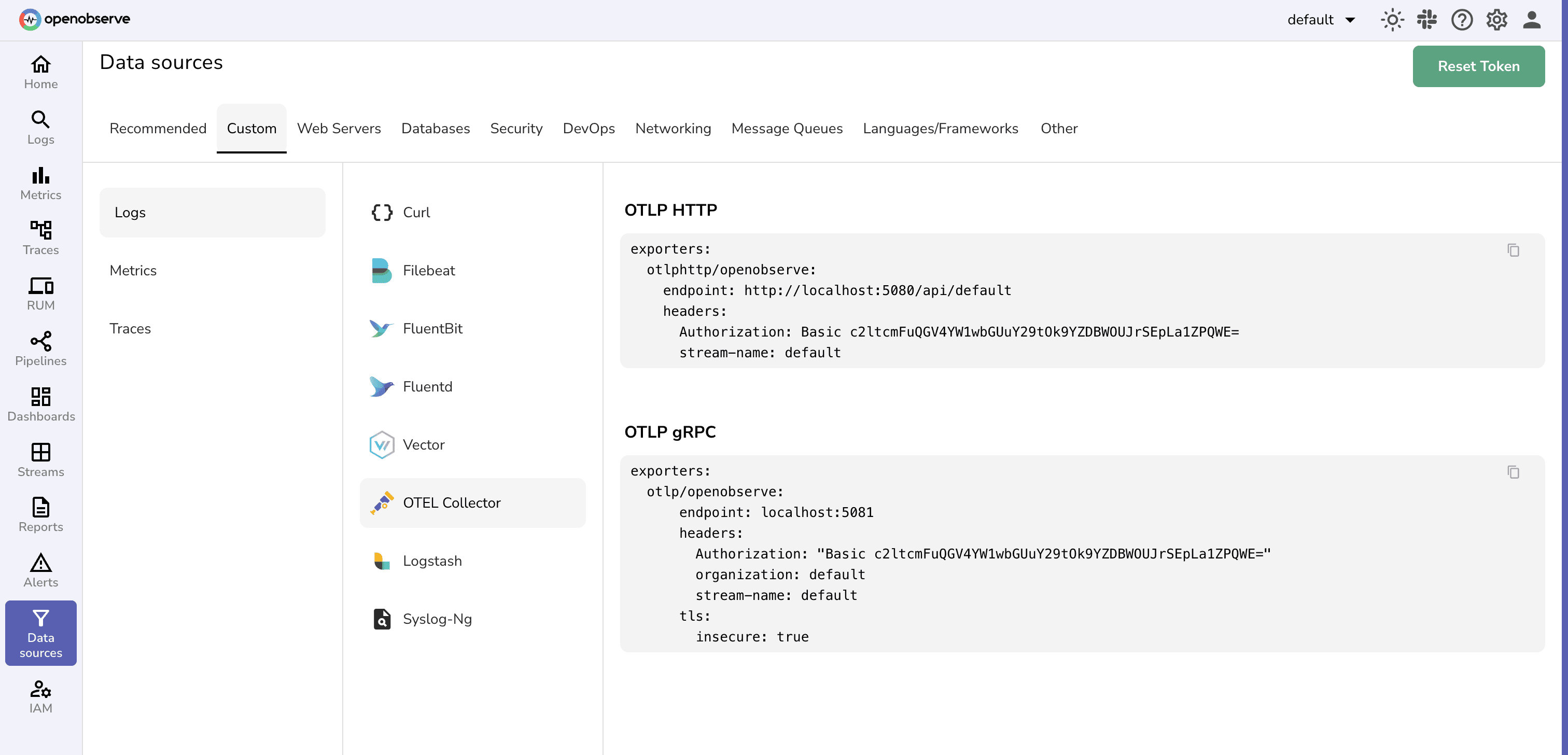
You can find your OTLP endpoint and the matching Authorization header in the OpenObserve UI under Data Sources → OpenTelemetry Collector - copy the values directly from there into your Collector config:
What to Look For in OpenObserve
Reading a multi-agent trace waterfall
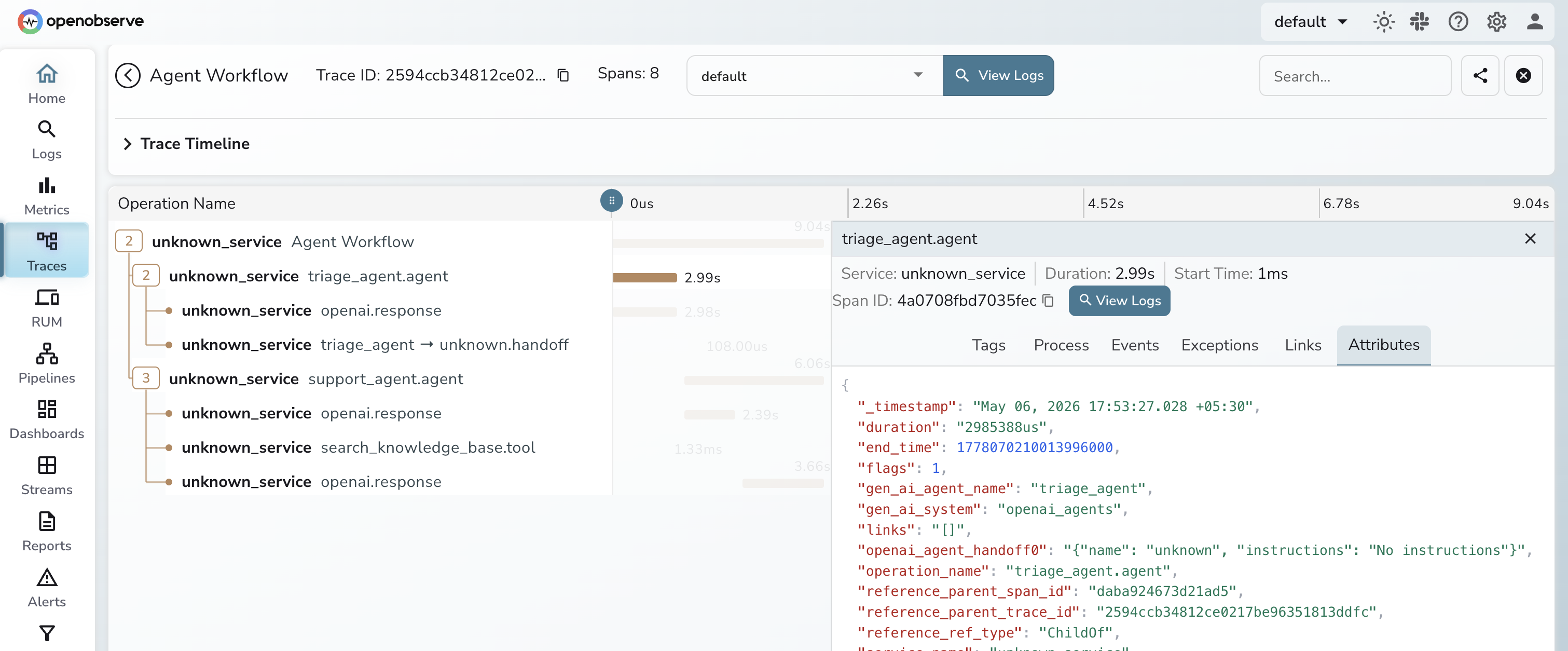
The trace timeline shows every span as a horizontal bar: width is duration, indentation is the parent-child relationship. For a LangChain ReAct agent, you can immediately see which LLM call or tool invocation is driving latency, something that's invisible in logs.
SQL queries for token usage and cost
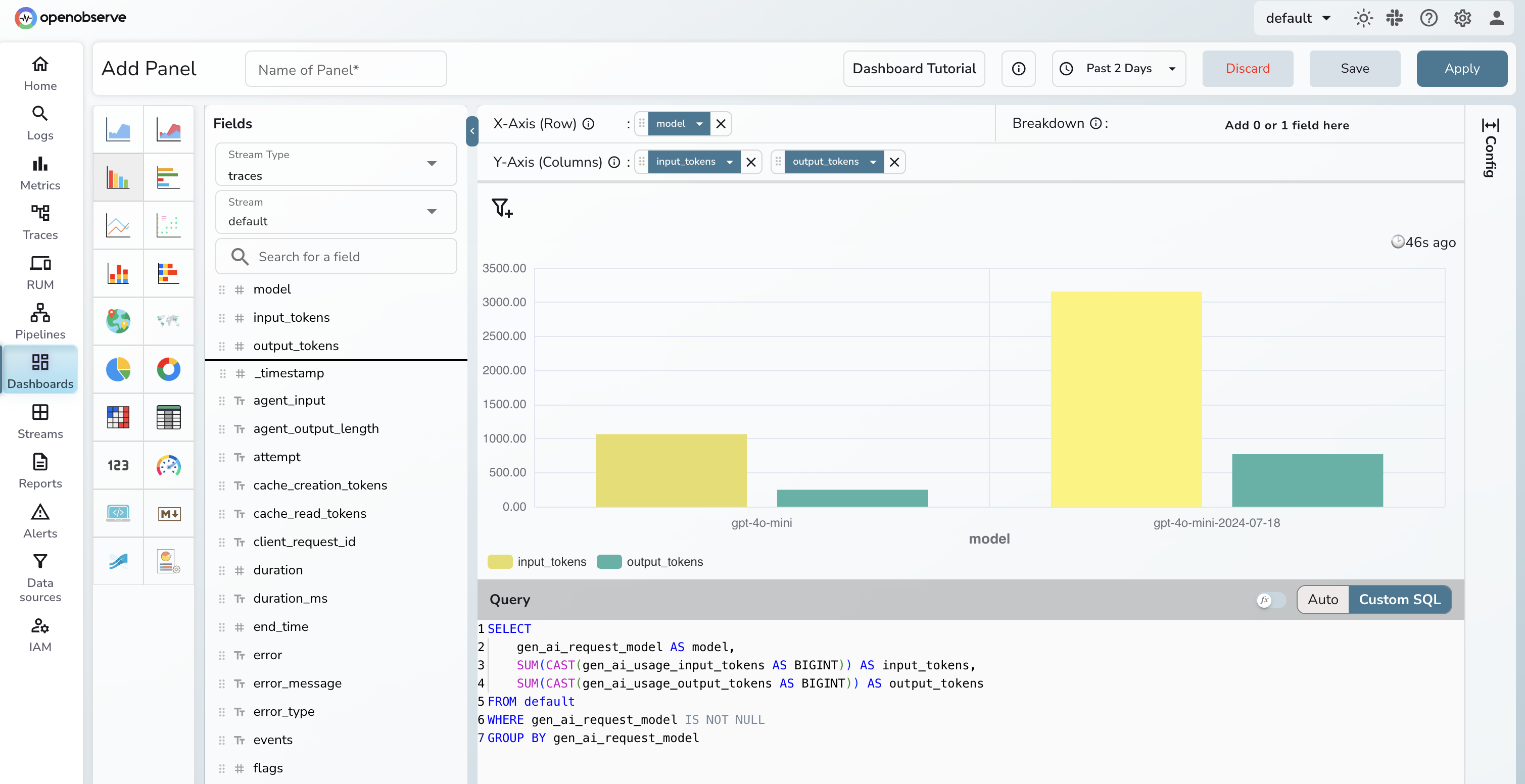
OpenObserve lets you query trace data with SQL directly against the gen_ai.* attributes. For example, token usage by model over the last hour:
SELECT
    gen_ai_request_model AS model,
    SUM(CAST(gen_ai_usage_input_tokens AS BIGINT)) AS input_tokens,
    SUM(CAST(gen_ai_usage_output_tokens AS BIGINT)) AS output_tokens
FROM default
WHERE gen_ai_request_model IS NOT NULL
GROUP BY gen_ai_request_model
ORDER BY input_tokens DESC
Note: OpenObserve stores span attributes as top-level flattened fields using underscores (
gen_ai_request_model, notattributes['gen_ai.request.model']). The time range filter is applied via the dashboard time picker rather than in SQL, since_timestampis stored as nanosecondInt64and is not directly comparable toNOW().
You can extend the same pattern to P99 latency by agent (span_name = 'agent.step') or error rate by tool (span_name = 'gen_ai.tool'). For a full cost attribution setup (per-agent, per-model, with real-time spend alerting), see LLM Cost Monitoring with OpenObserve.
Querying Agent Traces via MCP
OpenObserve exposes an MCP server, so any MCP-compatible LLM client can query your trace store directly, with no dashboard or SQL client required. Connect it to Claude Code:
claude mcp add o2 https://api.openobserve.ai/api/<your_org>/mcp \
  -t http \
  --header "Authorization: Basic <base64_token>"
For self-hosted OpenObserve, replace the URL with http://localhost:5080/api/<your_org>/mcp. Once connected, ask questions like "which tool had the highest error rate in the last hour?" and get structured results back in your LLM session.
For a full guide to MCP servers in the observability stack, see What Openobserve MCP server can do?
Production Checklist
PII redaction
Disable prompt and completion capture at the application level before traces leave the process:
# OpenLLMetry
TRACELOOP_TRACE_CONTENT=false

# OpenAI Agents SDK / OTel GenAI instrumentation
OTEL_INSTRUMENTATION_GENAI_CAPTURE_MESSAGE_CONTENT=no_content
For finer-grained redaction (specific patterns, or third-party instrumentation you don't fully control), OpenObserve has a native sensitive data redaction feature with 140+ built-in PII patterns and redact/hash/drop actions applied at ingestion time. See Sensitive Data Redaction in OpenObserve for a full walkthrough, or the OTel Collector approach for logs if you prefer to handle it at the pipeline level.
Sampling for LLM traffic
LLM spans are large and frequent. Tracing at 100% is expensive. Use tail-based sampling in the Collector: keep 100% of error traces and slow traces (e.g. >5s), and sample the rest probabilistically (e.g. 10%). This preserves the traces you need for debugging while keeping storage costs predictable. For a deeper look at head- vs. tail-based sampling tradeoffs and Collector configuration, see Head-Based vs Tail-Based Sampling.
Alerting
Four alerts to configure before your agent goes to production:
- Latency spike: P99 of
agent.stepspans exceeds 10 seconds in a 5-minute window - Cost anomaly: total
gen_ai.usage.output_tokensper hour exceeds your 7-day baseline by 3x - Tool failure rate: error percentage on any
gen_ai.toolspan exceeds 5% in 15 minutes - Trace volume spike: unique trace IDs per minute exceeds 5x the normal rate (retry storm or agent stuck in a loop)
OpenObserve supports scheduled and real-time alerts with SQL, PromQL, or the query builder. See the Alerts docs to configure these.
Try It on OpenObserve Cloud
OpenObserve Cloud gives you an OTLP endpoint ready to accept traces, metrics, and logs with no infrastructure to provision. Point your exporter at https://api.openobserve.ai/api/<your_org>/v1/traces, set your auth header, and agent traces start appearing in the UI within seconds. The same SQL queries, cost dashboards, and MCP server are available from day one.
Frequently Asked Questions
About the Author
Gorakhnath Yadav


Gorakhnath is a passionate developer advocate, working on bridging the gap between developers and the tools they use. He focuses on building communities and creating content that empowers developers to build better software.
Follow OpenObserve on Google
Add OpenObserve as a preferred source to see more of our articles in Google Search and Top Stories.