How to Send uberAgent Data to OpenObserve with Nginx and njs




Ready to get started?
Try OpenObserve Cloud today for more efficient and performant observability.

Sending uberAgent data to OpenObserve takes one small piece of glue: an Nginx njs shim that adds the index name to each bulk action line before the request reaches OpenObserve. With it in place, uberAgent's Elasticsearch output lands in a named stream and stays searchable. The traffic path is uberAgent, then Nginx on port 8088, then OpenObserve on 127.0.0.1:5080.
The glue is needed because uberAgent uses the Elasticsearch data-stream bulk format, where the index name travels in the URL rather than on the action line. This guide covers the full working setup: the njs script, the proxy config, how to verify records are actually landing, and how to get event timestamps right afterwards.
Key takeaways
- The shim is about thirty lines of JavaScript. Everything else is standard Nginx config.
- OpenObserve reads the target index from
_indexon the action line, so that field has to be present. The shim takes it from the URL path. - Plain Nginx cannot do this, because it cannot rewrite request bodies. The njs module can.
- Keep
client_body_buffer_sizegreater than or equal toclient_max_body_size, or large batches never reach the shim intact. - Verify by record count at the destination, not by the sender's success metric. A 200 response means the request was understood, not that anything was stored.
Why uberAgent needs a shim in the first place
Before the config, it helps to know what you are working around, because the failure mode is unusually quiet:
- uberAgent's own diagnostics report successful ingestion.
- OpenObserve access logs show HTTP 200 on the
_bulkendpoint. - No stream appears in the OpenObserve console, and no records are searchable.
Every layer reports health. The only signal that anything is wrong is the absence of data, which nobody notices until someone goes looking for a dashboard that was never populated.
Here is the response that hides the problem:
{"took":0,"errors":false,"items":[]}
errors is false because nothing errored. items is empty because nothing was ingested. Both statements are true at once, and uberAgent only checks the status code.
How does the data-stream bulk format differ?
The Elasticsearch bulk API accepts two shapes. In the classic shape, each action line names its own target index:
{"create":{"_index":"uberagent"}}
{"field":"value"}
In the data-stream shape, the action line is empty and the target comes from the URL path instead:
POST /api/<org>/uberagent/_bulk
{"create":{}}
{"field":"value"}
uberAgent sends the second shape. OpenObserve's _bulk endpoint resolves the target stream from the _index field on the action line, and does not fall back to the URL path. When it finds no _index, it skips that line. Because the parser tracks bulk input as alternating action and document pairs, skipping the action line also skips the document line that follows it.
Repeat that for every pair in the batch and you get a fully consumed request with zero ingested records, which is exactly the "items":[] response above.
This is a compatibility gap rather than an outage, and it only affects the Elasticsearch-compatible ingestion path. If you are starting fresh rather than adapting an existing Elasticsearch sender, OpenObserve's native OTLP and HTTP ingestion endpoints do not have this behaviour. For an overview of how the platform handles Elasticsearch-shaped workloads generally, see moving from Elasticsearch to OpenObserve.
Two proxy settings to check first
If you already have a reverse proxy in front of OpenObserve, check these two things before writing any new config. Both showed up in the setup this guide came from, and both keep causing problems even once the shim is in place.
A rewrite rule that strips the index name
rewrite ^.*$ /api/<org>/_bulk break;
This drops uberagent from the URL, which deletes the request's last remaining copy of the index name. Once the action line is empty and the path is rewritten, the index exists nowhere in the request at all.
A buffer size mismatch
If client_body_buffer_size is smaller than client_max_body_size, any body above the smaller limit gets written to a temporary file rather than held in memory. That matters here because the fix below reads the body from memory.
With bodies in the low hundreds of kilobytes this never triggers, so it looks harmless. It becomes the same silent data loss the moment batch sizes grow, which is a bad property for a failure mode you just spent days finding.
Setting up the Nginx njs shim
The proxy needs to inject the index name into the request body. Standard Nginx cannot do this, since sub_filter only rewrites responses. This requires njs, the official NGINX JavaScript module.
Step 1: install the njs module
dnf install -y nginx-module-njs
Add this line to the top of /etc/nginx/nginx.conf, outside the http { } block:
load_module modules/ngx_http_js_module.so;
Step 2: create the njs script
mkdir -p /etc/nginx/njs
Create /etc/nginx/njs/bulk.js:
const UPSTREAM       = 'http://127.0.0.1:5080';
const ORG            = '<ORG_NAME>';
const FALLBACK_INDEX = 'uberagent';

async function bulk(r) {
    const body     = r.requestText;
    const declared = Number(r.headersIn['Content-Length'] || 0);

    // If nginx spooled the body to disk, requestText is empty. Fail loudly:
    // silently forwarding an empty body is the exact bug we are fixing.
    if (declared > 0 && (!body || body.length === 0)) {
        r.error('bulk: body not in memory; raise client_body_buffer_size');
        r.return(413, '{"error":"body too large to rewrite"}');
        return;
    }

    // /api/<org>/uberagent/_bulk  ->  "uberagent"
    const m = r.uri.match(/\/([^\/]+)\/_bulk$/);
    const index = (m && m[1] !== ORG && m[1] !== 'api') ? m[1] : FALLBACK_INDEX;

    // Inject the index into the action line, which is what OpenObserve reads.
    const patched = body
        .replace(/\{\s*"create"\s*:\s*\{\s*\}\s*\}/g, '{"create":{"_index":"' + index + '"}}')
        .replace(/\{\s*"index"\s*:\s*\{\s*\}\s*\}/g,  '{"index":{"_index":"'  + index + '"}}');

    try {
        const resp = await ngx.fetch(UPSTREAM + '/api/' + ORG + '/_bulk', {
            method: 'POST',
            headers: {
                'Content-Type':  r.headersIn['Content-Type'] || 'application/json',
                'Authorization': r.headersIn['Authorization'] || ''
            },
            body: patched,
            max_response_body_size: 33554432
        });
        const text = await resp.text();
        r.headersOut['Content-Type'] = 'application/json';
        r.return(resp.status, text);
    } catch (e) {
        r.error('bulk: upstream failed: ' + e.message);
        r.return(502, '{"error":"upstream unreachable"}');
    }
}

export default { bulk };
Set ORG to your OpenObserve organization name before deploying.
Two details in that script are worth calling out. The index is taken from the URL path when it is present, so adding more data sources with different index names needs no further Nginx changes. And the empty-body check returns 413 instead of forwarding, because a proxy that quietly passes an empty batch upstream is how you end up back where you started.
Step 3: replace the proxy config
Replace /etc/nginx/conf.d/openobserve_proxy.conf with:
js_import obulk from /etc/nginx/njs/bulk.js;

# Must be >= client_max_body_size, or njs receives an empty body
# and records are lost silently.
client_body_buffer_size 16M;

map $request_body $bulk_action {
    default                        "none";
    "~*^(?<action>\{[^\r\n]+\})"   $action;
}

log_format debug_headers '$remote_addr - [$time_local] "$request" status:$status '
                         'User_Agent:"$http_user_agent" '
                         'Content_Type:"$http_content_type" '
                         'Action:"$bulk_action"';

server {
    listen 8088;
    server_name _;

    client_max_body_size 16M;

    access_log /var/log/nginx/uberagent_headers.log debug_headers;

    # 1. Bulk ingestion. Must come first, since nginx evaluates regex
    #    locations in order of appearance.
    location ~* _bulk$ {
        js_content obulk.bulk;
    }

    # 2. Elasticsearch compatibility handshake. OpenObserve implements
    #    these routes intentionally; a catch-all 404 blocks them.
    location ~* ^/api/[^/]+/(_license|_xpack|_ilm/policy/|_index_template/|_data_stream/|_ingest/pipeline/) {
        proxy_pass http://127.0.0.1:5080;
        proxy_http_version 1.1;
        proxy_set_header Host            $host;
        proxy_set_header X-Real-IP       $remote_addr;
        proxy_set_header X-Forwarded-For $proxy_add_x_forwarded_for;
        proxy_set_header Authorization   $http_authorization;
    }

    # 3. Elasticsearch version probe: GET /api/<org>/
    location ~* ^/api/[^/]+/?$ {
        proxy_pass http://127.0.0.1:5080;
        proxy_http_version 1.1;
        proxy_set_header Host            $host;
        proxy_set_header X-Real-IP       $remote_addr;
        proxy_set_header X-Forwarded-For $proxy_add_x_forwarded_for;
        proxy_set_header Authorization   $http_authorization;
    }

    # 4. Security fallback
    location / {
        return 404;
    }
}
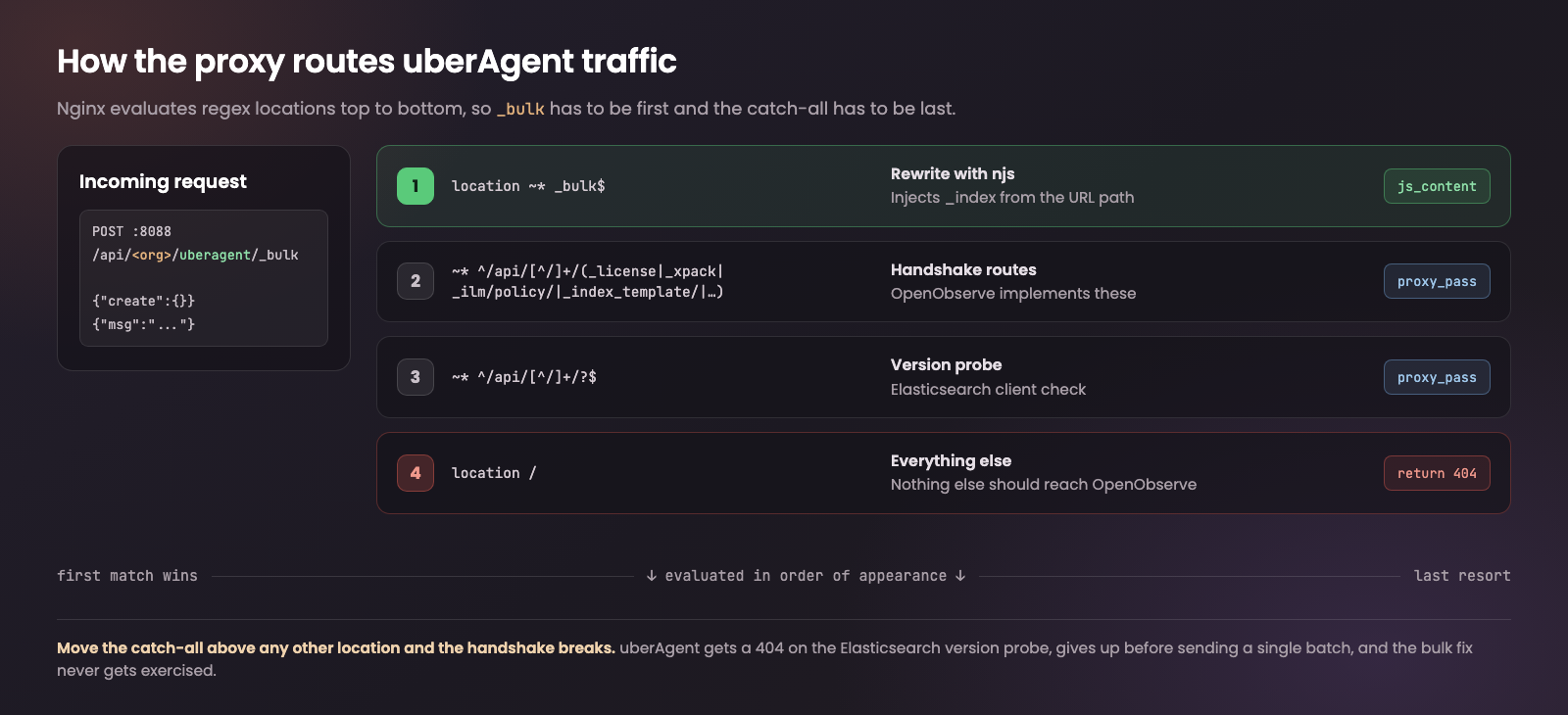
Two rules govern whether this config works at all.
Ordering matters. The _bulk location must appear first, because Nginx evaluates regex locations in order of appearance. Put the catch-all anywhere above it and you will serve 404s to the handshake routes.
Buffer sizes matter. client_body_buffer_size must be greater than or equal to client_max_body_size. Otherwise njs receives an empty body, and you are back to losing records silently.
Step 4: put the index name back in the uberAgent receiver
If you previously removed the index segment from the receiver URL while debugging, restore it, so requests once again go to:
POST /api/<org>/uberagent/_bulk
The shim reads the index from the URL path, so this is what gives you per-source routing. Leave it out and ingestion still works, but everything lands in the single fallback index instead of separate streams.
While you are in that config, you can also drop RESTHeaders = stream-name: uberagent. That header is not read on the Elasticsearch-compatible ingestion path, so it has no effect on where bulk records land.
Step 5: apply
nginx -t && systemctl reload nginx
How do you verify records are landing?
Send one record through the proxy by hand:
curl -s -u '<OPENOBSERVE_USER>:<OPENOBSERVE_TOKEN>' \
  -H 'Content-Type: application/json' \
  -X POST 'http://<PROXY_HOST>:8088/api/<ORG_NAME>/uberagent/_bulk' \
  --data-binary $'{"create":{}}\n{"msg":"shim-test"}\n'
| State | Expected response |
|---|---|
| Before the fix | {"took":0,"errors":false,"items":[]} |
| After the fix | a populated items[] array |
Then confirm a stream named uberagent appears under Streams in the OpenObserve UI. If the response looks right but no stream shows up, check that you are filtering the Streams page by the correct stream type.
Getting timestamps right
Once data is flowing, there is one more thing to fix before the data is genuinely useful.
OpenObserve orders and filters records by a field named exactly _timestamp. uberAgent sends its event time under a different field name, so records arrive stamped with their ingestion time rather than the time the event actually occurred. Everything is searchable, but the timeline is wrong, which quietly ruins any investigation that depends on ordering.
Capture one sample record, identify the field carrying the real event time, and map it to _timestamp with a telemetry pipeline.
One related constraint if you plan to replay history: OpenObserve rejects records older than a configurable window, controlled by ZO_INGEST_ALLOWED_UPTO and defaulting to 5 hours. Backfilling older data means raising that value first.
Troubleshooting
| Symptom | Likely cause |
|---|---|
HTTP 200 with "items":[] |
The index name is not reaching the action line. Confirm the _bulk location is matching and that bulk.js loaded |
HTTP 413 with body too large to rewrite |
The request body was spooled to disk. Raise client_body_buffer_size |
HTTP 502 upstream unreachable |
OpenObserve is not listening on 127.0.0.1:5080, or is down |
| HTTP 404 on the handshake routes | The catch-all location / is matching first. Check location ordering |
| Data lands in the fallback stream only | uberAgent is not sending the index in the URL path. See step 4 |
| Nginx fails to start after the change | The load_module line is inside http { }. It belongs at the top level |
Two logs worth watching while you test:
tail -f /var/log/nginx/uberagent_headers.log   # request level, includes the parsed action line
tail -f /var/log/nginx/error.log               # njs r.error() output
The custom debug_headers log format exists specifically so you can see the first line of each bulk body. If the Action: field shows {"create":{}} on requests that already passed through njs, the shim is not matching the location.
Placeholder reference
| Placeholder | Meaning |
|---|---|
<ORG_NAME> |
OpenObserve organization name |
<PROXY_HOST> |
Hostname or IP of the Nginx proxy |
<OPENOBSERVE_USER> |
OpenObserve account used for ingestion |
<OPENOBSERVE_TOKEN> |
Ingestion token or password for that account |
Wrapping up
Once the shim is running, uberAgent ingestion is boring in the way you want it to be: records land in a named stream, new data sources with their own index names work without touching Nginx again, and the only remaining task is mapping the event timestamp.
The lesson worth carrying to other integrations is the verification habit. A 200 response only tells you the request was understood, not that anything was stored, and a sender that checks status codes alone will report success indefinitely. If you run Elasticsearch-compatible ingestion anywhere, add one check that counts records at the destination rather than trusting the sender's own success metric. That single check turns this class of problem from a multi-day mystery into an alert.
This shim is a workaround for a compatibility gap in the Elasticsearch-compatible _bulk path, not a permanent architecture. OpenObserve is open source under AGPL-3.0, so if you would rather not run a proxy at all, the native OTLP and HTTP ingestion endpoints accept data directly. For teams migrating off an existing Elasticsearch pipeline, the Elasticsearch alternative overview covers which ingestion path fits which sender.
Frequently Asked Questions
About the Author
Chaitanya Sistla

Chaitanya Sistla is a Principal Solutions Architect with 17X certifications across Cloud, Data, DevOps, and Cybersecurity. Leveraging extensive startup experience and a focus on MLOps, Chaitanya excels at designing scalable, innovative solutions that drive operational excellence and business transformation.
Follow OpenObserve on Google
Add OpenObserve as a preferred source to see more of our articles in Google Search and Top Stories.