OpenTelemetry GenAI Semantic Conventions: A Practical Guide




Ready to get started?
Try OpenObserve Cloud today for more efficient and performant observability.
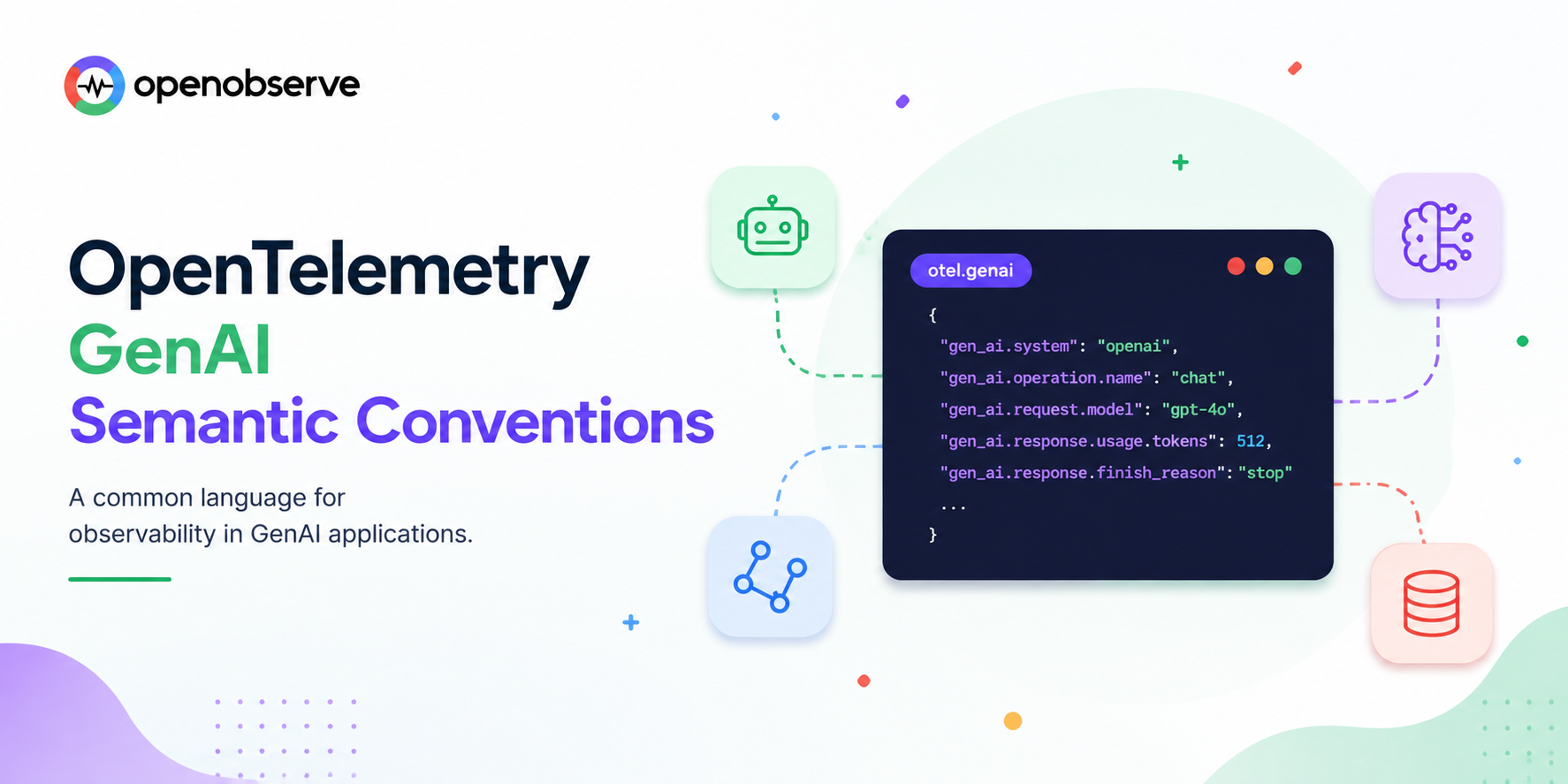
Two engineers instrument the same OpenAI call. One names the attribute model, the other llm_model_name, a third framework calls it openai.request.model. None of these compose into one dashboard. That's the exact problem OpenTelemetry's GenAI semantic conventions exist to solve: a single, standardized gen_ai.* vocabulary so a chat span from LangChain, a raw OpenAI SDK call, and a Claude agent all speak the same attribute names.
This is a practical, attribute-by-attribute reference, not just a definition. It covers the actual gen_ai.* names you'll write and query, which ones are stable enough to build a dashboard on today, and a worked example you can copy directly into an instrumentation script.
For the broader context of why LLM observability differs from traditional APM, see OpenTelemetry for LLMs; for semantic conventions outside the GenAI namespace (HTTP, database, resource attributes), see OpenTelemetry Semantic Conventions Explained.
TL;DR
OpenTelemetry's GenAI semantic conventions standardize LLM and AI agent telemetry under a single gen_ai.* namespace, covering span attributes (gen_ai.request.model, gen_ai.usage.input_tokens), metrics (gen_ai.client.token.usage, gen_ai.client.operation.duration), and opt-in content events for prompts and responses. Core chat attributes are mature enough for production dashboards; agent and multi-agent conventions are still evolving.
- Namespace: everything lives under
gen_ai.*, so it's filterable as one group across spans, metrics, and logs. - Core span attributes:
gen_ai.operation.name,gen_ai.provider.name,gen_ai.request.model,gen_ai.response.model,gen_ai.usage.input_tokens,gen_ai.usage.output_tokens. - Content is opt-in: prompt and response bodies aren't in standard attributes by default; they're separate, explicitly-enabled events, because they routinely contain PII.
- Metrics: two standardized histogram instruments cover token usage and operation duration, enough for p95 latency and cost SLOs.
- Stability varies by attribute: chat and embeddings are mature; agent and tool-orchestration conventions are still marked Development and change more often.
What Are OpenTelemetry GenAI Semantic Conventions?
Semantic conventions are OpenTelemetry's naming rules: standardized attribute names and value formats so telemetry means the same thing regardless of who instrumented it. The GenAI semantic conventions apply that idea to LLM and AI agent workloads specifically, defined by the OTel GenAI Special Interest Group since April 2024.
Concretely, that means: when any properly-instrumented library makes a chat completion call, the model name lands in gen_ai.request.model, not model, not modelName, not llm_model. Every OTel-instrumented LLM library that follows the spec produces that exact attribute name.
The conventions cover three telemetry types:
- Spans: one span per LLM operation (chat call, embedding generation, tool invocation, agent step), carrying request and response metadata as attributes
- Metrics: two standardized instruments for token usage and operation duration, aggregatable across providers and models
- Events: opt-in, separately-captured prompt and response content, kept out of standard attributes specifically because of PII exposure risk
Why GenAI Traffic Needed Its Own Semantic Conventions
The existing HTTP and database conventions don't fit LLM calls, for three concrete reasons:
1. Billing is per-token, not per-request. A traditional HTTP span cares about status code and duration. An LLM span needs input and output token counts, because that's what determines cost, and no existing convention had a place for that.
2. Request parameters affect output, not just performance. temperature, top_p, and max_tokens change what the model returns, not just how fast. Standard HTTP conventions have nothing analogous; a query parameter doesn't usually change response semantics the way a sampling temperature does.
3. The content itself is often the thing you need to debug. Debugging a slow database query rarely requires reading the row data. Debugging a bad LLM response usually requires reading the actual prompt and completion, which is exactly the sensitive data standard conventions are designed to avoid capturing by default.
Stability Status: What You Can Rely On Today
Every attribute in the spec carries a stability marker, the same three-tier system used across all OpenTelemetry semantic conventions: Development, Release Candidate, and Stable. GenAI conventions are younger than HTTP or database conventions, so stability varies more by section:
| Area | Typical Stability | What That Means |
|---|---|---|
Core chat/completion attributes (gen_ai.request.model, gen_ai.usage.*) |
Stable / Release Candidate | Safe to build permanent dashboards and alerts on |
| Embeddings attributes | Release Candidate | Mostly settled, minor naming changes still possible |
| Tool and function call attributes | Development | Usable, but expect attribute renames as multi-tool agent patterns mature |
Agent and multi-agent attributes (gen_ai.agent.*) |
Development | Actively being designed; treat as provisional |
Check the live spec before locking in a dashboard on anything from the agent or tool-orchestration sections, since those are the parts most likely to change between OTel releases.
The Core gen_ai.* Attributes Every Span Should Have
These are the attributes that show up on essentially every LLM span, regardless of provider or operation type:
| Attribute | Type | What It Tells You |
|---|---|---|
gen_ai.operation.name |
string | The operation type: chat, text_completion, embeddings, execute_tool, create_agent, invoke_agent |
gen_ai.provider.name |
string | Which provider handled the call: openai, anthropic, azure.ai.openai, and so on (see the gen_ai.system migration note below) |
gen_ai.request.model |
string | The model requested, e.g. gpt-4o, claude-opus-4 |
gen_ai.response.model |
string | The model that actually served the response, which can differ from the request if the provider routed to a specific dated snapshot |
gen_ai.usage.input_tokens |
int | Prompt token count, the primary cost driver on the request side |
gen_ai.usage.output_tokens |
int | Completion token count, the primary cost driver on the response side |
gen_ai.request.temperature |
double | Sampling temperature; correlate with quality regressions over time |
gen_ai.request.top_p |
double | Nucleus sampling parameter; affects output diversity |
gen_ai.request.max_tokens |
int | The cap requested; useful for spotting truncated responses |
gen_ai.response.finish_reasons |
string[] | Why generation stopped, as an array (["stop"], ["tool_use"], ["length"]), since a response can technically have multiple choices |
gen_ai.response.id |
string | Provider-assigned response ID, useful for correlating with provider-side logs or support tickets |
gen_ai.conversation.id |
string | Groups every span belonging to one logical session or multi-turn conversation, the attribute OpenObserve's LLM Sessions view keys on |
error.type |
string | Rate limits, timeouts, content policy rejections, the GenAI equivalent of a 5xx |
Note the plural on gen_ai.response.finish_reasons: it's an array, not a single string, even though a typical single-response chat call populates it with exactly one value.
Span Conventions by Operation Type
gen_ai.operation.name determines which additional attributes apply. The core set above covers chat, but other operation types add their own:
Embeddings (gen_ai.operation.name: "embeddings"):
gen_ai.request.encoding_formats: requested output format(s), e.g.["float"]gen_ai.embeddings.dimension.count: dimensionality of the returned vectors
Tool / function calls (gen_ai.operation.name: "execute_tool"):
gen_ai.tool.name: the tool or function being invokedgen_ai.tool.call.id: a unique ID for this specific call, useful for matching a tool call span to its resultgen_ai.tool.description: what the tool does, if available
Agents (gen_ai.operation.name: "create_agent" / "invoke_agent"), still Development-stability:
gen_ai.agent.name/gen_ai.agent.id: which agent handled the stepgen_ai.agent.description: the agent's stated purposegen_ai.agent_version: version string for the agent implementation, useful for correlating a quality regression with a specific agent deploy
Span naming follows the pattern {gen_ai.operation.name} {gen_ai.request.model} where practical, for example a chat call to gpt-4o produces a span named chat gpt-4o, so a trace waterfall reads as a sequence of operations without needing to open each span to see what it did.
Metric Conventions
Two standardized histogram instruments cover the numbers you actually alert and SLO on:
gen_ai.client.token.usage              → histogram (tokens per request)
gen_ai.client.operation.duration       → histogram (latency in seconds)
Both carry the same core attributes as spans (gen_ai.provider.name, gen_ai.request.model, gen_ai.operation.name), so they're aggregatable by provider, model, or operation type without needing to join against span data.
Recommended SLO dimensions built from these two instruments:
- p95
gen_ai.client.operation.durationgrouped by(gen_ai.provider.name, gen_ai.request.model) - Token budget utilization per team or feature, using
gen_ai.client.token.usagewith a custom resource attribute for team/feature - Error rate by
error.type - Cost per 1,000 requests: multiply
gen_ai.client.token.usageby your provider's per-token pricing in a dashboard panel
See the official GenAI metrics reference for the complete instrument list, including experimental ones still moving through the stability process.
Capturing Prompt and Response Content
This is the part every team gets wrong at least once: prompt and response bodies are not standard span attributes. The spec deliberately keeps them out of the default attribute set, because unlike a model name or token count, message content routinely contains names, emails, account numbers, or proprietary business logic typed directly by a user.
Instead, content capture is modeled as a separate, opt-in mechanism: structured log-based events, correlated back to the originating span via trace_id and span_id, only emitted when explicitly enabled (commonly via an environment variable like OTEL_INSTRUMENTATION_GENAI_CAPTURE_MESSAGE_CONTENT in current instrumentation libraries).
Practical pattern:
- Leave content capture off by default in production.
- When you do enable it, route those log events through an OTel Collector redaction processor before they reach storage.
- Query captured content by pivoting from a span's
trace_idinto the log stream, rather than expecting it to appear as a span attribute.
For the redaction mechanics specifically, see Redacting PII from LLM Telemetry and Filter Logs at Source in OTel Collector for the processor patterns this relies on.
A Complete Worked Example
Here's what a fully-populated chat span looks like end to end, combining the core attributes above into one realistic example:
Span name: chat gpt-4o

Attributes:
  gen_ai.operation.name: "chat"
  gen_ai.provider.name: "openai"
  gen_ai.request.model: "gpt-4o"
  gen_ai.response.model: "gpt-4o-2024-08-06"
  gen_ai.response.id: "chatcmpl-abc123"
  gen_ai.usage.input_tokens: 312
  gen_ai.usage.output_tokens: 148
  gen_ai.request.temperature: 0.7
  gen_ai.request.top_p: 0.9
  gen_ai.request.max_tokens: 1024
  gen_ai.response.finish_reasons: ["stop"]
  gen_ai.conversation.id: "conv_9f2a1b"
  server.address: "api.openai.com"
And the equivalent instrumentation in Python, using the official OpenTelemetry OpenAI instrumentation:
from opentelemetry.instrumentation.openai import OpenAIInstrumentor
from opentelemetry import trace

# Instrument before any LLM calls are made
OpenAIInstrumentor().instrument()

from openai import OpenAI
client = OpenAI()

response = client.chat.completions.create(
    model="gpt-4o",
    temperature=0.7,
    top_p=0.9,
    max_tokens=1024,
    messages=[{"role": "user", "content": "Summarize this incident report."}],
)
# The span above is created and populated automatically:
# gen_ai.request.model, gen_ai.usage.*, gen_ai.response.finish_reasons,
# and the rest are attached with zero manual span code.
If you're instrumenting manually (no auto-instrumentation library available for your provider), the same attributes apply; you're just setting them yourself on a span you create explicitly:
from opentelemetry import trace

tracer = trace.get_tracer(__name__)

with tracer.start_as_current_span("chat gpt-4o") as span:
    span.set_attribute("gen_ai.operation.name", "chat")
    span.set_attribute("gen_ai.provider.name", "openai")
    span.set_attribute("gen_ai.request.model", "gpt-4o")
    # ... make the actual API call ...
    span.set_attribute("gen_ai.response.model", response.model)
    span.set_attribute("gen_ai.usage.input_tokens", response.usage.prompt_tokens)
    span.set_attribute("gen_ai.usage.output_tokens", response.usage.completion_tokens)
    span.set_attribute("gen_ai.response.finish_reasons", [response.choices[0].finish_reason])
Migrating from gen_ai.system or Provider-Specific Attributes
If your instrumentation predates the current spec, or you're consolidating traces from multiple libraries, you'll run into naming drift. The most common migration:
gen_ai.system→gen_ai.provider.name: the original provider-identification attribute is being superseded bygen_ai.provider.name. Many current instrumentation libraries emit both during the transition, so don't be surprised to see either in production traces; write queries that check both until your whole fleet is on updated libraries.llm.request.model/llm.usage.prompt_tokens(older, pre-standardization naming) →gen_ai.request.model/gen_ai.usage.input_tokens: some earlier LLM-specific instrumentation used anllm.*namespace before the GenAI SIG's conventions solidified. If you have telemetry from that era, either re-instrument with a current library or add an OTel Collectorattributesprocessor to rename fields into the currentgen_ai.*names at ingestion.- Provider SDK-native field names (e.g. a raw OpenAI response's
usage.prompt_tokens) →gen_ai.usage.input_tokens: don't ship provider SDK field names directly into your telemetry; map them to the standard attribute names so a Claude call and a GPT call land in the same dashboard column.
The GenAI Instrumentation Ecosystem
You rarely hand-write every attribute. These libraries auto-instrument popular providers and frameworks to the GenAI conventions:
| Library | Coverage |
|---|---|
Official OTel contrib (opentelemetry-instrumentation-openai, -anthropic) |
OpenAI and Anthropic clients, Python and JavaScript |
| OpenLIT | OpenAI, Anthropic, LangChain, LlamaIndex, and popular vector databases |
| OpenLLMetry | Broader framework and agent coverage, plus a gateway proxy for centralized instrumentation |
Whichever library you pick, the payoff of standardized conventions is that the backend doesn't care which one produced the span, gen_ai.request.model means the same thing regardless of source. See OpenTelemetry for LLMs for a full instrumentation walkthrough, and Top 10 LLM Observability Tools in 2026 for how different backends handle this data once it arrives.
Common Mistakes When Adopting GenAI Semantic Conventions
- Inventing custom attribute names instead of using the spec. The entire point is cross-tool consistency; a custom
model_nameattribute breaks every dashboard built against the standardgen_ai.request.model. - Treating
gen_ai.response.finish_reasonsas a single string. It's an array. Code that expects a scalar will break or silently mis-parse it. - Capturing prompt/response content by default. Leaving content capture always-on ships PII into your telemetry backend as a matter of routine, not exception.
- Building permanent dashboards on Development-status agent attributes. Those names are still being finalized; expect churn if you depend on them today.
- Ignoring
gen_ai.conversation.id. Without it, multi-turn conversations and agent loops show up as disconnected individual spans instead of one traceable session, which is exactly the view you need to catch a runaway agent loop; see Tracing a Runaway LLM Token Spike for what that investigation looks like when the session grouping is in place.
Seeing GenAI Semantic Conventions in Practice
Here's what these attributes actually look like once they land in a real backend, an OpenObserve trace for a Claude Code agent interaction, with the full gen_ai_* attribute set expanded (OpenObserve replaces dots with underscores in field names, so gen_ai.usage.input_tokens appears as gen_ai_usage_input_tokens):
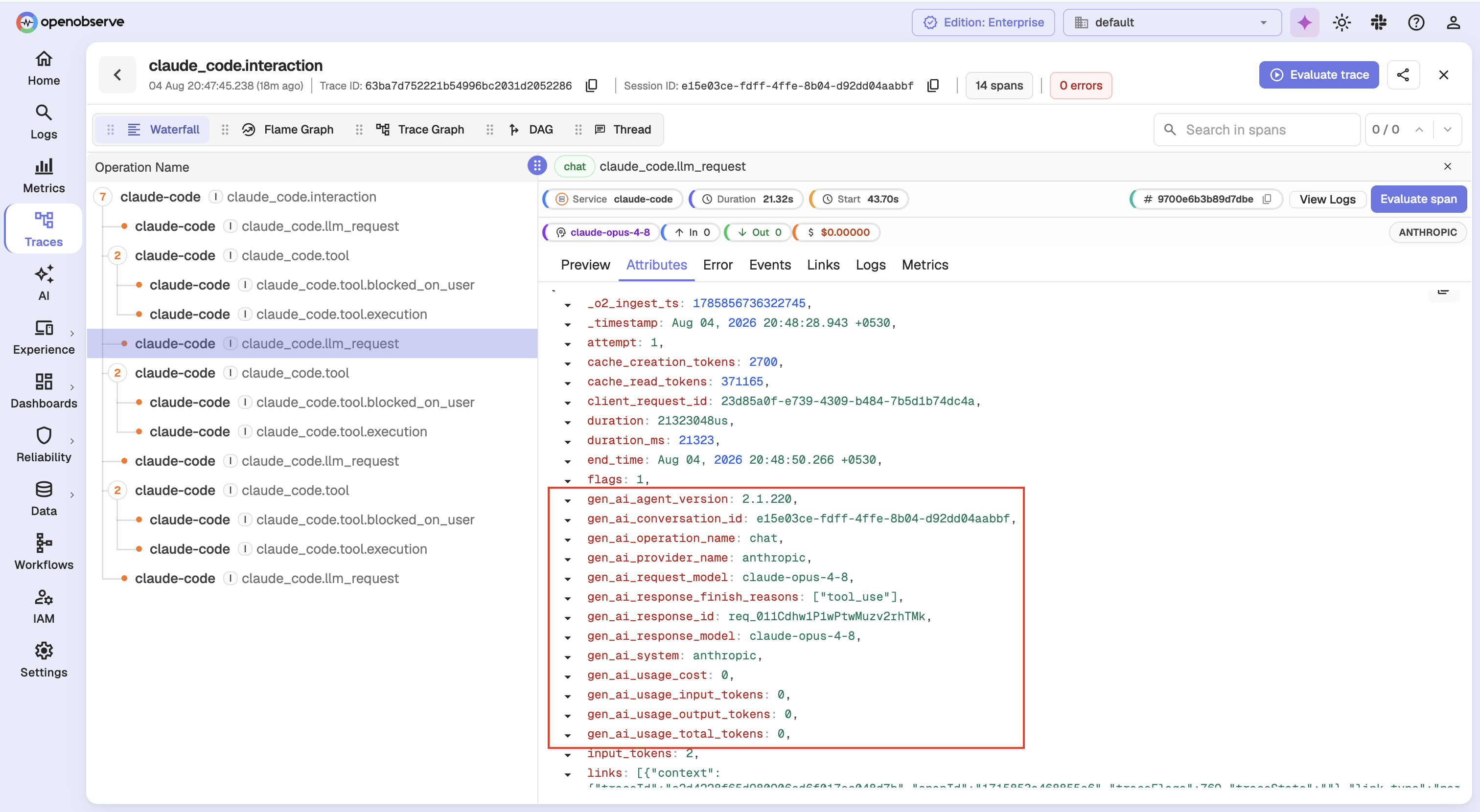
Notice gen_ai_response_finish_reasons shown as ["tool_use"], confirming the array format, gen_ai_conversation_id grouping this span into its parent session, and both gen_ai_system and gen_ai_provider_name present side by side, exactly the migration overlap described above.
Conclusion
OpenTelemetry's GenAI semantic conventions solve one specific problem: making gen_ai.* attributes mean the same thing no matter which library, language, or provider produced them. Core chat and embeddings attributes are stable enough to build production dashboards on today; agent and tool-orchestration conventions are still settling, so treat those as provisional. Standardize on the spec's attribute names instead of inventing your own, keep prompt content opt-in and redacted, and use gen_ai.conversation.id to keep multi-turn sessions traceable as a unit.
OpenObserve ingests gen_ai.* spans, metrics, and events natively over OTLP, no custom attribute mapping required, so instrumentation that follows the spec works against it as-is.
Frequently Asked Questions
About the Author
Simran Kumari

Passionate about observability, AI systems, and cloud-native tools. All in on DevOps and improving the developer experience.
Follow OpenObserve on Google
Add OpenObserve as a preferred source to see more of our articles in Google Search and Top Stories.