




LibreChat → OpenObserve
Capture per-conversation latency, endpoint, completion status, and error rates for every message sent through LibreChat's API. LibreChat is a self-hosted multi-provider chat UI supporting OpenAI, Anthropic, Ollama, and others. Instrumentation wraps LibreChat's HTTP API in manual OpenTelemetry spans.
Prerequisites
- Python 3.8+
- An OpenObserve account (cloud or self-hosted)
- Your OpenObserve organisation ID and Base64-encoded auth token
- A running LibreChat instance (self-hosted via Docker)
- LibreChat credentials (email and password) for programmatic login
Installation
Configuration
Create a .env file in your project root:
OPENOBSERVE_URL=https://api.openobserve.ai/
OPENOBSERVE_ORG=your_org_id
OPENOBSERVE_AUTH_TOKEN=Basic <your_base64_token>
LIBRECHAT_BASE_URL=http://localhost:3080
LIBRECHAT_EMAIL=your@email.com
LIBRECHAT_PASSWORD=your-password
Instrumentation
Call openobserve_init() before making API calls. Pass resource_attributes to set the service name. The script logs in to LibreChat to obtain a JWT, posts each message to the async chat endpoint, and polls for completion before closing the span.
from dotenv import load_dotenv
load_dotenv()

from openobserve import openobserve_init, openobserve_shutdown
openobserve_init(resource_attributes={"service.name": "my-app"})

from opentelemetry import trace
import os
import time
import requests

tracer = trace.get_tracer(__name__)

base_url = os.environ.get("LIBRECHAT_BASE_URL", "http://localhost:3080")
email = os.environ["LIBRECHAT_EMAIL"]
password = os.environ["LIBRECHAT_PASSWORD"]
endpoint = os.environ.get("LIBRECHAT_ENDPOINT", "openAI")

BROWSER_UA = (
    "Mozilla/5.0 (Macintosh; Intel Mac OS X 10_15_7) "
    "AppleWebKit/537.36 (KHTML, like Gecko) "
    "Chrome/120.0.0.0 Safari/537.36"
)


def login():
    resp = requests.post(
        f"{base_url}/api/auth/login",
        headers={"Content-Type": "application/json"},
        json={"email": email, "password": password},
        timeout=15,
    )
    resp.raise_for_status()
    return resp.json()["token"]


def wait_for_completion(jwt_token, conversation_id, timeout=30):
    headers = {"Authorization": f"Bearer {jwt_token}", "User-Agent": BROWSER_UA}
    deadline = time.time() + timeout
    while time.time() < deadline:
        resp = requests.get(
            f"{base_url}/api/agents/chat/status/{conversation_id}",
            headers=headers,
            timeout=10,
        )
        if not resp.json().get("active", True):
            return True
        time.sleep(1)
    return False


jwt_token = login()

headers = {
    "Authorization": f"Bearer {jwt_token}",
    "Content-Type": "application/json",
    "User-Agent": BROWSER_UA,
}

with tracer.start_as_current_span("librechat.chat") as span:
    span.set_attribute("librechat.endpoint", endpoint)
    span.set_attribute("librechat.question", "What is distributed tracing?")
    resp = requests.post(
        f"{base_url}/api/agents/chat",
        headers=headers,
        json={"text": "What is distributed tracing?", "endpoint": endpoint, "model": "gpt-4o-mini"},
        timeout=30,
    )
    resp.raise_for_status()
    data = resp.json()
    conversation_id = data["conversationId"]
    span.set_attribute("librechat.conversation_id", conversation_id)
    span.set_attribute("librechat.status_code", resp.status_code)
    completed = wait_for_completion(jwt_token, conversation_id)
    span.set_attribute("librechat.completed", completed)
    span.set_attribute("span_status", "OK")

openobserve_shutdown()
LibreChat's chat API is asynchronous. POST /api/agents/chat returns a conversationId immediately and processes the response in the background. The wait_for_completion helper polls GET /api/agents/chat/status/:conversationId until the job finishes, so the span duration reflects the full end-to-end latency including the LLM response time.
LibreChat enforces a browser User-Agent header on the chat endpoint. Requests without a recognisable browser UA are rejected with Illegal request.
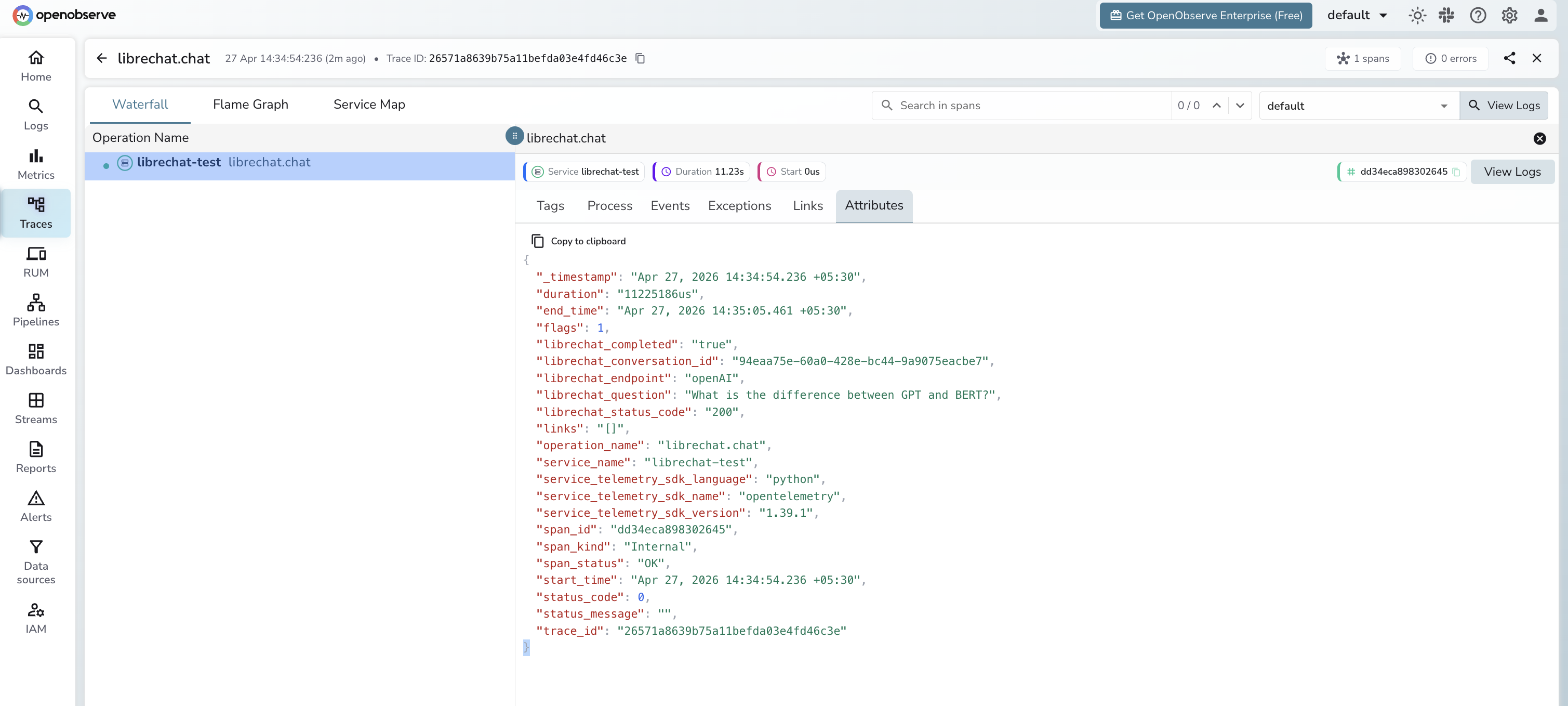
What Gets Captured
| Attribute | Description |
|---|---|
librechat_conversation_id |
Unique ID for the conversation created by the chat request |
librechat_endpoint |
Provider endpoint name (e.g. openAI, anthropic) |
librechat_question |
User message text, truncated to 100 characters |
librechat_status_code |
HTTP status code from POST /api/agents/chat |
librechat_completed |
Whether the async job completed within the timeout |
span_status |
OK on success, ERROR on failed requests |
error_message |
Error detail when the request fails |
duration |
End-to-end latency including LLM response time |
Viewing Traces
- Log in to OpenObserve and navigate to Traces
- Filter by
service_name = librechat-testto isolate LibreChat spans - Click a
librechat.chatspan to inspect the conversation ID and endpoint - Filter by
span_status = ERRORto identify authentication or connection failures - Sort by
durationto find the slowest LLM responses
Next Steps
With LibreChat instrumented, every API call is recorded in OpenObserve. From here you can monitor latency per provider endpoint, track completion rates for async jobs, and alert when requests fail or exceed acceptable latency thresholds.