
Ragas → OpenObserve
Capture evaluation scores, latency, and metadata for every Ragas evaluation run. Ragas does not include a dedicated OTel instrumentor, so evaluation calls are wrapped in manual spans with scores extracted from the result.
Prerequisites
- Python 3.9+
- An OpenObserve account (cloud or self-hosted)
- Your OpenObserve organisation ID and Base64-encoded auth token
- An OpenAI API key (Ragas uses LLMs to compute metrics)
Installation
pip install openobserve-telemetry-sdk ragas instructor python-dotenvConfiguration
Create a .env file in your project root:
OPENOBSERVE_URL=https://api.openobserve.ai/
OPENOBSERVE_ORG=your_org_id
OPENOBSERVE_AUTH_TOKEN=Basic <your_base64_token>
OPENAI_API_KEY=your-openai-api-key
Instrumentation
Call openobserve_init() to set up the tracer provider, then wrap each metric scoring call in a manual span.
Ragas 0.4.x uses an async scoring API. Pass an AsyncOpenAI client wrapped with instructor to the metric, and call ascore() inside an asyncio.run() block.
import asyncio
from dotenv import load_dotenv
load_dotenv()

from openobserve import openobserve_init
openobserve_init()

import os
import instructor
from openai import AsyncOpenAI
from opentelemetry import trace
from ragas.llms import LiteLLMStructuredLLM
from ragas.metrics.collections import Faithfulness

tracer = trace.get_tracer(__name__)

oai = AsyncOpenAI(api_key=os.environ["OPENAI_API_KEY"])
client = instructor.from_openai(oai)
llm = LiteLLMStructuredLLM(client=client, model="gpt-4o-mini", provider="openai")
faithfulness_metric = Faithfulness(llm=llm)


async def evaluate_sample(user_input: str, response: str, retrieved_contexts: list) -> None:
    with tracer.start_as_current_span("ragas.evaluate") as span:
        span.set_attribute("ragas.question", user_input)
        span.set_attribute("ragas.metrics", "faithfulness")
        result = await faithfulness_metric.ascore(
            user_input=user_input,
            response=response,
            retrieved_contexts=retrieved_contexts,
        )
        span.set_attribute("ragas.faithfulness", float(result.value))
    print(f"Faithfulness: {result.value:.2f}")


asyncio.run(evaluate_sample(
    user_input="What is OpenTelemetry?",
    response="OpenTelemetry is a vendor-neutral observability framework.",
    retrieved_contexts=["OpenTelemetry provides APIs and SDKs for distributed tracing, metrics, and logging."],
))
Batch evaluation
async def evaluate_batch(samples: list) -> None:
    for i, sample in enumerate(samples):
        with tracer.start_as_current_span("ragas.evaluate") as span:
            span.set_attribute("ragas.question", sample["user_input"])
            span.set_attribute("ragas.metrics", "faithfulness")
            result = await faithfulness_metric.ascore(**sample)
            span.set_attribute("ragas.faithfulness", float(result.value))
        print(f"[{i+1}] faithfulness={result.value:.2f}")

samples = [
    {
        "user_input": "What is a span?",
        "response": "A span is a unit of work in a distributed trace.",
        "retrieved_contexts": ["A span represents a named, timed operation in a trace."],
    },
    {
        "user_input": "What does OTLP stand for?",
        "response": "OTLP stands for OpenTelemetry Protocol.",
        "retrieved_contexts": ["OTLP is used to transmit telemetry data to backends."],
    },
]

asyncio.run(evaluate_batch(samples))
What Gets Captured
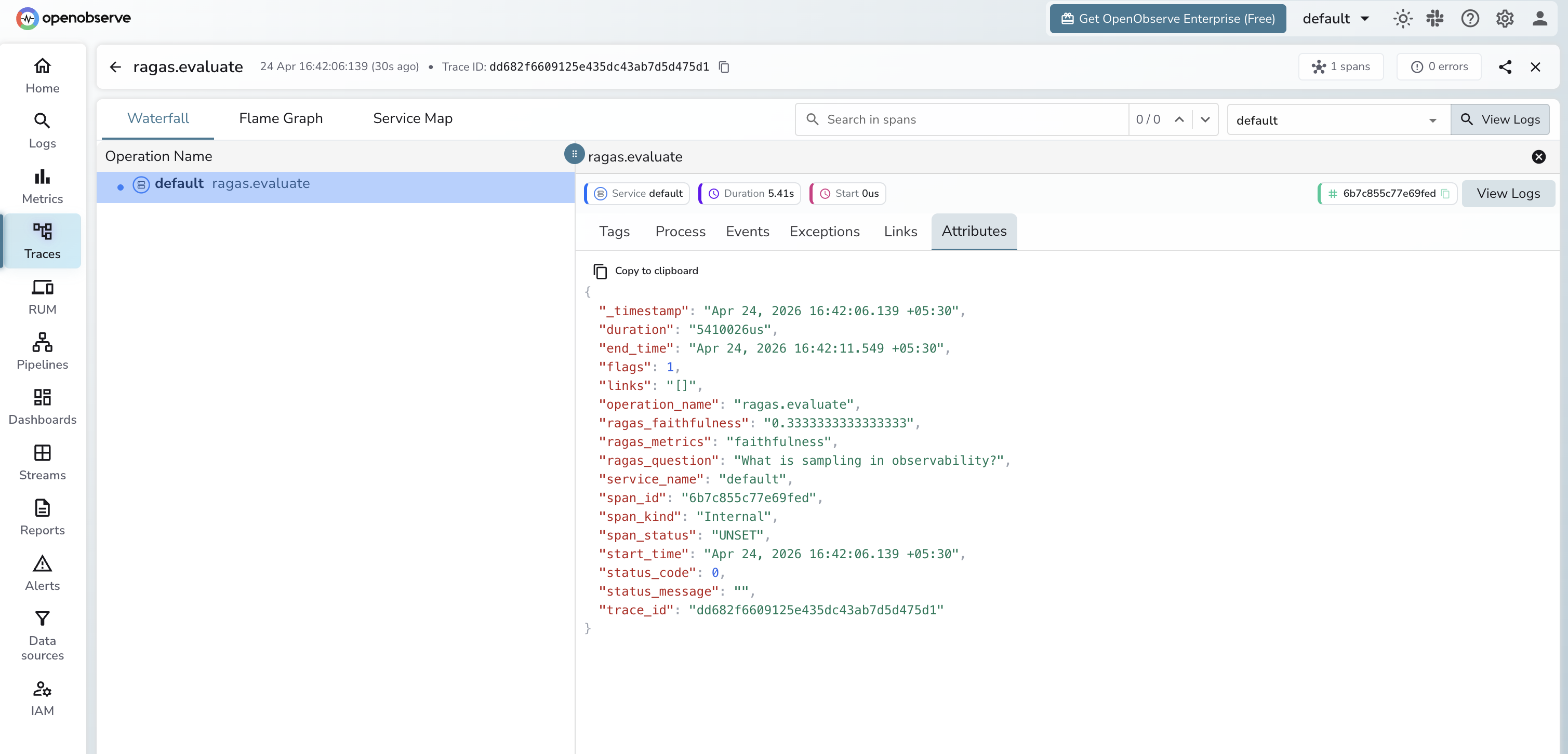
Each evaluation wrapped in a span produces the following attributes. OpenObserve stores dot-separated attribute names with underscores.
| Attribute (in OpenObserve) | Description |
|---|---|
operation_name | ragas.evaluate |
ragas_question | The question being evaluated |
ragas_metrics | Comma-separated list of metrics computed |
ragas_faithfulness | Faithfulness score (0.0 to 1.0) |
duration | End-to-end evaluation latency |
span_status | UNSET on success, ERROR on failure |
Viewing Traces
- Log in to OpenObserve and navigate to Traces in the left sidebar
- Filter by
operation_name = ragas.evaluateto find evaluation spans - Click any span to inspect metric scores and the question being evaluated
- Use Dashboards to plot
ragas_faithfulnessover time and track RAG quality trends
Next Steps
With Ragas instrumented, every evaluation run is recorded in OpenObserve. From here you can track RAG quality scores over time, correlate evaluation results with retrieval or model changes, and alert when scores drop below a threshold.
Read More
Last updated on