
Flowise → OpenObserve
Trace every prediction request made to a Flowise chatflow by wrapping the REST API calls in manual OpenTelemetry spans. Flowise is an open-source drag-and-drop LLM flow builder. This integration instruments a Python client that calls the Flowise prediction API and exports spans to OpenObserve.
Prerequisites
- Docker installed
- An OpenObserve account (cloud or self-hosted)
- Your OpenObserve organisation ID and Base64-encoded auth token
- OpenAI API key (or another provider supported by Flowise)
Installation
pip install openobserve opentelemetry-sdk opentelemetry-exporter-otlp python-dotenv requestsConfiguration
Start Flowise via Docker, passing your OpenObserve endpoint as the OTLP export target:
docker run -d \
  --name flowise \
  -p 3000:3000 \
  -e OTEL_EXPORTER_OTLP_ENDPOINT=http://host.docker.internal:5080/api/default/v1/traces \
  "-e OTEL_EXPORTER_OTLP_HEADERS=Authorization=Basic <your_base64_token>" \
  -e OTEL_SERVICE_NAME=flowise \
  flowiseai/flowise
Replace host.docker.internal with your OpenObserve host if it is not running on the same machine.
Once Flowise is running, open http://localhost:3000, build a chatflow, and copy the chatflow ID from the canvas URL.
Set the following in your .env file:
OPENOBSERVE_URL=http://localhost:5080/
OPENOBSERVE_ORG=default
OPENOBSERVE_AUTH_TOKEN=Basic <your_base64_token>
FLOWISE_BASE_URL=http://localhost:3000
FLOWISE_CHATFLOW_ID=<your_chatflow_id>
Instrumentation
Wrap each prediction call in a manual span using the OpenTelemetry tracer:
from dotenv import load_dotenv
load_dotenv()

from openobserve import openobserve_init
openobserve_init()

from opentelemetry import trace
import os
import requests

tracer = trace.get_tracer(__name__)

base_url = os.environ["FLOWISE_BASE_URL"]
chatflow_id = os.environ["FLOWISE_CHATFLOW_ID"]

with tracer.start_as_current_span("flowise.chatflow_predict") as span:
    span.set_attribute("flowise_chatflow_id", chatflow_id)
    span.set_attribute("flowise_question", "Explain distributed tracing in one sentence.")
    resp = requests.post(
        f"{base_url}/api/v1/prediction/{chatflow_id}",
        headers={"Content-Type": "application/json"},
        json={"question": "Explain distributed tracing in one sentence."},
        timeout=30,
    )
    resp.raise_for_status()
    text = resp.json().get("text", "")
    span.set_attribute("flowise_answer_length", len(text))
    span.set_attribute("span_status", "OK")
    print(text)
What Gets Captured
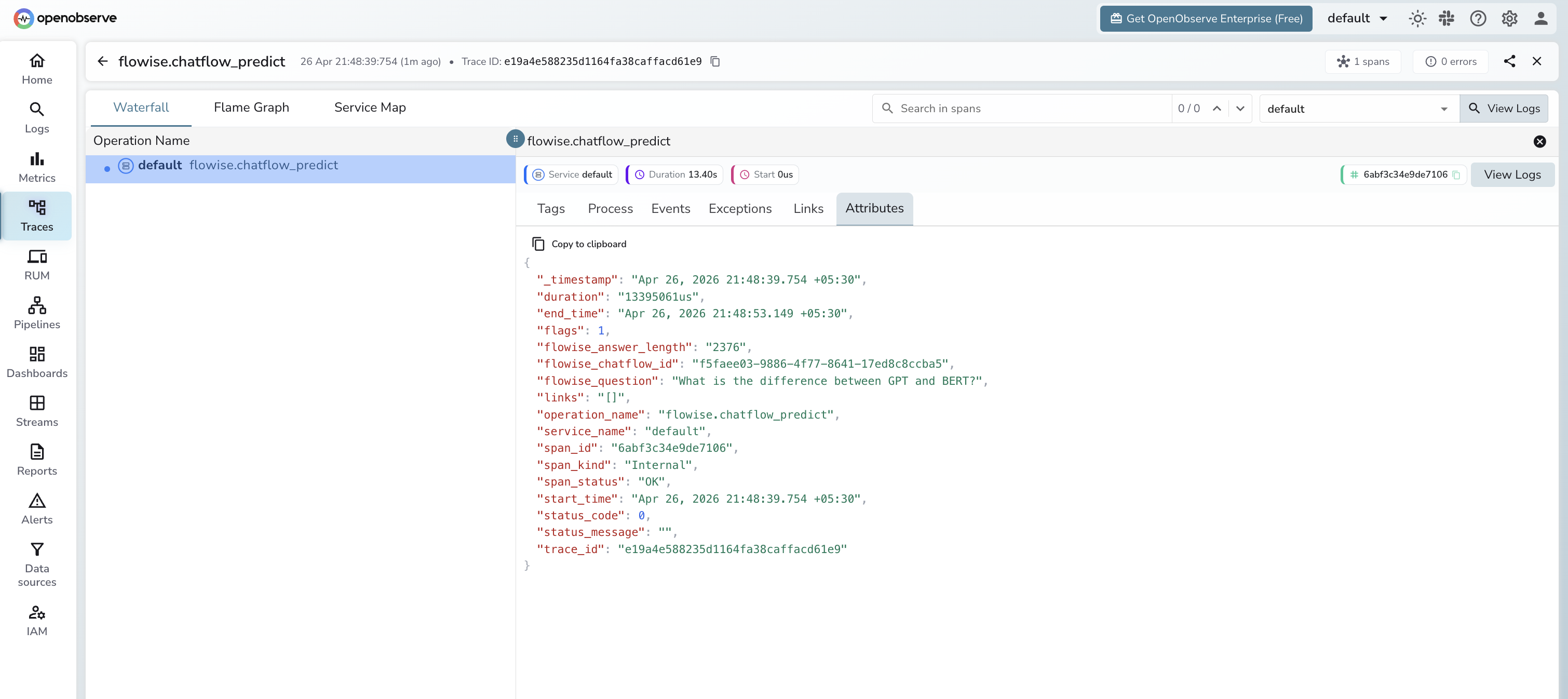
Each prediction call emits one flowise.chatflow_predict span:
| Attribute | Description |
|---|---|
flowise_chatflow_id | The chatflow UUID that handled the request |
flowise_question | The question text sent to the chatflow |
flowise_answer_length | Character length of the response |
span_status | OK on success, ERROR on failure |
error_message | Error detail when the request fails |
duration | Total round-trip latency in microseconds |
Viewing Traces
- Log in to OpenObserve and navigate to Traces
- Filter by
operation_name=flowise.chatflow_predictto isolate Flowise spans - Click a trace to inspect the chatflow ID, question, and response length
- Filter by
span_status=ERRORto find failed predictions
Next Steps
With Flowise traces in OpenObserve, you can track chatflow latency over time, compare performance across different flow designs, and alert on prediction failures.
Read More
Last updated on