
LlamaIndex Workflows → OpenObserve
Automatically capture step-by-step execution spans for every LlamaIndex Workflow run. LlamaIndex Workflows are event-driven, step-based pipelines built on top of the LlamaIndex core. The OpenInference LlamaIndex instrumentor covers the workflow execution path, emitting spans for each step and any LLM calls within them.
Prerequisites
- Python 3.9+
- An OpenObserve account (cloud or self-hosted)
- Your OpenObserve organisation ID and Base64-encoded auth token
- An OpenAI API key
Installation
pip install openobserve "openinference-instrumentation-llama-index==2.2.4" \
  "llama-index-core==0.10.68" "llama-index-llms-openai==0.1.31" \
  python-dotenv
Pin llama-index-core to 0.10.68 on Python 3.9. Later versions use X | Y union syntax that requires Python 3.10+.
Configuration
Create a .env file in your project root:
OPENOBSERVE_URL=http://localhost:5080/
OPENOBSERVE_ORG=default
OPENOBSERVE_AUTH_TOKEN=Basic <your_base64_token>
OPENAI_API_KEY=your-openai-api-key
Instrumentation
Call LlamaIndexInstrumentor().instrument() before importing LlamaIndex components. Define your workflow steps normally.
from dotenv import load_dotenv
load_dotenv()

from openinference.instrumentation.llama_index import LlamaIndexInstrumentor
from openobserve import openobserve_init

LlamaIndexInstrumentor().instrument()
openobserve_init()

import os
import asyncio
from llama_index.core.workflow import Workflow, StartEvent, StopEvent, step, Event
from llama_index.llms.openai import OpenAI

class QuestionEvent(Event):
    question: str

class QAWorkflow(Workflow):
    @step
    async def start(self, ev: StartEvent) -> QuestionEvent:
        return QuestionEvent(question=ev.get("question", "What is AI?"))

    @step
    async def answer(self, ev: QuestionEvent) -> StopEvent:
        llm = OpenAI(model="gpt-4o-mini", api_key=os.environ["OPENAI_API_KEY"])
        response = await llm.acomplete(f"Answer briefly: {ev.question}")
        return StopEvent(result=str(response))

async def main():
    workflow = QAWorkflow(timeout=30, verbose=False)
    result = await workflow.run(question="Explain distributed tracing in one sentence.")
    print(result)

asyncio.run(main())
What Gets Captured
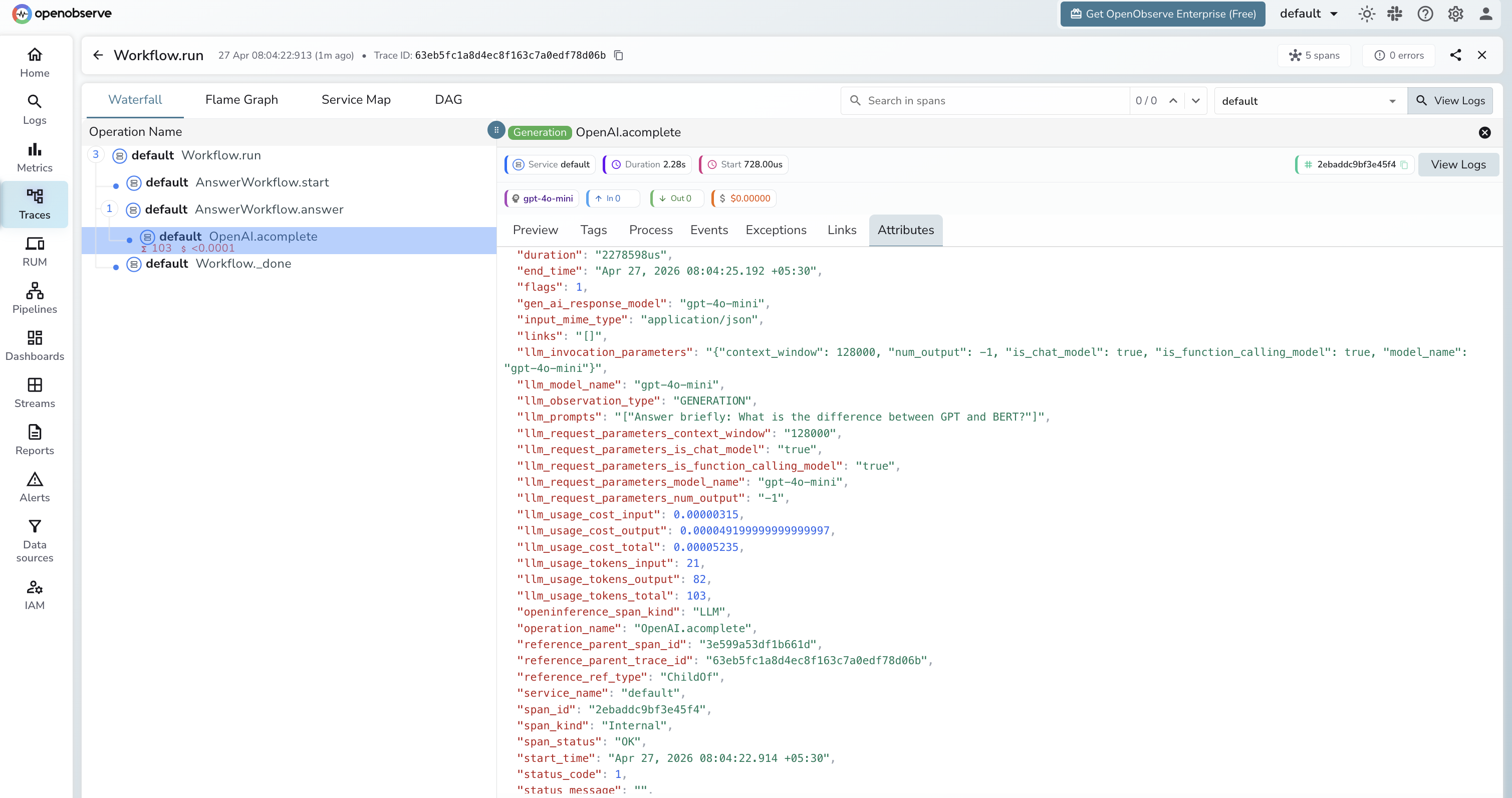
Each workflow run produces a trace with spans for each step and any LLM calls within them:
| Attribute | Description |
|---|---|
openinference_span_kind | CHAIN for the workflow root and steps, LLM for model calls |
operation_name | Span name, e.g. OpenAI.acomplete for async LLM calls |
llm_model_name | Model used inside the LLM step (e.g. gpt-4o-mini) |
llm_prompts | The prompt string sent to the model |
llm_usage_tokens_input | Input token count |
llm_usage_tokens_output | Output token count |
llm_usage_tokens_total | Total tokens for the LLM call |
llm_usage_cost_input | Estimated cost of input tokens |
llm_usage_cost_output | Estimated cost of output tokens |
llm_invocation_parameters | JSON string of model config (context window, function calling support) |
llm_observation_type | GENERATION for LLM spans |
gen_ai_response_model | Model ID returned by the provider |
span_status | OK or error status |
duration | Latency per step and for the full workflow |
Viewing Traces
- Log in to OpenObserve and navigate to Traces
- Each workflow run appears as a root span with child spans per step
- Expand the trace to see the step execution order and which step called the LLM
- Filter by
openinference_span_kind=LLMto focus on model calls - Filter by
span_status=ERRORto find failed workflow runs
Next Steps
With LlamaIndex Workflows instrumented, every pipeline run is recorded in OpenObserve. From here you can monitor step latency, track token usage per step, and identify slow or failing steps.
Read More
Last updated on