
OpenAI Agents SDK → OpenObserve
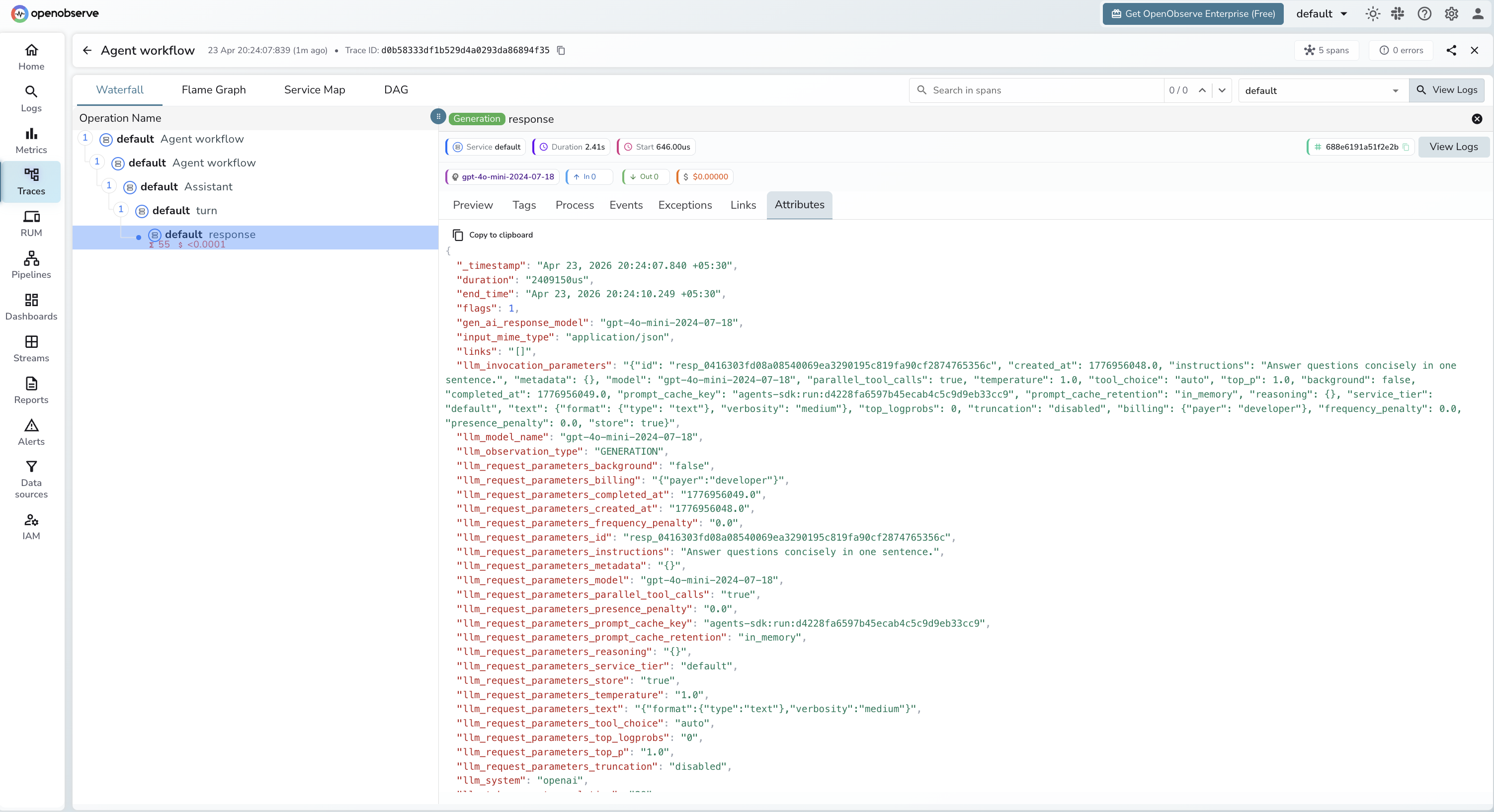
Automatically capture agent runs, LLM calls, and handoffs for every agent built with the OpenAI Agents SDK. Each Runner.run() call produces a trace with a four-level span hierarchy: a root runner span, an Agent workflow (CHAIN) span, an Assistant span, a turn span, and a response (LLM) span for each model call.
Prerequisites
- Python 3.10+
- An OpenObserve account (cloud or self-hosted)
- Your OpenObserve organisation ID and Base64-encoded auth token
- An OpenAI API key
Installation
pip install openobserve-telemetry-sdk openinference-instrumentation-openai-agents openai-agents python-dotenvConfiguration
Create a .env file in your project root:
# OpenObserve instance URL
# Default for self-hosted: http://localhost:5080
OPENOBSERVE_URL=https://api.openobserve.ai/

# Your OpenObserve organisation slug or ID
OPENOBSERVE_ORG=your_org_id

# Basic auth token — Base64-encoded "email:password"
OPENOBSERVE_AUTH_TOKEN=Basic <your_base64_token>

# OpenAI API key
OPENAI_API_KEY=your-openai-key
Instrumentation
Call OpenAIAgentsInstrumentor().instrument() before importing any agents modules.
from dotenv import load_dotenv
load_dotenv()

from openinference.instrumentation.openai_agents import OpenAIAgentsInstrumentor
from openobserve import openobserve_init

OpenAIAgentsInstrumentor().instrument()
openobserve_init()

import asyncio
from agents import Agent, Runner

agent = Agent(
    name="Assistant",
    instructions="You are a helpful assistant.",
    model="gpt-4o-mini",
)

async def main():
    result = await Runner.run(agent, "What is OpenTelemetry?")
    print(result.final_output)

asyncio.run(main())
Agent with tools
from dotenv import load_dotenv
load_dotenv()

from openinference.instrumentation.openai_agents import OpenAIAgentsInstrumentor
from openobserve import openobserve_init

OpenAIAgentsInstrumentor().instrument()
openobserve_init()

import asyncio
from agents import Agent, Runner, function_tool

@function_tool
def get_weather(city: str) -> str:
    """Return current weather for a city."""
    return f"Sunny, 22°C in {city}"

agent = Agent(
    name="WeatherAgent",
    instructions="Use get_weather to answer weather questions.",
    model="gpt-4o-mini",
    tools=[get_weather],
)

async def main():
    result = await Runner.run(agent, "What is the weather in London?")
    print(result.final_output)

asyncio.run(main())
Multi-agent handoffs
from dotenv import load_dotenv
load_dotenv()

from openinference.instrumentation.openai_agents import OpenAIAgentsInstrumentor
from openobserve import openobserve_init

OpenAIAgentsInstrumentor().instrument()
openobserve_init()

import asyncio
from agents import Agent, Runner

specialist = Agent(
    name="Specialist",
    instructions="You are a specialist in technical topics.",
    model="gpt-4o-mini",
)

triage = Agent(
    name="Triage",
    instructions="Route technical questions to the Specialist.",
    model="gpt-4o-mini",
    handoffs=[specialist],
)

async def main():
    result = await Runner.run(triage, "Explain how OTLP works.")
    print(result.final_output)

asyncio.run(main())
What Gets Captured
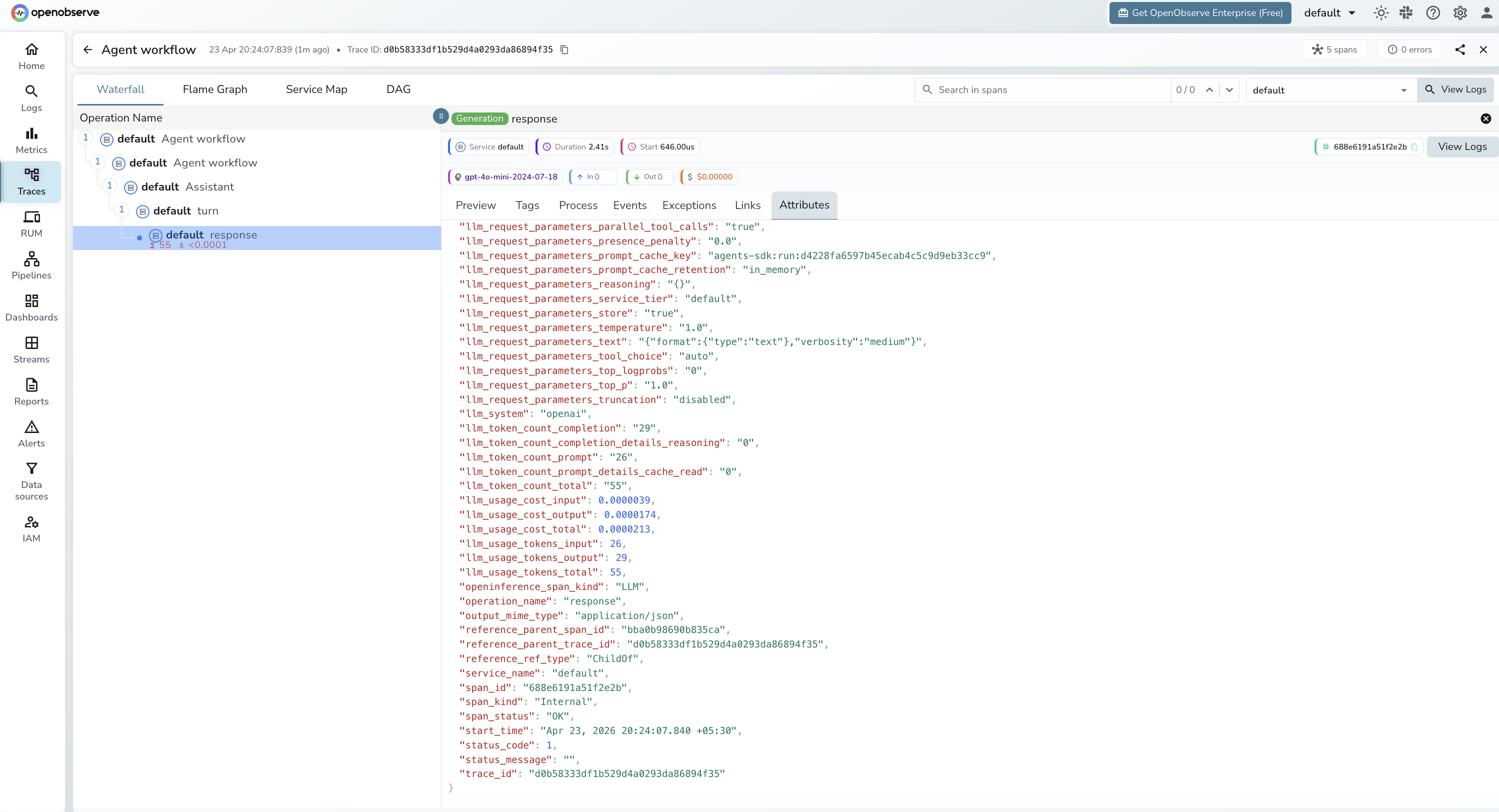
Each Runner.run() call produces a trace with a four-level span tree. The Agent workflow span (CHAIN) wraps an Assistant span, which contains a turn span, which contains a response span (LLM) for each model call.
| Attribute | Description |
|---|---|
openinference_span_kind | CHAIN for agent workflow steps, LLM for model calls |
operation_name | Agent workflow for agent steps, response for LLM calls |
llm_model_name | Resolved model snapshot (e.g. gpt-4o-mini-2024-07-18) |
llm_system | openai |
llm_token_count_prompt | Input tokens for the LLM call |
llm_token_count_completion | Output tokens for the LLM call |
llm_token_count_total | Total tokens consumed |
llm_token_count_completion_details_reasoning | Reasoning tokens (0 for non-reasoning models) |
llm_token_count_prompt_details_cache_read | Prompt tokens served from cache |
llm_usage_cost_input | Estimated input cost in USD |
llm_usage_cost_output | Estimated output cost in USD |
duration | Span latency |
span_status | OK or error status |
Viewing Traces
- Log in to OpenObserve and navigate to Traces in the left sidebar
- Click any root span to open the waterfall view
- Expand the tree to see
CHAINagent workflow spans and theirLLMchild spans - For multi-agent workflows, each handoff appears as a separate
CHAINspan making it easy to trace which agent handled each step
Next Steps
With the OpenAI Agents SDK instrumented, every agent run is recorded in OpenObserve with a full span hierarchy. From here you can track token usage per agent step, measure per-call latency, trace handoff chains, and set alerts on failed runs.
Read More
Last updated on