
Google ADK → OpenObserve
Automatically capture agent runs, LLM calls, tool executions, and token usage for every Google ADK agent in your Python application.
Prerequisites
- Python 3.10+
- An OpenObserve account (cloud or self-hosted)
- Your OpenObserve organisation ID and Base64-encoded auth token
- A Google AI Studio API key (
GOOGLE_API_KEY)
Installation
pip install openobserve-telemetry-sdk openinference-instrumentation-google-adk google-adk python-dotenvConfiguration
Create a .env file in your project root:
# OpenObserve instance URL
# Default for self-hosted: http://localhost:5080
OPENOBSERVE_URL=https://api.openobserve.ai/

# Your OpenObserve organisation slug or ID
OPENOBSERVE_ORG=your_org_id

# Basic auth token — Base64-encoded "email:password"
OPENOBSERVE_AUTH_TOKEN=Basic <your_base64_token>

# Google AI Studio API key
GOOGLE_API_KEY=your-google-api-key
Instrumentation
Call GoogleADKInstrumentor().instrument() before importing any ADK modules.
from dotenv import load_dotenv
load_dotenv()

from openinference.instrumentation.google_adk import GoogleADKInstrumentor
from openobserve import openobserve_init

GoogleADKInstrumentor().instrument()
openobserve_init()

import asyncio
from google.adk import Agent, Runner
from google.adk.sessions import InMemorySessionService
from google.genai import types


def get_weather(city: str) -> str:
    """Get current weather for a city."""
    return f"Sunny, 22°C in {city}"


agent = Agent(
    name="weather_agent",
    model="gemini-2.5-flash",
    instruction="You are a helpful assistant. Use get_weather for weather questions.",
    tools=[get_weather],
)

session_service = InMemorySessionService()
runner = Runner(agent=agent, session_service=session_service, app_name="my_app")


async def main():
    await session_service.create_session(
        app_name="my_app", user_id="user1", session_id="session1"
    )
    content = types.Content(
        role="user",
        parts=[types.Part.from_text(text="What's the weather in London?")],
    )
    async for event in runner.run_async(
        user_id="user1", session_id="session1", new_message=content
    ):
        if event.content and event.content.parts:
            for part in event.content.parts:
                if getattr(part, "text", None):
                    print(part.text)


asyncio.run(main())
What Gets Captured
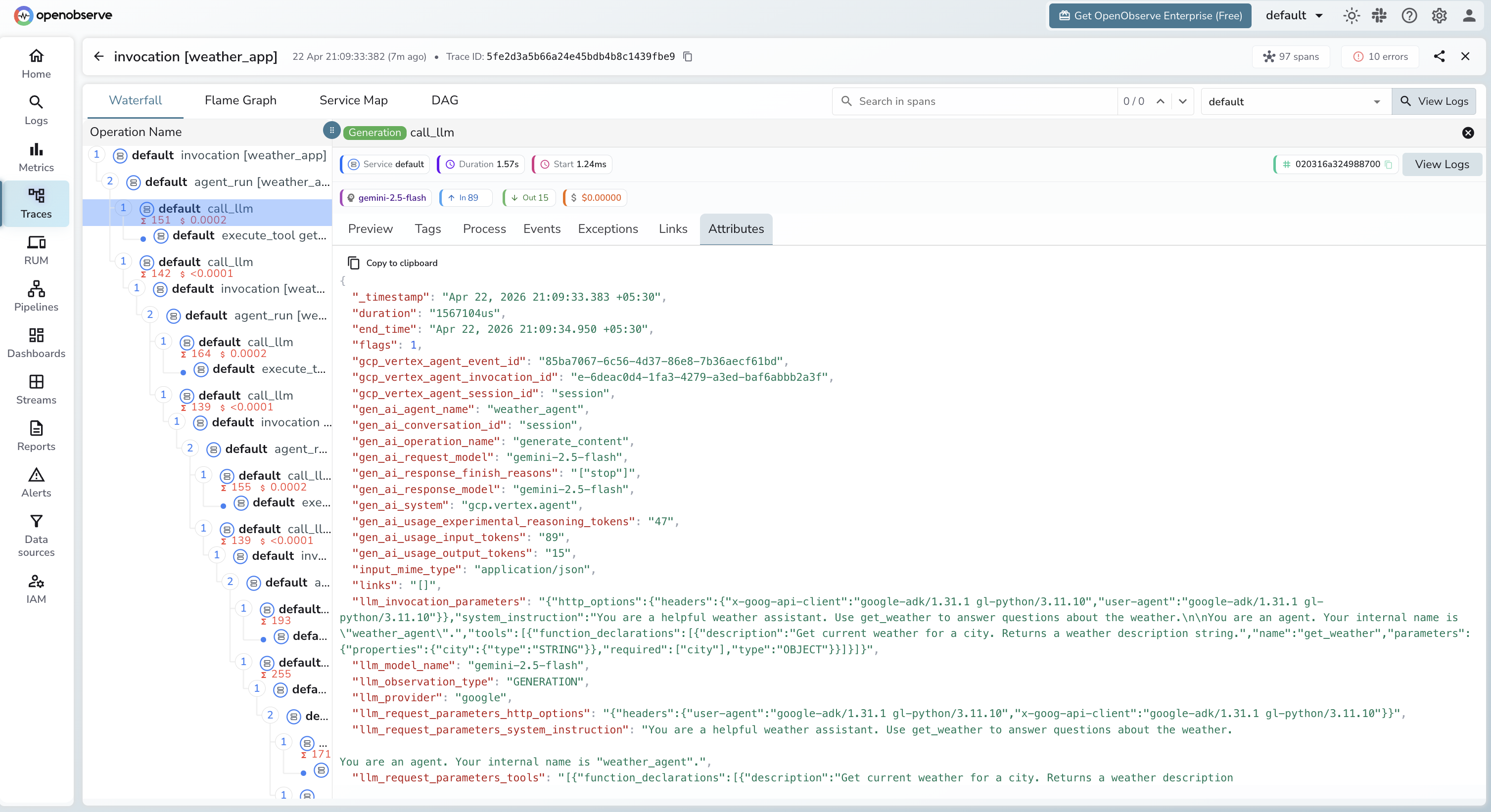
Each agent invocation produces a trace with a hierarchy of spans: invocation [<app_name>] at the root, agent_run [<agent_name>] for the agent execution, call_llm for each LLM API call, and execute_tool <tool_name> for each tool invocation. Multi-turn agents produce multiple call_llm spans within a single agent_run.
| Attribute | Description |
|---|---|
gcp_vertex_agent_name | Agent name (e.g. weather_agent) |
gcp_vertex_agent_invocation_id | Unique ID for the agent invocation |
gen_ai_request_model | Model used (e.g. gemini-2.5-flash) |
gen_ai_system | gcp.vertex.agent |
gen_ai_conversation_id | Session identifier passed to the runner |
llm_usage_input_tokens | Input tokens for the LLM call |
llm_usage_output_tokens | Output tokens for the LLM call |
llm_usage_tokens_total | Total tokens consumed |
llm_usage_cost_input | Estimated input cost in USD |
llm_usage_cost_output | Estimated output cost in USD |
llm_token_count_completion_details_reasoning | Reasoning tokens (Gemini 2.5 thinking budget) |
user_id | User identifier passed to the runner |
duration | Span latency |
span_status | OK or ERROR |
Viewing Traces
- Log in to OpenObserve and navigate to Traces in the left sidebar
- Click any
invocation [<app_name>]root span to open the waterfall view - Expand the tree to see
agent_run,call_llm, andexecute_toolchild spans - Click a
call_llmspan to inspect token counts, model, and cost for that specific LLM call
Next Steps
With Google ADK instrumented, every agent invocation is recorded in OpenObserve with a full span hierarchy. From here you can track token usage per agent run, compare latency across tools and LLM calls, and set alerts on error spans from failed tool executions.
Read More
Last updated on