
Haystack → OpenObserve
Automatically capture pipeline runs, component executions, and LLM calls for every Haystack v2 pipeline in your Python application.
Prerequisites
- Python 3.10+
- An OpenObserve account (cloud or self-hosted)
- Your OpenObserve organisation ID and Base64-encoded auth token
- An OpenAI API key (or whichever generator component you use)
Installation
pip install openobserve-telemetry-sdk openinference-instrumentation-haystack haystack-ai python-dotenvConfiguration
Create a .env file in your project root:
# OpenObserve instance URL
# Default for self-hosted: http://localhost:5080
OPENOBSERVE_URL=https://api.openobserve.ai/

# Your OpenObserve organisation slug or ID
OPENOBSERVE_ORG=your_org_id

# Basic auth token — Base64-encoded "email:password"
OPENOBSERVE_AUTH_TOKEN=Basic <your_base64_token>

# LLM provider key
OPENAI_API_KEY=your-openai-key
Instrumentation
Call HaystackInstrumentor().instrument() before importing any Haystack modules.
from dotenv import load_dotenv
load_dotenv()

from openinference.instrumentation.haystack import HaystackInstrumentor
from openobserve import openobserve_init

HaystackInstrumentor().instrument()
openobserve_init()

from haystack import Pipeline
from haystack.components.builders import PromptBuilder
from haystack.components.generators import OpenAIGenerator

template = "Answer the following question in one sentence: {{ question }}"

pipeline = Pipeline()
pipeline.add_component("prompt", PromptBuilder(template=template))
pipeline.add_component("llm", OpenAIGenerator(model="gpt-4o-mini"))
pipeline.connect("prompt.prompt", "llm.prompt")

result = pipeline.run({"prompt": {"question": "What is OpenTelemetry?"}})
print(result["llm"]["replies"][0])
RAG pipeline
from haystack.components.retrievers.in_memory import InMemoryBM25Retriever
from haystack.document_stores.in_memory import InMemoryDocumentStore
from haystack import Document

store = InMemoryDocumentStore()
store.write_documents([
    Document(content="OpenObserve is an observability platform for logs, metrics, and traces."),
    Document(content="OpenTelemetry is a vendor-neutral standard for telemetry data."),
])

rag = Pipeline()
rag.add_component("retriever", InMemoryBM25Retriever(document_store=store))
rag.add_component("prompt", PromptBuilder(
    template="Given these documents: {% for doc in documents %}{{ doc.content }}{% endfor %}\nAnswer: {{ question }}"
))
rag.add_component("llm", OpenAIGenerator(model="gpt-4o-mini"))
rag.connect("retriever.documents", "prompt.documents")
rag.connect("prompt.prompt", "llm.prompt")

result = rag.run({"retriever": {"query": "What is OpenObserve?"}, "prompt": {"question": "What is OpenObserve?"}})
print(result["llm"]["replies"][0])
What Gets Captured
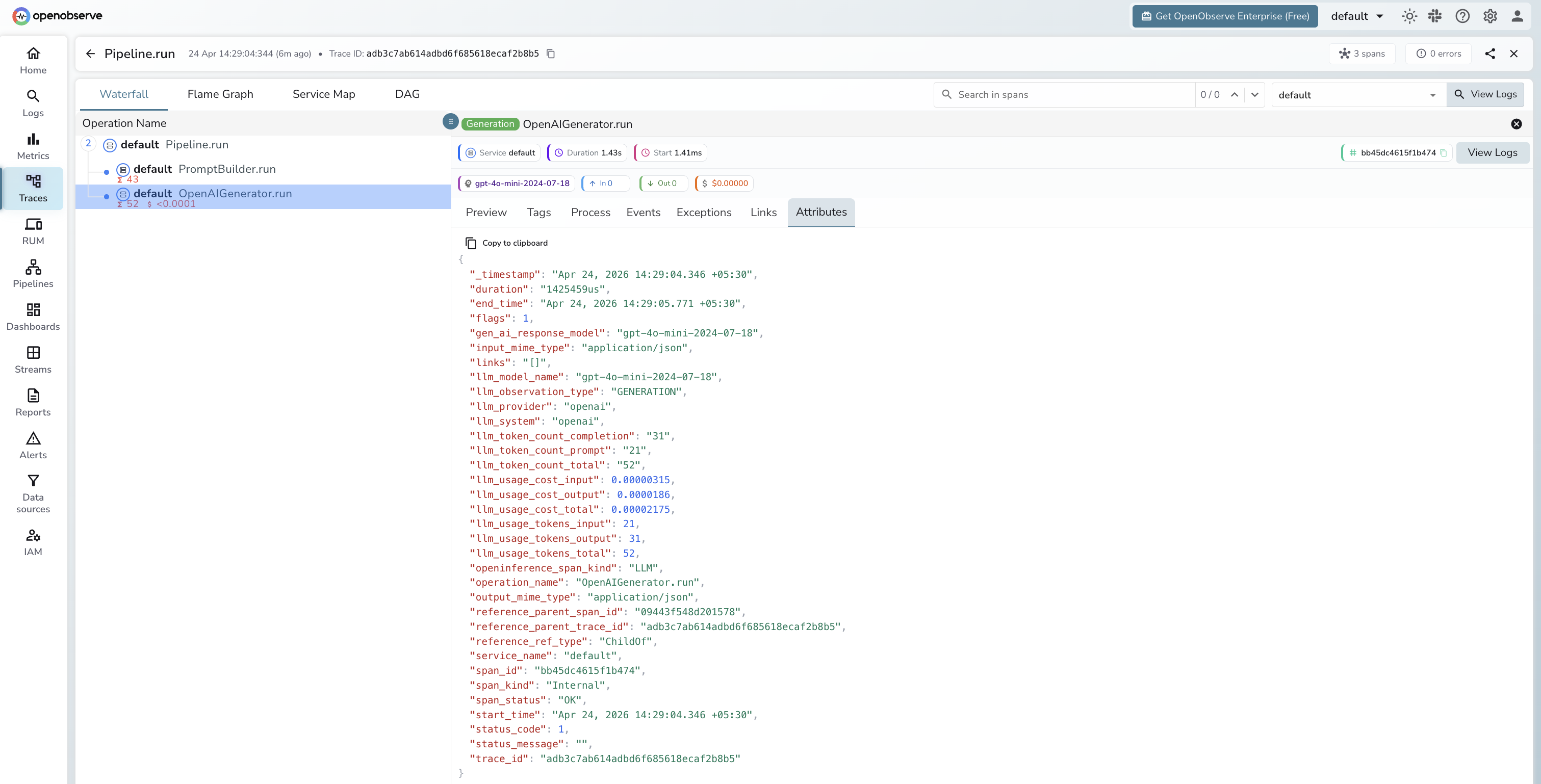
Each pipeline.run() produces a root CHAIN span with a child span per component. Generator components produce LLM child spans.
LLM span (OpenAIGenerator)
| Attribute | Description |
|---|---|
openinference_span_kind | LLM |
operation_name | OpenAIGenerator.run |
llm_model_name | Resolved model version (e.g. gpt-4o-mini-2024-07-18) |
llm_provider | openai |
llm_system | openai |
llm_observation_type | GENERATION |
llm_token_count_prompt | Input token count |
llm_token_count_completion | Output token count |
llm_token_count_total | Total tokens consumed |
llm_usage_tokens_input | Input tokens (numeric) |
llm_usage_tokens_output | Output tokens (numeric) |
llm_usage_cost_input | Estimated input cost in USD |
llm_usage_cost_output | Estimated output cost in USD |
gen_ai_response_model | Exact model version returned by the API |
duration | Component execution latency |
span_status | OK on success, ERROR on failure |
Viewing Traces
- Log in to OpenObserve and navigate to Traces in the left sidebar
- Click any root pipeline span to open the waterfall view
- Expand the tree to see each component span in execution order
- Filter by
operation_name = OpenAIGenerator.runto find LLM spans and inspect token counts
Next Steps
With Haystack instrumented, every pipeline execution is recorded in OpenObserve with a span for each component. From here you can identify which components add the most latency, track token usage per pipeline run, and compare retrieval quality across different configurations.
Read More
Was this page helpful?
Last updated on