
OpenRouter → OpenObserve
Automatically capture token usage, latency, and model metadata for every OpenRouter request in your Python application. OpenRouter is a unified API gateway that routes to 200+ models from providers including OpenAI, Anthropic, Meta, Google, and Mistral. Instrumentation uses the standard OpenAI instrumentor pointed at the OpenRouter endpoint.
Prerequisites
- Python 3.8+
- An OpenObserve account (cloud or self-hosted)
- Your OpenObserve organisation ID and Base64-encoded auth token
- An OpenRouter API key
Installation
pip install openobserve-telemetry-sdk openinference-instrumentation-openai openai python-dotenvConfiguration
Create a .env file in your project root:
# OpenObserve instance URL
# Default for self-hosted: http://localhost:5080
OPENOBSERVE_URL=https://api.openobserve.ai/

# Your OpenObserve organisation slug or ID
OPENOBSERVE_ORG=your_org_id

# Basic auth token — Base64-encoded "email:password"
OPENOBSERVE_AUTH_TOKEN=Basic <your_base64_token>

# OpenRouter API key
OPENROUTER_API_KEY=your-openrouter-api-key
Instrumentation
Call OpenAIInstrumentor().instrument() before creating the OpenAI client. The two optional OpenRouter headers passed via default_headers are not required for requests to succeed, but they populate your OpenRouter usage dashboard.
from dotenv import load_dotenv
load_dotenv()

from openinference.instrumentation.openai import OpenAIInstrumentor
from openobserve import openobserve_init

OpenAIInstrumentor().instrument()
openobserve_init()

import os
from openai import OpenAI

client = OpenAI(
    api_key=os.environ["OPENROUTER_API_KEY"],
    base_url="https://openrouter.ai/api/v1",
    default_headers={
        "HTTP-Referer": "https://your-app.com",
        "X-Title": "Your App Name",
    },
)

response = client.chat.completions.create(
    model="openai/gpt-oss-20b:free",
    messages=[{"role": "user", "content": "Explain distributed tracing in one sentence."}],
)
print(response.choices[0].message.content)
Switching models
Because every request goes through the same OpenRouter endpoint, changing the model string is all it takes to route to a different provider. Each switch produces a separate span with its own llm_model_name, making cross-provider comparisons straightforward in OpenObserve.
models = [
    "openai/gpt-oss-20b:free",
    "google/gemma-4-31b-it:free",
    "qwen/qwen3-coder:free",
]

for model in models:
    response = client.chat.completions.create(
        model=model,
        messages=[{"role": "user", "content": "What is OpenTelemetry?"}],
    )
    print(f"{model}: {response.choices[0].message.content}")
Free-tier models use the :free suffix and are rate-limited. OpenRouter's full model list is available at openrouter.ai/models.
What Gets Captured
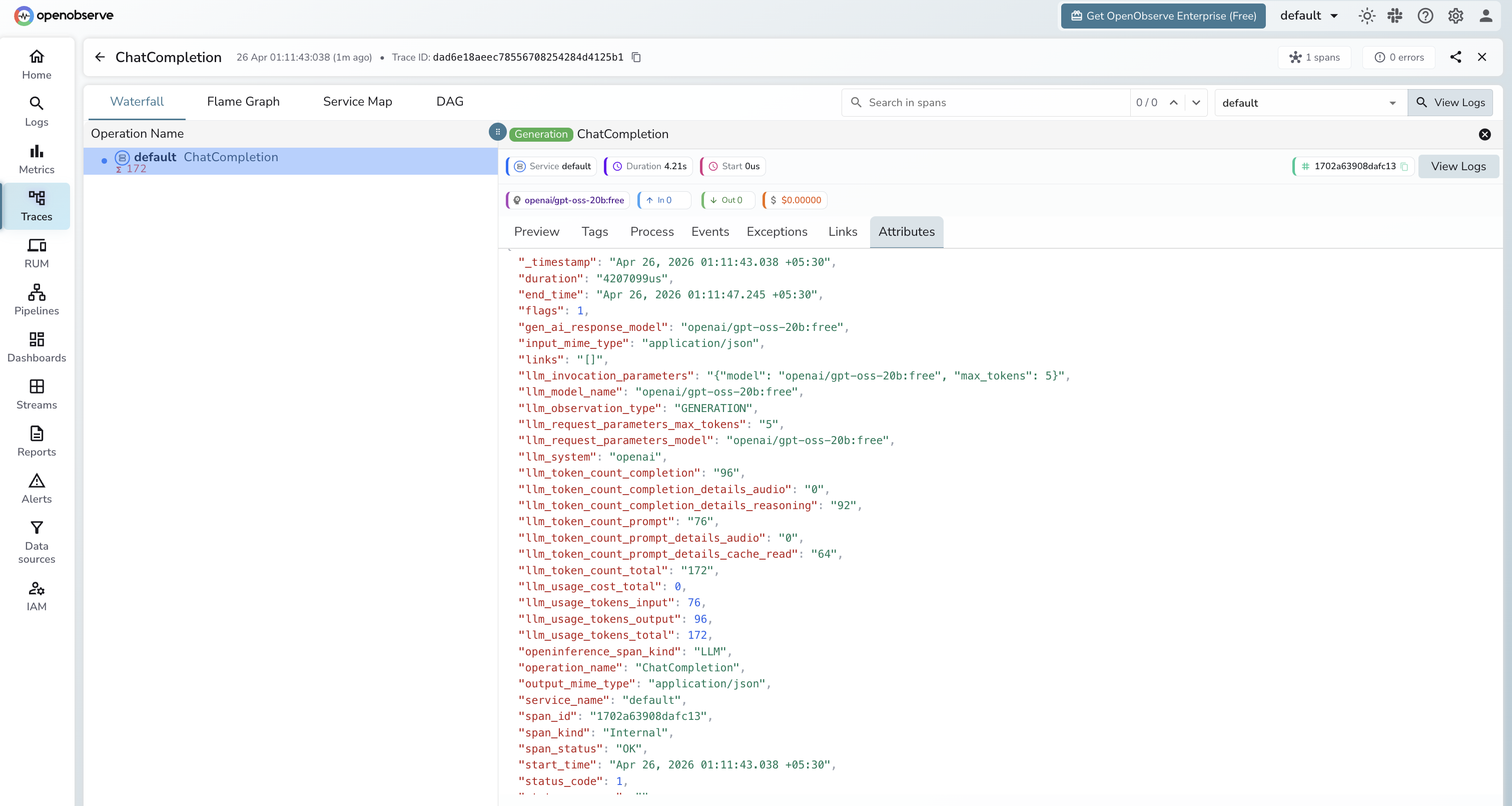
| Attribute | Description |
|---|---|
llm_model_name | Full model identifier including provider (e.g. openai/gpt-oss-20b:free) |
llm_request_parameters_model | The model requested |
gen_ai_response_model | The model that served the response |
llm_token_count_prompt | Tokens in the prompt |
llm_token_count_completion | Tokens in the response |
llm_token_count_total | Total tokens consumed |
llm_system | openai (the client library used) |
openinference_span_kind | LLM |
duration | End-to-end request latency |
span_status | OK or error status |
Viewing Traces
- Log in to OpenObserve and navigate to Traces
- Filter by
llm_model_nameto compare latency and token usage across different providers and models in a single dashboard - Click any span to inspect the full request and response payload
Next Steps
With OpenRouter instrumented, every request is recorded in OpenObserve regardless of which underlying provider served it. From here you can build dashboards comparing cost and latency across providers, identify which model delivers the best performance for your workload, and set alerts on error spikes.
Read More
Last updated on