
LangChain DeepAgents → OpenObserve
Capture agent invocation latency, LangChain call chains, and message counts for every DeepAgents run. DeepAgents is an agent harness built on LangChain and LangGraph with built-in planning and subagent support for complex multi-step tasks. Instrumentation uses openinference-instrumentation-langchain to automatically trace all LLM and LangGraph calls, plus manual spans to capture agent-level context.
Prerequisites
- Python 3.11+
- An OpenObserve account (cloud or self-hosted)
- Your OpenObserve organisation ID and Base64-encoded auth token
- An OpenAI API key
Installation
pip install openobserve-telemetry-sdk openinference-instrumentation-langchain \
  deepagents langchain-openai python-dotenv
Configuration
Create a .env file in your project root:
OPENOBSERVE_URL=https://api.openobserve.ai/
OPENOBSERVE_ORG=your_org_id
OPENOBSERVE_AUTH_TOKEN=Basic <your_base64_token>
OPENAI_API_KEY=your-openai-api-key
Instrumentation
Call LangChainInstrumentor().instrument() before openobserve_init(). DeepAgents builds on LangGraph, so all LangChain and LangGraph calls are automatically traced as child spans. Wrap each agent.invoke() call in a manual root span to attach your own attributes.
from dotenv import load_dotenv
load_dotenv()

from openinference.instrumentation.langchain import LangChainInstrumentor
LangChainInstrumentor().instrument()

from openobserve import openobserve_init, openobserve_shutdown
openobserve_init(resource_attributes={"service.name": "my-app"})

from opentelemetry import trace
from langchain_openai import ChatOpenAI
from deepagents import create_deep_agent

tracer = trace.get_tracer(__name__)

model = ChatOpenAI(model="gpt-4o-mini", temperature=0)
agent = create_deep_agent(model=model, tools=[])

with tracer.start_as_current_span("deepagents.invoke") as span:
    span.set_attribute("deepagents.question", "What is distributed tracing?")
    result = agent.invoke({
        "messages": [{"role": "user", "content": "What is distributed tracing?"}]
    })
    messages = result.get("messages", [])
    answer = messages[-1].content[:80] if messages else ""
    span.set_attribute("deepagents.answer_preview", answer)
    span.set_attribute("deepagents.message_count", len(messages))
    span.set_attribute("span_status", "OK")
    print(answer)

openobserve_shutdown()
What Gets Captured
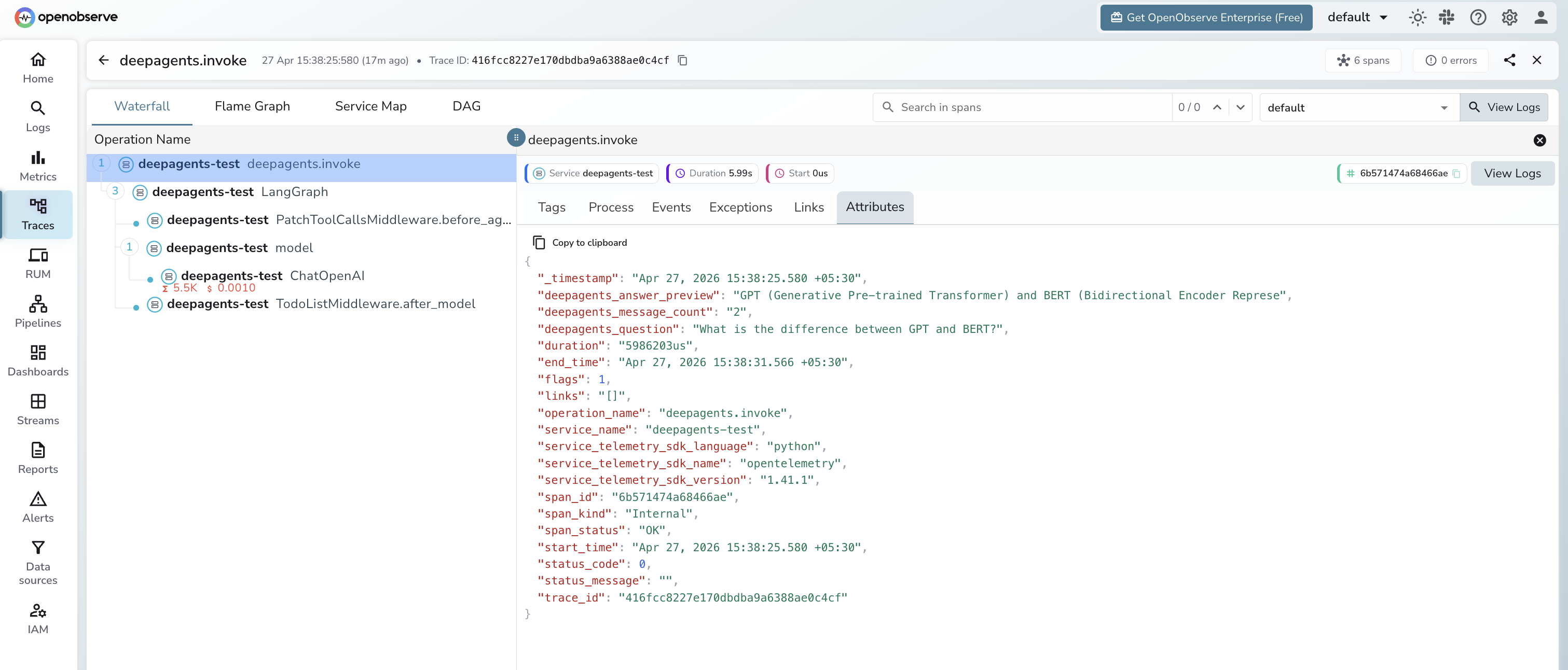
Each agent run produces a manual deepagents.invoke root span with child spans from the LangChain instrumentation for every LLM call and LangGraph node execution.
deepagents.invoke span (manual root)
| Attribute | Description |
|---|---|
deepagents_question | The user prompt passed to the agent |
deepagents_answer_preview | First 80 characters of the final agent response |
deepagents_message_count | Total messages in the agent result |
span_status | OK or ERROR |
error_message | Error detail on failed runs |
duration | End-to-end agent run latency |
LangChain child spans (auto-instrumented)
| Span name | Description |
|---|---|
ChatOpenAI | Each LLM call with model name, input, output, and token counts |
LangGraph | LangGraph node execution for the agent graph |
PatchToolCallsMiddleware.before_agent | Middleware pre-processing step |
TodoListMiddleware.after_model | Post-model processing middleware |
Viewing Traces
- Log in to OpenObserve and navigate to Traces
- Filter by
service_name = deepagents-testto see all agent spans - Filter by
operation_name = deepagents.invoketo see the root spans for each run - Expand any trace to see the full LangGraph span tree with nested LLM calls
- Filter by
span_status = ERRORto find failed agent runs
Next Steps
With DeepAgents instrumented, every agent run is recorded in OpenObserve. From here you can track end-to-end agent latency, inspect the full LangGraph execution tree, and compare token consumption across different prompts.
Read More
Last updated on