
BeeAI → OpenObserve
Capture latency, model name, question input, response length, and error details for every BeeAI ReAct agent run. BeeAI is IBM Research's open-source agent framework. Instrumentation wraps each agent.run() call in a manual OpenTelemetry span.
Prerequisites
- Python 3.11+ (required by
beeai-framework) - An OpenObserve account (cloud or self-hosted)
- Your OpenObserve organisation ID and Base64-encoded auth token
- An OpenAI API key
Installation
pip install beeai-framework openai openobserve-telemetry-sdk python-dotenvConfiguration
Create a .env file in your project root:
OPENOBSERVE_URL=http://localhost:5080/
OPENOBSERVE_ORG=default
OPENOBSERVE_AUTH_TOKEN=Basic <your_base64_token>
OPENAI_API_KEY=your-openai-api-key
Instrumentation
Call openobserve_init() before importing BeeAI. Wrap each agent.run() call in a manual span.
from dotenv import load_dotenv
load_dotenv()

from openobserve import openobserve_init
openobserve_init()

from opentelemetry import trace
import asyncio

from beeai_framework.agents.react.agent import ReActAgent
from beeai_framework.backend.chat import ChatModel
from beeai_framework.memory.unconstrained_memory import UnconstrainedMemory

tracer = trace.get_tracer(__name__)
model = ChatModel.from_name("openai:gpt-4o-mini")

async def run_agent(question: str) -> str:
    with tracer.start_as_current_span("beeai.agent_run") as span:
        span.set_attribute("beeai.question", question[:200])
        span.set_attribute("beeai.model", "gpt-4o-mini")
        try:
            agent = ReActAgent(llm=model, tools=[], memory=UnconstrainedMemory())
            response = await agent.run(question)
            result = response.last_message.text
            span.set_attribute("beeai.response_length", len(result))
            span.set_attribute("span_status", "OK")
            return result
        except Exception as e:
            span.set_attribute("span_status", "ERROR")
            span.set_attribute("error.message", str(e)[:200])
            raise

async def main():
    response = await run_agent("Explain distributed tracing in one sentence.")
    print(response)
    trace.get_tracer_provider().force_flush()

asyncio.run(main())
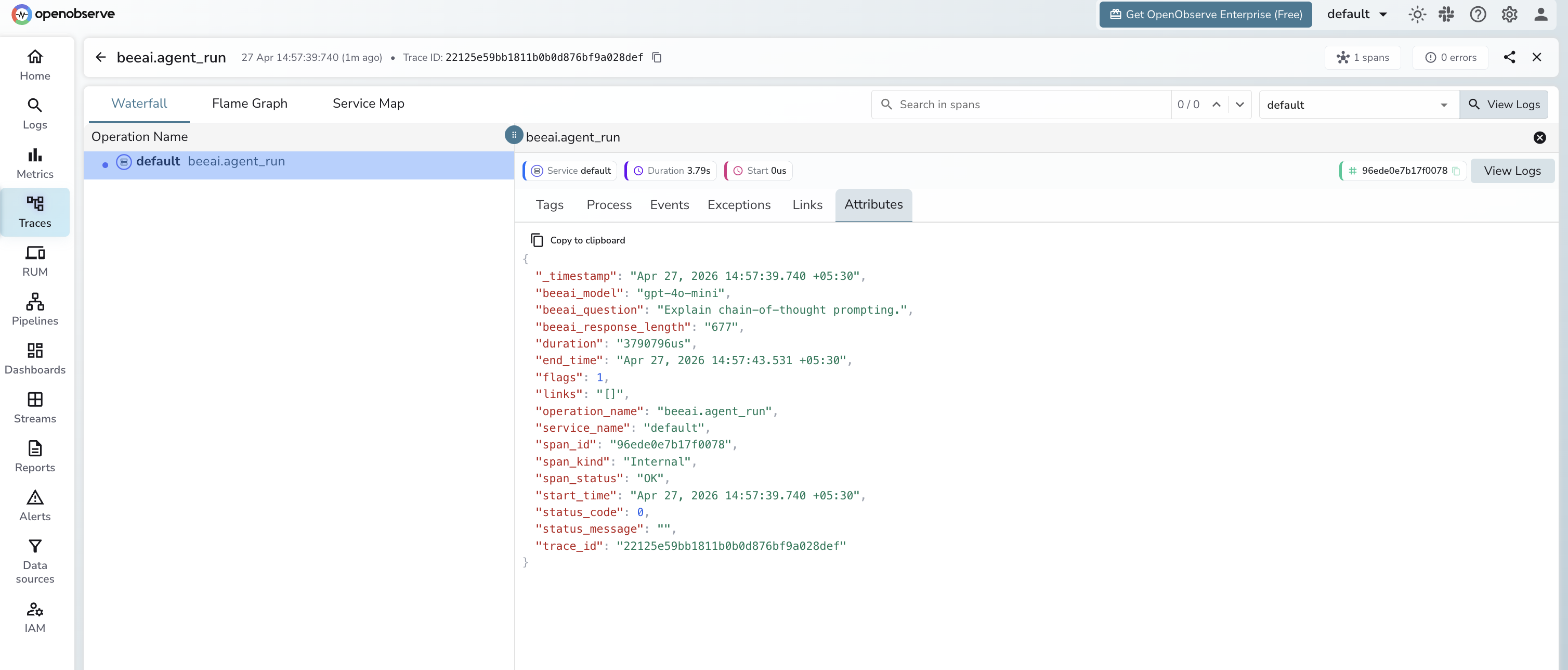
What Gets Captured
| Attribute | Description |
|---|---|
operation_name | beeai.agent_run |
beeai_model | Model name passed to the agent (e.g. gpt-4o-mini) |
beeai_question | Input question sent to the agent (truncated to 200 chars) |
beeai_response_length | Character count of the agent's response |
span_status | OK on success, ERROR on failure |
error_message | Error detail when the agent run fails |
duration | End-to-end agent run latency |
Viewing Traces
- Log in to OpenObserve and navigate to Traces
- Filter by
operation_name=beeai.agent_runto see all agent runs - Filter by
span_status=ERRORto find failed runs - Sort by duration to identify the slowest agent invocations
Next Steps
With BeeAI instrumented, every agent run is recorded in OpenObserve. From here you can monitor agent latency, track error rates, and correlate slow runs with specific question types.
Read More
Was this page helpful?
Last updated on