
Instructor → OpenObserve
Automatically capture structured output extractions, token usage, and latency for every Instructor call in your Python application. Instructor adds a span for each structured extraction on top of the underlying LLM call span.
Prerequisites
- Python 3.9+
- An OpenObserve account (cloud or self-hosted)
- Your OpenObserve organisation ID and Base64-encoded auth token
- An OpenAI API key (or whichever provider Instructor is calling)
Installation
pip install openobserve-telemetry-sdk openinference-instrumentation-instructor openinference-instrumentation-openai instructor openai python-dotenvConfiguration
Create a .env file in your project root:
# OpenObserve instance URL
# Default for self-hosted: http://localhost:5080
OPENOBSERVE_URL=https://api.openobserve.ai/

# Your OpenObserve organisation slug or ID
OPENOBSERVE_ORG=your_org_id

# Basic auth token — Base64-encoded "email:password"
OPENOBSERVE_AUTH_TOKEN=Basic <your_base64_token>

# LLM provider key
OPENAI_API_KEY=your-openai-key
Instrumentation
Call both InstructorInstrumentor().instrument() and OpenAIInstrumentor().instrument() before importing Instructor or the OpenAI client. The Instructor instrumentor captures the structured extraction layer; the OpenAI instrumentor captures the raw LLM call beneath it.
from dotenv import load_dotenv
load_dotenv()

from openinference.instrumentation.instructor import InstructorInstrumentor
from openinference.instrumentation.openai import OpenAIInstrumentor
from openobserve import openobserve_init

InstructorInstrumentor().instrument()
OpenAIInstrumentor().instrument()
openobserve_init()

import instructor
from openai import OpenAI
from pydantic import BaseModel


class Person(BaseModel):
    name: str
    age: int
    occupation: str


client = instructor.from_openai(OpenAI())

person = client.chat.completions.create(
    model="gpt-4o-mini",
    response_model=Person,
    messages=[{"role": "user", "content": "Marie Curie was a 44-year-old physicist."}],
)
print(f"{person.name}, age {person.age}, {person.occupation}")
Retries
Instructor retries failed extractions automatically. Each retry attempt appears as a separate LLM span, letting you see how many attempts were needed and why earlier ones failed.
from pydantic import validator

class StrictPerson(BaseModel):
    name: str
    age: int

    @validator("age")
    def age_must_be_positive(cls, v):
        if v <= 0:
            raise ValueError("age must be positive")
        return v

person = client.chat.completions.create(
    model="gpt-4o-mini",
    response_model=StrictPerson,
    max_retries=3,
    messages=[{"role": "user", "content": "Extract: Bob is 25 years old."}],
)
What Gets Captured
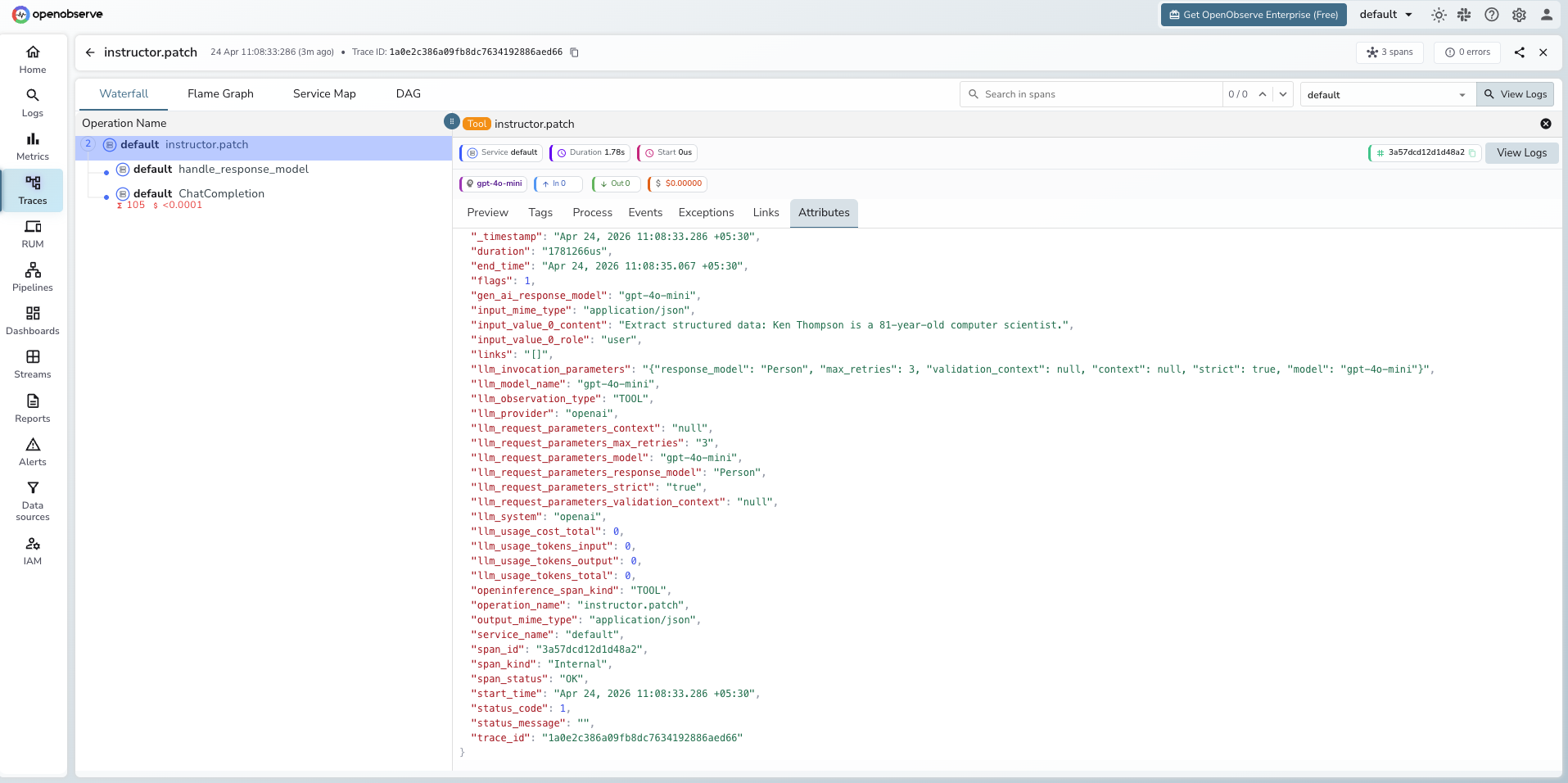
Each client.chat.completions.create call with a response_model produces two spans: one TOOL span for the Instructor extraction layer and one child LLM span for the underlying OpenAI call.
Instructor span (TOOL)
| Attribute | Description |
|---|---|
openinference_span_kind | TOOL |
operation_name | instructor.patch |
llm_model_name | Model used (e.g. gpt-4o-mini) |
llm_provider | openai |
llm_system | openai |
llm_invocation_parameters | JSON string with Instructor parameters (response model, max retries, strict mode) |
llm_request_parameters_response_model | Name of the Pydantic model used for extraction |
llm_request_parameters_max_retries | Number of retries configured |
input_value_0_content | Message content sent to the LLM |
input_value_0_role | Message role (e.g. user) |
input_mime_type | application/json |
output_mime_type | application/json |
duration | End-to-end extraction latency |
Child OpenAI span (LLM)
| Attribute | Description |
|---|---|
openinference_span_kind | LLM |
llm_usage_tokens_input | Prompt token count |
llm_usage_tokens_output | Completion token count |
llm_usage_tokens_total | Total tokens consumed |
gen_ai_response_model | Model that handled the request |
span_status | OK on success, ERROR on failure |
Viewing Traces
- Log in to OpenObserve and navigate to Traces in the left sidebar
- Filter by
operation_name = instructor.patchto find Instructor spans - Click any span to expand the trace and see the child OpenAI LLM span
- When validation fails, Instructor retries automatically. Each attempt appears as a separate child LLM span under the same
instructor.patchroot - Check
llm_request_parameters_response_modelto see which Pydantic schema was used for each extraction
Next Steps
With Instructor instrumented, every structured extraction is recorded in OpenObserve alongside the raw LLM call that produced it. From here you can track retry rates, monitor token cost per extraction, and identify which schemas cause the most validation failures.
Read More
Last updated on