
Mixpanel → OpenObserve
Record LLM usage events in Mixpanel for product analytics while simultaneously exporting structured OTel traces to OpenObserve for observability. Mixpanel captures aggregated LLM usage per user or feature; OpenObserve stores the full span tree with token counts and latency.
Prerequisites
- Python 3.8+
- An OpenObserve account (cloud or self-hosted)
- Your OpenObserve organisation ID and Base64-encoded auth token
- A Mixpanel project token
- An OpenAI API key (or another LLM provider)
Installation
pip install openobserve-telemetry-sdk openinference-instrumentation-openai mixpanel openai python-dotenvConfiguration
Create a .env file in your project root:
OPENOBSERVE_URL=https://api.openobserve.ai/
OPENOBSERVE_ORG=your_org_id
OPENOBSERVE_AUTH_TOKEN=Basic <your_base64_token>
OPENAI_API_KEY=your-openai-api-key
MIXPANEL_TOKEN=your-mixpanel-project-token
Instrumentation
Call OpenAIInstrumentor().instrument() and openobserve_init() before creating any clients. Track each LLM call in both Mixpanel and OpenObserve.
from dotenv import load_dotenv
load_dotenv()

from openinference.instrumentation.openai import OpenAIInstrumentor
from openobserve import openobserve_init

OpenAIInstrumentor().instrument()
openobserve_init()

from opentelemetry import trace
import os
import uuid
import mixpanel
from openai import OpenAI

tracer = trace.get_tracer(__name__)
mp = mixpanel.Mixpanel(os.environ["MIXPANEL_TOKEN"])
client = OpenAI(api_key=os.environ["OPENAI_API_KEY"])

def generate(prompt: str, user_id: str = None) -> str:
    with tracer.start_as_current_span("mixpanel.llm_call") as span:
        span.set_attribute("mixpanel.model", "gpt-4o-mini")
        span.set_attribute("mixpanel.prompt", prompt[:200])
        response = client.chat.completions.create(
            model="gpt-4o-mini",
            messages=[{"role": "user", "content": prompt}],
            max_tokens=200,
        )
        reply = response.choices[0].message.content
        trace_id = hex(span.get_span_context().trace_id)

        mp.track(user_id or str(uuid.uuid4()), "LLM Call", {
            "model": "gpt-4o-mini",
            "prompt_tokens": response.usage.prompt_tokens,
            "completion_tokens": response.usage.completion_tokens,
            "trace_id": trace_id,
        })
        return reply

result = generate("Explain distributed tracing in one sentence.", user_id="user-123")
print(result)
What Gets Captured
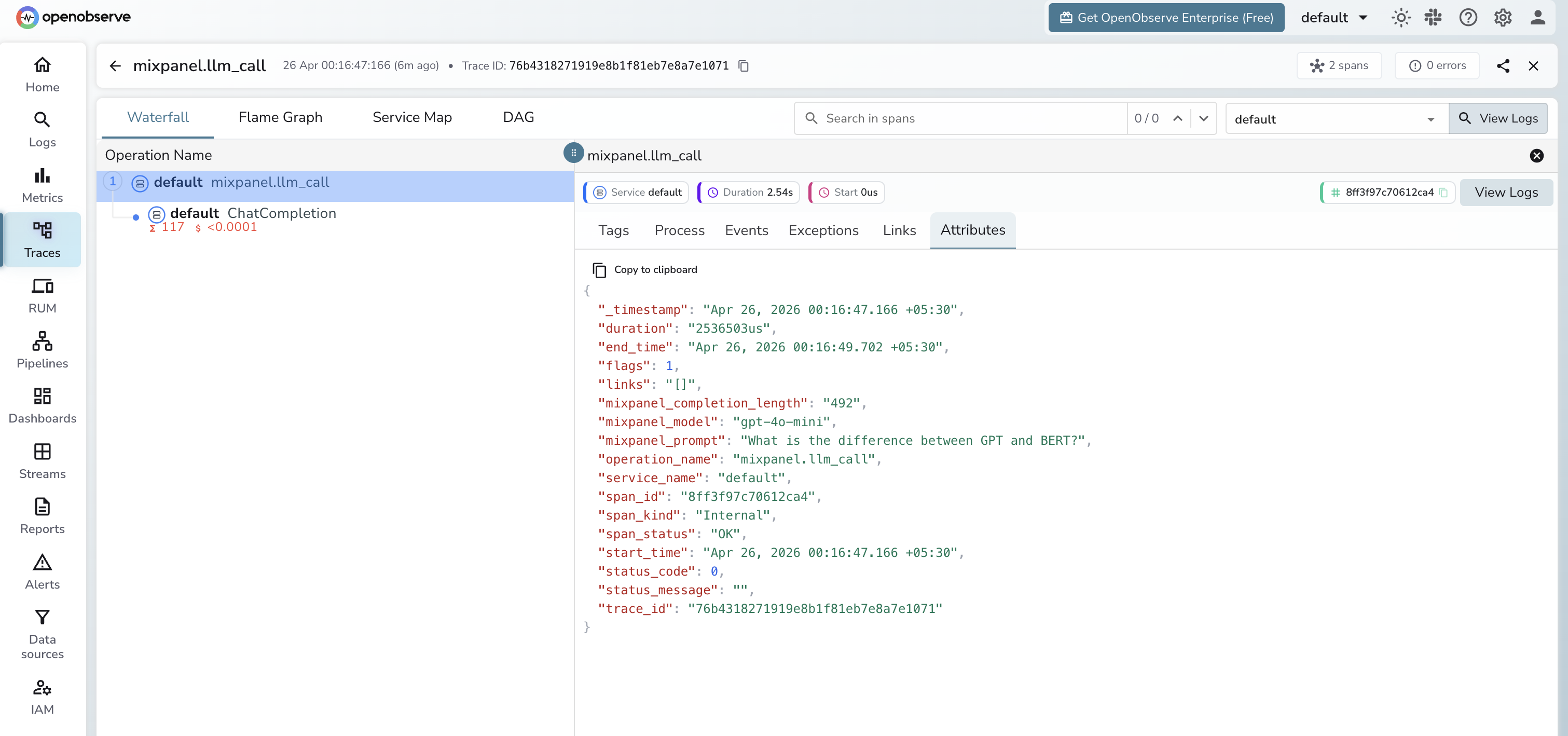
In OpenObserve (OTel traces):
| Attribute | Description |
|---|---|
mixpanel_model | The model used |
mixpanel_prompt | The input prompt |
mixpanel_completion_length | Character length of the model response |
llm_token_count_prompt | Prompt tokens (from OpenAI instrumentor child span) |
llm_token_count_completion | Completion tokens (from OpenAI instrumentor child span) |
duration | Request latency |
span_status | OK or error status |
In Mixpanel (LLM Call event):
| Property | Description |
|---|---|
model | LLM model name |
prompt_tokens | Input token count |
completion_tokens | Output token count |
trace_id | OpenObserve trace ID for cross-referencing |
Viewing Traces
- Log in to OpenObserve and navigate to Traces
- Filter by span name
mixpanel.llm_callto see all LLM calls - Use the
trace_idproperty in Mixpanel to locate the full OTel trace in OpenObserve
Next Steps
With Mixpanel and OpenObserve both instrumented, you get product analytics in Mixpanel and deep observability in OpenObserve. Use Mixpanel funnels to track feature adoption and OpenObserve dashboards to monitor LLM latency.
Read More
Last updated on