
Vapi → OpenObserve
Capture assistant metadata, request latency, and error status for every Vapi API call in your voice AI application. Vapi is a platform for building phone and web voice agents. Instrumentation uses manual OpenTelemetry spans wrapping Vapi REST API calls.
Prerequisites
- Python 3.8+
- An OpenObserve account (cloud or self-hosted)
- Your OpenObserve organisation ID and Base64-encoded auth token
- A Vapi account and private API key from dashboard.vapi.ai
Installation
pip install openobserve-telemetry-sdk opentelemetry-api requests python-dotenvConfiguration
Create a .env file in your project root:
OPENOBSERVE_URL=https://api.openobserve.ai/
OPENOBSERVE_ORG=your_org_id
OPENOBSERVE_AUTH_TOKEN=Basic <your_base64_token>
VAPI_API_KEY=your-vapi-private-api-key
Instrumentation
Call openobserve_init() before making API calls. Pass resource_attributes to set the service name, then wrap each Vapi call in a manual span.
from dotenv import load_dotenv
load_dotenv()

from openobserve import openobserve_init, openobserve_shutdown
openobserve_init(resource_attributes={"service.name": "my-app"})

from opentelemetry import trace
import os
import requests

tracer = trace.get_tracer(__name__)

VAPI_BASE = "https://api.vapi.ai"
headers = {
    "Authorization": f"Bearer {os.environ['VAPI_API_KEY']}",
    "Content-Type": "application/json",
}

def create_assistant(name: str, first_message: str):
    with tracer.start_as_current_span("vapi.create_assistant") as span:
        span.set_attribute("vapi.assistant_name", name)
        resp = requests.post(f"{VAPI_BASE}/assistant", headers=headers, json={
            "name": name,
            "firstMessage": first_message,
            "model": {"provider": "openai", "model": "gpt-4o-mini"},
            "voice": {"provider": "11labs", "voiceId": "paula"},
        })
        resp.raise_for_status()
        assistant_id = resp.json()["id"]
        span.set_attribute("vapi.assistant_id", assistant_id)
        return assistant_id

def list_resource(path: str):
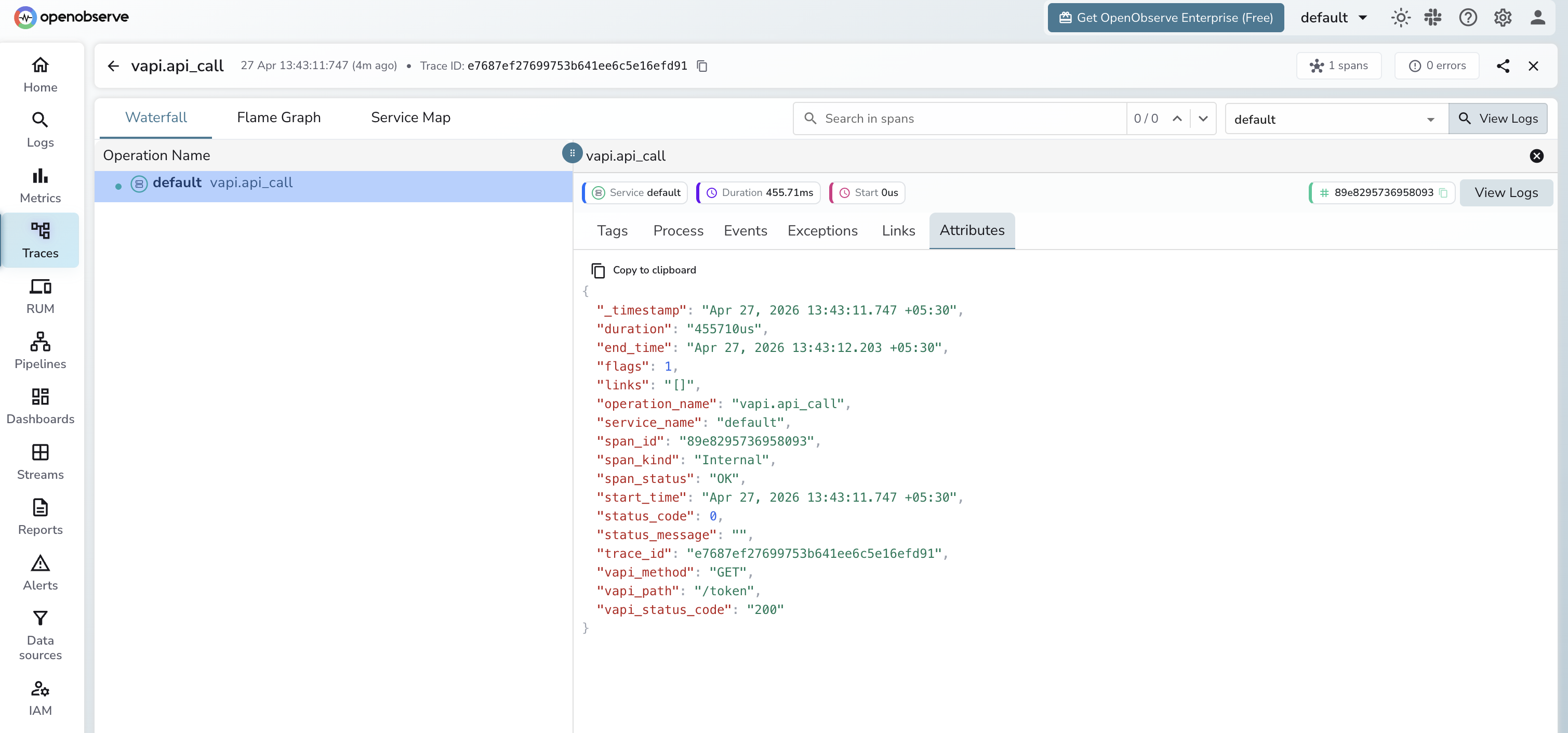
    with tracer.start_as_current_span("vapi.api_call") as span:
        span.set_attribute("vapi.method", "GET")
        span.set_attribute("vapi.path", path)
        resp = requests.get(f"{VAPI_BASE}{path}", headers=headers)
        span.set_attribute("vapi.status_code", resp.status_code)
        return resp.json()

assistant_id = create_assistant("ObsBot", "Hello! How can I assist you?")
calls = list_resource("/call")

openobserve_shutdown()
The Vapi private API key is found under API Keys in your Vapi dashboard. Use the Authorization: Bearer header. Vapi does not use x-api-key.
What Gets Captured
| Attribute | Description |
|---|---|
vapi_assistant_name | Name given to the created assistant |
vapi_assistant_id | Unique assistant resource ID returned by the API |
vapi_method | HTTP method used (GET, POST, DELETE) |
vapi_path | API path called (e.g. /assistant, /call, /phone-number) |
vapi_status_code | HTTP response status code |
span_status | OK or ERROR |
error_message | Error detail on failed requests |
duration | End-to-end API call latency |
Viewing Traces
- Log in to OpenObserve and navigate to Traces
- Filter by service name to find your Vapi spans
- Click a
vapi.create_assistantspan to inspect the assistant ID and creation latency - Filter by
span_status=ERRORto identify failed API calls
Next Steps
With Vapi instrumented, every API call in your voice AI application is recorded in OpenObserve. From here you can monitor assistant creation latency, track resource usage across calls and phone numbers, and alert on failed API requests.
Read More
Last updated on