
Mirascope → OpenObserve
Capture token usage, latency, and model metadata for every Mirascope call. Mirascope does not include a dedicated OTel instrumentor, so traces are created by wrapping calls in manual spans and extracting usage data from the response.
Prerequisites
- Python 3.9+
- An OpenObserve account (cloud or self-hosted)
- Your OpenObserve organisation ID and Base64-encoded auth token
- An OpenAI API key (or whichever provider your Mirascope functions target)
Installation
pip install openobserve-telemetry-sdk mirascope python-dotenvConfiguration
Create a .env file in your project root:
OPENOBSERVE_URL=https://api.openobserve.ai/
OPENOBSERVE_ORG=your_org_id
OPENOBSERVE_AUTH_TOKEN=Basic <your_base64_token>
OPENAI_API_KEY=your-openai-api-key
Instrumentation
Call openobserve_init() to set up the tracer provider, then wrap each Mirascope call in a manual span and extract token counts from the response.
from dotenv import load_dotenv
load_dotenv()

from openobserve import openobserve_init
openobserve_init()

from opentelemetry import trace
from mirascope.openai import OpenAICall, OpenAICallParams

tracer = trace.get_tracer(__name__)


class Answer(OpenAICall):
    prompt_template = "Answer in one sentence: {question}"
    call_params = OpenAICallParams(model="gpt-4o-mini", max_tokens=100)
    question: str


def traced_answer(question: str) -> str:
    with tracer.start_as_current_span("mirascope.call") as span:
        span.set_attribute("llm_model_name", "gpt-4o-mini")
        span.set_attribute("input_value", question)
        response = Answer(question=question).call()
        output = response.content
        span.set_attribute("output_value", output[:200])
        if response.usage:
            span.set_attribute("llm_token_count_prompt", response.usage.prompt_tokens or 0)
            span.set_attribute("llm_token_count_completion", response.usage.completion_tokens or 0)
        return output


print(traced_answer("What is OpenTelemetry?"))
Extractor (structured output)
Use OpenAIExtractor to extract structured data from unstructured text with the same manual tracing approach:
from typing import Literal
from mirascope.openai import OpenAIExtractor

class Sentiment(OpenAIExtractor[Literal["positive", "negative", "neutral"]]):
    extract_schema: type[Literal["positive", "negative", "neutral"]] = Literal["positive", "negative", "neutral"]
    prompt_template = "Classify the sentiment: {text}"
    call_params = OpenAICallParams(model="gpt-4o-mini")
    text: str

with tracer.start_as_current_span("mirascope.extract") as span:
    span.set_attribute("llm_model_name", "gpt-4o-mini")
    result = Sentiment(text="OpenObserve makes tracing easy.").extract()
    span.set_attribute("output_value", str(result))
    print(result)
What Gets Captured
These are the attributes you set explicitly on each manual span.
| Attribute | Description |
|---|---|
llm_model_name | Model used (e.g. gpt-4o-mini) |
input_value | Prompt or question passed to the call |
output_value | First 200 characters of the response content |
llm_token_count_prompt | Input tokens consumed |
llm_token_count_completion | Output tokens generated |
duration | End-to-end span latency |
error | Exception details on failure |
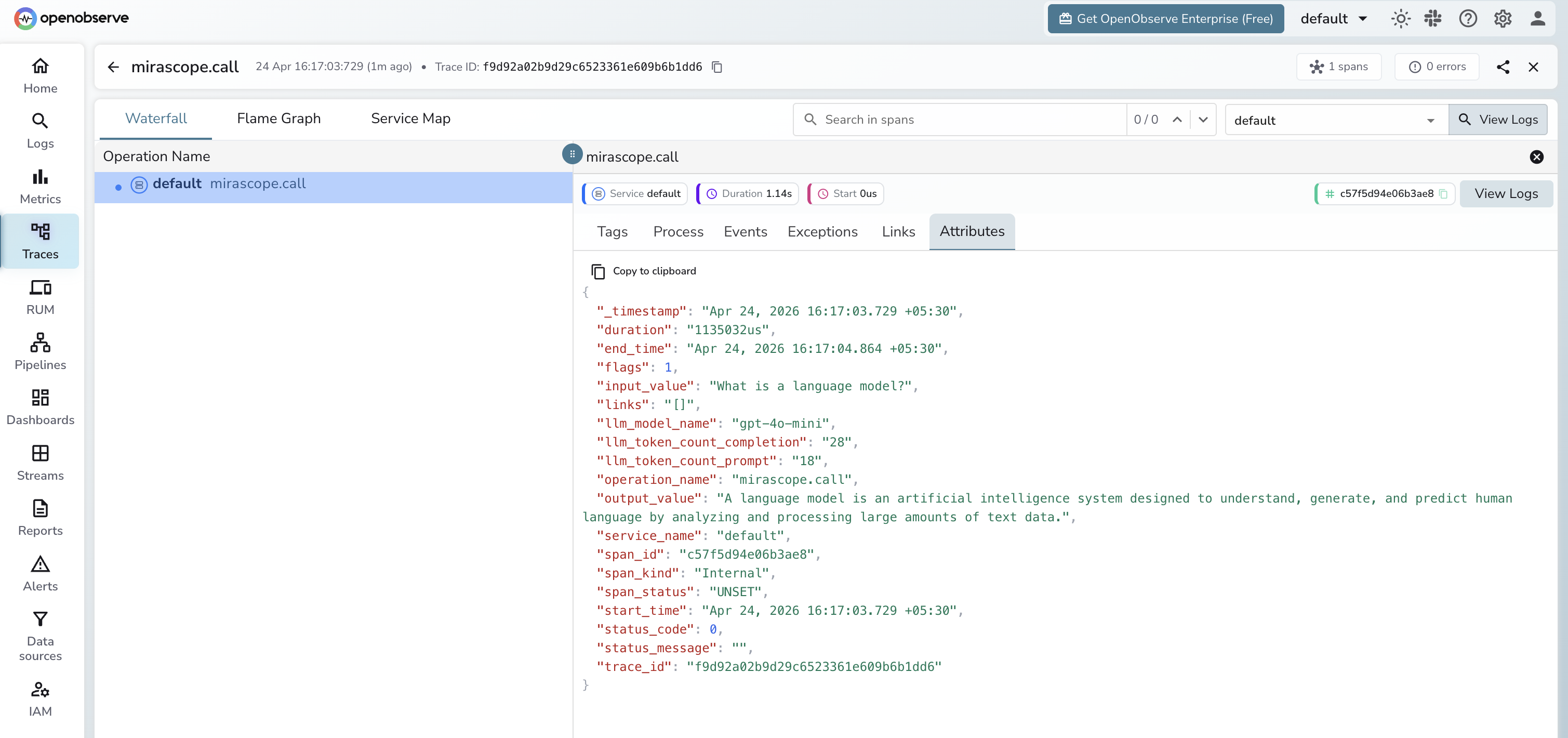
Viewing Traces
- Log in to OpenObserve and navigate to Traces in the left sidebar
- Filter by operation name
mirascope.callto find Mirascope spans - Click any span to inspect token counts and the prompt and response
Next Steps
With Mirascope instrumented, every LLM call is recorded in OpenObserve. From here you can track token usage per function, monitor latency per call class, and set alerts on error spans.
Read More
Last updated on