
Strands Agents → OpenObserve
Capture agent run timing, token usage, LLM call details, and event loop cycles for every Strands Agents invocation. Strands Agents emits OpenTelemetry spans automatically for each agent invocation, LLM call, and event loop cycle. Wrap agent calls in a manual root span to attach your own input and output attributes.
Prerequisites
- Python 3.10+
- An OpenObserve account (cloud or self-hosted)
- Your OpenObserve organisation ID and Base64-encoded auth token
- An Anthropic API key
Installation
pip install openobserve-telemetry-sdk strands-agents python-dotenvConfiguration
Create a .env file in your project root:
OPENOBSERVE_URL=https://api.openobserve.ai/
OPENOBSERVE_ORG=your_org_id
OPENOBSERVE_AUTH_TOKEN=Basic <your_base64_token>
ANTHROPIC_API_KEY=your-anthropic-api-key
Instrumentation
Call openobserve_init() to set up the tracer provider, then wrap each agent call in a manual span. Strands Agents automatically creates child spans for the agent invocation, event loop cycle, and LLM call.
from dotenv import load_dotenv
load_dotenv()

from openobserve import openobserve_init
openobserve_init()

from opentelemetry import trace
from strands import Agent
from strands.models.anthropic import AnthropicModel

tracer = trace.get_tracer(__name__)

model = AnthropicModel(model_id="claude-haiku-4-5-20251001", max_tokens=1000)
agent = Agent(model=model)

with tracer.start_as_current_span("strands.agent") as span:
    span.set_attribute("input_value", "What is OpenTelemetry?")
    response = agent("What is OpenTelemetry?")
    output = str(response)
    span.set_attribute("output_value", output[:200])

print(output)
What Gets Captured
Each agent call produces a tree of four spans. The manual strands.agent span is the root; Strands Agents creates the remaining three automatically.
strands.agent span (manual root)
| Attribute | Description |
|---|---|
input_value | Prompt passed to the agent |
output_value | First 200 characters of the agent response |
duration | End-to-end agent run latency |
span_status | UNSET on success, error status on failure |
invoke_agent span (Strands built-in)
| Attribute | Description |
|---|---|
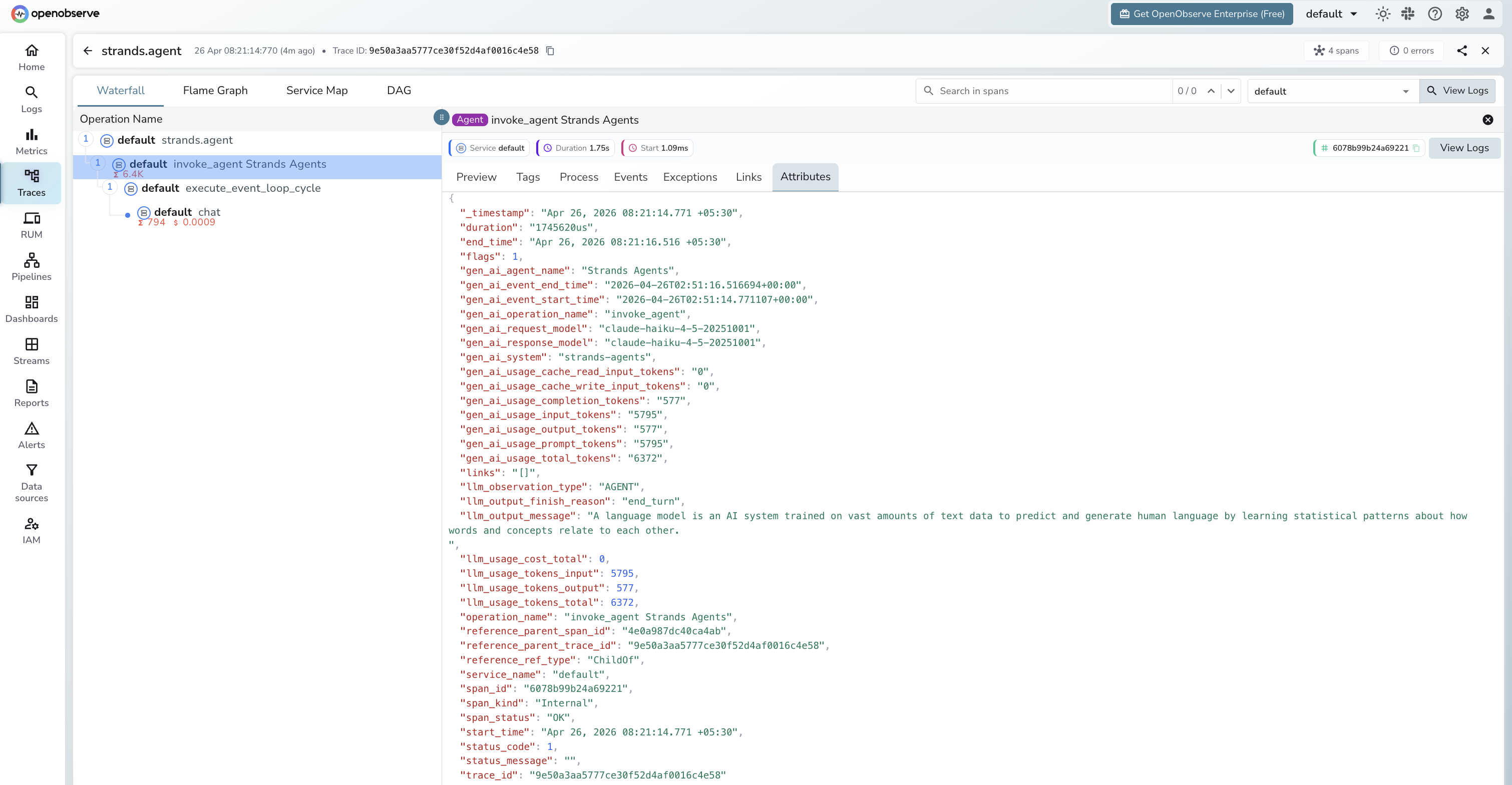
gen_ai_agent_name | Agent name (e.g. Strands Agents) |
gen_ai_system | strands-agents |
gen_ai_request_model | Model ID sent in the request |
gen_ai_response_model | Model ID that served the response |
gen_ai_usage_input_tokens | Prompt tokens across all LLM calls in the run |
gen_ai_usage_output_tokens | Completion tokens across all LLM calls |
gen_ai_usage_total_tokens | Total tokens for the full agent run |
gen_ai_usage_cache_read_input_tokens | Tokens served from prompt cache |
gen_ai_usage_cache_write_input_tokens | Tokens written to prompt cache |
llm_observation_type | AGENT |
llm_output_finish_reason | Reason the agent stopped (e.g. end_turn) |
llm_output_message | Final response text |
llm_usage_tokens_input | Input tokens (mirrored from gen_ai_usage_input_tokens) |
llm_usage_tokens_output | Output tokens (mirrored) |
llm_usage_tokens_total | Total tokens (mirrored) |
execute_event_loop_cycle span (Strands built-in)
| Attribute | Description |
|---|---|
gen_ai_system | strands-agents |
event_loop_cycle_id | Unique ID for this reasoning cycle |
llm_observation_type | SPAN |
chat span (Strands built-in, one per LLM call)
| Attribute | Description |
|---|---|
gen_ai_system | strands-agents |
gen_ai_request_model | Model ID sent in the request |
gen_ai_response_model | Model ID that served the response |
gen_ai_server_time_to_first_token | Time to first token in milliseconds |
gen_ai_usage_input_tokens | Prompt tokens for this call |
gen_ai_usage_output_tokens | Completion tokens for this call |
gen_ai_usage_total_tokens | Total tokens for this call |
llm_observation_type | GENERATION |
llm_output_finish_reason | Stop reason (e.g. end_turn) |
llm_output_message | Raw model output |
llm_usage_tokens_input | Input tokens |
llm_usage_tokens_output | Output tokens |
llm_usage_tokens_total | Total tokens |
llm_usage_cost_input | Estimated input cost |
llm_usage_cost_output | Estimated output cost |
Viewing Traces
- Log in to OpenObserve and navigate to Traces
- Filter by operation name
strands.agentto find agent root spans - Expand any trace to see the full span tree:
strands.agent>invoke_agent>execute_event_loop_cycle>chat - Click the
chatspan to inspect per-call token counts and time to first token - Click the
invoke_agentspan to see cumulative token usage across all LLM calls in the run
Next Steps
With Strands Agents instrumented, every agent run is recorded in OpenObserve. From here you can track latency per agent, compare token usage across prompts, monitor cache hit rates via gen_ai_usage_cache_read_input_tokens, and set alerts on error spans.
Read More
Last updated on