
Novita AI → OpenObserve
Automatically capture token usage, latency, and model metadata for every Novita AI inference call in your Python application. Novita AI exposes an OpenAI-compatible API, so instrumentation uses the standard OpenAI instrumentor pointed at the Novita endpoint.
Prerequisites
- Python 3.8+
- An OpenObserve account (cloud or self-hosted)
- Your OpenObserve organisation ID and Base64-encoded auth token
- A Novita AI API key
Installation
pip install openobserve-telemetry-sdk openinference-instrumentation-openai openai python-dotenvConfiguration
Create a .env file in your project root:
# OpenObserve instance URL
# Default for self-hosted: http://localhost:5080
OPENOBSERVE_URL=https://api.openobserve.ai/

# Your OpenObserve organisation slug or ID
OPENOBSERVE_ORG=your_org_id

# Basic auth token — Base64-encoded "email:password"
OPENOBSERVE_AUTH_TOKEN=Basic <your_base64_token>

# Novita AI API key
NOVITA_API_KEY=your-novita-api-key
Instrumentation
Call OpenAIInstrumentor().instrument() before creating the OpenAI client. Point the client at the Novita AI base URL and pass your Novita API key.
from dotenv import load_dotenv
load_dotenv()

from openinference.instrumentation.openai import OpenAIInstrumentor
from openobserve import openobserve_init

OpenAIInstrumentor().instrument()
openobserve_init()

import os
from openai import OpenAI

client = OpenAI(
    api_key=os.environ["NOVITA_API_KEY"],
    base_url="https://api.novita.ai/v3/openai",
)

response = client.chat.completions.create(
    model="meta-llama/llama-3.1-8b-instruct",
    messages=[{"role": "user", "content": "Explain distributed tracing in one sentence."}],
)
print(response.choices[0].message.content)
What Gets Captured
| Attribute | Description |
|---|---|
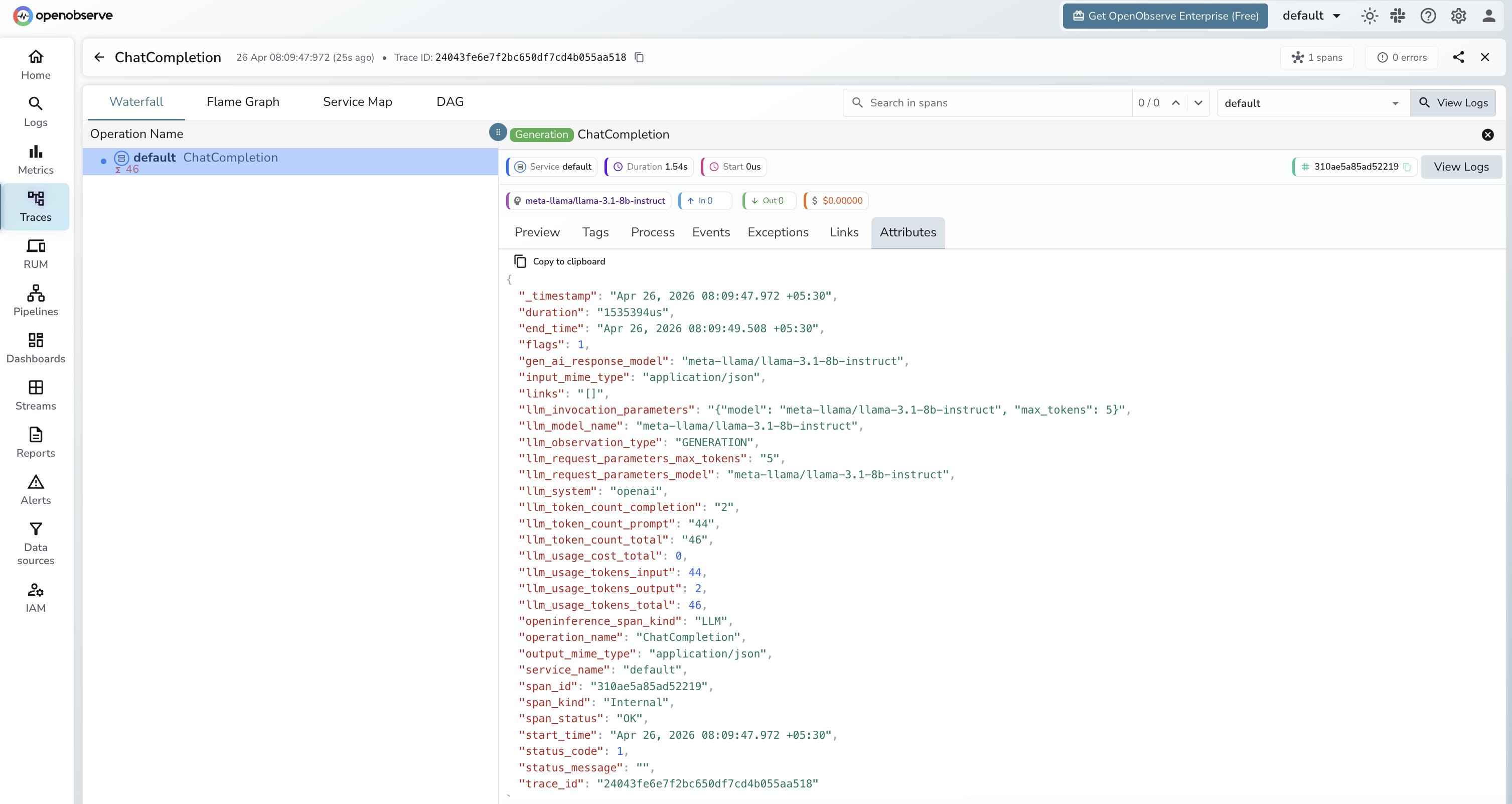
llm_model_name | Model name (e.g. meta-llama/llama-3.1-8b-instruct) |
gen_ai_response_model | Model that served the response |
llm_token_count_prompt | Tokens in the prompt |
llm_token_count_completion | Tokens in the response |
llm_token_count_total | Total tokens consumed |
llm_system | openai (the client library used) |
openinference_span_kind | LLM |
operation_name | ChatCompletion |
duration | End-to-end request latency |
span_status | OK or error status |
Viewing Traces
- Log in to OpenObserve and navigate to Traces
- Click any span to inspect token counts and the full request payload
- Filter by
llm_model_nameto compare latency across different Novita-hosted models
Next Steps
With Novita AI instrumented, every inference call is recorded in OpenObserve. From here you can compare token throughput across open-source models, monitor latency per model variant, and set alerts on error spans.
Read More
Was this page helpful?
Last updated on