
Mastra → OpenObserve
Capture agent run latency, token usage, model name, and finish reason for every Mastra agent invocation. Mastra is a TypeScript-first AI agent framework built on the Vercel AI SDK. Wrap each agent.generate() call in a manual OpenTelemetry span and export to OpenObserve via OTLP.
Prerequisites
- Node.js 18+
- An OpenObserve account (cloud or self-hosted)
- Your OpenObserve organisation ID and Base64-encoded auth token
- An OpenAI API key
Installation
npm install @mastra/core @ai-sdk/openai \
  @opentelemetry/sdk-node @opentelemetry/exporter-trace-otlp-http \
  @opentelemetry/sdk-trace-base @opentelemetry/resources \
  @opentelemetry/api dotenv
Configuration
Create a .env file in your project root:
OPENAI_API_KEY=your-openai-api-keyInstrumentation
Set up the OTel SDK before importing Mastra. Use dynamic imports to ensure the SDK is registered first, then wrap each agent.generate() call in a manual span to capture token usage and finish reason.
import 'dotenv/config';
process.env.OTEL_SERVICE_NAME = 'my-mastra-app';

import { NodeSDK } from '@opentelemetry/sdk-node';
import { OTLPTraceExporter } from '@opentelemetry/exporter-trace-otlp-http';
import { SimpleSpanProcessor } from '@opentelemetry/sdk-trace-base';
import { resourceFromAttributes } from '@opentelemetry/resources';

const sdk = new NodeSDK({
  resource: resourceFromAttributes({ 'service.name': 'my-mastra-app' }),
  spanProcessors: [
    new SimpleSpanProcessor(
      new OTLPTraceExporter({
        url: 'https://api.openobserve.ai/api/your_org_id/v1/traces',
        headers: { Authorization: 'Basic <your_base64_token>' },
      })
    ),
  ],
});
sdk.start();

const { trace, SpanStatusCode } = await import('@opentelemetry/api');
const { Agent } = await import('@mastra/core/agent');
const { openai } = await import('@ai-sdk/openai');

const tracer = trace.getTracer('mastra-agent');

const agent = new Agent({
  name: 'my-assistant',
  instructions: 'You are a helpful assistant.',
  model: openai('gpt-4o-mini'),
});

async function runAgent(question) {
  return tracer.startActiveSpan('mastra.agent_run', async (span) => {
    try {
      span.setAttributes({
        agent_name: agent.name,
        ai_model_name: 'gpt-4o-mini',
        user_input: question.slice(0, 200),
      });
      const result = await agent.generate(question);
      span.setAttributes({
        ai_usage_input_tokens: result.usage?.inputTokens || 0,
        ai_usage_output_tokens: result.usage?.outputTokens || 0,
        ai_usage_total_tokens: result.usage?.totalTokens || 0,
        ai_finish_reason: result.finishReason || '',
      });
      span.setStatus({ code: SpanStatusCode.OK });
      return result;
    } catch (e) {
      span.setStatus({ code: SpanStatusCode.ERROR, message: e.message });
      span.setAttribute('error_message', e.message);
      throw e;
    } finally {
      span.end();
    }
  });
}

const result = await runAgent('What is distributed tracing?');
console.log(result.text);
await sdk.shutdown();
Save the file as app.mjs and run with:
node app.mjsFor self-hosted OpenObserve, replace the URL with http://localhost:5080/api/default/v1/traces.
What Gets Captured
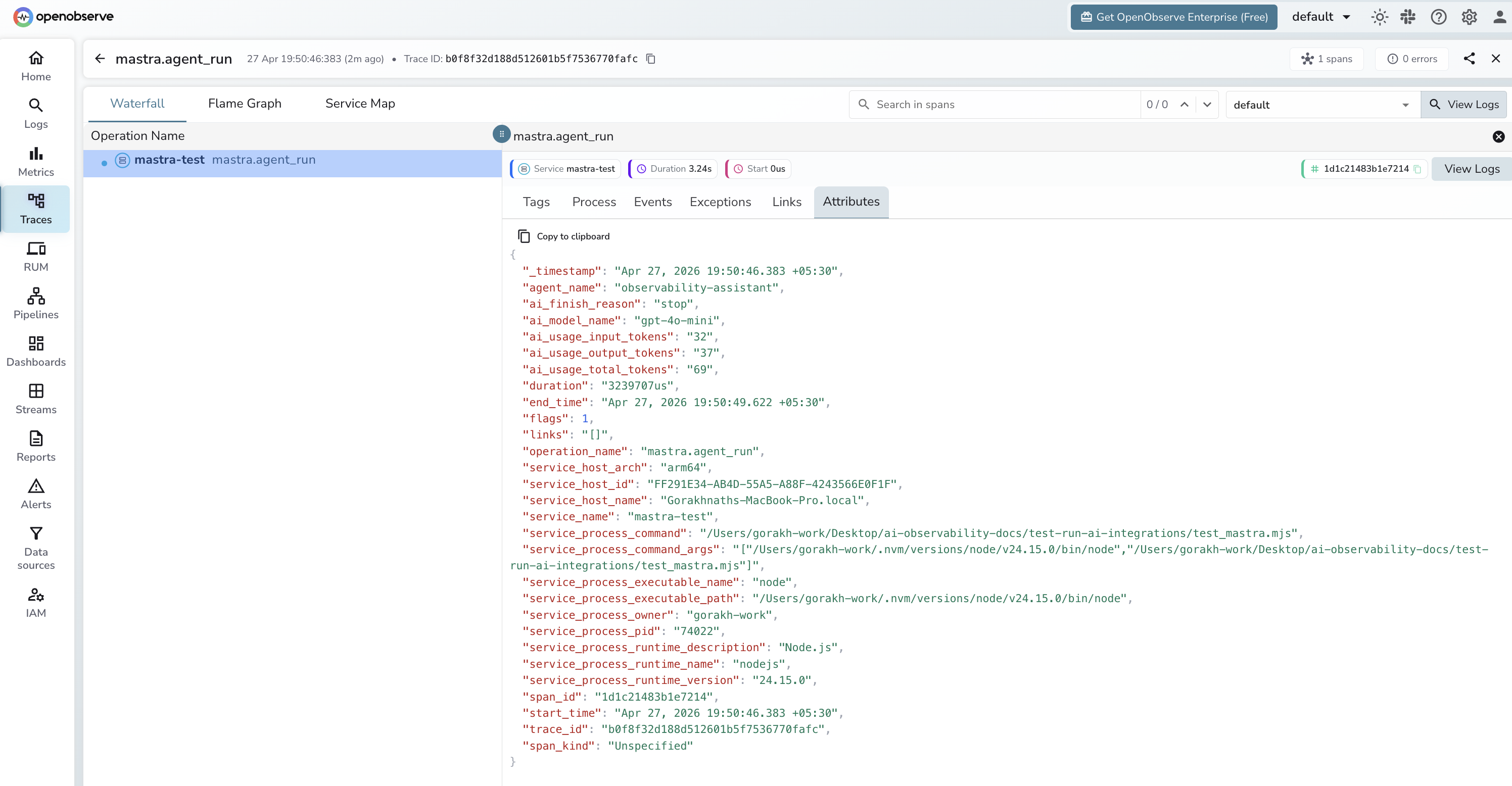
| Attribute | Description |
|---|---|
operation_name | mastra.agent_run |
agent_name | Name passed to the Agent constructor |
ai_model_name | Model used for the agent run (e.g. gpt-4o-mini) |
user_input | User's input message (truncated to 200 chars) |
ai_usage_input_tokens | Prompt tokens consumed |
ai_usage_output_tokens | Completion tokens generated |
ai_usage_total_tokens | Total tokens consumed |
ai_finish_reason | Why generation stopped (e.g. stop, length) |
error_message | Error detail on failed runs |
span_kind | Unspecified (Internal) |
span_status | OK on success, ERROR on failure |
duration | End-to-end agent run latency |
Viewing Traces
- Log in to OpenObserve and navigate to Traces
- Filter by
service_nameto find your application's spans - Spans appear with
operation_name: mastra.agent_run - Filter by
span_status = ERRORto find failed agent runs - Use
ai_finish_reason = lengthto identify responses cut off by token limits
Next Steps
With Mastra instrumented, every agent run is recorded in OpenObserve. From here you can track agent latency, compare token consumption across different prompts, and alert on error rates.
Read More
Last updated on