
AutoGen → OpenObserve
Automatically capture agent conversations, LLM calls, and tool executions for every AutoGen multi-agent workflow in your Python application.
Prerequisites
- Python 3.9+
- An OpenObserve account (cloud or self-hosted)
- Your OpenObserve organisation ID and Base64-encoded auth token
- An OpenAI API key (or whichever LLM backend your agents use)
Installation
pip install openobserve-telemetry-sdk openinference-instrumentation-autogen "ag2==0.9.0" python-dotenvThe ag2 package is the maintained fork of pyautogen and imports as autogen.
Configuration
Create a .env file in your project root:
# OpenObserve instance URL
# Default for self-hosted: http://localhost:5080
OPENOBSERVE_URL=https://api.openobserve.ai/

# Your OpenObserve organisation slug or ID
OPENOBSERVE_ORG=your_org_id

# Basic auth token — Base64-encoded "email:password"
OPENOBSERVE_AUTH_TOKEN=Basic <your_base64_token>

# LLM provider key
OPENAI_API_KEY=your-openai-key
Instrumentation
Call AutogenInstrumentor().instrument() before importing AutoGen.
from dotenv import load_dotenv
load_dotenv()

from openinference.instrumentation.autogen import AutogenInstrumentor
from openobserve import openobserve_init

AutogenInstrumentor().instrument()
openobserve_init()

import os
import autogen

config_list = [{"model": "gpt-4o-mini", "api_key": os.environ["OPENAI_API_KEY"]}]

assistant = autogen.AssistantAgent(
    name="assistant",
    llm_config={"config_list": config_list},
    system_message="You are a helpful assistant. Keep answers brief.",
)

user = autogen.UserProxyAgent(
    name="user",
    human_input_mode="NEVER",
    max_consecutive_auto_reply=1,
    is_termination_msg=lambda x: True,
)

user.initiate_chat(assistant, message="Explain OpenTelemetry in one sentence.")
Two-agent conversation
researcher = autogen.AssistantAgent(
    name="researcher",
    llm_config={"config_list": config_list},
    system_message="You research questions and provide factual answers.",
)

critic = autogen.AssistantAgent(
    name="critic",
    llm_config={"config_list": config_list},
    system_message="You review answers and confirm if they are correct. Reply TERMINATE when done.",
)

user = autogen.UserProxyAgent(
    name="user",
    human_input_mode="NEVER",
    max_consecutive_auto_reply=0,
)

user.initiate_chat(
    researcher,
    message="What is the capital of France?",
    max_turns=2,
)
What Gets Captured
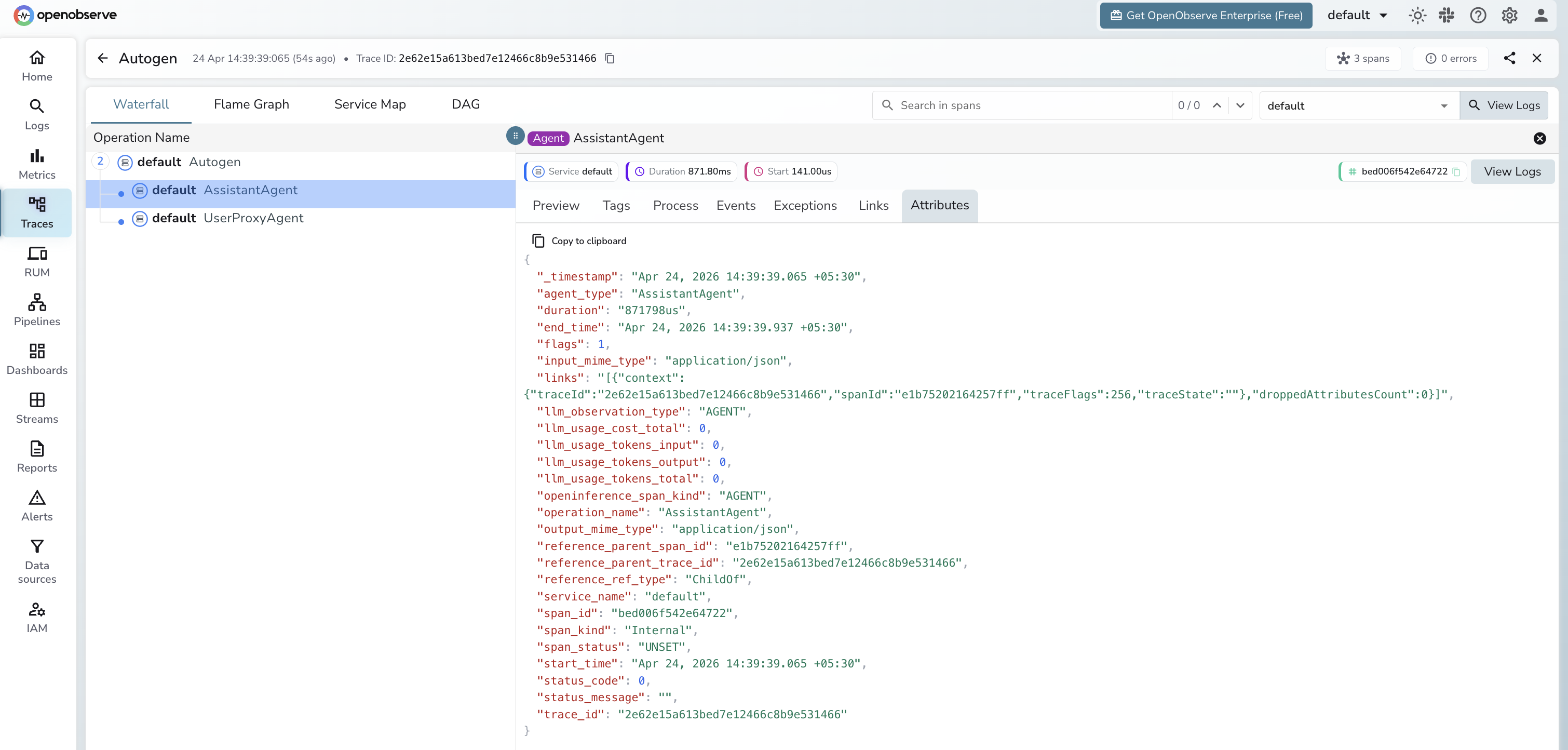
Each initiate_chat() call produces a root span with child AGENT spans per agent and LLM spans for each model call.
Agent span
| Attribute | Description |
|---|---|
openinference_span_kind | AGENT |
operation_name | Agent class name (e.g. AssistantAgent) |
agent_type | Agent class name (e.g. AssistantAgent) |
llm_observation_type | AGENT |
input_mime_type | application/json |
output_mime_type | application/json |
duration | Agent turn latency |
span_status | UNSET on success, ERROR on failure |
Token counts and model name appear on the child LLM spans beneath each agent span.
Viewing Traces
- Log in to OpenObserve and navigate to Traces in the left sidebar
- Click any root conversation span to open the waterfall view
- Expand the tree to see each
AssistantAgentspan and its child LLM calls - Filter by
operation_name = AssistantAgentto find all agent spans
Next Steps
With AutoGen instrumented, every multi-agent conversation is recorded in OpenObserve with the full sequence of LLM calls. From here you can track how many turns a conversation takes, measure token usage per agent, and identify which agents drive the most cost.
Read More
Last updated on