
LlamaIndex → OpenObserve
Automatically capture query, retrieve, and LLM spans for every LlamaIndex pipeline run. The OpenInference LlamaIndex instrumentor wraps query engines, retrievers, and chat engines to emit structured OTLP traces directly to OpenObserve.
Prerequisites
- Python 3.9+
- An OpenObserve account (cloud or self-hosted)
- Your OpenObserve organisation ID and Base64-encoded auth token
- An OpenAI API key (or another LlamaIndex-supported LLM)
Installation
pip install openobserve "openinference-instrumentation-llama-index==2.2.4" \
  "llama-index-core==0.10.68" "llama-index-llms-openai==0.1.31" \
  python-dotenv
Pin llama-index-core to 0.10.68 on Python 3.9. Later versions use X | Y union syntax that requires Python 3.10+. Pin the instrumentor to 2.2.4 for compatibility with this core version.
Configuration
Create a .env file in your project root:
OPENOBSERVE_URL=http://localhost:5080/
OPENOBSERVE_ORG=default
OPENOBSERVE_AUTH_TOKEN=Basic <your_base64_token>
OPENAI_API_KEY=your-openai-api-key
Instrumentation
Call LlamaIndexInstrumentor().instrument() before importing LlamaIndex components. This patches the core query engine, retriever, and LLM call paths.
from dotenv import load_dotenv
load_dotenv()

from openinference.instrumentation.llama_index import LlamaIndexInstrumentor
from openobserve import openobserve_init

LlamaIndexInstrumentor().instrument()
openobserve_init()

import os
from llama_index.core import VectorStoreIndex, Document, Settings
from llama_index.llms.openai import OpenAI

Settings.llm = OpenAI(model="gpt-4o-mini", api_key=os.environ["OPENAI_API_KEY"])

documents = [
    Document(text="OpenObserve is an observability platform for logs, metrics, and traces."),
    Document(text="OpenTelemetry is a vendor-neutral standard for collecting telemetry data."),
]
index = VectorStoreIndex.from_documents(documents)
query_engine = index.as_query_engine()

response = query_engine.query("What is OpenObserve?")
print(response)
What Gets Captured
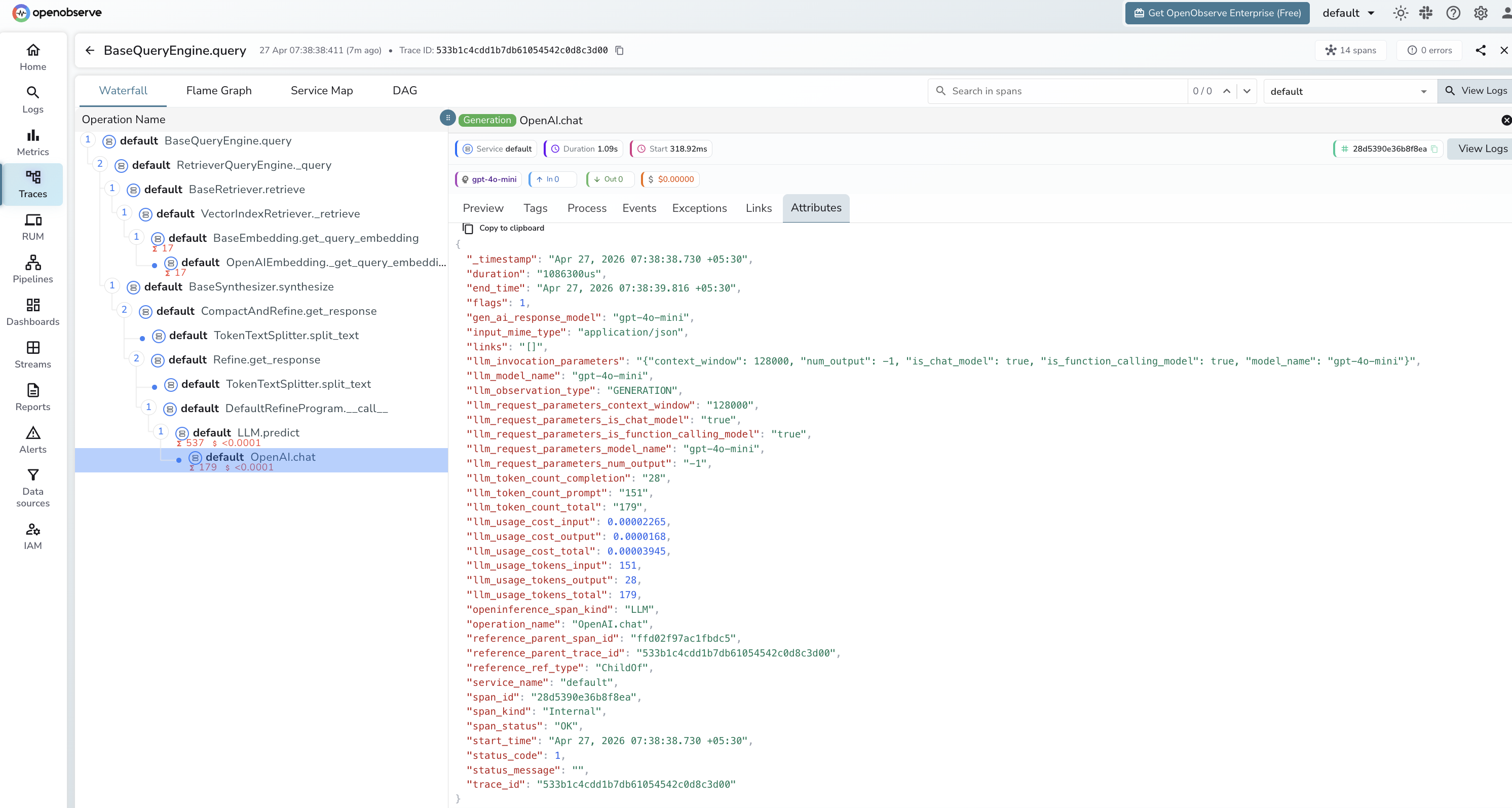
Each query produces a trace with spans for the query engine, retriever, and LLM call:
| Attribute | Description |
|---|---|
openinference_span_kind | CHAIN for the query engine, RETRIEVER for the retriever, LLM for the model call |
operation_name | Span name, e.g. BaseQueryEngine.query, BaseRetriever.retrieve, OpenAI.chat |
llm_model_name | Model used for synthesis (e.g. gpt-4o-mini) |
llm_token_count_prompt | Prompt tokens sent to the model |
llm_token_count_completion | Completion tokens returned by the model |
llm_token_count_total | Total tokens for the LLM call |
llm_usage_tokens_input | Input token count as a number |
llm_usage_tokens_output | Output token count as a number |
llm_usage_cost_input | Estimated cost of input tokens |
llm_usage_cost_output | Estimated cost of output tokens |
llm_invocation_parameters | JSON string of model config (context window, function calling support) |
llm_observation_type | GENERATION for LLM spans |
gen_ai_response_model | Model ID returned by the provider |
span_status | OK or error status |
duration | Span execution latency |
Viewing Traces
- Log in to OpenObserve and navigate to Traces
- Each query appears as a root
BaseQueryEngine.queryspan with child spans for retrieval and LLM synthesis - Filter by
openinference_span_kind=LLMto focus on model calls - Expand the retriever span to inspect which document chunks were matched
- Filter by
span_status=ERRORto find failed queries
Next Steps
With LlamaIndex instrumented, every query pipeline run is recorded in OpenObserve. From here you can monitor retrieval quality, track token usage across pipeline stages, and alert on slow or failed queries.
Read More
Last updated on