
Gradio → OpenObserve
Capture per-request latency, input length, and LLM spans for every Gradio chat or prediction call. Gradio does not emit OTel traces automatically, so instrumentation wraps the prediction function in a manual span and uses the OpenAI instrumentor for any LLM calls inside it.
Prerequisites
- Python 3.8+
- An OpenObserve account (cloud or self-hosted)
- Your OpenObserve organisation ID and Base64-encoded auth token
- An OpenAI API key (or another LLM provider)
Installation
pip install openobserve-telemetry-sdk openinference-instrumentation-openai "gradio==4.20.0" "huggingface_hub<1.0" openai python-dotenvConfiguration
Create a .env file in your project root:
OPENOBSERVE_URL=https://api.openobserve.ai/
OPENOBSERVE_ORG=your_org_id
OPENOBSERVE_AUTH_TOKEN=Basic <your_base64_token>
OPENAI_API_KEY=your-openai-api-key
Instrumentation
Call OpenAIInstrumentor().instrument() and openobserve_init() before defining the Gradio interface. Wrap the prediction function body in a manual span to capture Gradio-level metadata alongside the LLM child spans.
from dotenv import load_dotenv
load_dotenv()

from openinference.instrumentation.openai import OpenAIInstrumentor
from openobserve import openobserve_init

OpenAIInstrumentor().instrument()
openobserve_init()

from opentelemetry import trace
import os
import gradio as gr
from openai import OpenAI

tracer = trace.get_tracer(__name__)
client = OpenAI(api_key=os.environ["OPENAI_API_KEY"])


def chat(message: str, history: list) -> str:
    with tracer.start_as_current_span("gradio.chat_predict") as span:
        span.set_attribute("gradio.input_length", len(message))
        span.set_attribute("gradio.history_turns", len(history))
        messages = []
        for user_msg, ai_msg in history:
            messages.append({"role": "user", "content": user_msg})
            messages.append({"role": "assistant", "content": ai_msg})
        messages.append({"role": "user", "content": message})
        response = client.chat.completions.create(
            model="gpt-4o-mini",
            messages=messages,
            max_tokens=200,
        )
        reply = response.choices[0].message.content
        span.set_attribute("gradio.output_length", len(reply))
        return reply


gr.ChatInterface(chat).launch()
What Gets Captured
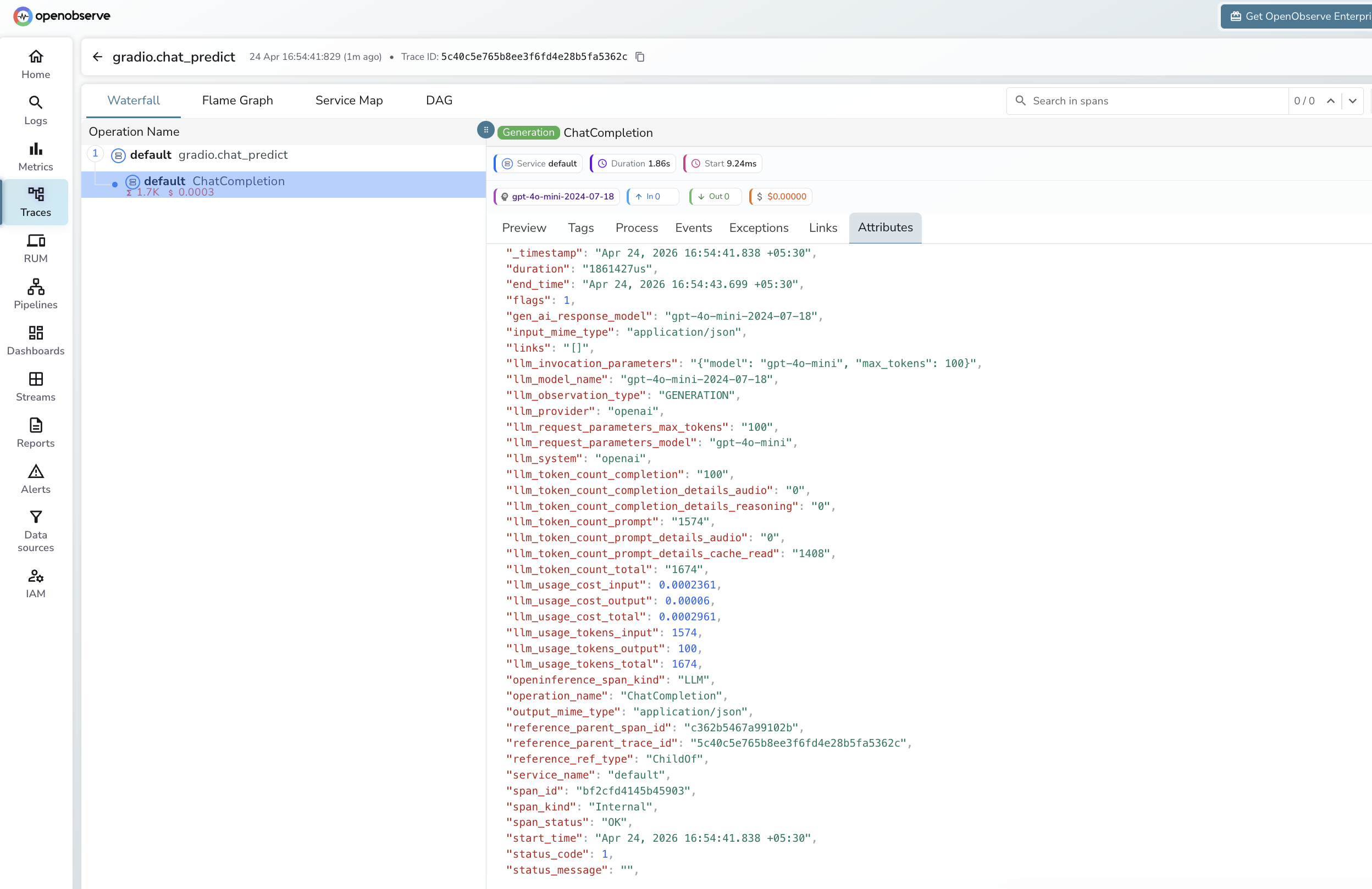
Each chat turn produces a root gradio.chat_predict span with a child LLM span from the OpenAI instrumentor. OpenObserve stores dot-separated attribute names with underscores.
Gradio root span
| Attribute (in OpenObserve) | Description |
|---|---|
operation_name | gradio.chat_predict |
gradio_input_length | Character count of the user message |
gradio_history_turns | Number of prior conversation turns |
gradio_output_length | Character count of the assistant reply |
duration | End-to-end span latency |
span_status | UNSET on success, ERROR on failure |
LLM child span (OpenAI instrumentor)
| Attribute | Description |
|---|---|
openinference_span_kind | LLM |
operation_name | ChatCompletion |
llm_provider | openai |
llm_system | openai |
llm_model_name | Resolved model version (e.g. gpt-4o-mini-2024-07-18) |
llm_token_count_prompt | Input tokens |
llm_token_count_completion | Output tokens |
llm_token_count_total | Total tokens |
llm_token_count_prompt_details_cache_read | Cached input tokens |
llm_usage_cost_input | Estimated input cost in USD |
llm_usage_cost_output | Estimated output cost in USD |
llm_invocation_parameters | Model and parameters passed to the API |
span_status | OK on success, ERROR on failure |
Viewing Traces
- Log in to OpenObserve and navigate to Traces in the left sidebar
- Each chat turn appears as a root
gradio.chat_predictspan with a childChatCompletionLLM span - Filter by
operation_name = gradio.chat_predictto find all chat turns - Expand any span to inspect
gradio_input_length,gradio_output_length, and token counts from the child span
Next Steps
With Gradio instrumented, every user interaction in your ML demo is recorded in OpenObserve. From here you can monitor response latency, track token usage per session, and alert on prediction errors.
Read More
Last updated on