




Vercel AI Gateway → OpenObserve
Capture every LLM call routed through the Vercel AI Gateway: model name, token counts, full request and response payloads, latency, gateway routing decisions, and error status. Because the gateway exposes an OpenAI-compatible API, the openinference-instrumentation-openai library instruments it without any gateway-specific code.
Prerequisites
- Python 3.8+
- An OpenObserve account (cloud or self-hosted)
- Your OpenObserve organisation ID and Base64-encoded auth token
- A Vercel AI Gateway API key (
vck_…)
Installation
Configuration
Add the following to your .env file:
OPENOBSERVE_URL=https://api.openobserve.ai
OPENOBSERVE_ORG=your_org_id
OPENOBSERVE_AUTH_TOKEN=Basic <your_base64_token>
VERCEL_AI_GATEWAY_API_KEY=vck_...
For self-hosted OpenObserve:
OPENOBSERVE_URL=http://localhost:5080
OPENOBSERVE_ORG=default
OPENOBSERVE_AUTH_TOKEN=Basic <your_base64_token>
Instrumentation
Follow this import order exactly: load env vars first, then instrument, then initialise OpenObserve, then import the OpenAI client.
import os
from dotenv import load_dotenv
load_dotenv()

from openinference.instrumentation.openai import OpenAIInstrumentor
OpenAIInstrumentor().instrument()

from openobserve import openobserve_init, openobserve_shutdown
openobserve_init(resource_attributes={"service.name": "vercel-ai-gateway"})

from openai import OpenAI

GATEWAY_URL = "https://ai-gateway.vercel.sh/v1"

client = OpenAI(
    api_key=os.environ["VERCEL_AI_GATEWAY_API_KEY"],
    base_url=GATEWAY_URL,
)

response = client.chat.completions.create(
    model="anthropic/claude-haiku-4.5",
    messages=[{"role": "user", "content": "What is distributed tracing?"}],
    max_tokens=100,
)
print(response.choices[0].message.content)

openobserve_shutdown()
The gateway accepts models in provider/model-id format (for example anthropic/claude-haiku-4.5, openai/gpt-4o-mini, google/gemini-2.0-flash). The base_url and api_key are the only gateway-specific settings; everything else is standard OpenAI SDK usage.
What Gets Captured
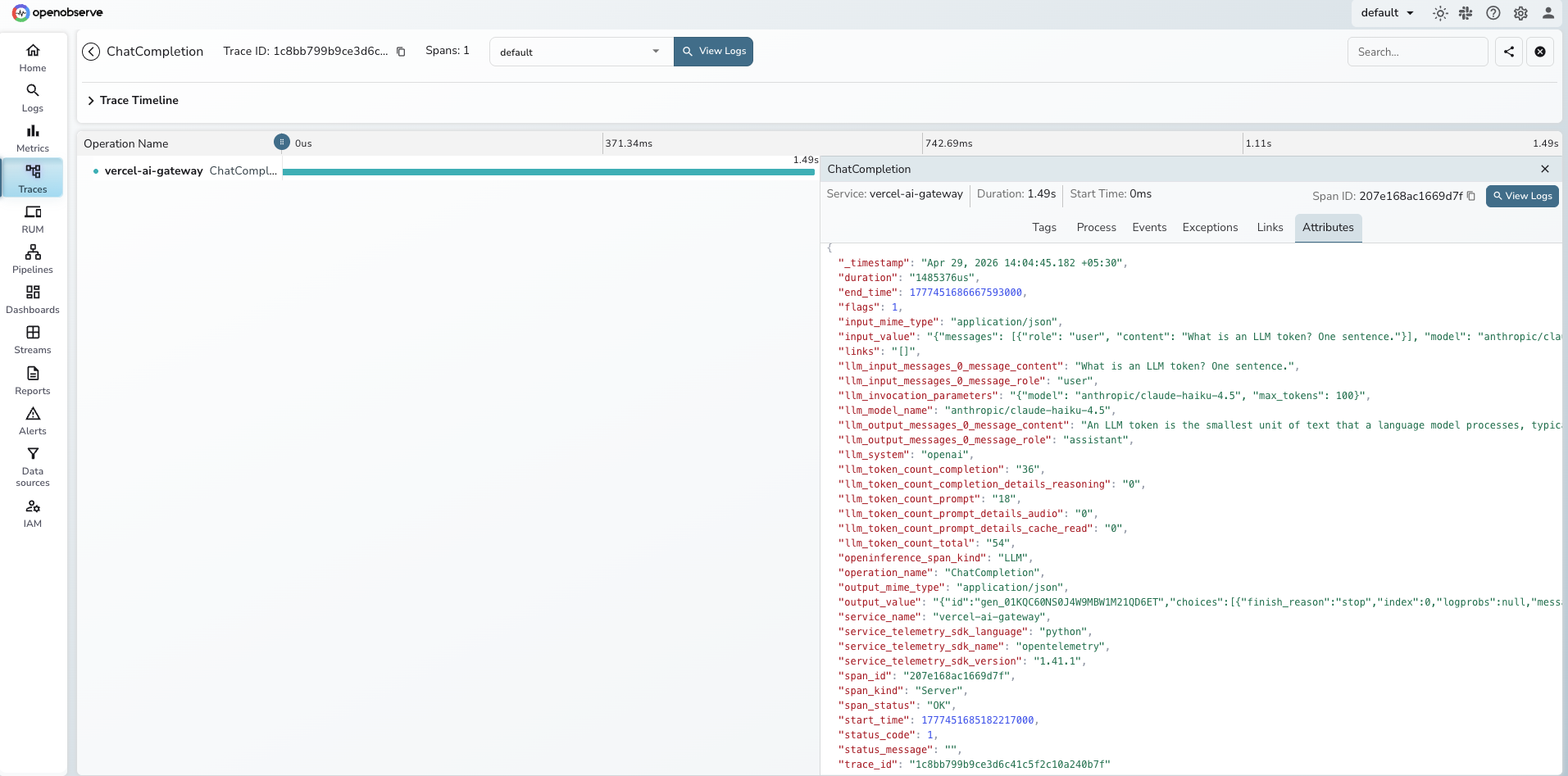
Each client.chat.completions.create() call produces one span. All attributes below were verified from real traces.
| Attribute | Description |
|---|---|
operation_name |
Always ChatCompletion |
openinference_span_kind |
Always LLM |
llm_model_name |
Gateway model identifier (e.g. anthropic/claude-haiku-4.5) |
llm_system |
Always openai (gateway uses OpenAI-compatible protocol) |
llm_invocation_parameters |
JSON of model and generation parameters |
llm_input_messages_0_message_role |
Role of the first input message (user, system) |
llm_input_messages_0_message_content |
Text of the first input message |
llm_output_messages_0_message_role |
Role of the first output message (assistant) |
llm_output_messages_0_message_content |
Generated response text |
llm_token_count_prompt |
Input tokens consumed |
llm_token_count_completion |
Output tokens generated |
llm_token_count_total |
Total tokens (prompt + completion) |
llm_token_count_prompt_details_cache_read |
Tokens served from the provider's prompt cache |
llm_token_count_completion_details_reasoning |
Reasoning tokens (for models that support it) |
input_value |
Full request JSON including messages and parameters |
output_value |
Full response JSON including gateway routing metadata, provider selection, cost details, and fallback information |
input_mime_type |
Always application/json |
output_mime_type |
Always application/json |
span_status |
OK on success, ERROR on failure |
duration |
End-to-end latency in microseconds |
The output_value field contains the complete Vercel AI Gateway response, which embeds routing decisions (gateway.routing.resolvedProvider, gateway.routing.fallbacksAvailable, gateway.routing.planningReasoning) and cost data (gateway.marketCost) alongside the model output.
Viewing Traces
- Log in to OpenObserve and navigate to Traces
- Filter by
service_name = vercel-ai-gateway - Click any
ChatCompletionspan to inspect full request and response payloads - Use the
llm_model_nameattribute to compare latency and token usage across different models and providers - Filter by
span_status = ERRORto find authentication failures and rate limit errors
Next Steps
With the Vercel AI Gateway instrumented, every routed LLM call is recorded in OpenObserve. From here you can build dashboards tracking token consumption and cost per model, compare latency across providers using the llm_model_name dimension, and set alerts on error rates when gateway authentication or upstream provider calls fail.