
BytePlus ModelArk → OpenObserve
Capture LLM call latency, token usage, model name, input messages, and output content for every BytePlus ModelArk inference call. BytePlus ModelArk exposes an OpenAI-compatible API. Instrumentation uses openinference-instrumentation-openai to automatically patch the OpenAI SDK pointed at the ModelArk endpoint and export spans to OpenObserve via OTLP.
Prerequisites
- Python 3.9+
- An OpenObserve account (cloud or self-hosted)
- Your OpenObserve organisation ID and Base64-encoded auth token
- A BytePlus ModelArk account with an API key and an inference endpoint ID
Installation
pip install openobserve-telemetry-sdk openinference-instrumentation-openai \
  openai python-dotenv
Configuration
Create a .env file in your project root:
OPENOBSERVE_URL=https://api.openobserve.ai/
OPENOBSERVE_ORG=your_org_id
OPENOBSERVE_AUTH_TOKEN=Basic <your_base64_token>
BYTEPLUS_API_KEY=your-byteplus-api-key
BYTEPLUS_BASE_URL=https://ark.ap-southeast.bytepluses.com/api/v3
BYTEPLUS_ENDPOINT_ID=ep-xxxxxxxxxxxxxxxx-xxxxx
Create your API key under ModelArk Console → API Key Management and your endpoint ID under ModelArk Console → Online Inference → Create Inference Endpoint.
Instrumentation
Call OpenAIInstrumentor().instrument() before openobserve_init(), then import and configure the OpenAI client with the BytePlus base URL. Every chat.completions.create call is automatically traced.
from dotenv import load_dotenv
load_dotenv()

from openinference.instrumentation.openai import OpenAIInstrumentor
OpenAIInstrumentor().instrument()

from openobserve import openobserve_init, openobserve_shutdown
openobserve_init(resource_attributes={"service.name": "byteplus"})

import os
from openai import OpenAI

client = OpenAI(
    api_key=os.environ["BYTEPLUS_API_KEY"],
    base_url=os.environ["BYTEPLUS_BASE_URL"],
)

model = os.environ["BYTEPLUS_ENDPOINT_ID"]

response = client.chat.completions.create(
    model=model,
    messages=[{"role": "user", "content": "What is distributed tracing?"}],
    max_tokens=256,
)
print(response.choices[0].message.content)

openobserve_shutdown()
Run with:
python3 main.pyWhat Gets Captured
| Attribute | Description |
|---|---|
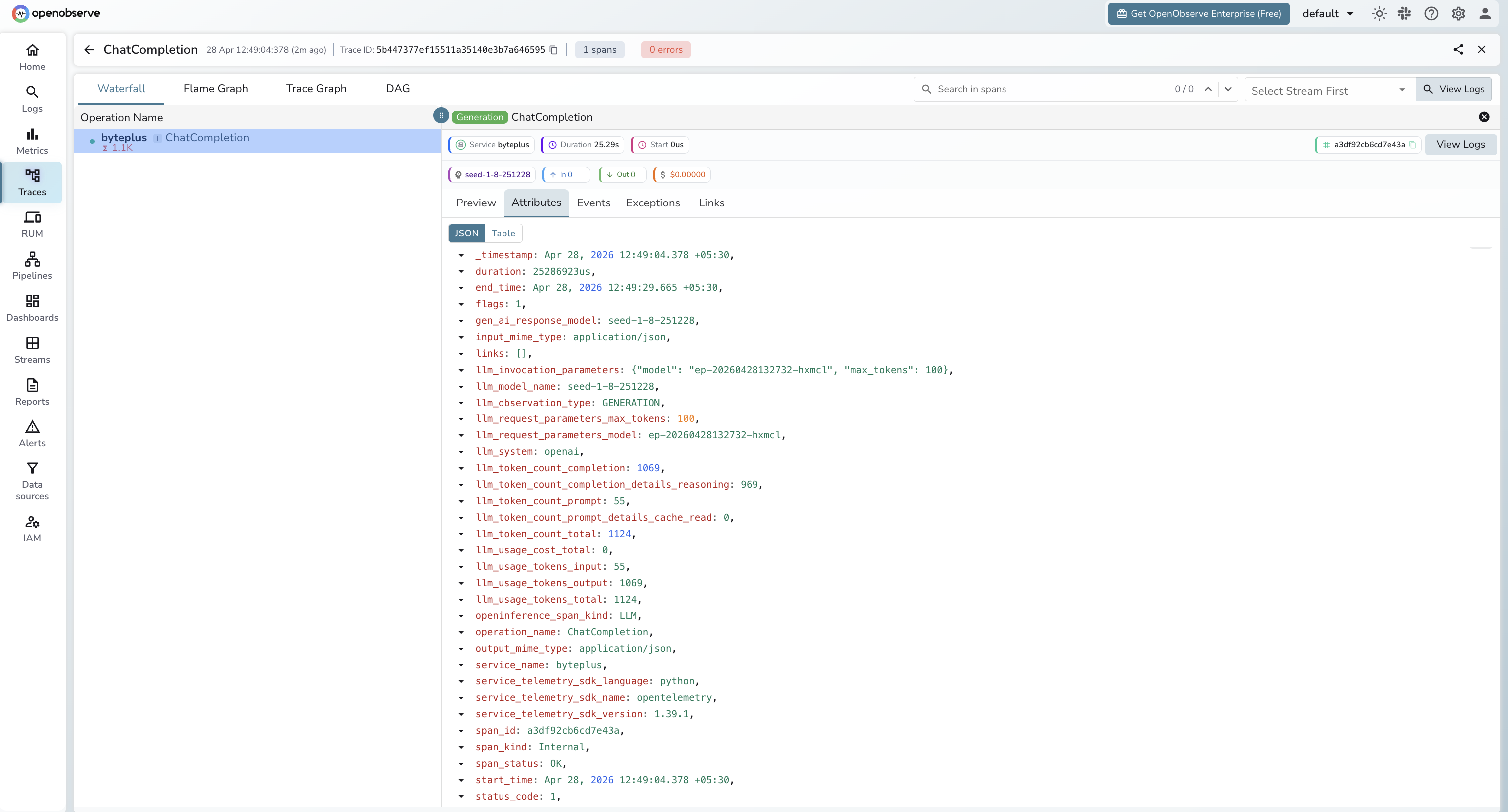
llm_model_name | Resolved model name served by the endpoint (e.g. seed-1-8-251228) |
gen_ai_response_model | Same resolved model name returned in the response |
llm_request_parameters_model | Endpoint ID passed in the request |
llm_system | Always openai (instrumented via the OpenAI SDK) |
llm_token_count_prompt | Prompt tokens consumed |
llm_token_count_completion | Completion tokens generated (includes reasoning tokens) |
llm_token_count_completion_details_reasoning | Reasoning tokens (present for thinking models) |
llm_token_count_prompt_details_cache_read | Prompt tokens served from cache |
llm_token_count_total | Total tokens for the call |
llm_usage_tokens_input | Input tokens (numeric) |
llm_usage_tokens_output | Output tokens (numeric) |
llm_usage_tokens_total | Total tokens (numeric) |
llm_invocation_parameters | JSON-encoded request parameters |
llm_input | Input messages as JSON |
llm_output | Full response JSON from the provider |
openinference_span_kind | Always LLM |
operation_name | Always ChatCompletion |
span_status | OK on success, ERROR on failed calls |
duration | End-to-end call latency |
Viewing Traces
- Log in to OpenObserve and navigate to Traces
- Filter by
service_name = byteplusto isolate BytePlus spans - Click any
ChatCompletionspan to inspect token counts and the resolved model name - Check
llm_token_count_completion_details_reasoningto see how many tokens the model spent on reasoning - Filter by
span_status = ERRORto find authentication or endpoint failures
Next Steps
With BytePlus ModelArk instrumented, every inference call is recorded in OpenObserve. From here you can build dashboards tracking token consumption over time, compare reasoning token usage across models, and set alerts on error rates or latency thresholds.
Read More
Last updated on