
Spring AI → OpenObserve
Capture LLM call latency, model name, token usage, and request parameters for every Spring AI chat call. Spring AI integrates with Spring Boot's Micrometer observability stack. Add the micrometer-tracing-bridge-otel and opentelemetry-exporter-otlp dependencies, configure your OTLP endpoint, and every ChatClient call is automatically traced with a full span hierarchy.
Prerequisites
- Java 17+
- Maven 3.9+
- An OpenObserve account (cloud or self-hosted)
- Your OpenObserve organisation ID and Base64-encoded auth token
- An OpenAI API key
Installation
Add the following to your pom.xml:
<parent>
  <groupId>org.springframework.boot</groupId>
  <artifactId>spring-boot-starter-parent</artifactId>
  <version>3.4.0</version>
</parent>

<properties>
  <java.version>17</java.version>
  <spring-ai.version>1.0.4</spring-ai.version>
</properties>

<dependencies>
  <dependency>
    <groupId>org.springframework.ai</groupId>
    <artifactId>spring-ai-starter-model-openai</artifactId>
    <version>${spring-ai.version}</version>
  </dependency>
  <dependency>
    <groupId>org.springframework.boot</groupId>
    <artifactId>spring-boot-starter-actuator</artifactId>
  </dependency>
  <dependency>
    <groupId>io.micrometer</groupId>
    <artifactId>micrometer-tracing-bridge-otel</artifactId>
  </dependency>
  <dependency>
    <groupId>io.opentelemetry</groupId>
    <artifactId>opentelemetry-exporter-otlp</artifactId>
  </dependency>
</dependencies>
Configuration
Set the following in src/main/resources/application.yml:
spring:
  main:
    web-application-type: none
  application:
    name: spring-ai
  ai:
    openai:
      api-key: ${OPENAI_API_KEY}
      chat:
        options:
          model: gpt-4o-mini
          max-tokens: 256

management:
  tracing:
    sampling:
      probability: 1.0
  otlp:
    tracing:
      endpoint: ${OPENOBSERVE_OTLP_URL:https://api.openobserve.ai/api/<your_org_id>/v1/traces}
      headers:
        Authorization: ${OPENOBSERVE_AUTH_TOKEN:Basic <your_base64_token>}
The spring.application.name value becomes the service_name in OpenObserve. Set web-application-type: none for command-line applications that do not serve HTTP traffic.
Instrumentation
Inject ChatClient.Builder, build a ChatClient, and call .prompt().call().content(). Spring AI and Micrometer automatically trace each call with no additional code.
import org.springframework.ai.chat.client.ChatClient;
import org.springframework.boot.CommandLineRunner;
import org.springframework.boot.SpringApplication;
import org.springframework.boot.autoconfigure.SpringBootApplication;
import org.springframework.context.annotation.Bean;

@SpringBootApplication
public class MyApp {

    public static void main(String[] args) {
        SpringApplication.run(MyApp.class, args);
    }

    @Bean
    CommandLineRunner runner(ChatClient.Builder builder) {
        return args -> {
            ChatClient client = builder.build();
            String response = client
                .prompt("What is distributed tracing?")
                .call()
                .content();
            System.out.println(response);
            System.exit(0);
        };
    }
}
Run with:
export OPENAI_API_KEY=your-key
mvn spring-boot:run
What Gets Captured
Each ChatClient call produces a hierarchy of spans. The innermost LLM generation span carries model and token details.
LLM generation span (chat gpt-4o-mini):
| Attribute | Example Value |
|---|---|
operation_name | chat gpt-4o-mini |
gen_ai_system | openai |
gen_ai_operation_name | chat |
gen_ai_request_model | gpt-4o-mini |
gen_ai_response_model | gpt-4o-mini-2024-07-18 |
gen_ai_request_max_tokens | 256 |
gen_ai_request_temperature | 0.7 |
gen_ai_response_finish_reasons | ["LENGTH"] |
gen_ai_usage_input_tokens | 15 |
gen_ai_usage_output_tokens | 256 |
gen_ai_usage_total_tokens | 271 |
llm_usage_tokens_input | 15 |
llm_usage_tokens_output | 256 |
llm_observation_type | GENERATION |
span_status | UNSET on success, ERROR on failure |
duration | End-to-end LLM call latency in microseconds |
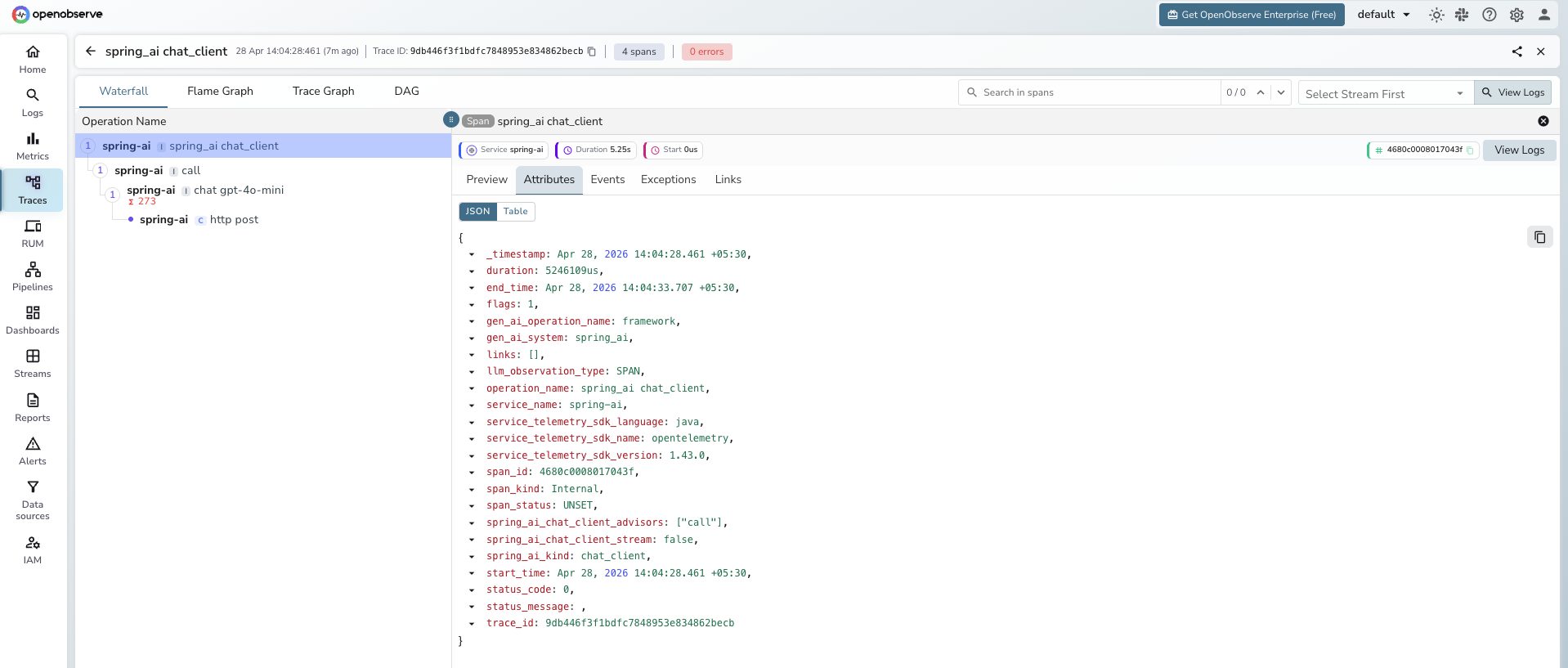
Outer chat client span (spring_ai chat_client):
| Attribute | Example Value |
|---|---|
operation_name | spring_ai chat_client |
gen_ai_system | spring_ai |
spring_ai_kind | chat_client |
spring_ai_chat_client_advisors | ["call"] |
spring_ai_chat_client_stream | false |
HTTP client span (http post):
| Attribute | Example Value |
|---|---|
operation_name | http post |
http_url | https://api.openai.com/v1/chat/completions |
method | POST |
status | 200 |
span_kind | Client |
Viewing Traces
- Log in to OpenObserve and navigate to Traces
- Filter by
service_name = spring-aito see all Spring AI calls - Click any trace to expand the full span hierarchy:
chat_client→advisor→chat→http post - Inspect
gen_ai_request_model,gen_ai_usage_input_tokens, andgen_ai_usage_output_tokenson the innermostchatspan - Filter by
span_status = ERRORto find failed chat calls
Next Steps
With Spring AI instrumented, every ChatClient call is recorded in OpenObserve. From here you can track token consumption per endpoint, compare latency across models, and alert on error rates across Spring AI services.
Read More
Last updated on