
Quarkus LangChain4j → OpenObserve
Capture LLM call latency, token usage, prompt content, completion content, and model metadata for every AI service call in a Quarkus application. Quarkus LangChain4j integrates LangChain4j with Quarkus's native OpenTelemetry extension. Add the quarkus-opentelemetry extension, configure your OTLP endpoint, and every @RegisterAiService call is automatically traced with gen_ai.* attributes and a nested HTTP client span.
Prerequisites
- Java 17+
- Maven 3.9+
- An OpenObserve account (cloud or self-hosted)
- Your OpenObserve organisation ID and Base64-encoded auth token
- An OpenAI API key
Installation
Add the following to your pom.xml:
<dependencyManagement>
  <dependencies>
    <dependency>
      <groupId>io.quarkus.platform</groupId>
      <artifactId>quarkus-bom</artifactId>
      <version>3.22.3</version>
      <type>pom</type>
      <scope>import</scope>
    </dependency>
    <dependency>
      <groupId>io.quarkiverse.langchain4j</groupId>
      <artifactId>quarkus-langchain4j-bom</artifactId>
      <version>0.26.1</version>
      <type>pom</type>
      <scope>import</scope>
    </dependency>
  </dependencies>
</dependencyManagement>

<dependencies>
  <dependency>
    <groupId>io.quarkiverse.langchain4j</groupId>
    <artifactId>quarkus-langchain4j-openai</artifactId>
  </dependency>
  <dependency>
    <groupId>io.quarkus</groupId>
    <artifactId>quarkus-opentelemetry</artifactId>
  </dependency>
</dependencies>
Configuration
Set the following in src/main/resources/application.properties:
quarkus.application.name=quarkus-langchain4j
quarkus.otel.service.name=quarkus-langchain4j

quarkus.otel.exporter.otlp.protocol=http/protobuf
quarkus.otel.exporter.otlp.endpoint=https://api.openobserve.ai/api/your_org_id
quarkus.otel.exporter.otlp.headers=Authorization=Basic <your_base64_token>

quarkus.langchain4j.openai.api-key=${OPENAI_API_KEY}
quarkus.langchain4j.openai.chat-model.model-name=gpt-4o-mini
quarkus.langchain4j.openai.timeout=30s

quarkus.langchain4j.tracing.include-prompt=true
quarkus.langchain4j.tracing.include-completion=true
Instrumentation
Define an AI service interface with @RegisterAiService. In command mode, wrap calls inside an @ApplicationScoped runner bean annotated with @ActivateRequestContext so the CDI request scope is active when the AI service bean is invoked.
AiService.java
import dev.langchain4j.service.UserMessage;
import io.quarkiverse.langchain4j.RegisterAiService;

@RegisterAiService
public interface AiService {
    String ask(@UserMessage String question);
}
Runner.java
import jakarta.enterprise.context.ApplicationScoped;
import jakarta.enterprise.context.control.ActivateRequestContext;
import jakarta.inject.Inject;

@ApplicationScoped
public class Runner {

    @Inject
    AiService aiService;

    @ActivateRequestContext
    public void run() {
        String answer = aiService.ask("What is distributed tracing?");
        System.out.println(answer);
    }
}
Main.java
import io.quarkus.runtime.QuarkusApplication;
import io.quarkus.runtime.annotations.QuarkusMain;
import jakarta.inject.Inject;

@QuarkusMain
public class Main implements QuarkusApplication {

    @Inject
    Runner runner;

    @Override
    public int run(String... args) throws Exception {
        runner.run();
        return 0;
    }
}
Build and run:
mvn package
export OPENAI_API_KEY=your-key
java -jar target/quarkus-app/quarkus-run.jar
What Gets Captured
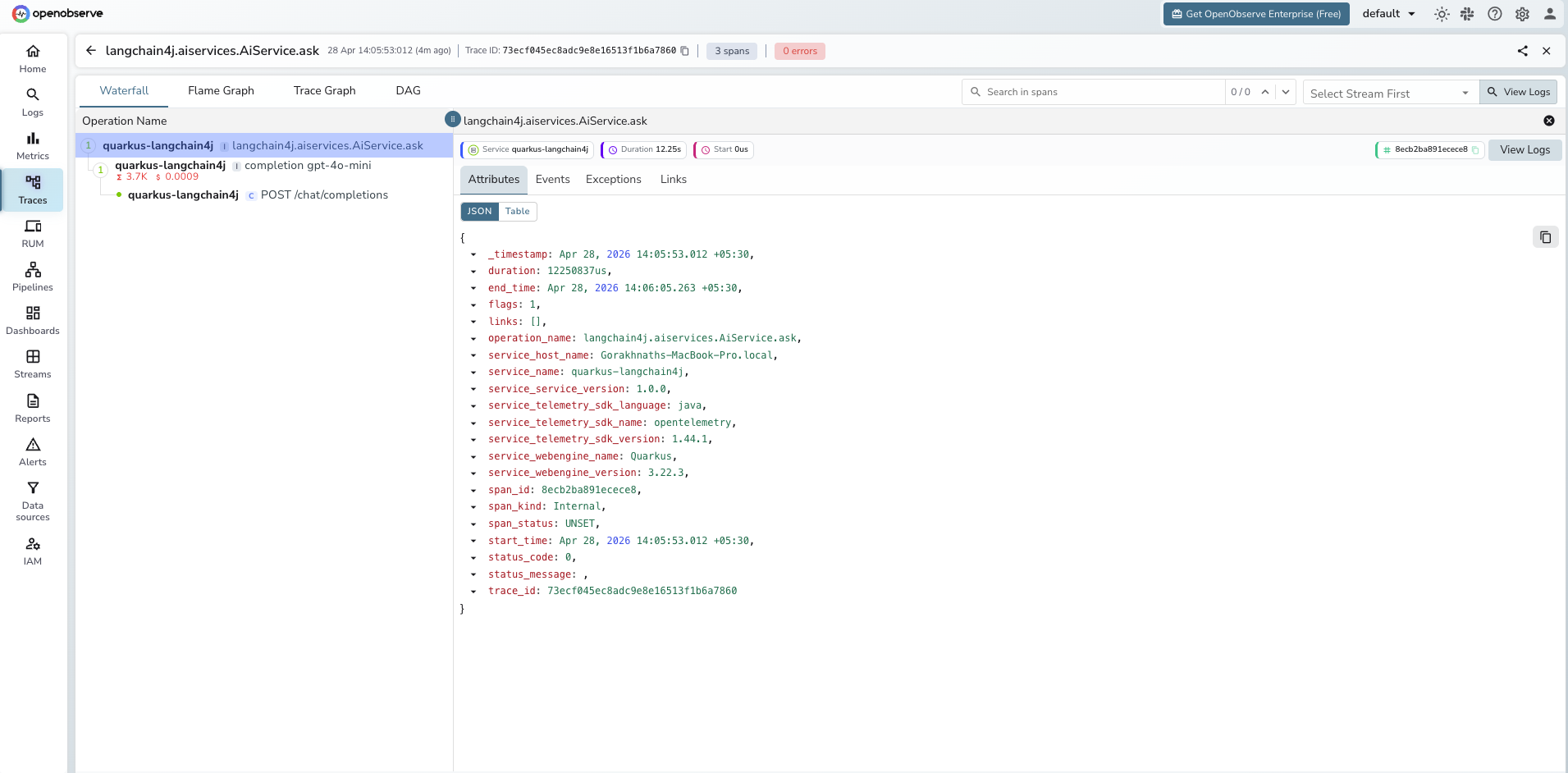
Each AI service call produces two spans: a root langchain4j.aiservices.<Interface>.<method> span and a child completion <model_name> span. A third HTTP client span is nested under the completion span.
langchain4j.aiservices.AiService.ask span (root)
| Attribute | Description |
|---|---|
operation_name | Always langchain4j.aiservices.<Interface>.<method> |
span_status | UNSET on success, ERROR on exception |
duration | End-to-end latency including the LLM call |
completion <model_name> span (LLM call)
| Attribute | Description |
|---|---|
gen_ai_request_model | Model name passed in the request (e.g. gpt-4o-mini) |
gen_ai_response_model | Resolved model name returned by the provider |
gen_ai_response_finish_reasons | Why generation stopped (e.g. STOP) |
gen_ai_response_id | Provider response ID |
gen_ai_usage_prompt_tokens | Prompt tokens consumed |
gen_ai_usage_completion_tokens | Completion tokens generated |
gen_ai_client_estimated_cost | Estimated cost string (e.g. 0.00056000USD) |
llm_input | Prompt text (requires include-prompt=true) |
llm_output | Completion text (requires include-completion=true) |
llm_usage_tokens_input | Input tokens (numeric) |
llm_usage_tokens_output | Output tokens (numeric) |
llm_usage_tokens_total | Total tokens (numeric) |
llm_usage_cost_input | Estimated cost for input tokens |
llm_usage_cost_output | Estimated cost for output tokens |
span_status | UNSET on success, ERROR on exception |
duration | LLM call latency |
Viewing Traces
- Log in to OpenObserve and navigate to Traces
- Filter by
service_name = quarkus-langchain4jto isolate spans - Click a
langchain4j.aiservices.AiService.asktrace to expand the full span tree - Inspect the nested
completionspan for token counts and cost - Filter by
span_status = ERRORto find failed AI service calls
Next Steps
With Quarkus LangChain4j instrumented, every AI service call is recorded in OpenObserve. From here you can track token consumption per service method, build cost dashboards, and set alerts on latency regressions.
Read More
Last updated on