
Amazon Bedrock AgentCore → OpenObserve
Amazon Bedrock AgentCore is AWS's managed runtime for deploying and operating AI agents. There are two ways to get AgentCore telemetry into OpenObserve:
- Runtime OTLP export (recommended) — the agent running inside AgentCore exports its own traces (model calls, tool invocations, agent loops) directly to OpenObserve via standard OpenTelemetry environment variables.
- Client-side spans — wrap each
invoke_agent_runtimecall in a manual span to capture invocation latency and metadata from the calling application.
Prerequisites
- Python 3.10+
- An OpenObserve account (cloud or self-hosted)
- Your OpenObserve organisation ID and Base64-encoded auth token
- AWS credentials with
BedrockAgentCoreFullAccessandAmazonBedrockFullAccesspermissions - For option 1: the AgentCore starter toolkit to deploy an agent
- For option 2: a deployed AgentCore runtime ARN
Option 1: Export Runtime Traces via OTLP
Agents deployed to AgentCore emit OpenTelemetry traces. By default these go to CloudWatch through the AWS Distro for OpenTelemetry (ADOT); setting DISABLE_ADOT_OBSERVABILITY=true together with standard OTLP environment variables routes them to OpenObserve instead.
Create the agent
agent.py — a minimal Strands agent hosted in AgentCore. The StrandsTelemetry call is required: it registers the OTLP exporter from the OTEL_EXPORTER_OTLP_* environment variables. Without it no spans are exported, because DISABLE_ADOT_OBSERVABILITY=true also turns off the ADOT auto-instrumentation that would otherwise do this.
from strands.telemetry import StrandsTelemetry
StrandsTelemetry().setup_otlp_exporter()

from bedrock_agentcore.runtime import BedrockAgentCoreApp
from strands import Agent

app = BedrockAgentCoreApp()
agent = Agent()

@app.entrypoint
def invoke(payload):
    result = agent(payload.get("prompt", "Hello"))
    return {"result": result.message}

if __name__ == "__main__":
app.run()requirements.txt:
bedrock-agentcore
strands-agents[otel]
Deploy with OTLP environment variables
Install the starter toolkit, then configure and launch the agent with the OpenObserve endpoint. The exporter appends /v1/traces automatically, so set the endpoint without the path suffix.
pip install bedrock-agentcore-starter-toolkit

agentcore configure --entrypoint agent.py

agentcore launch \
  --env DISABLE_ADOT_OBSERVABILITY=true \
  --env OTEL_EXPORTER_OTLP_PROTOCOL=http/protobuf \
  --env OTEL_EXPORTER_OTLP_ENDPOINT=https://api.openobserve.ai/api/your_org_id \
  --env "OTEL_EXPORTER_OTLP_HEADERS=Authorization=Basic <your_base64_token>" \
  --env OTEL_SERVICE_NAME=bedrock-agentcore-agent
For a self-hosted OpenObserve instance replace the endpoint, e.g. http://your-host:5080/api/default.
Invoke the agent
agentcore invoke '{"prompt": "Explain observability in one sentence."}'Each invocation produces a full trace in OpenObserve: the agent loop, every model call with token usage, and every tool invocation as child spans.
Option 2: Client-Side Invocation Spans
If you only need invocation latency from the calling application, wrap each runtime call in a manual span.
Install dependencies:
pip install openobserve-telemetry-sdk boto3 python-dotenvCreate a .env file in your project root:
OPENOBSERVE_URL=https://api.openobserve.ai/
OPENOBSERVE_ORG=your_org_id
OPENOBSERVE_AUTH_TOKEN=Basic <your_base64_token>

AWS_ACCESS_KEY_ID=your-access-key-id
AWS_SECRET_ACCESS_KEY=your-secret-access-key
AWS_DEFAULT_REGION=your-aws-region
BEDROCK_AGENTCORE_RUNTIME_ARN=arn:aws:bedrock-agentcore:us-east-1:123456789012:runtime/your-runtime-id
from dotenv import load_dotenv
load_dotenv()
from openobserve import openobserve_init
openobserve_init(resource_attributes={"service.name": "amazon-bedrock-agentcore"})
from opentelemetry import trace
import os, json, uuid, boto3
RUNTIME_ARN = os.environ["BEDROCK_AGENTCORE_RUNTIME_ARN"]
client = boto3.client(
"bedrock-agentcore",
region_name=os.environ.get("AWS_DEFAULT_REGION", "us-east-1"),
)
tracer = trace.get_tracer(__name__)
with tracer.start_as_current_span("bedrock_agentcore.invoke") as span:
span.set_attribute("bedrock_agentcore.runtime_arn", RUNTIME_ARN)
span.set_attribute("bedrock_agentcore.input", "Explain observability in one sentence.")
response = client.invoke_agent_runtime(
agentRuntimeArn=RUNTIME_ARN,
runtimeSessionId=str(uuid.uuid4()),
payload=json.dumps({"input": "Explain observability in one sentence."}).encode(),
contentType="application/json",
accept="application/json",
)
output = json.loads(response["response"].read()).get("output", "")
span.set_attribute("bedrock_agentcore.output_length", len(output))
print(output)What Gets Captured
With runtime OTLP export (option 1), each invocation produces a trace with spans invoke_agent Strands Agents → execute_event_loop_cycle → chat, plus one span per tool call, following the gen_ai.* semantic conventions:
| Attribute | Description |
|---|---|
gen_ai_agent_name / gen_ai_system | Agent framework identifier (Strands Agents / strands-agents) |
gen_ai_operation_name | Operation per span (e.g. invoke_agent, chat) |
gen_ai_request_model / gen_ai_response_model | Model invoked by the agent |
gen_ai_usage_input_tokens / gen_ai_usage_output_tokens / gen_ai_usage_total_tokens | Token usage per model call |
gen_ai_output_messages_message | The agent's response text |
gen_ai_output_messages_finish_reason | Why generation stopped (e.g. end_turn) |
span_status | OK on success, ERROR on failure |
duration | Latency of each step in the agent loop |
With client-side spans (option 2):
| Attribute | Description |
|---|---|
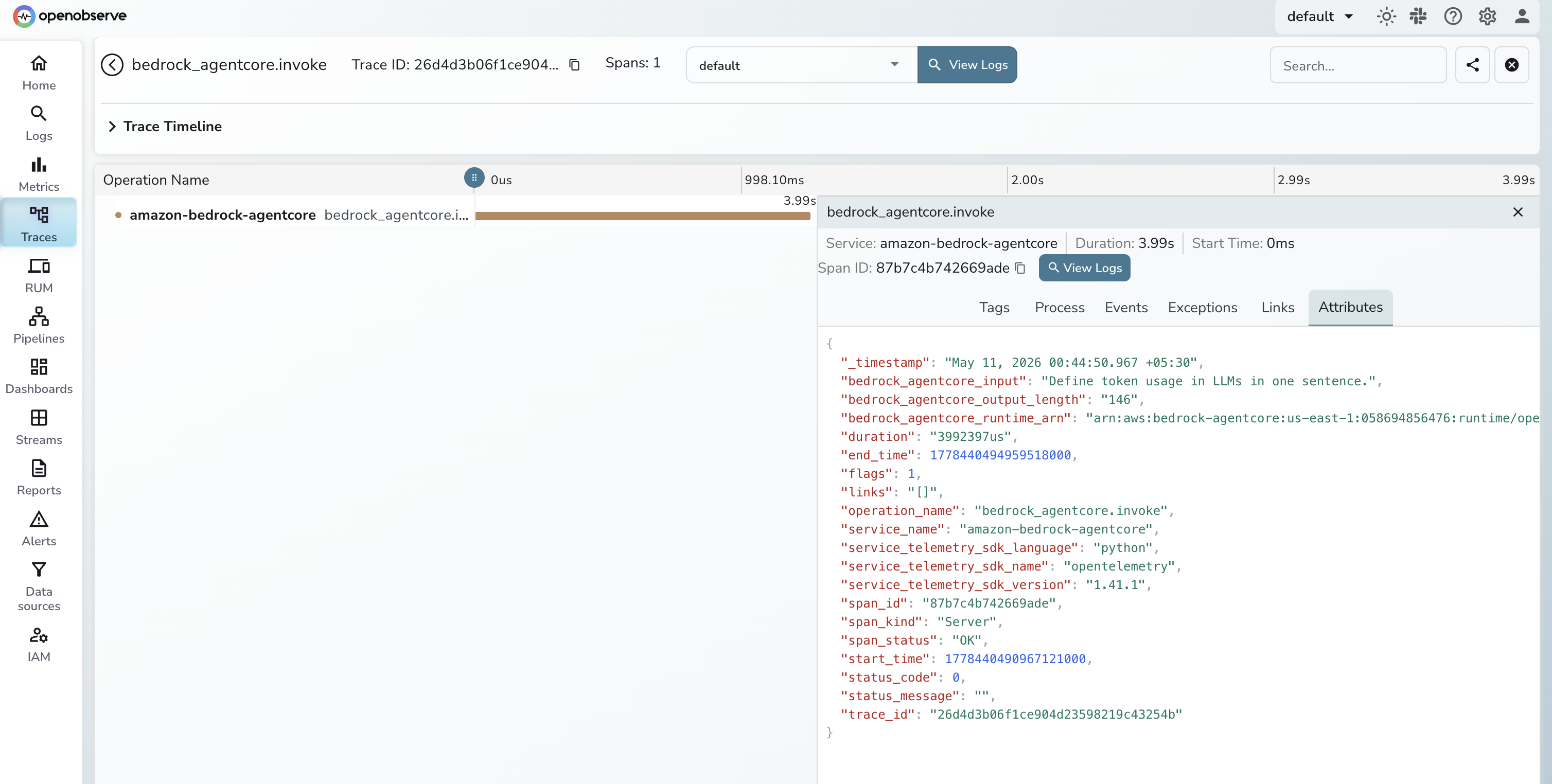
operation_name | Always bedrock_agentcore.invoke |
bedrock_agentcore_runtime_arn | ARN of the invoked runtime |
bedrock_agentcore_input | Input text sent to the agent |
bedrock_agentcore_output_length | Character length of the response |
span_status | OK on success, ERROR on failure |
duration | End-to-end invocation latency |
Viewing Traces
- Log in to OpenObserve and navigate to Traces in the left sidebar
- Filter by
service_name = bedrock-agentcore-agent(option 1) orservice_name = amazon-bedrock-agentcore(option 2) - Click a span to inspect latency, token usage, and input/output attributes
Next Steps
Track agent latency over time, set alerts on slow or failing invocations, monitor token usage per model call, and correlate agent spans with downstream Bedrock model calls.
Read More
Last updated on